
AI-generated Google Maps photos are being used to hijack local business calls
A correct phone number on your Google Business Profile is not enough if a fake-number photo is sitting where ready-to-buy customers can see it.
What changed and who it hits
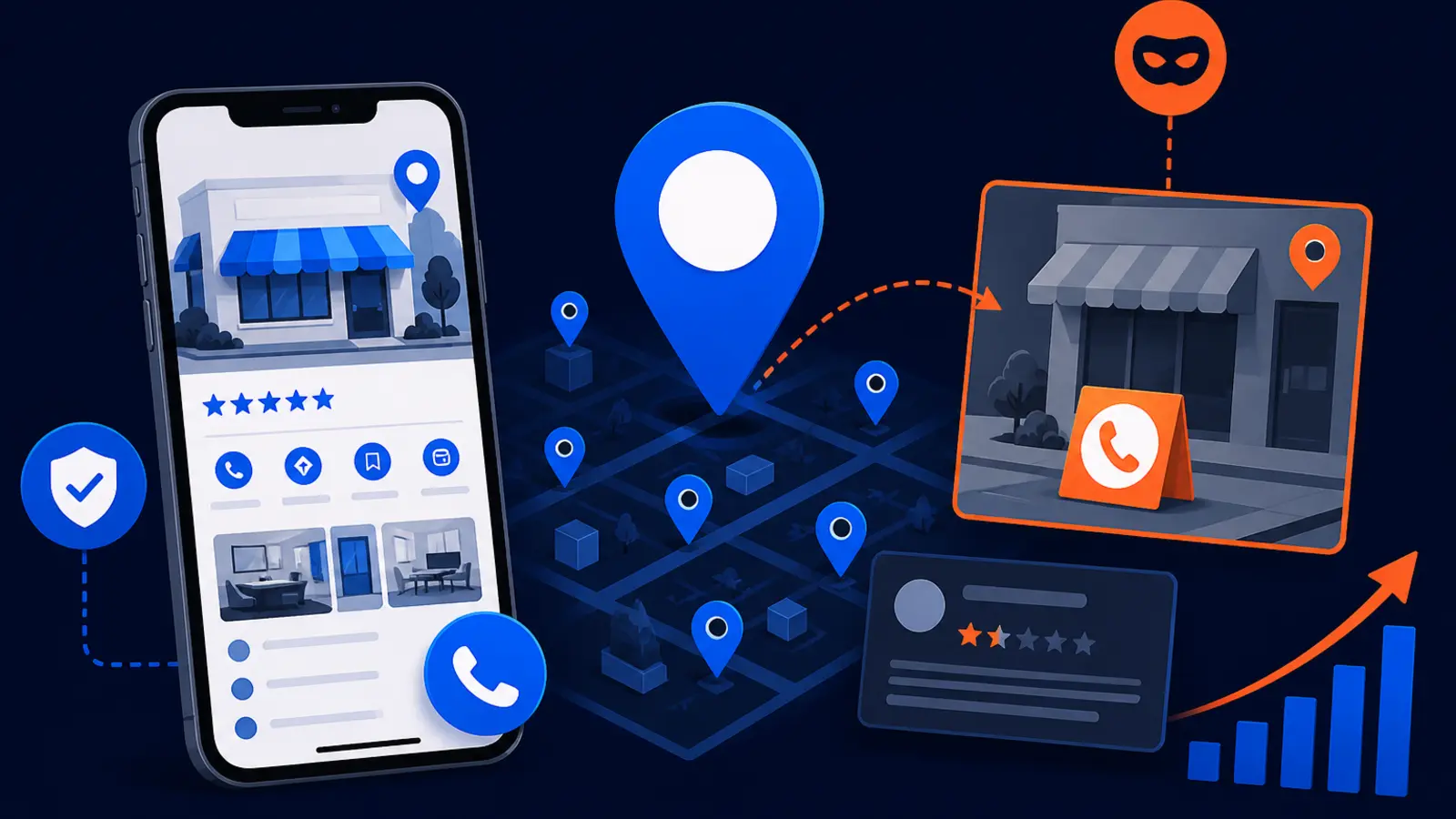
Search Engine Roundtable reported on September 10, 2026 that scammers were uploading AI-generated photos to legitimate Google Business Profiles with a fake phone number embedded inside the image. The original LinkedIn report from Sam Sarsten said one contributor had made more than 150 photo contributions to unrelated U.S. businesses using the same wrong number. Search Engine Roundtable later updated its report to say Google removed the scammy contributor and photos.
This hits any local business that depends on calls from Google Maps. A roofer, plumber, dentist, attorney, HVAC contractor, locksmith, med spa, or home services company can have the correct phone number on the profile and still lose calls if Google displays a scam photo prominently enough for a customer to dial it.
That is why this is not just a reputation problem. It is a direct lead interception problem. A customer who is already looking at your profile may be ready to call, book, or ask for an estimate. If the most visible photo contains a different phone number, that customer may never reach you.
Why the scam is dangerous even when your profile is correct
Many owners think of Google Business Profile risk as a basic data problem. Is the business name right? Is the address right? Is the phone number right? Those checks still matter, but this scam shows a different weakness: the profile can be technically accurate while a user-uploaded image sends customers somewhere else.
Google Maps is visual. Customers often scan photos before they read every field on a profile. If a fake image looks like a service ad, coupon, branded truck, before-and-after photo, or quick-call graphic, it can pull attention away from the official call button.
The danger is higher for emergency and high-urgency searches. Someone with a leaking pipe, roof damage, tooth pain, or a legal deadline may not carefully compare the phone number in the image with the official profile button. They may just call the number they see first.
How the fake photo call hijack works
The reported example involved AI-generated images, but the tactic does not require anything complicated for the customer to see the wrong number. A scammer contributes a photo to a real business profile. The photo contains a phone number that does not belong to the business. If Google displays that photo, the image can act like a fake ad sitting inside your own profile.
Google has systems for fighting fake contributions. In the Google Blog post New ways we tackle fake contributions on Google Maps, Google described using machine learning, automated detection, and human operators to reduce fake content. That matters, but this news is a reminder that owners still need human monitoring because bad contributions can appear before they are removed.
For a local owner, the scam usually creates a few practical risks:
- ▸Customers may dial the number shown in the photo instead of tapping the official call button.
- ▸The scam number may route to a competitor, lead seller, call center, or impersonator.
- ▸Your staff may see fewer calls without knowing why.
- ▸Your local SEO report may still show rankings while actual call quality drops.
- ▸The fake photo may be visible in Google Search, Google Maps, or the profile photo carousel.
Should your local SEO provider monitor profile photos
Yes. If you are paying for local SEO, Google Business Profile photo monitoring should be part of the conversation. Rankings are important, but they are not the finish line. Once a customer lands on your profile, your provider should also help protect the path from profile view to call, direction request, website visit, or booking.
Photo monitoring does not mean your provider can prevent every bad upload before it appears. It means someone is checking the profile often enough to catch suspicious photos, document them, report them, and verify removal. It also means the provider understands that user-generated content is part of local search risk.
Ask your provider whether they have a simple process for these items:
- ▸Checking owner-uploaded and user-uploaded photos separately.
- ▸Reviewing new contributor activity for unrelated or suspicious uploads.
- ▸Looking for phone numbers, QR codes, fake coupons, or off-brand graphics inside images.
- ▸Capturing evidence before reporting the image.
- ▸Confirming removal instead of assuming a report worked.
- ▸Checking whether call volume changed around the time the photo appeared.
Five things to check on your profile this week
You do not need to be technical to run a first pass. Open your Google Business Profile the way a customer would, both in Google Search and Google Maps. Do it on a phone, because many local searches and calls happen there.
Spend a few minutes looking at what is actually visible, not just what you entered in the dashboard. Pay special attention to the first few photos Google shows because those can shape what a customer trusts.
Use this quick check this week:
- ▸Search your business name and open the profile in Google Search.
- ▸Open the same profile in the Google Maps app and scan the photo carousel.
- ▸Look for any image that contains a phone number that is not yours.
- ▸Check for photos that look AI-generated, generic, or unrelated to your team, trucks, office, work, or location.
- ▸Tap into the photos area and review both owner photos and customer photos.
- ▸Look at recent photo contributors and note names that appear unrelated to your business.
- ▸Ask your front desk or call handler if customers have mentioned a different number or confusing image.
What to do about it if you find a fake-number photo
If you find a photo with a fake phone number, do not just report it and move on. Treat it like evidence of lead theft. You want a clear record of what appeared, where it appeared, when you found it, and what action you took.
The goal is to get the photo removed quickly while preserving enough detail to escalate if the first report does not work. Keep the process simple so your team can repeat it if the scam comes back under another contributor name.
Take these steps:
- ▸Screenshot the image, the full profile view, and the photo contributor information if visible.
- ▸Write down the date, time, device, and whether you were in Google Search or Google Maps.
- ▸Report the photo through the available Google option for inappropriate or misleading content.
- ▸Flag that the image contains a phone number that does not belong to the business.
- ▸Ask your local SEO provider to document the issue and monitor for removal.
- ▸Check the profile again from a phone and desktop after reporting.
- ▸If calls dropped during the same period, save call logs and notes for comparison.
Why evidence capture matters
Evidence is what keeps this from becoming a vague complaint. If the photo disappears after your report, you still want a record in case the same number, contributor pattern, or image style shows up again. If the photo does not disappear, evidence helps your provider escalate the issue with a clear timeline.
Good evidence also helps you separate a scam from an ordinary customer mistake. A customer may upload the wrong storefront, a photo from a nearby business, or an old image by accident. A repeated fake-number pattern across unrelated businesses is different and should be treated more seriously.
Your evidence file should answer these questions:
- ▸What phone number appeared in the image?
- ▸Was that number anywhere on your official website or profile?
- ▸Which Google surface showed the image first?
- ▸Was the image displayed near the top of the photo carousel?
- ▸Who contributed the image, if Google showed that information?
- ▸Did the same image or phone number appear on more than one location?
- ▸What date did you report it and when was it removed?
Call-source auditing can reveal the damage
A fake-number image can hurt before anyone on your team notices. That is why call-source auditing matters. You want to know whether the calls you expect from Google are actually reaching your business, and whether call patterns changed when suspicious content appeared.
For most owners, this does not need to be complicated. Compare what your Google Business Profile reports, your phone system records, your call tracking records if you use them, and your actual booked jobs or appointments. If the profile was ranking well but calls slowed down, look beyond rankings and check the profile experience itself.
Also ask staff to log strange caller comments. If someone says, "I called the number in the picture," or "the first number did not work," that is useful. Those comments can point you toward a photo, post, review, or third-party listing that is confusing customers.
Rankings alone do not protect the lead
Google says local ranking is based on relevance, distance, and prominence. A strong local SEO campaign works on those areas so your business can appear when nearby customers search for your services. But this scam shows why visibility and lead protection are different jobs.
If you rank in the Map Pack, the customer still has to choose you, trust your profile, and contact the right business. A scam photo attacks that last step. It does not need to outrank you. It only needs to sit inside your profile where a rushed customer can see it.
Your local SEO program should therefore include both ranking work and profile integrity work. At a practical level, that means checking:
- ▸Whether your primary category and services still match what you sell.
- ▸Whether your official phone number, website, and booking links are correct.
- ▸Whether new photos are real, relevant, and free of fake contact details.
- ▸Whether reviews, Q&A, and updates create trust instead of confusion.
- ▸Whether profile activity lines up with real calls and booked work.
Questions to ask your SEO provider before you buy
If you are shopping for local SEO, this news gives you a better way to compare providers. Do not only ask where they think they can rank you. Ask how they protect the lead after the customer reaches the profile.
A provider does not need to promise that no spam will ever appear. That would not be realistic. They should be able to explain how they monitor, document, report, and follow up when something suspicious appears on your Google Business Profile.
Ask these questions before you sign:
- ▸Do you monitor Google Business Profile photos, including customer and contributor uploads?
- ▸How often do you check for fake phone numbers, QR codes, and misleading graphics?
- ▸Do you capture screenshots before reporting suspicious content?
- ▸Who reports the issue to Google and who confirms removal?
- ▸Do you review call-source data when profile activity and calls do not match?
- ▸Will you tell me when spam is found, or only if I ask?
- ▸Do you include contributor spam checks as part of GBP management?
- ▸What happens if the same scam returns after removal?
The owner-level policy to put in place now
This should not live only in your marketing provider's head. Put a simple internal policy in place so your team knows what to do. The policy can be one page and still prevent confusion.
Assign one person to check the profile weekly, even if an outside provider also manages it. Give your front desk, dispatcher, or office manager permission to flag anything that looks wrong. Make sure everyone knows your official phone numbers, especially if you use tracking lines.
Your policy should include:
- ▸The official phone numbers customers should see.
- ▸Who checks Google Search and Google Maps each week.
- ▸Who saves screenshots when something looks wrong.
- ▸Who reports suspicious photos to Google.
- ▸Who contacts the SEO provider or marketing manager.
- ▸Who reviews call logs if calls seem lower than normal.
- ▸Where evidence is stored so it is not lost in texts or email threads.
What this means for your next local SEO decision
The Search Engine Roundtable report and Sam Sarsten's LinkedIn post are a useful warning for local business owners: a Google Business Profile is not a set-it-and-forget-it listing. It is a live sales asset with owner content, customer content, contributor content, photos, reviews, calls, and trust signals all mixed together.
When you choose a local SEO provider, ask whether Google Business Profile protection is part of the work. Rankings matter, but a provider should also help you monitor photos, document spam, report fake contributions, audit calls, and keep the profile clean enough for customers to contact the right business.
Digital Domination is a Las Vegas local SEO agency serving local service businesses nationally. If you want to see how Google Business Profile SEO should be handled, visit digitaldomination.ai/google-business-profile-seo/. That page explains the GBP work that supports local visibility, stronger profile trust, and better Map Pack performance. If you want a starting point for your own market, get the free GeoGrid scan at digitaldomination.ai/scan/.
Keep reading
Related guides
- ▸How Much Does AI Search Optimization (AEO and GEO) Cost?
- ▸AI SEO for Local Business
- ▸Are Angi Leads Worth It for Contractors?
Put it into action
Frequently Asked Questions
Can someone add a fake phone number to my Google Business Profile photo?
Yes, a contributor can upload a photo that contains a phone number inside the image. Your official profile phone number may still be correct, but the image can confuse customers if Google displays it prominently.
How do I remove a fake phone number photo from Google Maps?
Open the photo in Google Search or Google Maps and use Google's report option for misleading or inappropriate content. Before you report it, take screenshots of the image, contributor details if visible, the profile view, and the date and time.
Should my SEO company monitor Google Business Profile photos?
Yes. If they manage local SEO or Google Business Profile SEO, they should monitor owner photos, customer photos, and suspicious contributor uploads. They should also document problems, report them, and verify that removal actually happened.
Can a fake Google Maps photo steal calls even if my phone number is right?
Yes. A rushed customer may dial the number shown in a photo instead of tapping the official call button. This is especially risky for emergency services and high-intent searches where people want help fast.
How often should I check my Google Business Profile photos?
A weekly check is a practical minimum for many local businesses, with faster checks after unusual call drops or spam activity. Multi-location businesses or emergency service companies may need more frequent monitoring.
What did Google say about fake contributions on Maps?
In the Google Blog post New ways we tackle fake contributions on Google Maps, Google described using machine learning, automated systems, and human operators to fight fake content. Those systems help, but business owners should still monitor their own profiles because bad content can appear before it is removed.
What should I ask a local SEO provider about this scam?
Ask whether GBP photo monitoring, contributor spam checks, evidence capture, escalation, and call-source auditing are included. Also ask how they notify you when suspicious content is found and how they confirm that Google removed it.
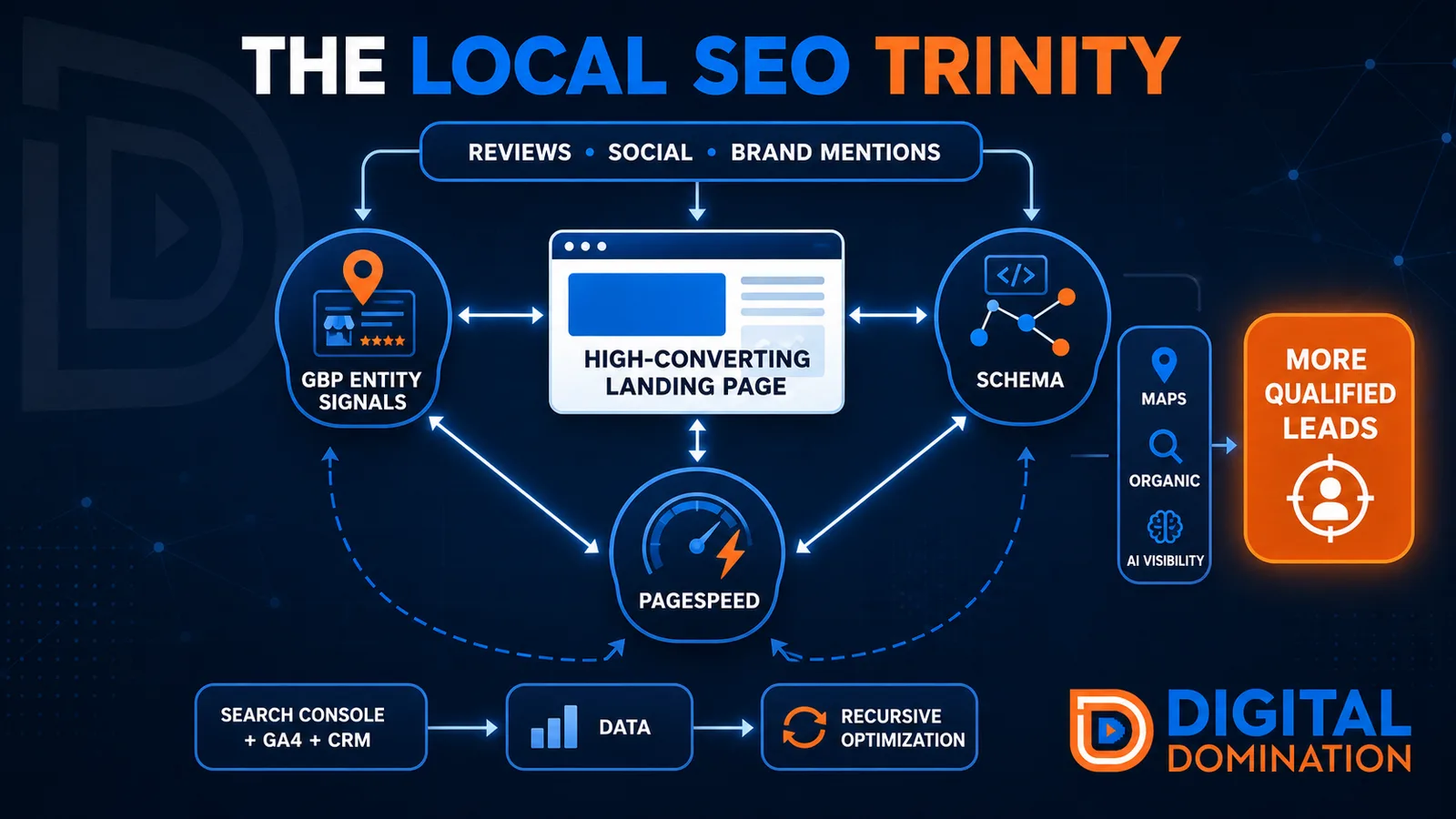
The Local SEO Trinity
Think of a three-legged stool. Your Google profile, your website, and your reviews all have to hold you up. If one leg is short, the whole thing wobbles.
GBP entity signals
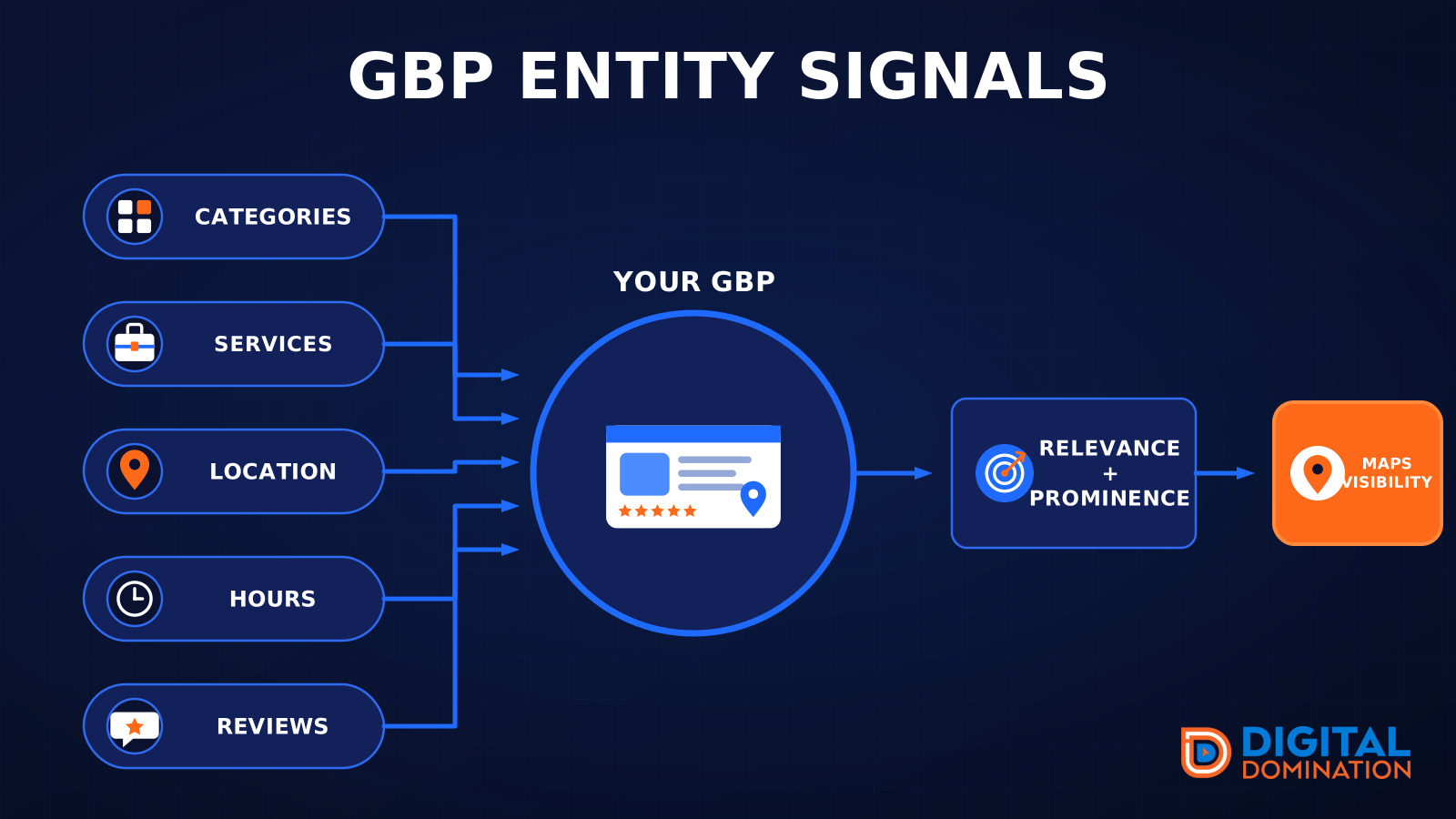
This leg is your Google Business Profile. GBP means Google Business Profile. It covers your categories, your services, your location, your hours, and your reviews. Google uses those facts to decide who to show.
Your Google profile is your storefront sign. If the sign is missing, or it names the wrong shop, people drive past.
PageSpeed to conversion
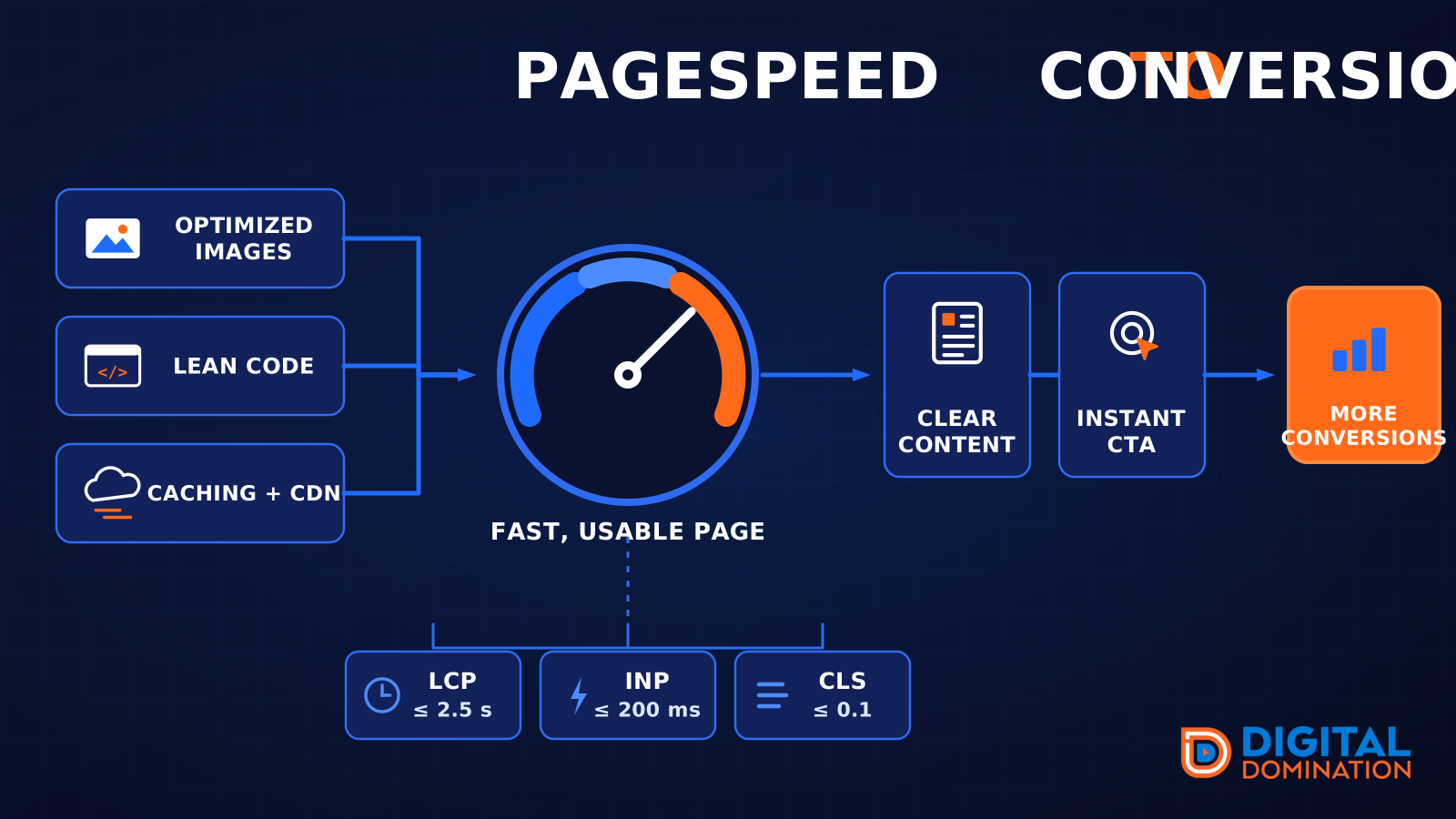
This leg is your website, above all on a phone. Small images, lean code, and caching make a page fast. A fast, clear page is what turns a visit into a call. Phone speed is one of the 12 Trinity checks because a slow page loses the call before anyone sees your offer.
Your website is the showroom. If the door sticks, people leave before they look around.
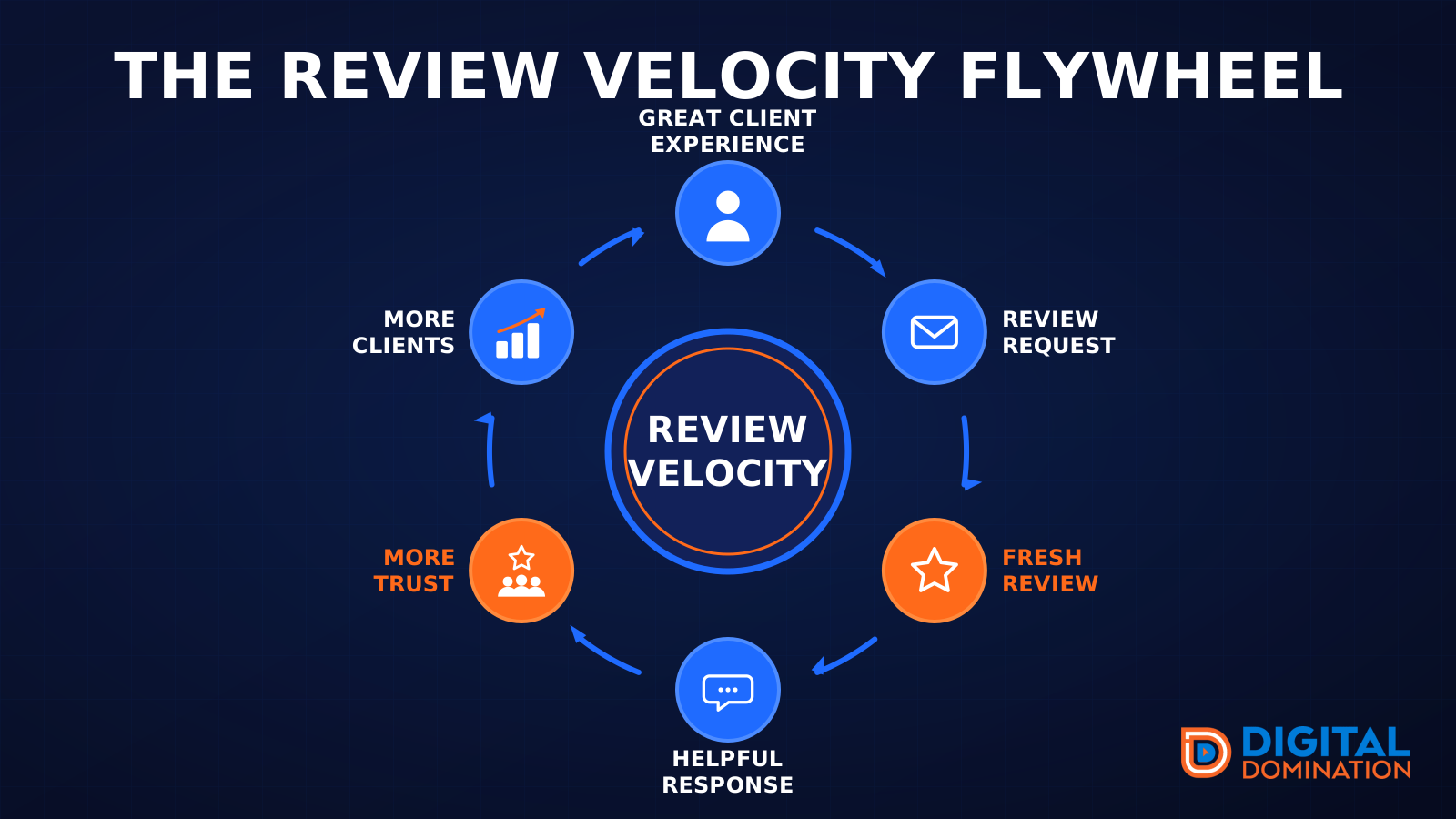
The review velocity flywheel
This leg is reviews and reputation. A good visit leads to a review request, then a fresh review, then a helpful reply, then more trust, then more customers. When the scan can find your Google listing, it shows your rating, your recent reviews, and how many you answered.
Reviews are word of mouth. One kind word helps. A steady stream of real reviews, and a reply from you, helps more.
How this turns into revenue
Being found in more searches leads to more calls. More calls lead to more booked jobs. More booked jobs lead to more revenue.
Example numbers, not a real business: 40 calls from search in a month, a 25 percent close rate, and a $400 average job. That is 10 booked jobs. That is $4,000. The math is the lesson. It is not a promise.
The full page has a box where you can type your own average job value and close rate.
One real story, from our car dealership case study: Medina Auto Group went from invisible on Google Maps to dominating every high-intent search across their market. The turnaround spanned all four of their rooftops at once. The same page says the team eliminated 89 unfair one-star reviews that had been dragging the dealership's reputation down and keeping it out of the Map Pack. It also says: “Results described here are exceptional and non-typical. Outcomes vary based on market conditions, competition, and implementation. No guarantees are made regarding earnings, rankings, or conversions.”
Free strategy call
More booked jobs start with a clear plan
Book a free strategy call. We look at your Google profile, your website, and your reviews, and we tell you what to fix first.
Free. You pick the time. A real person shows up.