
Google adds EEA supplier unit guidance for regional Search results
If your local business serves European customers, Google’s new documentation means you should check which Search features appear in each market, then clean up the site signals that make you eligible.
What changed and who it hits
Google added new Search Central documentation on September 8, 2026, explaining that Search experiences can differ by region. The guide, called Regional differences in Search experience, covers aggregator units, supplier units, places-site features and structured-data carousels. Search Engine Roundtable also reported on the new regional documentation the same day, noting that Google is now spelling out how these Search features can vary by location.
The most important local SEO piece is the EEA supplier unit. In Google’s Supplier unit in Google Search documentation, Google says direct providers can appear alongside aggregator units for eligible query types. Google gives examples that include individual hotels, brick-and-mortar businesses and service providers such as plumbers.
That matters if you serve customers in the European Economic Area, or if your business depends on European travelers, homeowners, tenants or buyers. You may not be competing only for a classic blue link, a Google Business Profile result or the local pack. In some EEA searches, Google may show a supplier unit that gives direct providers another way to appear.
What is a supplier unit in plain English
Think of a supplier unit as a Google Search feature that can show direct providers for certain searches. A direct provider is the actual business that sells the room, performs the service or operates the location. That is different from an aggregator, which usually lists many providers in one place.
For a local owner, the key point is not the visual design of the feature. The key point is eligibility. Google’s documentation says supplier units can include direct providers such as local businesses and service providers, but only for eligible query types. That means you cannot force the feature to appear for every search. You can only make your business easier for Google to understand, crawl and evaluate when the feature is available.
Here are the practical distinctions to keep straight:
- ▸Aggregator unit: a Search feature that can show comparison or listing sites.
- ▸Supplier unit: a Search feature that can show direct providers.
- ▸Places-site feature: a Search experience related to places and local destination information.
- ▸Structured-data carousel: a richer Search display that can use structured data when Google supports it.
- ▸Classic local SEO: your Google Business Profile, local pack presence, organic pages, reviews and citations.
Why local businesses should not assume U.S.-style results
Many local SEO playbooks are written from a U.S. search results point of view. That can be useful, but this update is a reminder that Google does not always show the same result types in every region. A plumber in Dublin, a hotel in Madrid, a dental clinic serving expats in Lisbon or a tour operator selling to visitors in Paris may face a different Search page than a similar business in Phoenix or Tampa.
Google’s own Regional differences in Search experience guide is the important source here. The document is not saying every local business will suddenly appear in a new box. It is saying that Search experiences can be regional, and that certain features, including supplier units, can be part of that regional experience.
For an owner, the mistake to avoid is checking one U.S. search result, seeing no supplier unit, and deciding the feature does not matter. If your customers search from Europe, test Europe. If you target several countries, test each country.
How to tell whether your business could be shown
Start by separating two questions. First, does the Search feature appear for the type of query you care about in that market. Second, if it appears, is your business clear and eligible enough to be considered. You cannot answer the second question until you confirm the first one.
A local business owner can do a simple first pass this week without needing a developer. Search the way a real customer would search from the market you serve. Use the local language where appropriate. Compare brand searches, service searches and near-me style searches. Look for whether Google shows a supplier-style feature, aggregator-style feature, local pack, organic list or a mix.
Check these signals before you spend time guessing:
- ▸Search from the country or city you actually serve, not only from your office.
- ▸Try the customer’s language, not only English.
- ▸Test service plus city searches, such as plumber in city or hotel in neighborhood.
- ▸Test problem searches, such as emergency leak repair or family hotel near landmark.
- ▸Look for direct providers appearing near aggregator results.
- ▸Save screenshots with the search phrase, market and date.
Five things to check on your site this week
The fastest wins are usually not advanced tricks. They are the boring site details that help Google and customers understand who you are, where you operate and what you sell. If supplier units can show direct providers, your site needs to make the direct provider part obvious.
Do not treat this as a one-time technical audit. Treat it as a customer clarity audit. If a person lands on your page from another country, can they tell what you do, where you do it and how to contact you without guessing. If the answer is no, Google may also have a harder time connecting your business to the right regional Search feature.
Start with these five checks:
- ▸Your business name, address and phone number are visible and consistent on key pages.
- ▸Your service area or physical location is written in plain language, not hidden in an image.
- ▸Your primary services have dedicated pages, not one vague page that lists everything.
- ▸Your contact page works, loads quickly and includes real ways to book or call.
- ▸Your page titles and headings match how customers describe the service in that market.
What to do about it
Your job is not to chase every new Search design. Your job is to build a site and local presence that can be understood in each market where your customers search. The EEA supplier unit documentation makes that more important because direct providers may be surfaced in a regional feature next to aggregators.
If your local business serves European customers, fix the fundamentals before you worry about advanced structured data or redesign work. Google still needs to crawl your pages, understand your business, connect you to a place or service area and trust that the information is current.
Here is the owner-level action plan:
- ▸List your EEA target markets, including countries, cities and languages.
- ▸Search each target market and record which Google features appear.
- ▸Update your location, service and contact pages so they are specific to those markets.
- ▸Make sure important pages are indexable and not blocked by a noindex tag or robots rule.
- ▸Add or clean up structured data only after the visible page content is accurate.
- ▸Compare your website details with your Google Business Profile and major citation listings.
- ▸Review the same searches monthly because regional features can change.
Make your pages easy for Google to crawl and trust
Supplier visibility starts with a simple requirement: Google must be able to access and understand your pages. If your main service content is buried behind forms, blocked scripts or vague page copy, you are making the hard part harder.
This is where many local websites fail. The owner knows the business serves a certain city or country, but the site only says serving the area. The owner knows emergency plumbing is the money service, but the homepage says quality solutions for all your needs. The owner knows customers can book online, but the booking page loads slowly or breaks on mobile.
Look at the pages that matter most and check these items:
- ▸Can Google reach the page without logging in or filling out a form.
- ▸Does the page name the service clearly.
- ▸Does the page name the city, region or service area clearly.
- ▸Does the page include the same business identity customers see elsewhere.
- ▸Does the page answer basic buying questions, such as hours, availability, booking and location.
- ▸Does the mobile version show the same important content as desktop.
Structured data helps only after the basics are right
Google’s regional documentation also mentions structured-data carousels, which will catch the eye of many business owners. Structured data can help Google understand certain page types, but it is not a substitute for accurate visible content. If your page copy is thin or confusing, markup will not magically make the business clearer.
For local service businesses, structured data should support the page rather than hide the truth. If you are a direct provider, say that clearly on the page. If you serve specific cities, write those cities naturally. If you have locations, make sure each location page has accurate contact and address details.
A practical order of operations is best. First, fix the words and facts customers see. Second, make sure Google can crawl the page. Third, add appropriate structured data if it matches the content on the page. Fourth, test whether the target market actually shows the Search feature you care about.
Do not confuse supplier units with the local pack
Google’s local ranking factors for local results are relevance, distance and prominence. Those still matter for Google Business Profile and local pack visibility. Supplier units are a separate Search feature described in Google’s new documentation, so you should not assume the same inputs will produce the same result.
That does not mean your Google Business Profile becomes less important. For many local searches, the profile is still one of the first things customers see. But if EEA results include supplier units or other regional features, your website may need more attention than it gets in a local pack only strategy.
Keep these lanes separate when you audit visibility:
- ▸Local pack: check Google Business Profile accuracy, categories, reviews, photos and proximity patterns.
- ▸Organic results: check page quality, crawlability, service pages and internal links.
- ▸Supplier units: check whether the feature appears in the target EEA market and whether your direct-provider pages are clear.
- ▸Aggregator units: check which listing sites appear and whether your business information there is accurate.
- ▸Customer experience: check whether a European searcher can contact, book or buy without friction.
Track each market separately
Regional Search features create a tracking problem for owners. One rank report from your office does not show what customers see in every market. If you serve several cities or countries, you need a simple market-by-market record.
This does not need to be complicated. Build a small spreadsheet with the market, language, search phrase, date, device and visible features. Note whether you see a local pack, supplier unit, aggregator unit, organic result or a mix. Add screenshots so you can spot changes later.
For local SEO work, a grid view is also useful because rankings can change across a city. Digital Domination’s GeoGrid scan checks 169 points across a market, which helps reveal whether visibility is concentrated near one area or spread across the places where customers actually search.
Track these items for each target market:
- ▸The search phrases real customers use.
- ▸The country, city and language tested.
- ▸The Google features that appear on the page.
- ▸Whether direct providers are visible next to aggregators.
- ▸Where your business appears, if at all.
- ▸Which page Google shows for your business.
- ▸What needs to be fixed before the next check.
Where Digital Domination fits
This update is not a reason to panic. It is a reason to stop treating every market as if Google shows the same page everywhere. If your local business serves European customers, the first move is to verify the Search experience in those markets, then clean up the site and profile signals that tell Google you are a real direct provider.
Digital Domination is a Las Vegas local SEO agency serving local service businesses nationally. From our perspective, the businesses that handle regional changes best are the ones that keep their website facts clean, their location pages specific and their tracking tied to real customer searches instead of generic vanity keywords.
If you want a practical starting point, check how your local visibility looks across your market before you guess what to fix. You can start with the free GeoGrid scan at digitaldomination.ai/scan/
Keep reading
Related guides
- ▸Google Maps optimization services near me
- ▸Google Maps optimization services vs DIY local SEO
- ▸Google Maps Ranking Factors 2026
Put it into action
Frequently Asked Questions
What are Google EEA supplier units?
Google’s Supplier unit in Google Search documentation describes a Search feature that can show direct providers for eligible query types. For local businesses, direct providers can include brick-and-mortar businesses and service providers such as plumbers.
Can my local business appear in a supplier unit?
Possibly, but only if the feature appears for the type of search and market you are targeting. You should test searches from the EEA market you serve, then make sure your website clearly shows your services, location or service area and contact details.
Is a supplier unit the same as the Google local pack?
No. The local pack is tied to Google’s local results, where relevance, distance and prominence are key factors. A supplier unit is a separate regional Search feature described in Google’s new Search Central documentation.
Do I need structured data to show in these new regional features?
Structured data can help Google understand certain page types, but it should come after the basics. First make sure your visible page content is accurate, crawlable and specific to the service and market you want to reach.
How do I check if supplier units show in my country?
Search from the country and city you serve, using the phrases customers would use in that market. Look for whether Google shows direct providers, aggregator units, local packs or classic organic results, and save screenshots with the query and date.
Does this update affect U.S. local SEO?
The documentation is about regional differences in Search experiences, with the EEA supplier unit being the most locally relevant piece. U.S. local SEO basics still matter, but businesses serving European searchers should not assume U.S. result layouts match EEA result layouts.
What should I fix first on my website?
Start with clarity. Make sure your business name, address or service area, phone number, services and booking options are visible, consistent and crawlable on your key pages.
Should I still work on my Google Business Profile?
Yes. Your Google Business Profile still matters for local pack and map visibility. The supplier unit guidance simply means your website and regional tracking deserve attention too, especially if you serve EEA searchers.
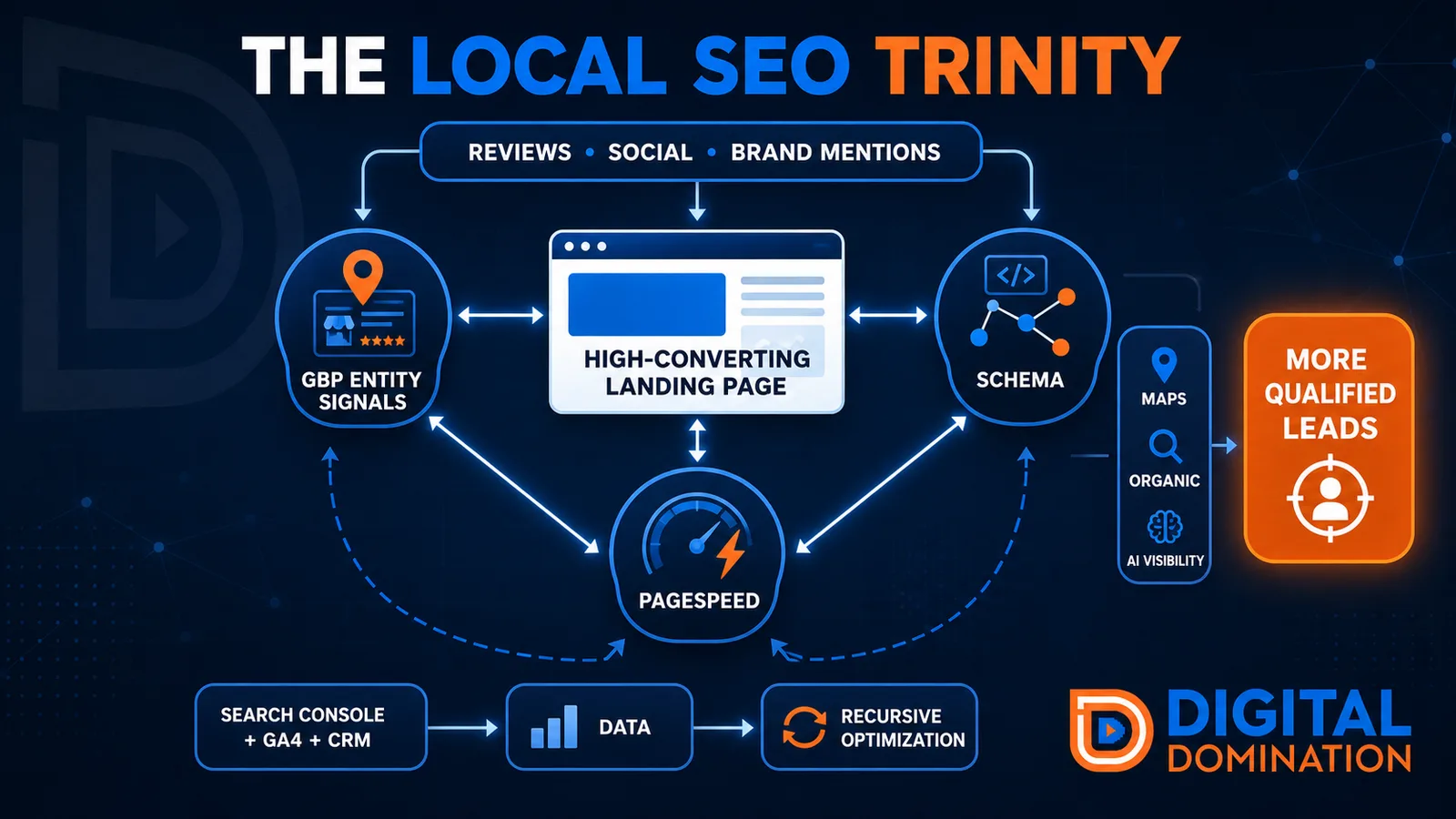
The Local SEO Trinity
Think of a three-legged stool. Your Google profile, your website, and your reviews all have to hold you up. If one leg is short, the whole thing wobbles.
GBP entity signals
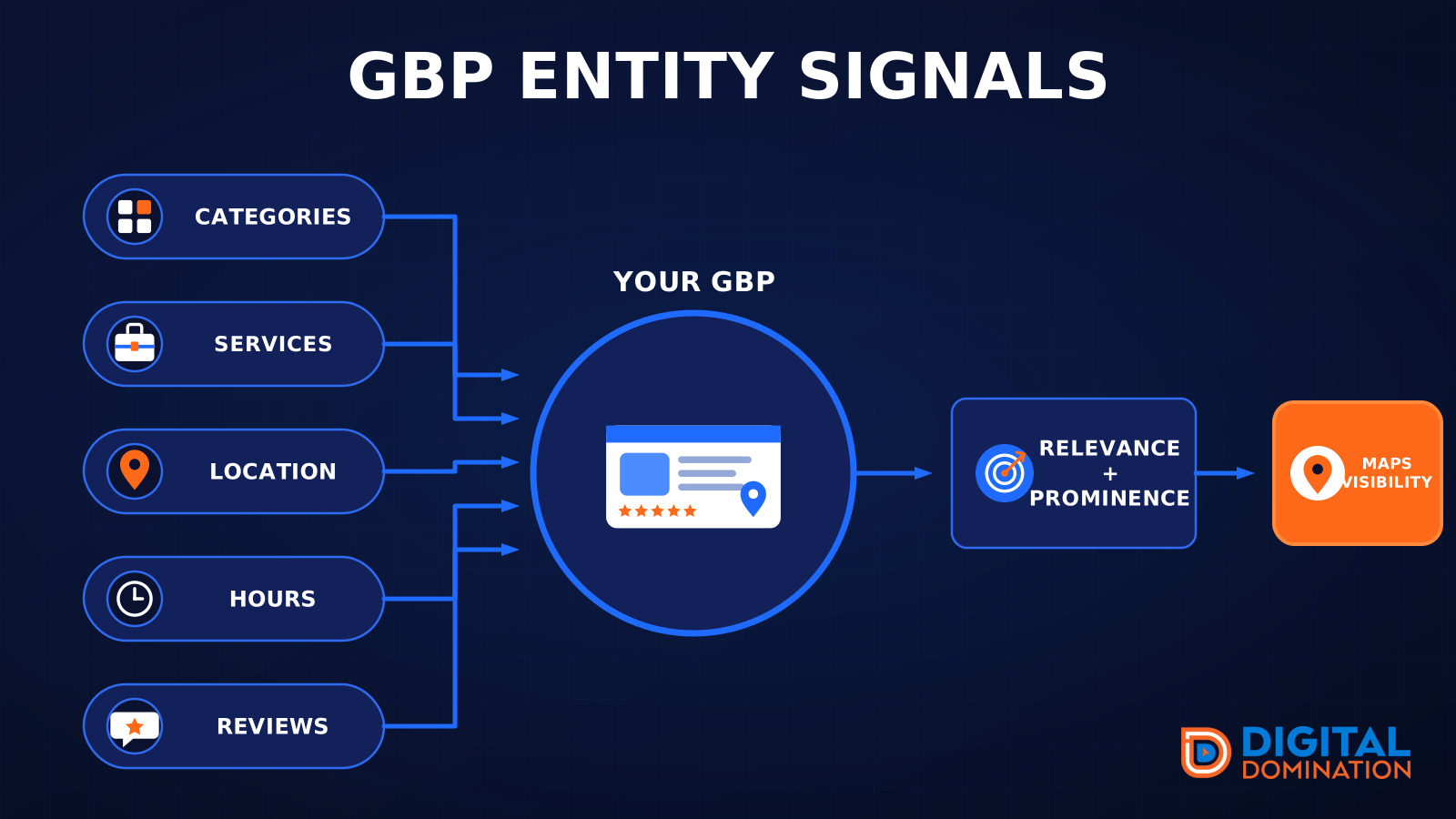
This leg is your Google Business Profile. GBP means Google Business Profile. It covers your categories, your services, your location, your hours, and your reviews. Google uses those facts to decide who to show.
Your Google profile is your storefront sign. If the sign is missing, or it names the wrong shop, people drive past.
PageSpeed to conversion
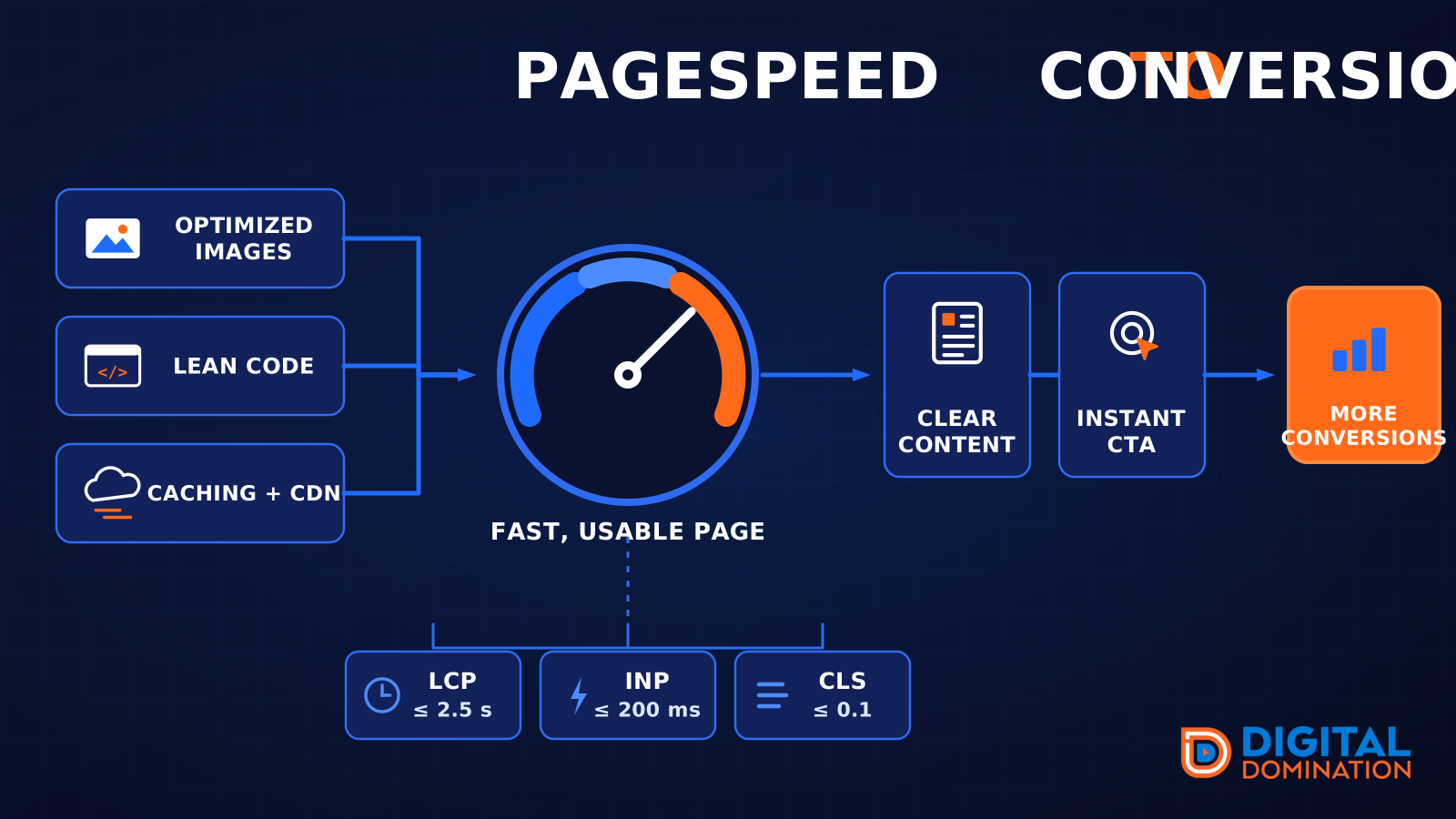
This leg is your website, above all on a phone. Small images, lean code, and caching make a page fast. A fast, clear page is what turns a visit into a call. Phone speed is one of the 12 Trinity checks because a slow page loses the call before anyone sees your offer.
Your website is the showroom. If the door sticks, people leave before they look around.
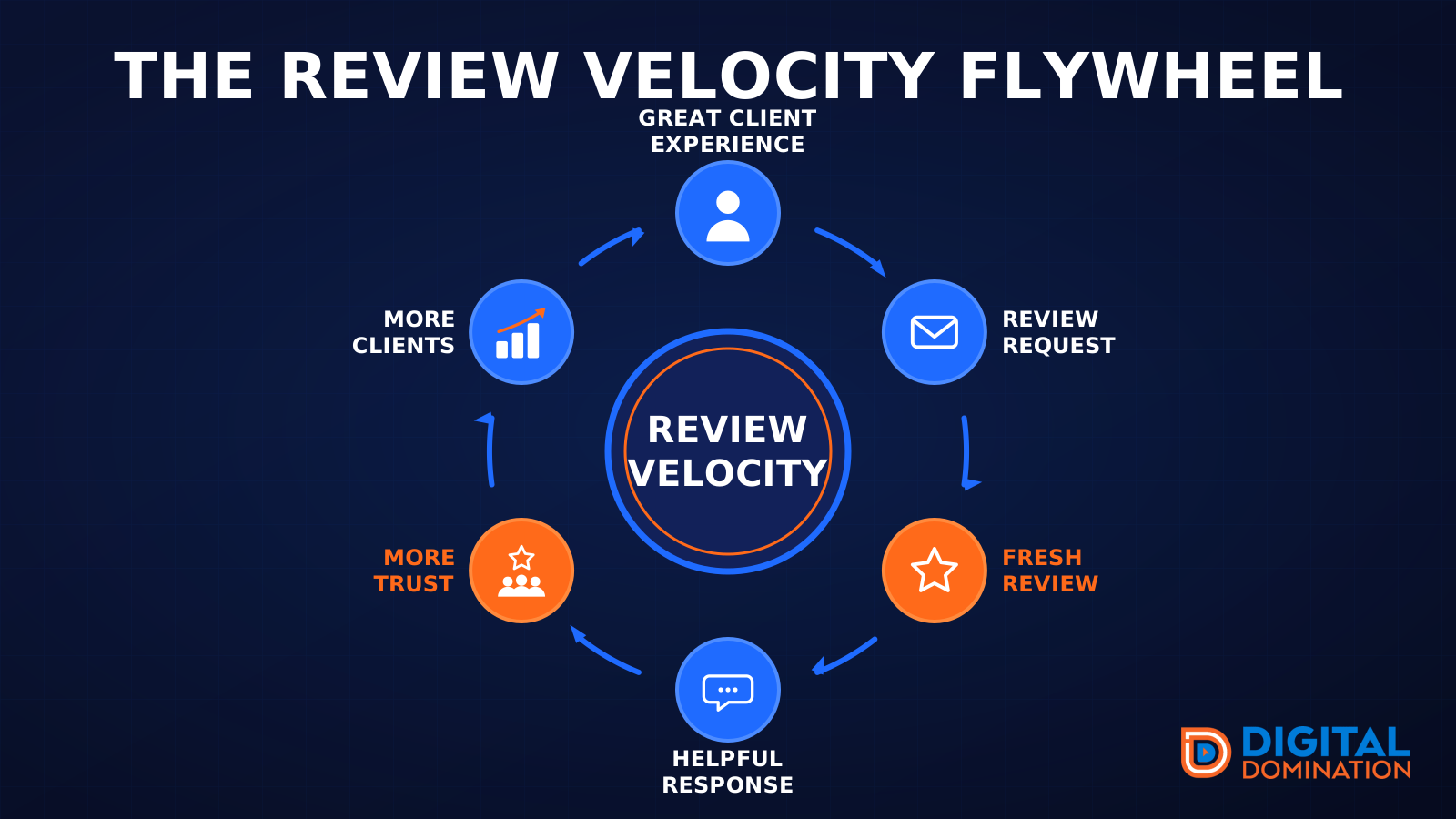
The review velocity flywheel
This leg is reviews and reputation. A good visit leads to a review request, then a fresh review, then a helpful reply, then more trust, then more customers. When the scan can find your Google listing, it shows your rating, your recent reviews, and how many you answered.
Reviews are word of mouth. One kind word helps. A steady stream of real reviews, and a reply from you, helps more.
How this turns into revenue
Being found in more searches leads to more calls. More calls lead to more booked jobs. More booked jobs lead to more revenue.
Example numbers, not a real business: 40 calls from search in a month, a 25 percent close rate, and a $400 average job. That is 10 booked jobs. That is $4,000. The math is the lesson. It is not a promise.
The full page has a box where you can type your own average job value and close rate.
One real story, from our car dealership case study: Medina Auto Group went from invisible on Google Maps to dominating every high-intent search across their market. The turnaround spanned all four of their rooftops at once. The same page says the team eliminated 89 unfair one-star reviews that had been dragging the dealership's reputation down and keeping it out of the Map Pack. It also says: “Results described here are exceptional and non-typical. Outcomes vary based on market conditions, competition, and implementation. No guarantees are made regarding earnings, rankings, or conversions.”
Free strategy call
More booked jobs start with a clear plan
Book a free strategy call. We look at your Google profile, your website, and your reviews, and we tell you what to fix first.
Free. You pick the time. A real person shows up.