
Google Business Profile adds a Collected info tab owners need to audit
Automated calls, texts and chats can now leave data inside your profile workflow. That makes ongoing Google Business Profile management more important for local lead quality.
What changed in Google Business Profile
Google has rolled out a Collected info tab inside Google Business Profile for eligible business owners. In plain English, this gives you a place to review information Google's automated assistant gathered from conversations with your business through calls, texts, WhatsApp or chat.
Search Engine Land reported the rollout in Google Business Profiles rolls out Collected Info on September 14, 2026. Search Engine Watch also covered the change, noting that owners can now review and delete collected information from inside the profile experience.
This matters most for service businesses that depend on Maps and Search calls: plumbers, roofers, dentists, med spas, HVAC companies, lawyers, restaurants, home service brands and any local business where one wrong detail can send a customer somewhere else. If Google collects an incorrect service, hour, booking note, price hint or availability detail, that information can create confusion before your staff ever speaks to the customer.
What the Collected info tab appears to do
Google's own documentation in Edit your Business Profile says collected details may be used to update your Business Profile. The same help page says owners can delete collected items, but deleting them does not automatically change information that already appears publicly on the Business Profile.
That last point is the part local owners should not miss. The Collected info tab is not just a trash can. It is a review area for inputs Google may consider when shaping public information about your business.
Here are the practical takeaways for an owner checking the tab this week:
- ▸You may see details gathered from calls, texts, WhatsApp or chat conversations.
- ▸Some details may be correct, outdated, incomplete or misunderstood.
- ▸Deleting a collected item does not automatically remove a public profile edit.
- ▸You still need to inspect the live profile customers see in Search and Maps.
- ▸If you pay someone to manage your GBP, this tab belongs in their audit routine.
Why automated information can hurt local leads
Local search is not only about ranking. It is also about whether the person who finds you believes you can solve the problem right now. A customer comparing three Map Pack results may pick the listing that shows the clearest services, hours, booking options and availability.
Google's local ranking factors are relevance, distance and prominence. Collected info can touch the relevance side because it may relate to what your business does, when you do it and how customers can work with you. It can also affect conversion because wrong public details make your listing look unreliable.
Think about a two-truck plumbing company. If an automated conversation suggests the company does not handle water heater work, or implies same-day service is unavailable when it actually is, the owner may lose calls without knowing why. The ranking report might look stable while lead quality quietly gets worse.
Five things to check on your profile this week
Do not wait for a customer complaint to find out your listing is carrying bad information. Set aside a short review window and compare what Google has collected with what your staff would tell a caller today.
Check these items on your profile this week:
- ▸Open the Collected info tab if it is available to your business and look for service, hour, price, booking and availability details.
- ▸Compare those details against the live Business Profile in Google Search and Google Maps.
- ▸Look for Google updates or pending edits inside the profile dashboard.
- ▸Review whether automated calls and texts from Google are enabled or appropriate for your operation.
- ▸Ask your front desk or call taker whether Google's automated assistant has contacted the business recently.
Deleting collected info is not the same as fixing the listing
The most important owner-level distinction is simple: deleting a collected item removes that item from the Collected info area, but it does not automatically fix information that is already public. Google's Edit your Business Profile documentation is clear on that point.
That means you need two checks. First, check what Google collected. Second, check what customers can actually see. If the public listing has already changed, you need to edit the affected field directly or address the Google update inside the profile.
This is where many businesses get caught. They clean up one screen and assume the listing is fixed. Then a customer still sees the wrong hour, the wrong service or a misleading booking detail on the public profile.
What your SEO provider should be auditing now
If you have a local SEO provider or a GBP management company, this change should be part of the conversation. Managing a Google Business Profile is no longer just categories, photos, posts and review responses. It also includes monitoring the places where Google gathers or suggests business facts.
The right question is not only whether your provider can optimize a profile. The better question is whether they have a recurring process for catching bad inputs before those inputs affect calls, directions, bookings and lead quality.
Ask your provider these questions this week:
- ▸Do you review the Collected info tab when it is available?
- ▸Do you compare collected items against the live GBP fields customers see?
- ▸Do you check Google updates, pending edits and owner suggested edits?
- ▸Do you review automated-call and automated-text settings as part of profile management?
- ▸Do you document what changed and what was rejected or deleted?
- ▸Do you look at the profile from multiple points in the market, not just from your office?
Why this matters for Map Pack lead quality
A bad profile detail can cause two different problems. It can reduce good calls because qualified customers decide not to contact you. It can also create bad calls because people contact you for something you do not offer, at a time you are not open, or under an expectation your staff has to correct.
Owners often notice the pain before they know the source. The phone rings, but the caller asks for the wrong service. A customer mentions an appointment option you do not support. Someone says Google showed different hours than your website. These are not just customer service issues. They are local search issues.
The Map Pack is a trust filter. Your listing needs to be accurate enough that the right customer can make a confident decision quickly. The Collected info tab adds one more place where that accuracy needs to be checked.
What to do about it
You do not need to become a technical SEO to respond to this change. You need a simple owner routine that protects the information customers use to decide whether to call, book or visit.
Take these actions this week:
- ▸Log in to the Google account that manages your Business Profile.
- ▸Look for the Collected info tab and review every available item.
- ▸Delete collected items that are clearly wrong, outdated or misleading.
- ▸After deleting anything, search your business name and inspect the live public profile.
- ▸Correct any public field that still shows wrong services, hours, booking details, prices or availability notes.
- ▸Review Google's About automated calls and texts from Google to your business help page so you understand how Google may contact your business.
- ▸Train staff to flag any automated Google call, text, WhatsApp message or chat interaction that asks about business details.
- ▸Keep a simple change log so you know what was accepted, rejected, deleted or edited.
What to watch after you make edits
Profile cleanup is not a one-time task. After you review collected information, watch the listing for new changes and listen for customer language that suggests your profile is still creating confusion.
You should also search from the customer's point of view. Look up your business name, your main service plus city, and a few neighborhood searches. Make sure the information on the listing matches what you want a real buyer to believe.
Watch these signals after your audit:
- ▸Customers mention hours, prices or booking options that do not match your policy.
- ▸Calls increase for services you do not offer.
- ▸Directions or website clicks change after a public profile edit.
- ▸A Google update appears after you delete or edit collected information.
- ▸Your staff reports another automated call, text or chat from Google.
How this changes your local SEO buying decision
If you are shopping for local SEO or GBP management, this update gives you a better way to separate surface-level work from real profile management. A provider that only talks about photos, categories and reviews may miss the operational details that affect whether Maps traffic turns into real customers.
Ask how often the provider audits the full Business Profile, including Collected info when available, public fields, Google updates, automated-call settings, services, hours, booking links and customer-facing details. Also ask how they verify rankings across the service area. A single search from one location does not show how your visibility changes street by street.
Digital Domination is a Las Vegas local SEO agency serving local service businesses nationally, so we watch these profile changes through the lens of calls, booked jobs and Map Pack visibility. Our Google Business Profile SEO service page at digitaldomination.ai/google-business-profile-seo/ explains what ongoing GBP optimization includes, how profile accuracy fits into local rankings, and why local businesses need more than a one-time setup. If you want to see how your business appears across your market, start with the free GeoGrid scan at digitaldomination.ai/scan/.
Keep reading
Related guides
- ▸Most local business websites still lack LocalBusiness schema
- ▸LocaliQ vs Townsquare Interactive for local SEO
- ▸LocaliQ vs Townsquare Interactive vs Digital Domination
Put it into action
Frequently Asked Questions
What is Collected info in Google Business Profile?
Collected info is a new area inside Google Business Profile where eligible owners can review details Google's automated assistant gathered from calls, texts, WhatsApp or chat conversations. Search Engine Land and Search Engine Watch both reported the rollout on September 14, 2026. Google says these details may be used to update the Business Profile.
Can Google use automated call information to change my business listing?
Google's Edit your Business Profile help documentation says collected details may be used to update your profile. That is why owners should review the Collected info tab and the public profile fields. If something is wrong, do not assume it will stay private or harmless.
If I delete Collected info, will it remove the public Google update?
No. Google's documentation says deleting collected items does not automatically change information already showing publicly on the Business Profile. After deleting anything, check the live profile in Search and Maps and edit any public field that is still wrong.
Where does Google get Collected info from?
Google says automated assistants may gather information through calls, texts, WhatsApp or chat conversations with your business. The help page About automated calls and texts from Google to your business explains that Google may contact businesses to confirm details. Staff should be trained to recognize and report those interactions.
Why should my SEO company care about Collected info?
Collected info can affect business details that influence calls, bookings and customer expectations. A provider managing your Google Business Profile should audit this tab when available, compare it to public fields, and monitor Google updates. That is now part of practical GBP management.
What wrong details should I look for first?
Start with anything that changes whether a customer contacts you: services, hours, appointment options, availability, prices, service areas and booking instructions. Then compare those details to your website and what your staff tells callers. Fix the live public profile if customers can already see incorrect information.
Does Collected info affect Map Pack rankings?
Google's local ranking factors are relevance, distance and prominence. Collected info may relate to relevance if it affects what Google understands about your services, hours or customer options. Even when rankings do not change, bad information can still reduce good leads from the Map Pack.
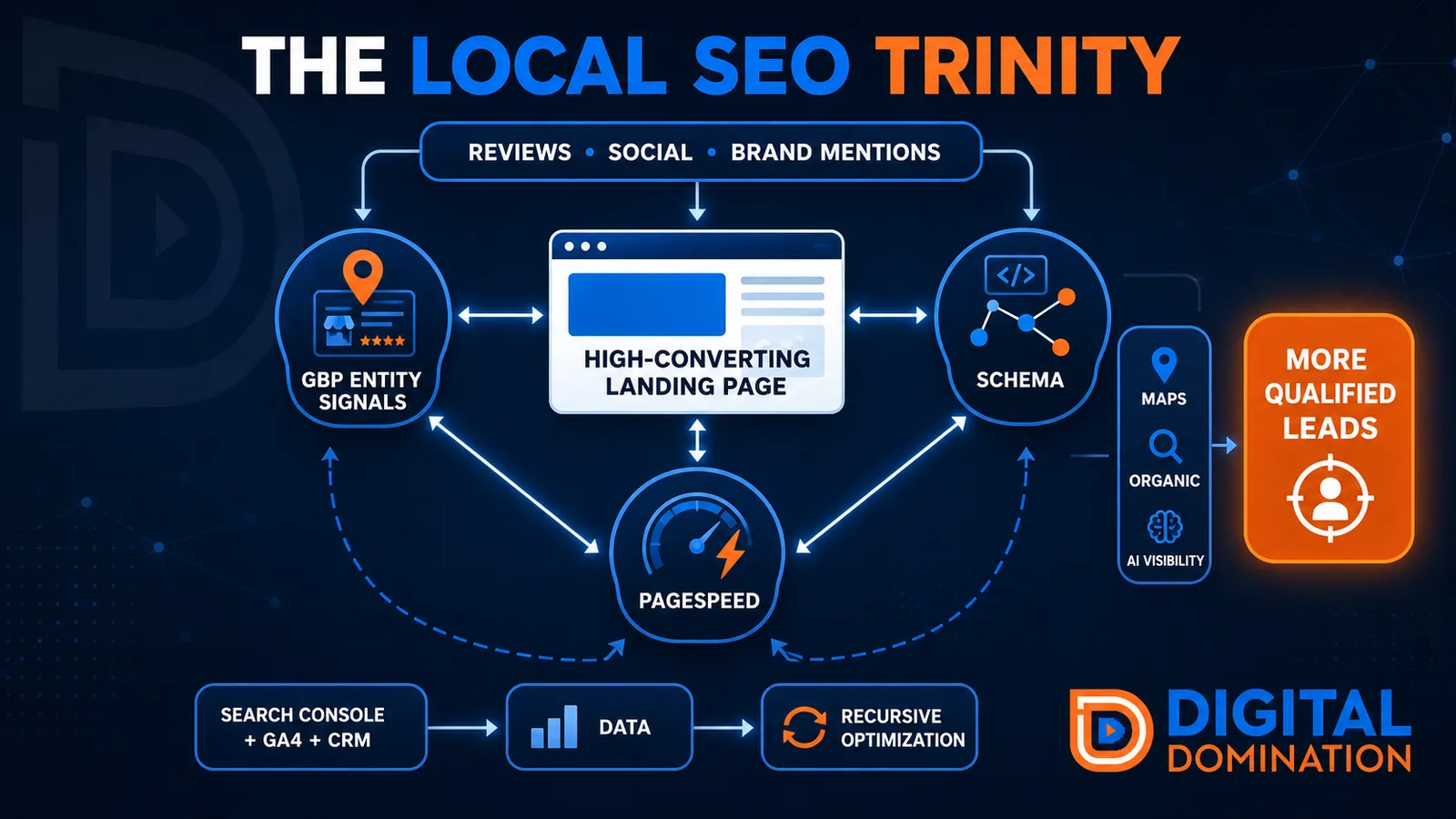
The Local SEO Trinity
Think of a three-legged stool. Your Google profile, your website, and your reviews all have to hold you up. If one leg is short, the whole thing wobbles.
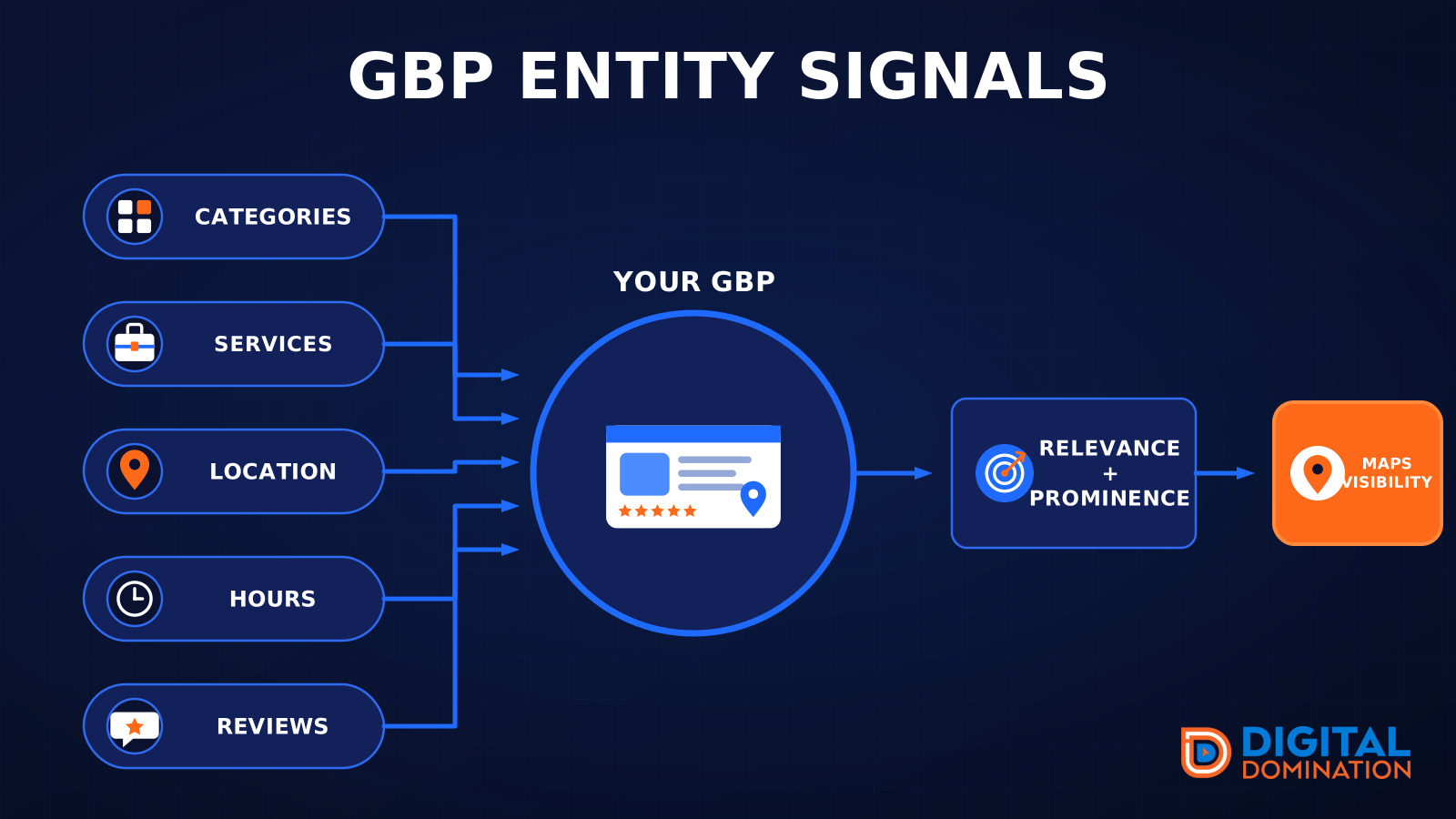
GBP entity signals
This leg is your Google Business Profile. GBP means Google Business Profile. It covers your categories, your services, your location, your hours, and your reviews. Google uses those facts to decide who to show.
Your Google profile is your storefront sign. If the sign is missing, or it names the wrong shop, people drive past.
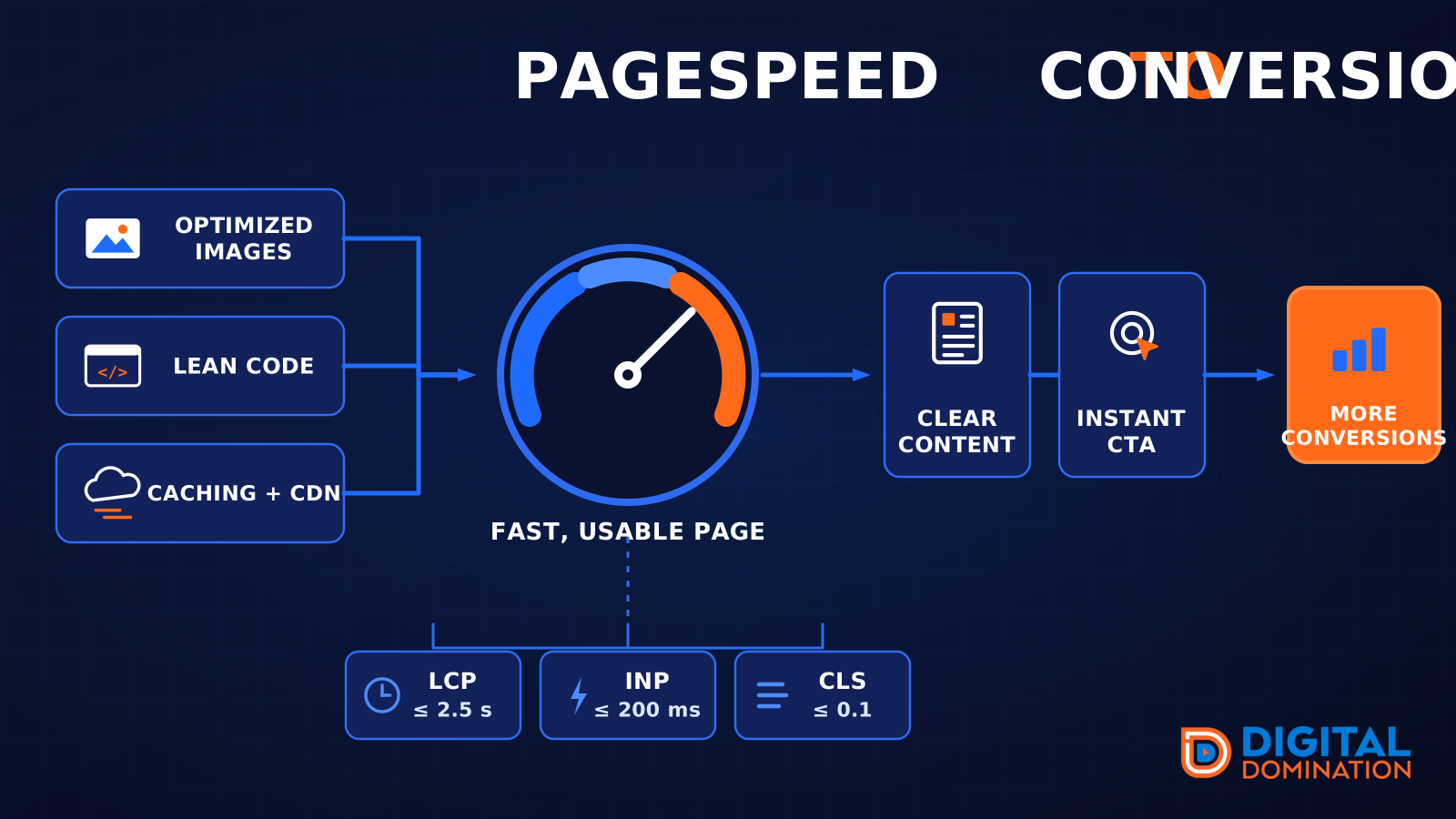
PageSpeed to conversion
This leg is your website, above all on a phone. Small images, lean code, and caching make a page fast. A fast, clear page is what turns a visit into a call. Phone speed is one of the 12 Trinity checks because a slow page loses the call before anyone sees your offer.
Your website is the showroom. If the door sticks, people leave before they look around.
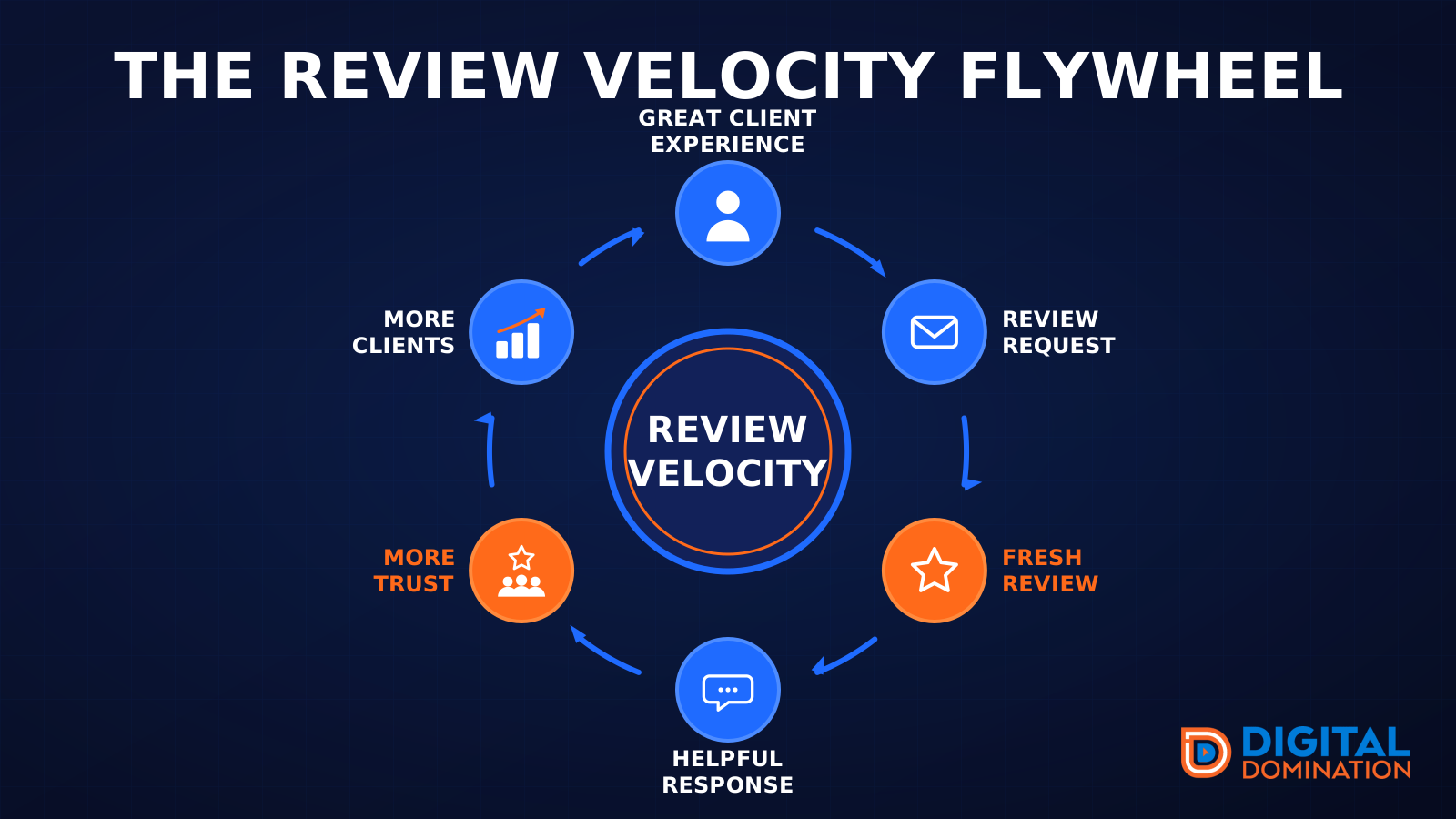
The review velocity flywheel
This leg is reviews and reputation. A good visit leads to a review request, then a fresh review, then a helpful reply, then more trust, then more customers. When the scan can find your Google listing, it shows your rating, your recent reviews, and how many you answered.
Reviews are word of mouth. One kind word helps. A steady stream of real reviews, and a reply from you, helps more.
How this turns into revenue
Being found in more searches leads to more calls. More calls lead to more booked jobs. More booked jobs lead to more revenue.
Example numbers, not a real business: 40 calls from search in a month, a 25 percent close rate, and a $400 average job. That is 10 booked jobs. That is $4,000. The math is the lesson. It is not a promise.
The full page has a box where you can type your own average job value and close rate.
One real story, from our car dealership case study: Medina Auto Group went from invisible on Google Maps to dominating every high-intent search across their market. The turnaround spanned all four of their rooftops at once. The same page says the team eliminated 89 unfair one-star reviews that had been dragging the dealership's reputation down and keeping it out of the Map Pack. It also says: “Results described here are exceptional and non-typical. Outcomes vary based on market conditions, competition, and implementation. No guarantees are made regarding earnings, rankings, or conversions.”
Free strategy call
More booked jobs start with a clear plan
Book a free strategy call. We look at your Google profile, your website, and your reviews, and we tell you what to fix first.
Free. You pick the time. A real person shows up.