
Questions to ask before buying the Maps Domination Program
Use these questions to separate real local SEO work from vague Google Business Profile cleanup, risky shortcuts, or reporting that cannot prove local map movement.
The short answer
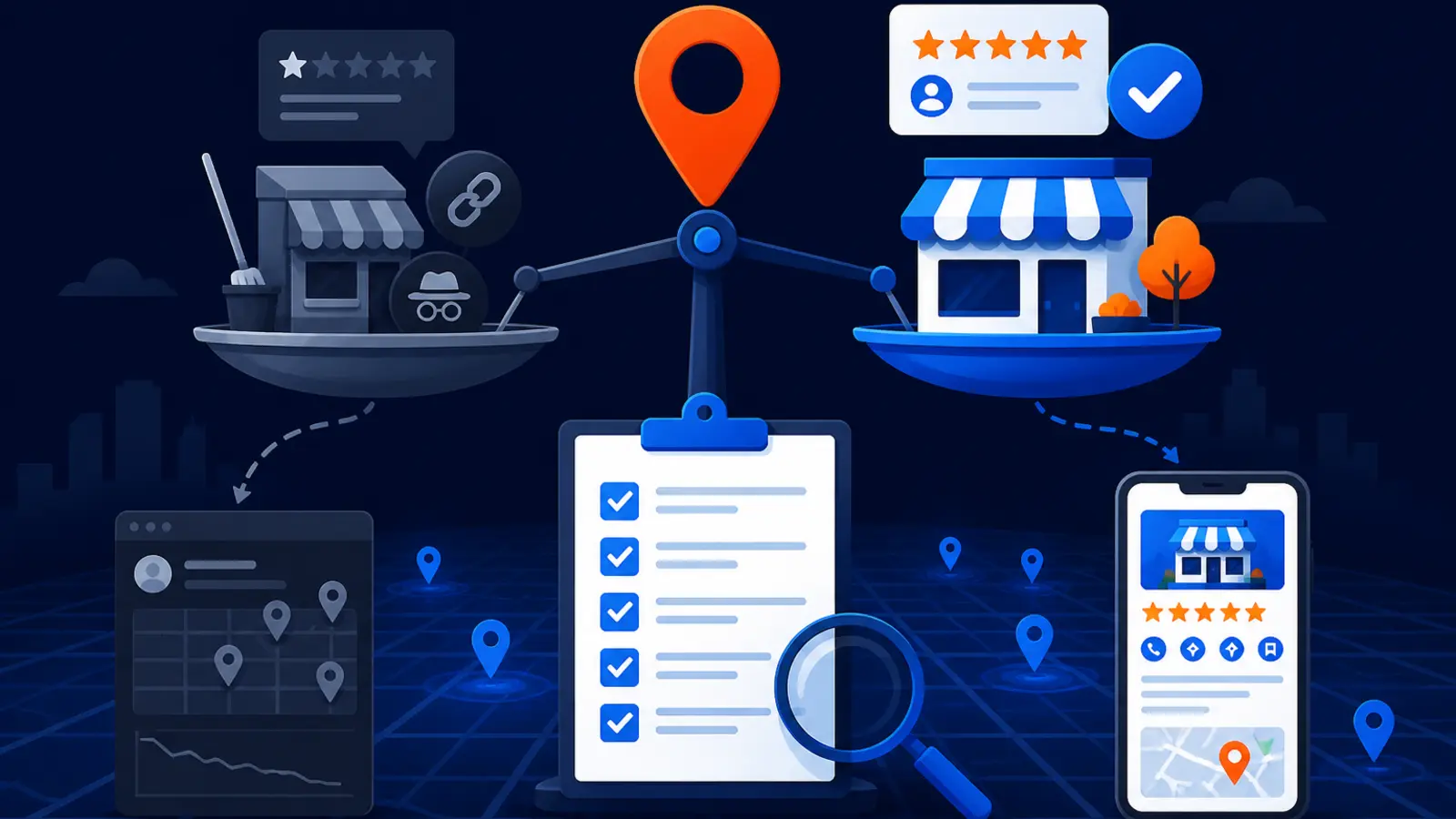
Before buying a Maps Domination Program, ask three things first: is the work safe under Google Business Profile policies, can the results be measured across the actual service area, and is the scope bigger than basic profile cleanup? If the answer is not clear on all three, slow down.
Google Business Profile Help says there is no way to request or pay for a better local ranking. Google says local results are mainly based on relevance, distance, and popularity. That means any responsible Maps program should be about improving the signals Google can read, not promising a private connection to Google or a paid shortcut.
The right program should show you where you rank before work starts, explain what will be changed, track your map visibility by location, and avoid review incentives, fake addresses, keyword stuffing, and other risky tactics. Basic cleanup may be enough for a simple business in a low-competition area, but a real Maps Domination Program should be built for harder local markets where proof matters.
Who should consider the cheaper or DIY path
Not every business needs a full Maps Domination Program. If your Google Business Profile is verified, your service area is simple, and your competitors are not strong, basic cleanup plus consistent review requests may be enough for now.
The cheaper or DIY path suits an owner who can personally manage the details and wait through Google review times. Google Business Profile Help says verifying a profile tells Google the business is authorized to represent it, which makes it more likely to show up in search results. Google also says complete and accurate profile information makes a business more likely to show up in local search results.
You may be a good fit for DIY or a lighter service if these are true:
- ▸You have one verified location.
- ▸You do not have suspension, ownership, or duplicate-profile problems.
- ▸Your business address and service area are straightforward.
- ▸You have time to manage profile data and review requests.
- ▸Your market has low competition.
- ▸You can check your own rankings from more than one neighborhood.
- ▸You are comfortable waiting for Google edits and verification reviews.
When basic Google Business Profile cleanup is not enough
Cleanup means fixing the obvious profile issues: categories, hours, services, address display, photos, business description, and outdated contact information. It is important, but it is not the same as competing for top map positions across a city or service area.
Google Business Profile Help says relevance is how well a profile matches what someone is searching for, and complete business information helps Google match the profile to relevant searches. It also says prominence can be based on how many websites link to a business and how many reviews it has, and that more reviews and positive ratings can help local ranking.
If your competitors are established, have stronger review profiles, or rank from several parts of town where you do not, you need more than a tidy profile. You need a measurable plan for relevance, prominence, proximity limits, and review generation that stays inside Google’s rules.
What to look for before you sign
A trustworthy Maps program should be clear enough that a non-technical owner can inspect the basics. You should not have to accept vague statements like “we fixed your SEO” without seeing what was checked, what changed, and how rankings moved across the map.
Google Business Profile Help says edits to a verified Business Profile usually take up to 10 minutes to review but can sometimes take up to 30 days. It also says verification reviews take up to 5 business days after the verification steps are completed, and mail verification codes usually arrive within 14 days. A provider should account for those normal delays instead of blaming every delay on mystery algorithm changes.
Use these checkpoints before you buy:
- ▸A baseline map ranking scan before the program begins.
- ▸A clear review of your primary category, services, service area, address display, and profile completeness.
- ▸A written explanation of any policy-sensitive changes.
- ▸A plan for review requests that does not offer incentives.
- ▸Tracking that shows rankings in different parts of the service area, not only at your office.
- ▸Reporting on calls, website clicks, directions, messages, or bookings where available.
- ▸A realistic explanation of what Google review and verification timelines can affect.
- ▸A named person or team responsible for profile changes and reporting.
Seven questions to ask before you sign
These questions are meant to protect you from three common problems: unsafe tactics, weak measurement, and paying for cleanup when you need a competitive local ranking plan. Ask them on the sales call and listen for plain answers, not jargon.
Bring these questions to the call:
- ▸What exact Google Business Profile changes will you make, and why?
- ▸How do you make sure the work follows Google’s profile, review, address, and service-area rules?
- ▸Will you show a map ranking baseline before work begins?
- ▸How many map points will you track, and how often will I see the report?
- ▸How will you separate Google Business Profile cleanup from broader Maps ranking work?
- ▸What review request process will you use, and does it avoid incentives?
- ▸What happens if my profile needs verification, duplicate cleanup, or a support review before ranking work can move forward?
Ask how they handle Google policy risk
Policy safety matters because your Google Business Profile is not just a marketing asset. For many local businesses, it is one of the main ways customers call, request directions, read reviews, and decide whether to trust you.
Google Business Profile Help says a service-area business that does not serve customers at its business address should remove the address and enter only its service area. Google also says a Business Profile can have up to 20 service areas, cannot use a radius-based service area, and should keep the overall area within about 2 hours of driving time from the business base.
A safe provider should be able to explain how it handles these risk areas:
- ▸Whether your address should be visible or hidden.
- ▸Whether your selected service areas are reasonable.
- ▸Whether your primary category matches the main business.
- ▸Whether services and descriptions are accurate.
- ▸Whether any duplicate or old profiles need attention.
- ▸Whether your business name is being kept clean and real.
- ▸Whether review requests follow Google’s rules.
Ask how measurement will work across the service area
Checking your ranking from your own phone is not enough. Local results change by search term, neighborhood, device context, and the location of the person searching. A business can look strong near its office and weak only a few miles away.
Local Falcon says a scan report shows where a business ranks in local search results for a keyword within a selected map scan radius and grid size. Local Falcon also says its Share of Local Voice score shows how often the business appears in the top 3 positions. That type of grid-based thinking matters because local rankings are geographic, not one fixed position.
Digital Domination’s free GeoGrid scan checks 169 real Google results across the service area. In the Maps Domination Program, weekly GeoGrid tracking reports are used to show visual proof of rankings and call volume.
Ask for reporting that can answer these questions:
- ▸Where do we rank near the office or business base?
- ▸Where do we rank in the neighborhoods that actually matter?
- ▸Which search terms are being tracked?
- ▸Are rankings shown as a grid instead of one average rank?
- ▸Are calls and other actions being reviewed along with ranking movement?
- ▸Can I compare the starting scan with later scans?
Ask what they will do with categories, services, and relevance
Relevance is one of the cleanest areas to improve because it starts with accurate profile information. Google Business Profile Help says businesses in certain categories can show services on their profile, choose suggested services, add custom services, group services into categories, and add descriptions and prices.
Whitespark’s Local Search Ranking Factors report surveyed 47 local search experts on 187 factors and ranked Primary GBP Category first for local pack and Maps ranking impact. The same report ranked proximity of address to the point of search second and keywords in the GBP business title third. That does not mean you should stuff keywords into a business name, but it does mean category selection and proximity need to be discussed honestly.
A provider should explain relevance work in plain language. For example, a plumber should not be optimized like an HVAC company, and a mobile service business should not be treated like a storefront if customers are not served at the address.
Ask how reviews will be requested without crossing the line
Reviews are part of local trust, and they can also support local visibility. Google Business Profile Help says prominence can be based partly on how many reviews a business has and that more reviews and positive ratings can help local ranking.
BrightLocal’s 2026 Local Consumer Review Survey used a representative panel of 1,002 US adult consumers and found that 45% of consumers left a Google review in the past year. That shows many customers are willing to review a business, but the request has to be handled correctly.
Google Business Profile Help says merchants may ask customers to leave reviews with a Google link or QR code, but incentives for reviews are strictly prohibited. Your provider should have a process that asks happy customers at the right time without discounts, gifts, contests, or pressure.
Ask these review questions:
- ▸Do you use a Google review link or QR code?
- ▸Do you avoid discounts, gifts, or rewards for reviews?
- ▸Do you help us ask consistently after real customer interactions?
- ▸Do you have a plan for responding to reviews?
- ▸Do you separate review requests from any employee bonus or customer incentive?
Ask what happens if verification, edits, or duplicates slow things down
Some Maps work is not instant because Google reviews certain changes. That does not mean the provider is doing nothing, but it does mean you should know which parts are under Google’s review process and which parts are active work.
Google Business Profile Help says verification reviews take up to 5 business days after the verification steps are completed. It also says mail verification codes usually arrive within 14 days. For edits, Google says review usually takes up to 10 minutes but can sometimes take up to 30 days.
If your profile has ownership confusion, an old duplicate, an address issue, or a verification requirement, the early phase may be about stabilizing the asset before ranking work can fully show. Ask for that to be explained before you buy, not after you are already frustrated.
How Digital Domination frames the decision
Digital Domination’s Maps Domination Program is built for local businesses that want map rankings measured across the service area, not just a cleaner profile. Pricing for the Maps Domination Program is set per market on a qualification call and tied to the ranking outcome.
The guarantee is simple: top 3 in the Google Map Pack in 12 weeks or you do not pay. Digital Domination also works with one client per trade per service area, so territory exclusivity is part of the fit conversation.
Before that conversation, the free 169-point GeoGrid scan shows how your business appears across real local search points. That gives both sides a better way to decide whether a full program is needed or whether simpler cleanup is enough.
Here is what to expect from the fit check:
- ▸A review of your current map visibility.
- ▸A look at the service area where you want to compete.
- ▸A discussion of trade and territory availability.
- ▸A qualification call before Maps Domination Program pricing is set.
- ▸A decision on whether the program is a fit or whether a simpler path makes more sense.
Where to go next
If you are comparing options, use the questions on this page as your call script. A good provider should welcome them. Clear answers are a sign that the work is real, measurable, and safer for your Google Business Profile.
To see the offer this guide supports, visit the Maps Domination Program page. It explains the program, the guarantee, territory exclusivity, and how qualification works. If you want proof before a call, start with the free GeoGrid scan page. It checks 169 real Google results across your service area so you can see the map problem before deciding what to buy.
Keep reading
Related guides
- ▸Google review spam alerts can pause your new reviews
- ▸Google spam update is done
- ▸Google Spam Update Local SEO Shortcuts
Put it into action
Frequently Asked Questions
What should I ask before buying a Maps Domination Program?
Ask how the provider keeps the work inside Google Business Profile rules, how rankings will be measured across your service area, and what is included beyond basic profile cleanup. Also ask for a baseline map scan before any work starts.
Is paying for Maps SEO against Google rules?
Paying a company to improve your profile, reviews process, website signals, and local SEO is not the same as paying Google for ranking. Google Business Profile Help says there is no way to request or pay for a better local ranking, so avoid anyone who suggests they have a paid shortcut or special ranking access.
Is Google Business Profile cleanup enough for my business?
It may be enough if you have one verified location, no duplicate or suspension issues, time to manage the profile, and a low-competition service area. If you need to win visibility across several neighborhoods against strong competitors, cleanup alone is usually too limited.
How should Maps rankings be measured?
They should be measured across the actual service area, not from one phone at one address. A GeoGrid-style report is useful because it shows where the business ranks at multiple map points for the search terms that matter.
Can I ask customers for Google reviews?
Yes. Google Business Profile Help says merchants may ask customers for reviews with a Google link or QR code, but incentives for reviews are strictly prohibited. A safe review process should never offer gifts, discounts, rewards, or contests for reviews.
How long do Google Business Profile edits take?
Google Business Profile Help says edits to a verified profile usually take up to 10 minutes to review, but some edits can take up to 30 days. Verification reviews can take up to 5 business days after the steps are completed, and mailed codes usually arrive within 14 days.
What makes the Maps Domination Program different from basic GBP management?
Basic GBP management usually focuses on keeping profile information accurate. A Maps Domination Program should also measure local rankings across the service area, work on relevance and prominence signals, track calls and actions, and show whether visibility is expanding where customers search.
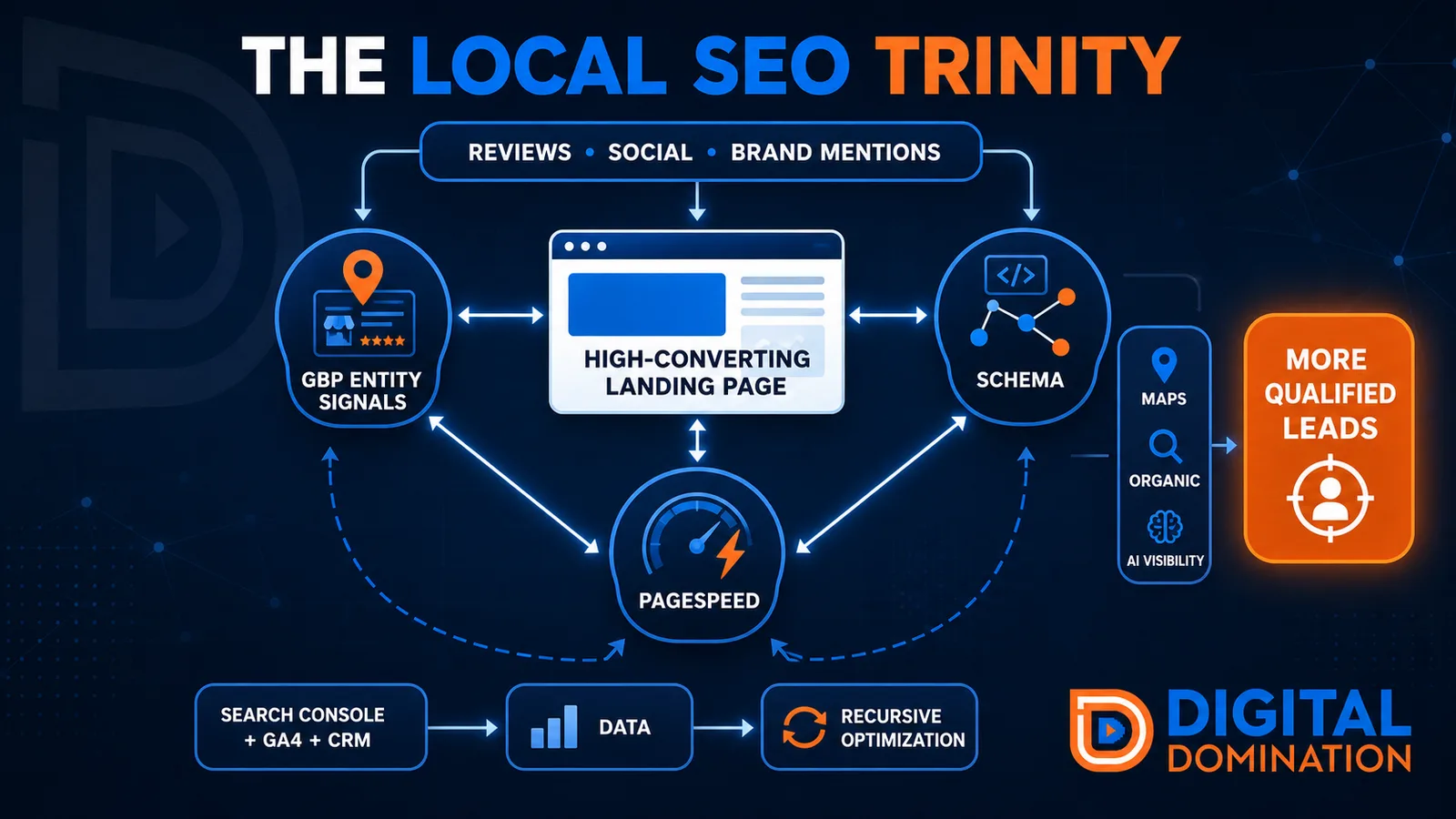
The Local SEO Trinity
Think of a three-legged stool. Your Google profile, your website, and your reviews all have to hold you up. If one leg is short, the whole thing wobbles.
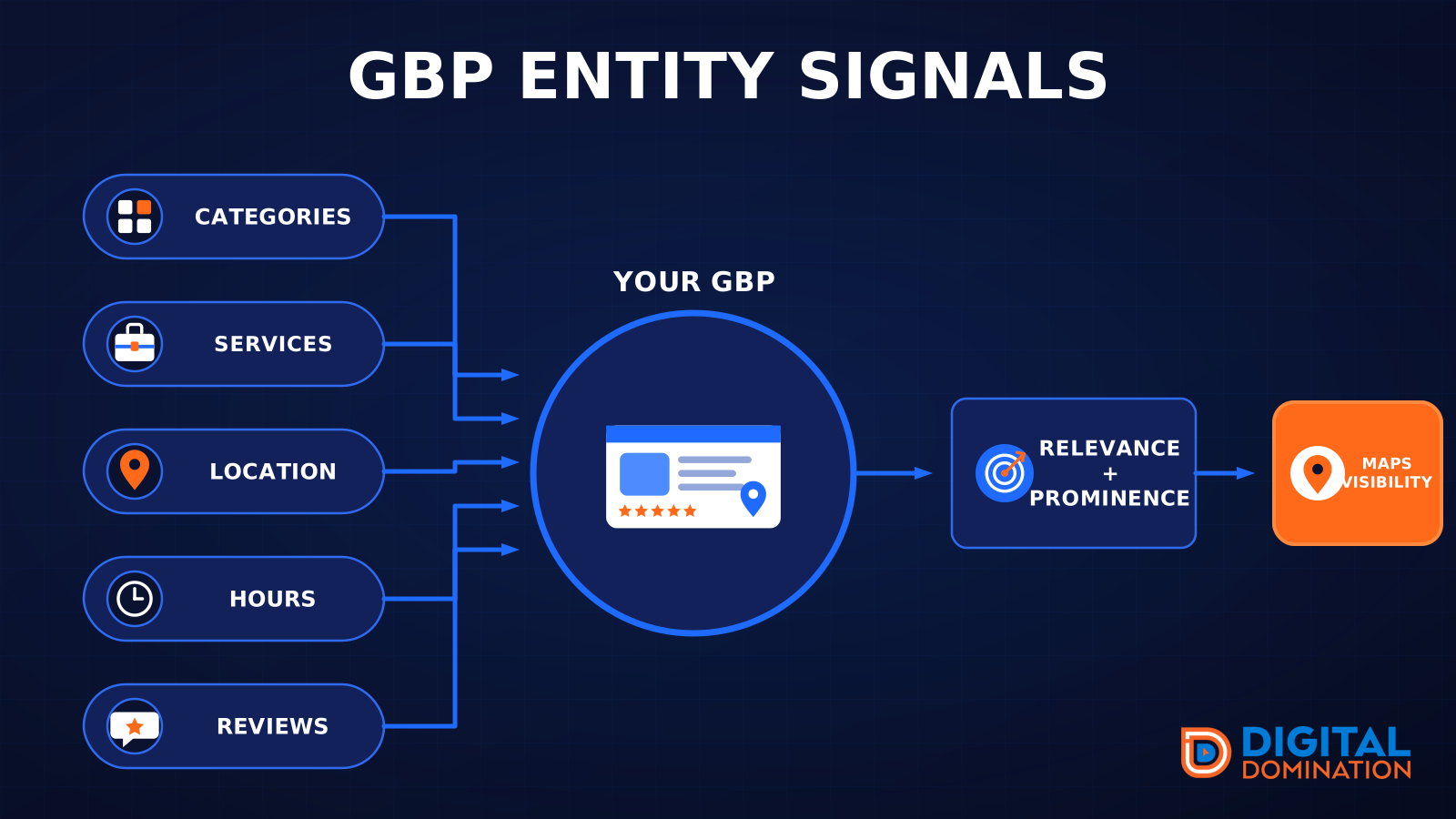
GBP entity signals
This leg is your Google Business Profile. GBP means Google Business Profile. It covers your categories, your services, your location, your hours, and your reviews. Google uses those facts to decide who to show.
Your Google profile is your storefront sign. If the sign is missing, or it names the wrong shop, people drive past.
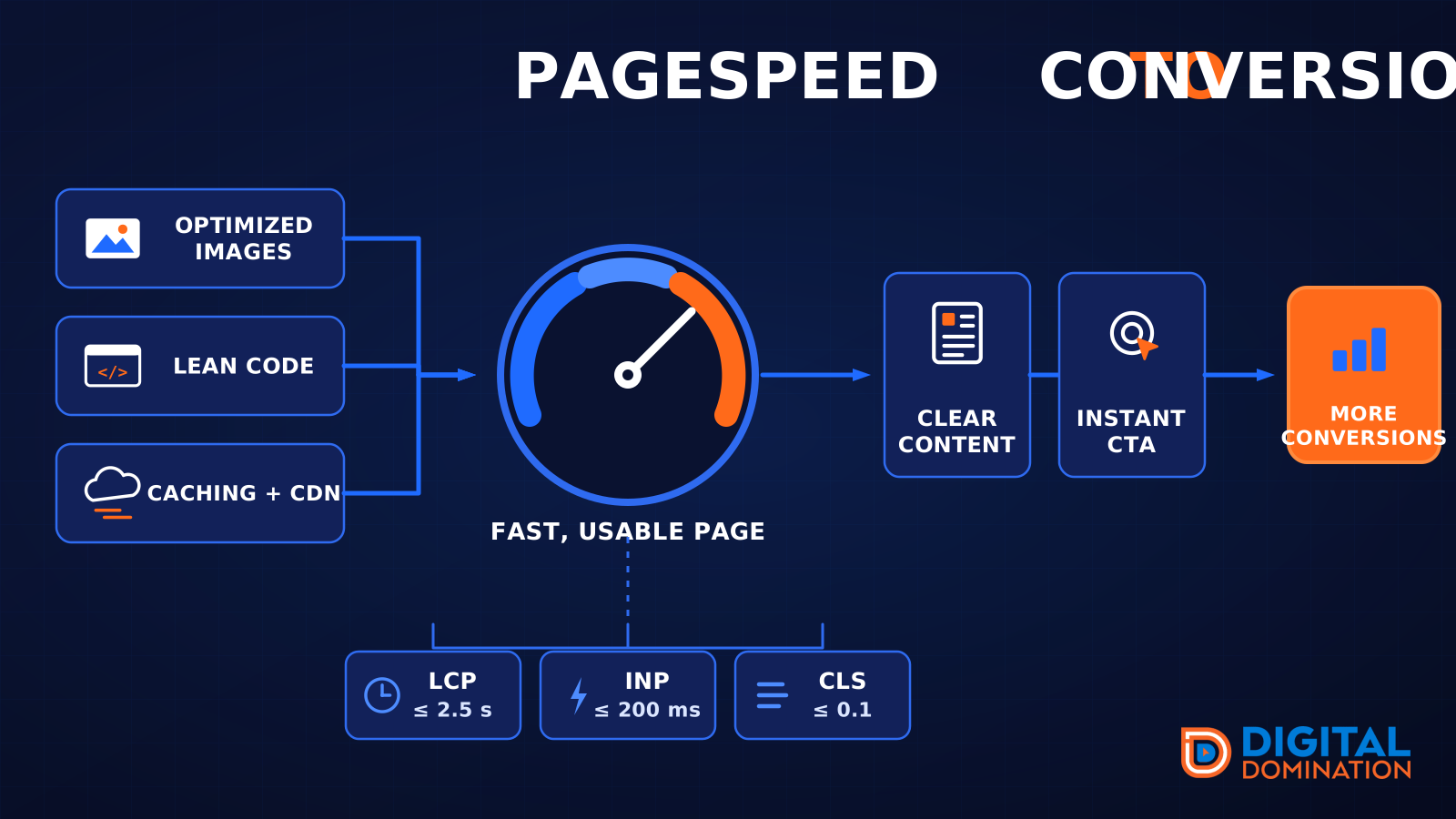
PageSpeed to conversion
This leg is your website, above all on a phone. Small images, lean code, and caching make a page fast. A fast, clear page is what turns a visit into a call. Phone speed is one of the 12 Trinity checks because a slow page loses the call before anyone sees your offer.
Your website is the showroom. If the door sticks, people leave before they look around.
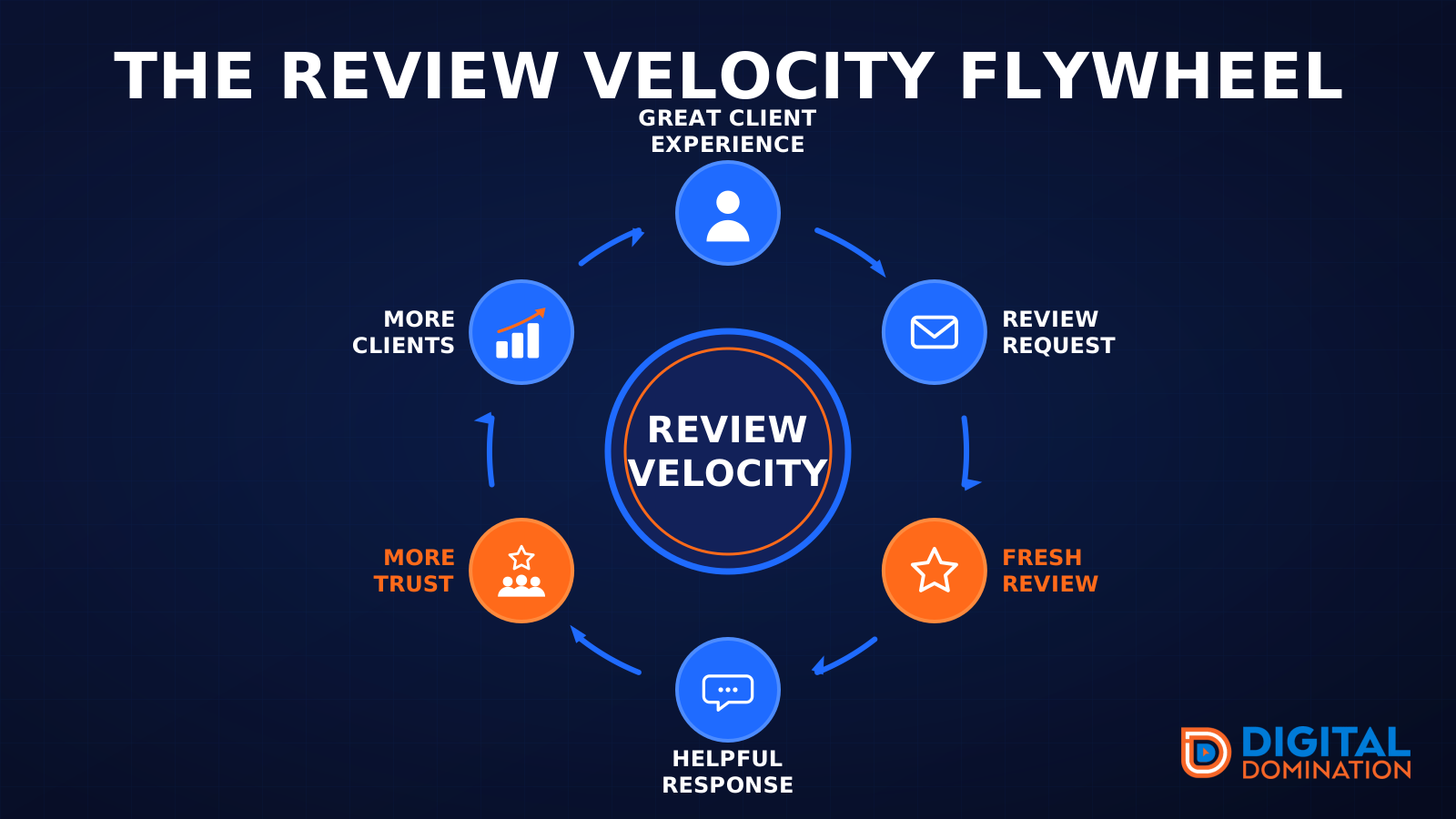
The review velocity flywheel
This leg is reviews and reputation. A good visit leads to a review request, then a fresh review, then a helpful reply, then more trust, then more customers. When the scan can find your Google listing, it shows your rating, your recent reviews, and how many you answered.
Reviews are word of mouth. One kind word helps. A steady stream of real reviews, and a reply from you, helps more.
How this turns into revenue
Being found in more searches leads to more calls. More calls lead to more booked jobs. More booked jobs lead to more revenue.
Example numbers, not a real business: 40 calls from search in a month, a 25 percent close rate, and a $400 average job. That is 10 booked jobs. That is $4,000. The math is the lesson. It is not a promise.
The full page has a box where you can type your own average job value and close rate.
One real story, from our car dealership case study: Medina Auto Group went from invisible on Google Maps to dominating every high-intent search across their market. The turnaround spanned all four of their rooftops at once. The same page says the team eliminated 89 unfair one-star reviews that had been dragging the dealership's reputation down and keeping it out of the Map Pack. It also says: “Results described here are exceptional and non-typical. Outcomes vary based on market conditions, competition, and implementation. No guarantees are made regarding earnings, rankings, or conversions.”
Free strategy call
More booked jobs start with a clear plan
Book a free strategy call. We look at your Google profile, your website, and your reviews, and we tell you what to fix first.
Free. You pick the time. A real person shows up.