
Ask Maps can now find appointments and call local businesses
For appointment-based local businesses, Maps visibility is no longer just about being found. It is about whether Google can understand your services, reach your team and confirm an open slot.
What changed in Google Maps
Google announced on November 16, 2026, that Ask Maps can now help customers find open appointment slots for beauty, pet care, auto and home repair services. In its post, “New Ask Maps features to help with holiday travel and prep,” Google said appointment finding is launching first in the U.S. on Android and iOS.
Search Engine Journal also reported that Ask Maps can call local businesses on the customer’s behalf as part of this appointment finding flow. That means a customer may ask Google Maps for help booking a haircut, pet grooming visit, oil change or repair appointment without first clicking through to your website or manually dialing your shop.
This hits any local business where the phone, calendar and Google Business Profile decide whether a lead becomes a booked job. The most affected owners include:
- ▸Salons, barbers, spas and other beauty businesses
- ▸Pet groomers, vets and pet care providers
- ▸Auto repair shops, tire shops and detailers
- ▸Home repair businesses, including HVAC, plumbing, electrical and handyman services
- ▸Any service business that relies on a front desk, dispatcher or owner answering calls
Why this matters for booked jobs
For years, many owners treated Google Maps as a visibility channel. If the business showed up, the phone rang, and the website got visits, the profile was doing its job. Ask Maps makes that view incomplete.
The new booking path can keep the customer inside Google Maps longer. If Google can identify your service, understand your availability, use your booking link or call your business, then your profile becomes part of the booking system itself. If the profile is vague, the booking link is broken or the call is mishandled, the customer may move to the next available business.
The local SEO lesson is simple: visibility without a clean booking process is not enough. Ranking well in Maps can create opportunity, but your profile and phone process still have to convert that opportunity into an appointment. This week, owners should think about these failure points:
- ▸The service the customer wants is missing from the profile
- ▸The booking link goes to a generic page or broken page
- ▸The phone is answered without a clear availability script
- ▸Google calls during busy hours and no one knows what to do
- ▸Hours, service areas or appointment rules are outdated
Ask Maps makes your Google Business Profile more important
Google’s local ranking factors are relevance, distance and prominence. Ask Maps does not change that basic local search reality, but it raises the stakes for relevance. If Google is trying to help someone book a specific service, your profile needs to say clearly that you offer it.
Many profiles are still built around broad categories only. A home repair company might list “contractor” but never add individual services. An auto shop might mention repairs but not show inspections, brakes, diagnostics or oil changes in a structured way. A salon may have categories but thin service descriptions.
You do not need to stuff keywords into your profile. You do need to make it easy for Google and customers to match a real need with a real service. Start with the parts of your profile that Google Maps uses to understand what you do:
- ▸Primary category and secondary categories
- ▸Services listed inside Google Business Profile
- ▸Business description
- ▸Appointment or booking link
- ▸Photos that show real services, not just logos
- ▸Questions and answers on the profile
Five things to check on your profile this week
This is the fast audit every appointment-based local business should run before assuming Ask Maps will send good booked jobs. Open your Google Business Profile as the owner or manager, then check these items one by one.
Treat this section as a short owner checklist, not a technical project:
- ▸Make sure your primary category matches your main money service, not a vague label
- ▸Add or clean up your service list so common appointment requests are represented
- ▸Update your hours, holiday hours and special hours so Google does not send bad availability signals
- ▸Check that the phone number goes to the person or system that can confirm appointments
- ▸Click your booking link from a phone and confirm it lands on the right scheduling page
Your booking link can no longer be an afterthought
If Google Maps can help customers find appointments, your booking link becomes a front door. Too many businesses send profile visitors to the homepage and expect them to hunt for the right button. That may work for a patient customer, but it is weak for someone asking Maps to solve the task quickly.
The right setup depends on the business. A salon may need an online scheduler with staff and service selection. A home repair company may need a short request form with service type, ZIP code and preferred time. An auto shop may need a page that separates drop-off appointments from same-day calls.
This week, test the booking path like a customer who has never heard of you. Use your phone, start from Google Maps, tap the booking option and look for friction. Pay attention to these details:
- ▸The page loads quickly on mobile
- ▸The customer can choose or request the exact service
- ▸The form asks only for information needed to schedule the next step
- ▸The phone number is visible for customers who do not want to use the form
- ▸Confirmation messages explain what happens next
- ▸Tracking or CRM tools do not break the customer experience
Phone handling is now part of Maps SEO
Search Engine Journal’s report makes the phone issue hard to ignore: Ask Maps may call local businesses for customers. That turns your front desk process into a local SEO conversion factor, even if it is not a ranking factor.
A Google-assisted call is still a customer opportunity. If the call is missed, sent to a full voicemail box or answered by someone who cannot confirm availability, the lead can die before the owner even knows it existed. The fix is not complicated, but it does require a clear script.
Write down how your team should handle availability calls from Google or from customers coming through Google Maps. Keep the script near the phone or inside the call system. At minimum, your team should be ready to capture:
- ▸The service requested
- ▸The customer’s preferred day or time
- ▸The earliest available appointment
- ▸The customer’s name and callback number
- ▸Whether the appointment is confirmed or only requested
- ▸Any service limits, travel fees or diagnostic rules that affect the booking
Check your Google automated-call settings
Google Business Profile Help has a page called “About automated calls and texts from Google to your business.” Google’s own documentation says automated calls and texts from Google may be used to help keep business information updated and assist users with business-related tasks, including appointment or reservation type interactions where available.
The same documentation explains that businesses can manage or opt out of some automated calls and texts. Owners should not ignore this setting just because the calls are automated. If your team is trained and your information is current, these calls may help customers complete a task. If your business cannot handle them, you need to know that before appointment requests start slipping through.
This is not a set-it-and-forget-it decision. Review the setting, decide who should answer and make sure your staff knows what Google calls may sound like. Check these items now:
- ▸Confirm your profile phone number is correct
- ▸Review automated-call and text preferences in Google Business Profile
- ▸Make sure call screening does not block Google or unknown callers by default
- ▸Tell staff not to hang up just because a call sounds automated
- ▸Use a shared call log so missed availability checks can be reviewed
Service categories need to match real demand
Ask Maps is built around user intent. The customer is not always asking for your brand name. They may ask for a “dog grooming appointment near me,” “brake repair today” or “AC repair appointment this week.” Your profile needs to connect those requests to the services you actually want to book.
Do not add services you do not perform. That creates bad leads and frustrated customers. Instead, use the services area of your profile to clarify your core offers in plain language. If you are a home repair business, separate emergency repair from maintenance. If you are a beauty business, separate haircuts, color, nails and skincare where appropriate.
This week, compare your service list against your phone calls and booking requests. If customers often ask for something profitable that is missing from your profile, add it. If customers frequently ask for something you do not do, clarify your description or service wording so Google and customers have better context.
What to do about it this week
The right answer is not to wait and see whether Ask Maps sends appointments. The safer move is to clean up the profile and booking process now, while most competitors are still treating this as a news item instead of an operations issue.
You do not need a full rebrand or new website to start. You need a clean profile, a working booking path and a phone process that can handle availability checks. Put one person in charge of testing the path from search to scheduled appointment.
Here is the owner-level action plan for the next few days:
- ▸Search your top services in Google Maps and see how your business appears
- ▸Open your profile and update categories, services, hours and appointment links
- ▸Place a test call to your published number during business hours
- ▸Ask your front desk how they would respond to a Google availability call
- ▸Test the booking page on mobile and remove obvious friction
- ▸Review Google automated-call settings in your Business Profile
- ▸Track missed calls and appointment requests for patterns
Do not confuse Maps visibility with booking readiness
A business can be visible in Google Maps and still lose appointments. That gap usually comes from boring operational problems: outdated services, weak booking pages, unanswered calls, unclear hours or staff who are not trained to confirm availability.
Local SEO gets the customer to the point of choosing. Booking readiness helps the customer finish the choice. With Ask Maps, those two pieces are closer together than before. If Google can act as a helper between the searcher and the business, your profile data and phone workflow become part of the customer experience.
The practical question is not whether this feature will affect every appointment tomorrow. The question is whether your business looks easy to book when Google Maps tries to help a customer take action. If the answer is no, fix that before spending more effort chasing visibility.
Where Digital Domination fits in
At Digital Domination, we look at this news through the lens of local service businesses that need Maps visibility to turn into calls, appointments and jobs. Ask Maps makes the Google Business Profile cleanup work more urgent, because a weak profile can now interrupt the booking path, not just the discovery path.
If you want to see what a stronger profile process looks like, our Google Business Profile SEO service page explains how we work on categories, services, optimization, local rankings and ongoing profile improvements for service businesses: digitaldomination.ai/google-business-profile-seo/
Before you make another Maps decision, check how your business appears across your real market. Digital Domination’s free GeoGrid scan checks 169 points across a market so you can see where you show up and where you do not: digitaldomination.ai/scan/
Keep reading
Related guides
- ▸Electrician local SEO
- ▸Emergency and same-day Google Maps SEO
- ▸Emergency and same-day Maps visibility
Put it into action
Frequently Asked Questions
Can Google Maps book appointments for my local business now?
Google announced that Ask Maps can find open appointment slots for certain local service categories, starting in the U.S. on Android and iOS. Search Engine Journal reported that the feature can also call businesses on a customer’s behalf. Whether it works for your business will depend on category, rollout status, profile data and booking availability.
What businesses are affected by Ask Maps appointment finding?
Google named beauty, pet care, auto and home repair services in its announcement. That makes the change most urgent for salons, groomers, repair shops, contractors and similar appointment-based businesses. Any local business that depends on calls or scheduling should still audit its profile.
Should I update my Google Business Profile because of Ask Maps?
Yes. Your categories, services, hours, phone number and booking link should be current before you rely on Maps visibility to produce appointments. If Google cannot understand what you offer or reach the right booking path, visibility can turn into missed demand.
How do I know if Google is allowed to call my business?
Google Business Profile Help has documentation on automated calls and texts from Google to your business. It explains that Google may use calls and texts for business information and user-related tasks, and that businesses can manage some settings. Owners should review those settings inside Google Business Profile.
What should my staff do if Google calls about availability?
Train your staff to treat the call like a real customer opportunity. They should confirm the requested service, offer the earliest available time, capture the customer details and explain whether the appointment is confirmed or pending. Do not let staff hang up just because the call sounds automated.
Do I need online booking for Ask Maps to help me?
Online booking can make the path easier, but the phone still matters because Ask Maps may call businesses. At minimum, your booking link should work on mobile and your phone should be answered by someone who can discuss availability. The goal is to remove friction from search to appointment.
Will this change my Google Maps rankings?
Google’s local ranking factors are relevance, distance and prominence. Ask Maps appointment finding is more about converting Maps visibility into action than replacing those ranking factors. Still, better profile services and clearer business information can support relevance for the searches you actually want.
What is the first thing I should check today?
Start with your Google Business Profile service list, booking link and phone number. Then test the full path from Google Maps on a mobile phone. If you cannot quickly request or confirm an appointment, customers may struggle too.
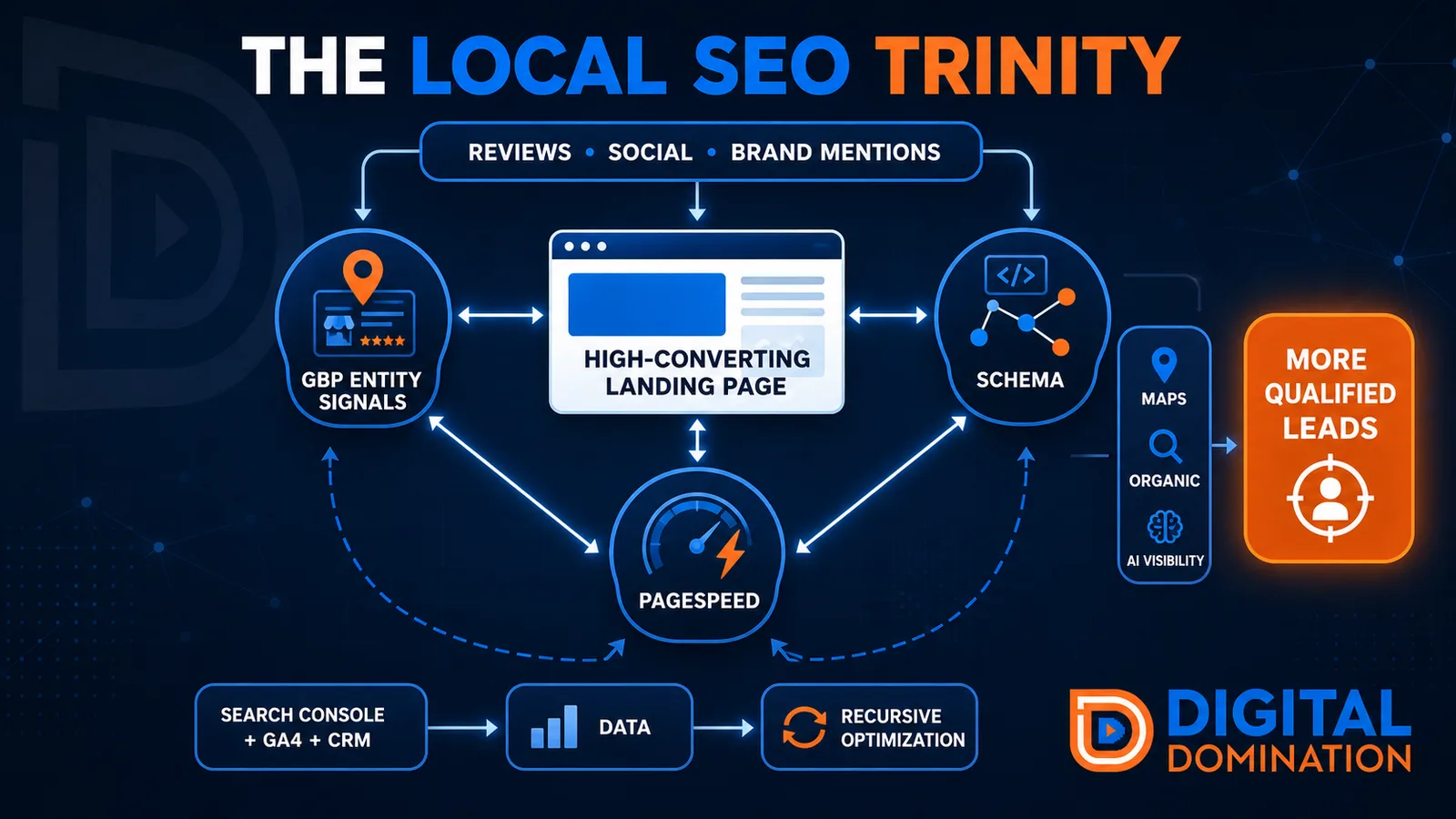
The Local SEO Trinity
Think of a three-legged stool. Your Google profile, your website, and your reviews all have to hold you up. If one leg is short, the whole thing wobbles.
GBP entity signals
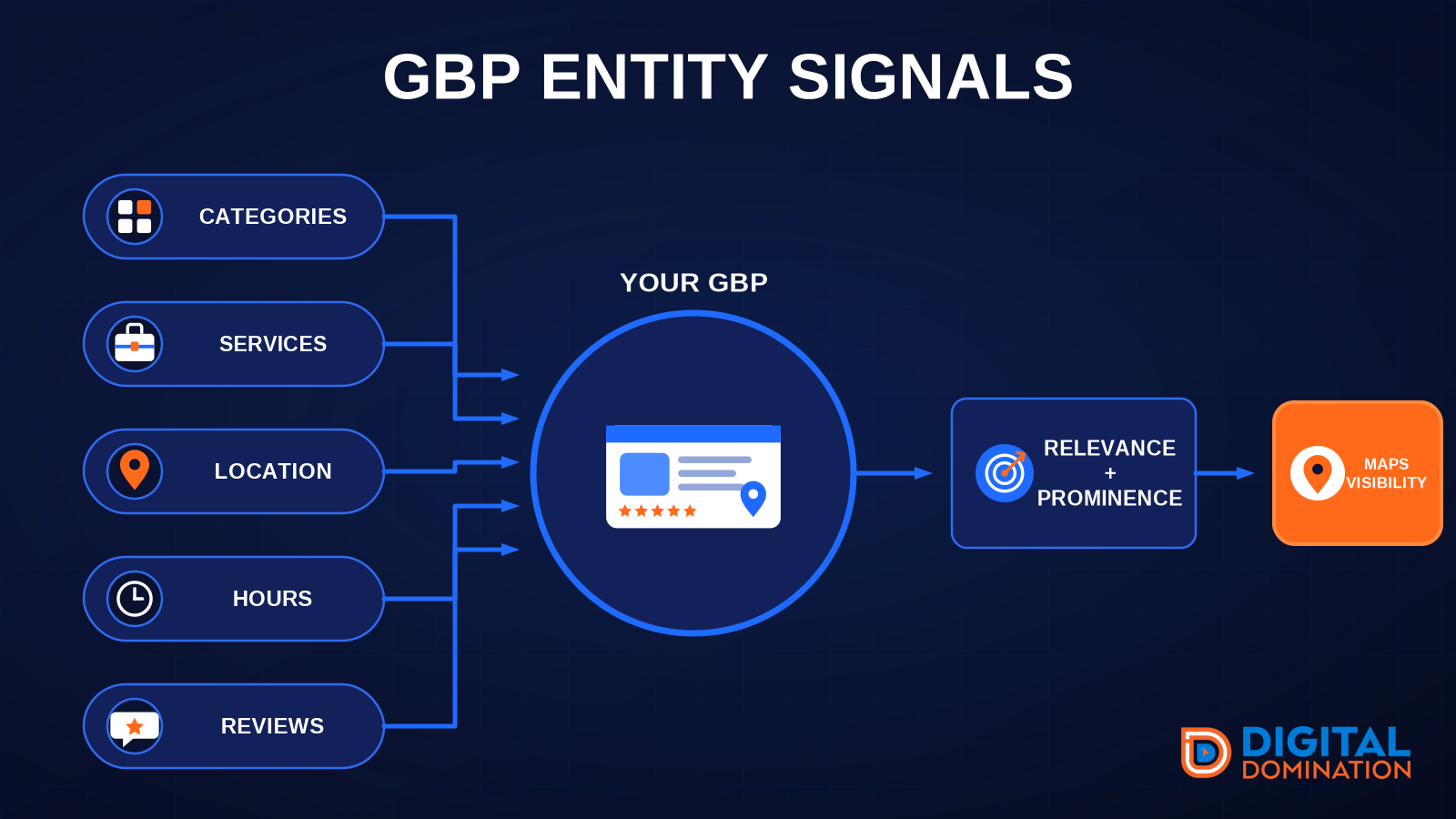
This leg is your Google Business Profile. GBP means Google Business Profile. It covers your categories, your services, your location, your hours, and your reviews. Google uses those facts to decide who to show.
Your Google profile is your storefront sign. If the sign is missing, or it names the wrong shop, people drive past.
PageSpeed to conversion
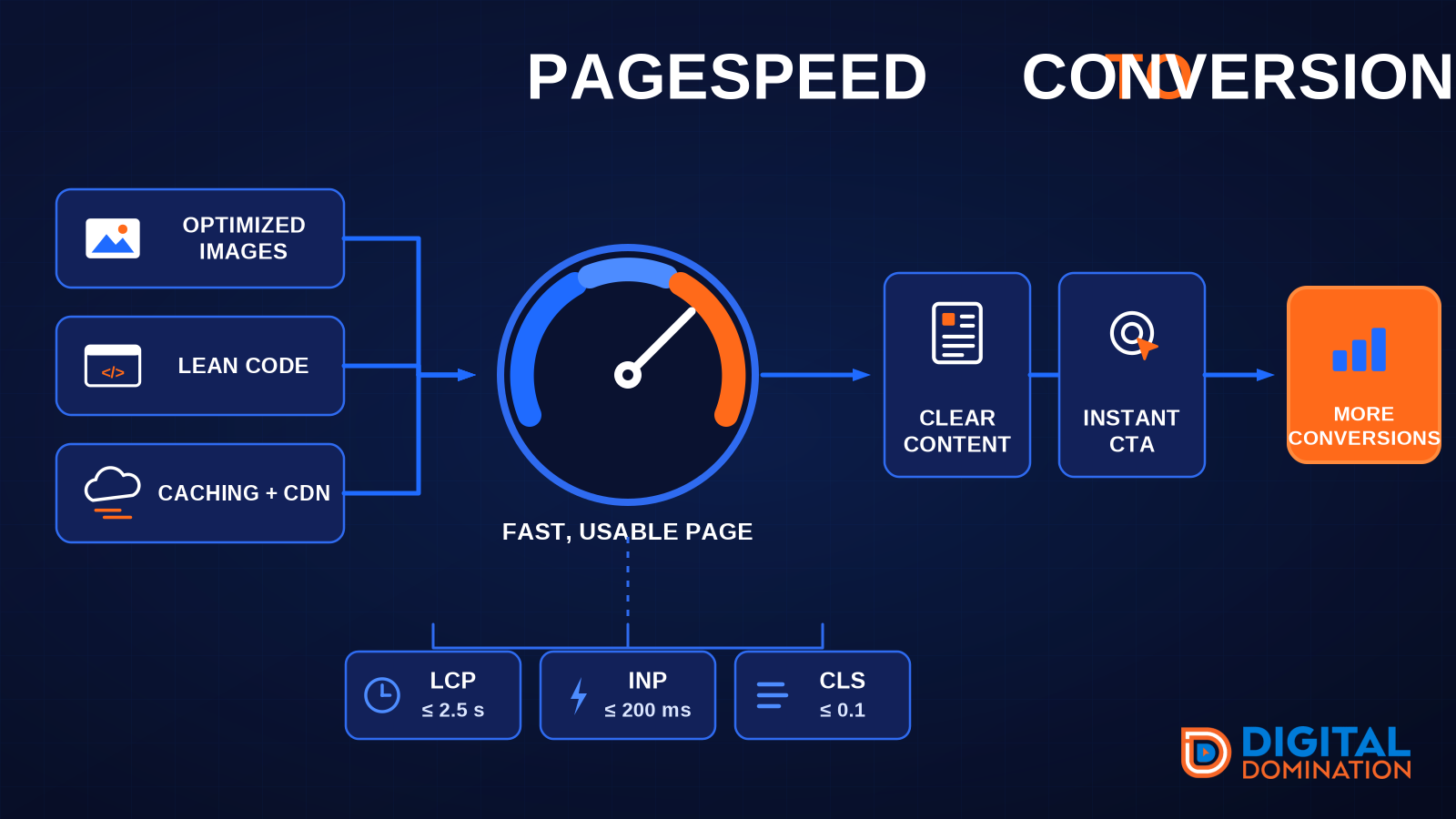
This leg is your website, above all on a phone. Small images, lean code, and caching make a page fast. A fast, clear page is what turns a visit into a call. Phone speed is one of the 12 Trinity checks because a slow page loses the call before anyone sees your offer.
Your website is the showroom. If the door sticks, people leave before they look around.
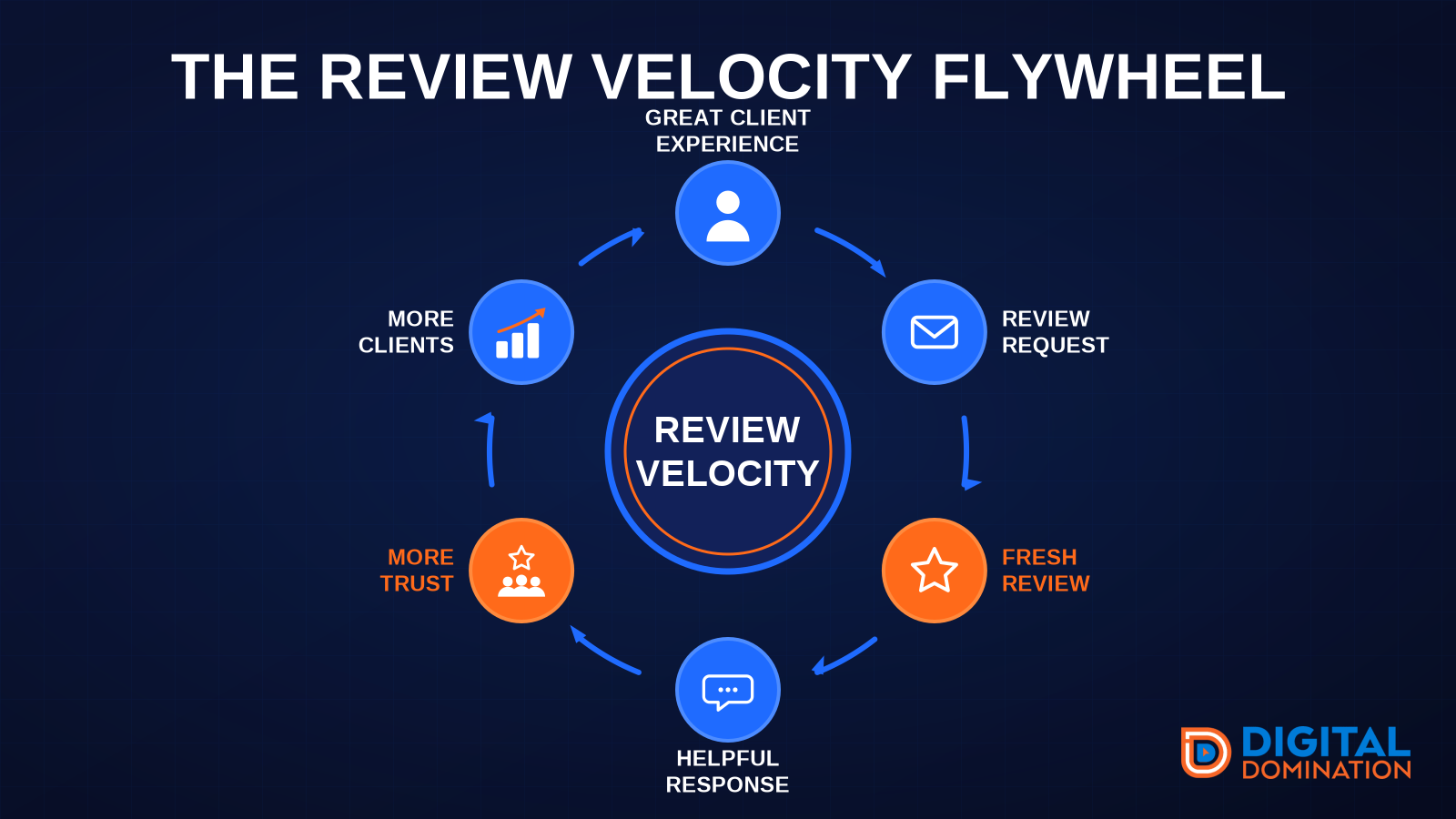
The review velocity flywheel
This leg is reviews and reputation. A good visit leads to a review request, then a fresh review, then a helpful reply, then more trust, then more customers. When the scan can find your Google listing, it shows your rating, your recent reviews, and how many you answered.
Reviews are word of mouth. One kind word helps. A steady stream of real reviews, and a reply from you, helps more.
How this turns into revenue
Being found in more searches leads to more calls. More calls lead to more booked jobs. More booked jobs lead to more revenue.
Example numbers, not a real business: 40 calls from search in a month, a 25 percent close rate, and a $400 average job. That is 10 booked jobs. That is $4,000. The math is the lesson. It is not a promise.
The full page has a box where you can type your own average job value and close rate.
One real story, from our car dealership case study: Medina Auto Group went from invisible on Google Maps to dominating every high-intent search across their market. The turnaround spanned all four of their rooftops at once. The same page says the team eliminated 89 unfair one-star reviews that had been dragging the dealership's reputation down and keeping it out of the Map Pack. It also says: “Results described here are exceptional and non-typical. Outcomes vary based on market conditions, competition, and implementation. No guarantees are made regarding earnings, rankings, or conversions.”
Free strategy call
More booked jobs start with a clear plan
Book a free strategy call. We look at your Google profile, your website, and your reviews, and we tell you what to fix first.
Free. You pick the time. A real person shows up.