
Cannabis dispensary local SEO: how GBP entity signals, schema and PageSpeed win 'dispensary open now' when you cannot buy an ad
Google will not sell a dispensary a single click, so the Map Pack, organic search and AI answers are the whole channel. Here is the system that wins them, built for a licensed dispensary, with things you can check before the next shift change.

9:52 pm, a locked door and a map that said open until 10
Tuesday, 9:52 pm. A regular pulls into the lot of the dispensary he has used for two years and the lights are off. The store moved its weekday close from 10 to 9 a month ago and changed the sign on the door, the loyalty text and the Instagram bio, but nobody touched the Google Business Profile, which still says open until 10:00 pm. He sits in the car and types 'dispensary open now'. The Map Pack shows a competitor eleven minutes away, open until midnight, with online ordering, an express pickup window and a photo of a lit storefront. He orders from the car and is home before his old store's profile would have said closed.
He does not go back. Not out of anger: the new store had his eighth bagged when he walked in, the budtender knew the brand he asked about, and the out-the-door price was on the screen before he paid. The first store had better flower and better prices. It lost a two-year customer to one unedited field.
This is how dispensaries are chosen: on a phone, in a car, in the time it takes to answer three questions. Are you open, what will it cost me at the register, and can I get in and out. Google and AI assistants answer those questions from the facts they hold about your store. A dispensary cannot run Google Ads or Meta ads for THC products, so there is no paid lane to jump into when the organic facts are wrong. The Map Pack, organic results and AI answers are the entire channel, and they reward the store that is easiest to understand.
The short version, for a store that cannot buy its way in
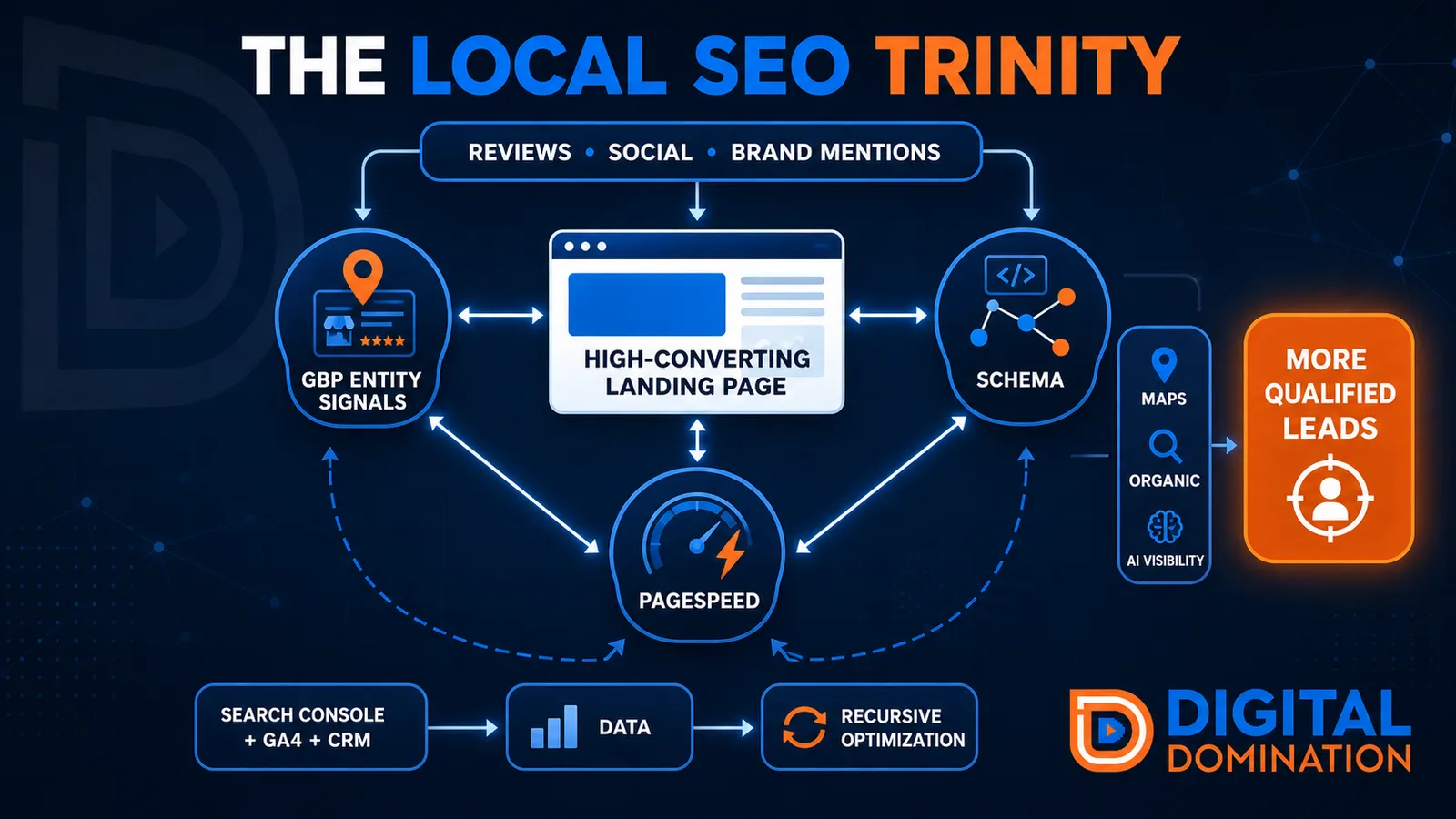
Google ranks local results on relevance, distance and prominence. Distance is wherever the customer is parked, and the store cannot change it. Relevance and prominence are built from the facts Google holds about the dispensary and from how many independent sources confirm them. At Digital Domination we call the foundation a trinity, and the rest of this article works through each layer as it applies to a licensed cannabis retailer:
- ▸Google Business Profile entity signals: the category, hours, attributes, services, photos and per-store landing page that tell Google what kind of cannabis store you are and where.
- ▸Schema: JSON-LD on your own domain that ties the store, the license number, the people, the services, the delivery zone and the deals into one machine-readable entity.
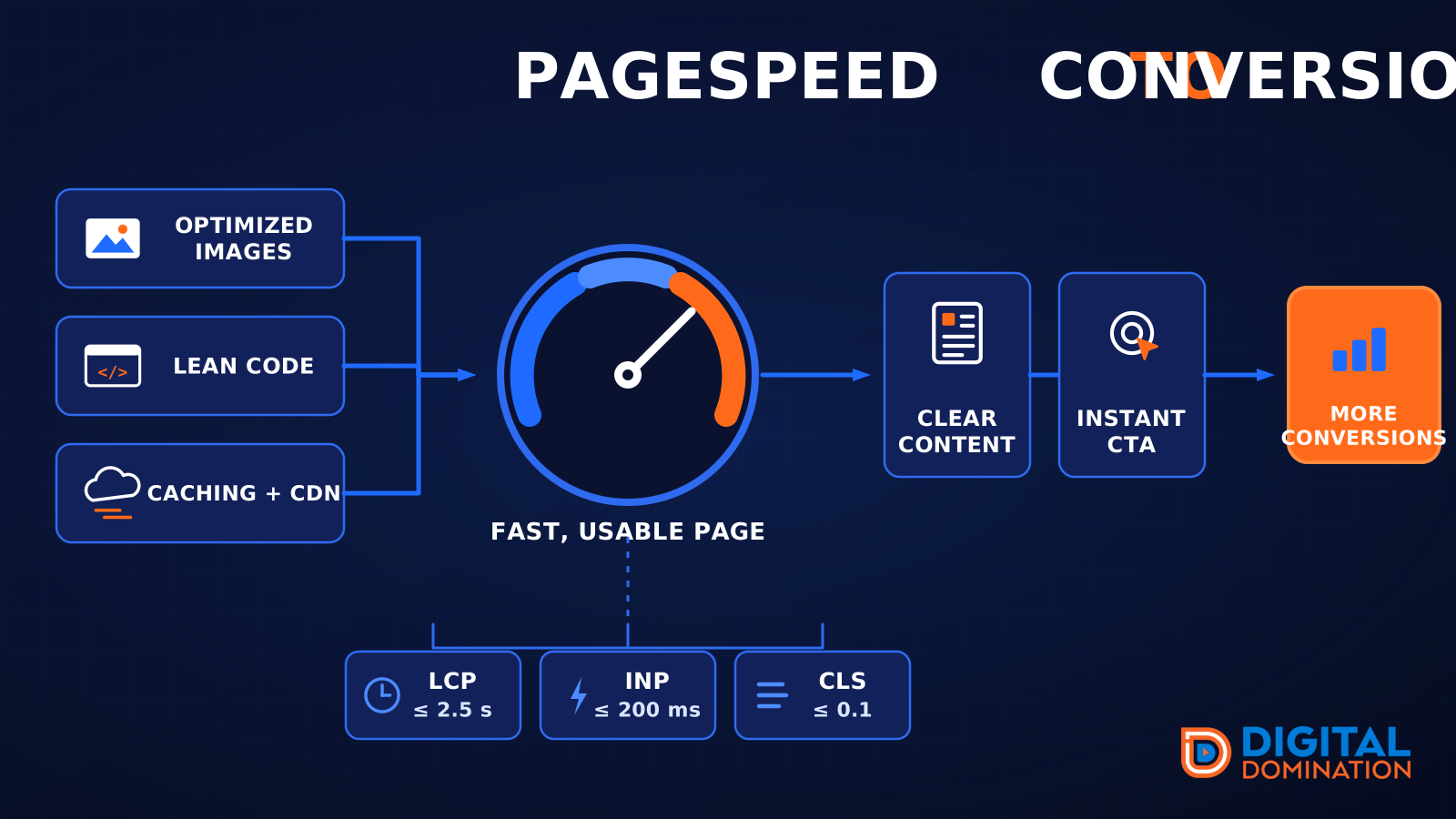
- ▸PageSpeed: a site that gets past the age gate, the menu embed and the deals popup fast enough for a customer in a parking lot and for the crawlers that feed AI answers.
- ▸Supporting layers: a store page that proves you are licensed and worth the drive, review velocity in customer language, brand mentions beyond your own site, and a Search Console, GA4 and point-of-sale loop that tells you what to fix next.
Profile signals: category, hours and the ID question, before anyone sees your menu
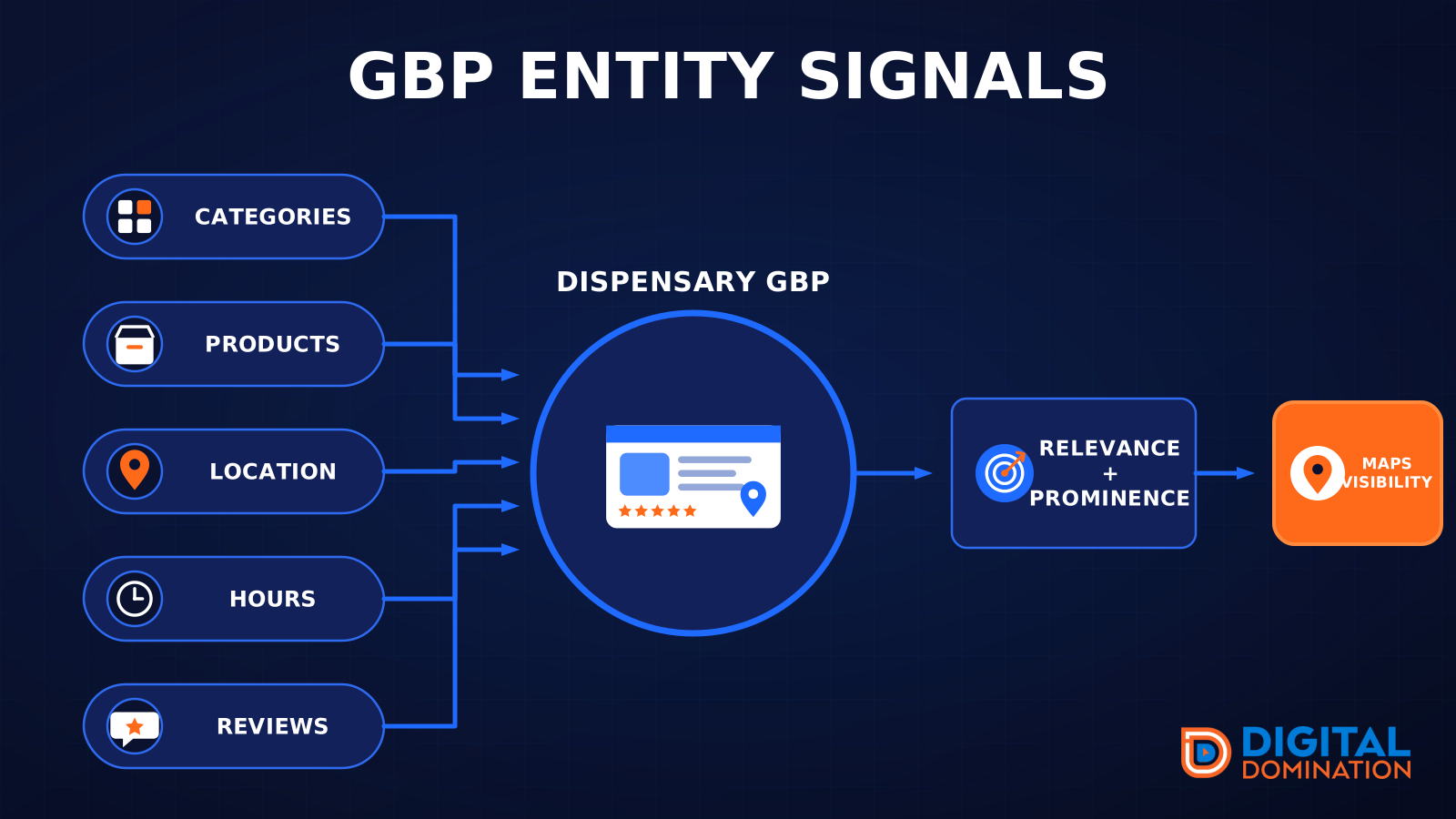
The profile is the first screen most cannabis customers see of your store, and for many 'dispensary near me' searches it is the only one, because the customer taps directions or the menu link without opening the site. Set the primary category to Cannabis store. If you hold a medical license and Google offers a medical dispensary category in your market, add it as a secondary, and add nothing the license does not cover: an accessories shelf does not make you a Vaporizer store. Name the profile exactly as the license and the sign read, with no 'Best Deals' or city name bolted on.
Hours are the highest-stakes field in this niche because closing time is the query. Keep them exact, set holiday hours for the 4/20 week, Green Wednesday and New Year's Eve well in advance, and edit the profile the same day the sign changes. Then fill in what the customer asks at the door: in-store pickup, curbside, delivery with the real service area, payment attributes (cash, debit, whatever your processor supports this quarter), wheelchair access and parking.
Google's profile content rules restrict how regulated products can be promoted, so many dispensaries watch posts and product listings get rejected. Keep product promotion on your own site and menu, and use the profile's service list for the categories you sell and the ways you sell them, written as facts: flower, pre-rolls, vapes, edibles, concentrates, tinctures, topicals; online ordering, express pickup, delivery, medical consultations where licensed. Photos follow the same rule. Check that the profile shows:
- ▸The storefront in daylight and lit at night, since late-hours searches happen after dark.
- ▸The entrance and check-in counter, so a first-time customer knows the ID check is normal.
- ▸The sales floor and display cases, with no consumption imagery and nothing that appeals to minors.
- ▸Parking, the pickup window or express lane, and the delivery vehicle if you run one.
- ▸A landing page per store as the profile's website link, with UTM parameters, carrying that store's hours, menu link, pickup instructions, neighborhoods served and delivery zone. Not the homepage.
- ▸One profile per licensed location, with the duplicates left by a rebrand or ownership change merged or removed.
Proof a dispensary can legally show above the fold
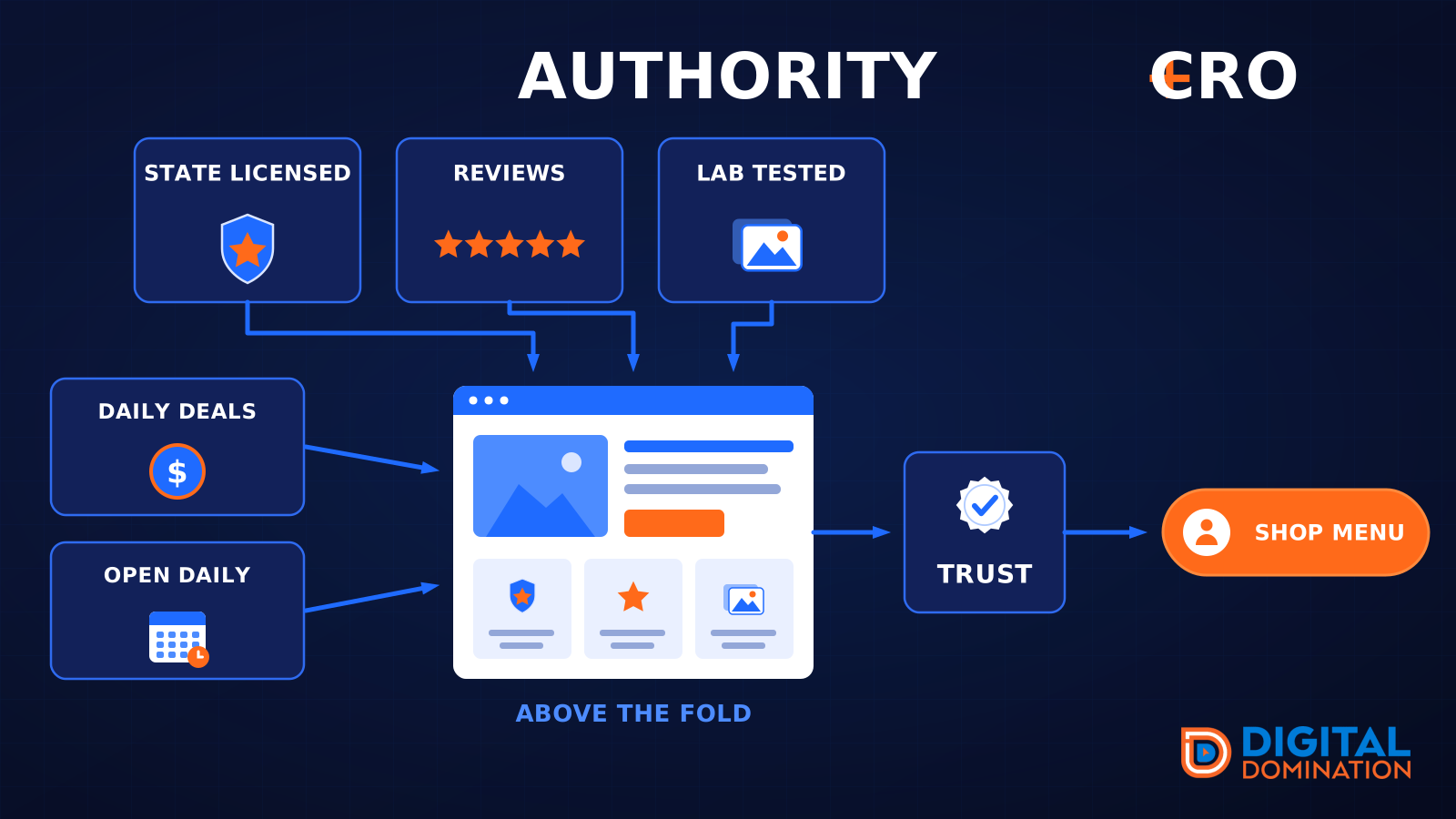
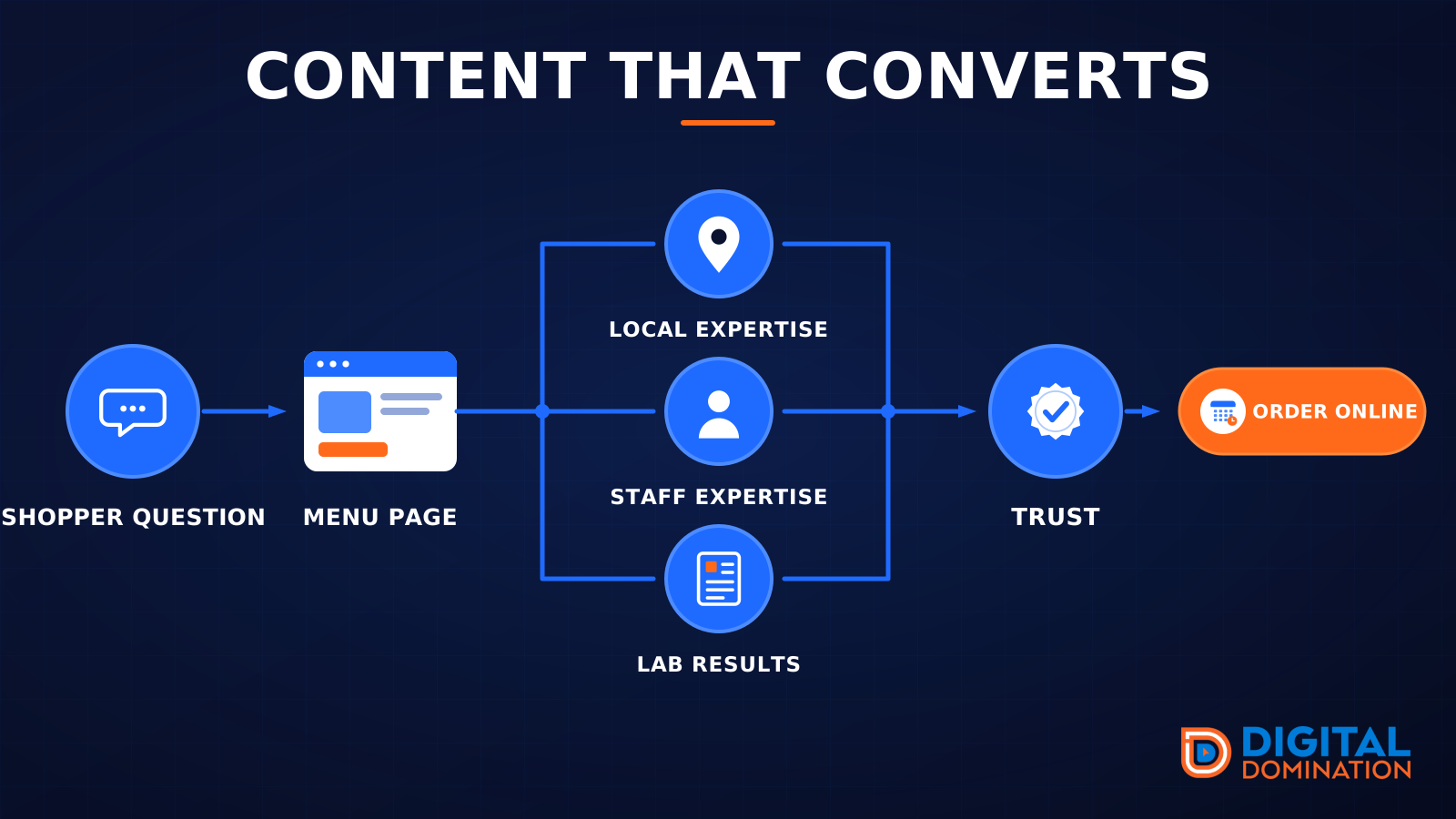
A cannabis customer is deciding whether to walk into a regulated store, hand over an ID and pay in cash. The first screen of each store page has to settle two questions: is this place licensed and legitimate, and will the visit be easy. Health claims are off the table in every state, so the proof is operational, and most of it is already in your compliance binder.
An example strip, with placeholder figures only, might read: Licensed by the State Cannabis Board, License C10-0000000 | Open since 2018 | 4.8 stars from 1,200 Google reviews | 60+ licensed brands | Debit accepted | Online orders ready in 15 minutes. Every item on it should be provable on the page below it and in the regulator's public record. The elements that belong there:
- ▸The state license number, as text. California requires it on advertising and marketing, other states have similar rules, and every legal state runs a public license lookup you can link to.
- ▸The regulator named in plain words: Nevada Cannabis Compliance Board, California Department of Cannabis Control, Michigan Cannabis Regulatory Agency, or your state's equivalent.
- ▸Years open, the number of licensed brands carried, and testing by a state-licensed lab with certificates of analysis available on request.
- ▸Google rating and review count, with Leafly and Weedmaps ratings beside it when they are strong.
- ▸Real memberships and recognition: the state dispensary association, the national industry association, a local weekly's best-of award with the year.
- ▸Staff credentials where they exist: a pharmacist or medical director in states that require one, a budtender training program, the head buyer's years in the industry.
Reviews that name the budtender, the wait and the out-the-door price
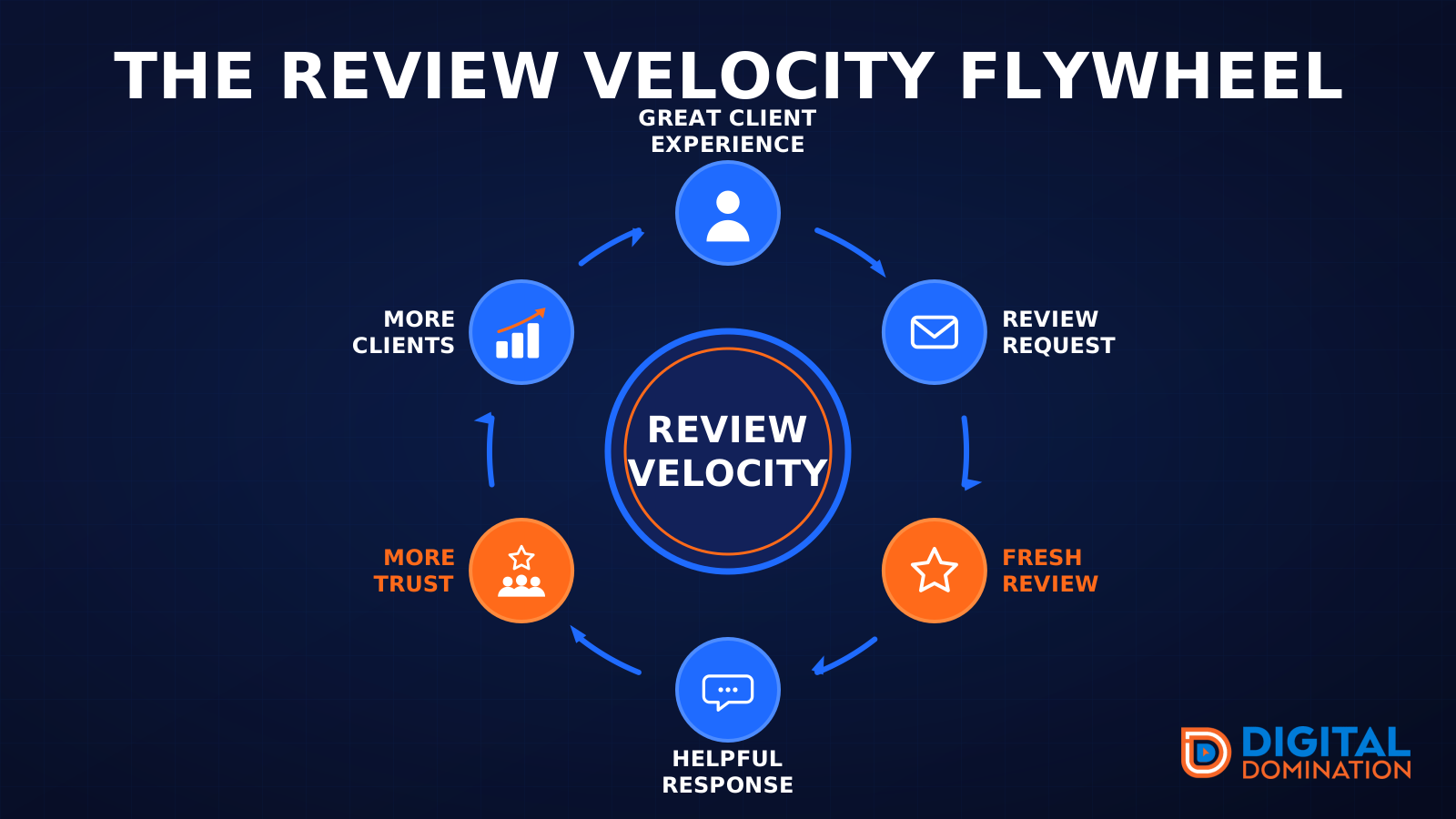
Review velocity, the steady arrival of new reviews, matters more in cannabis than the raw count, because a store with thousands of reviews and nothing new in three months looks like it changed hands, and in this industry it often has. The reviews that move rankings and customers describe the visit: the budtender by name, the wait at check-in, whether the online order was ready, the parking, and whether the price on the screen matched the receipt. That language ties your store to the service words and product categories customers search.
Ask at the pickup window and in the post-purchase text from your loyalty platform, never with a discount attached: Google prohibits incentivized reviews and most state regulators prohibit giving anything of value to promote cannabis. Reply to every review as a person and keep it about the service. 'Glad the gummies helped your sleep' is a health claim in a public reply, and regulators read those pages too. Leafly and Weedmaps reviews count as corroboration, but Google is where the parking-lot decision is made.
Schema architecture for a dispensary, anchored on Store with the license attached
Schema is JSON-LD that labels the facts already visible on your pages so machines can read them without guessing. Schema.org has no cannabis dispensary type, so the anchor is Store, a subtype of LocalBusiness, with additionalType or a plain description stating that the store is a licensed cannabis dispensary. Most dispensary sites ship nothing or the generic Organization block a WordPress theme emits, and the menu vendor's iframe contributes nothing to your domain. The architecture we implement, written as a list rather than a table:
- ▸The dispensary: Store with the name exactly as licensed, address, geo, telephone, openingHoursSpecification including the late closes, paymentAccepted, priceRange, and a permanent @id such as https://exampledispensary.com/#store.
- ▸The license: identifier as a PropertyValue, with propertyID naming the regulator and value holding the license number, matching the site footer and the regulator's lookup.
- ▸Each additional store: its own Store node and @id, tied to the company's Organization node with parentOrganization. Never one node carrying three addresses.
- ▸People: Person for the general manager, the head buyer and the pharmacist or medical director where the state requires one, with jobTitle, worksFor pointing at the store @id, knowsAbout and sameAs to LinkedIn.
- ▸Services: Service nodes for in-store shopping, online order pickup, curbside, delivery and medical consultations, each with provider set to the store @id and areaServed listing the actual delivery zone by city or zip.
- ▸Deals: Offer with validFrom and validThrough for daily deals and the first-visit discount, and a priceSpecification stating whether tax is included.
- ▸Catalog: OfferCatalog for flower, pre-rolls, vapes, edibles, concentrates, tinctures, topicals and accessories; Product only for items with a real page on your domain, brand set, no health claims in the description.
- ▸Corroboration: sameAs from the store node to the Google Business Profile, the state license lookup, Weedmaps, Leafly, Yelp, Apple Maps and the current Instagram profile, updated when an account is lost.
- ▸Pages: WebSite, WebPage and BreadcrumbList everywhere, FAQPage on the ID, tax and payment FAQ, Article on guides, all referencing the store and person @ids instead of recreating them.
PageSpeed when your menu lives in someone else's iframe
Core Web Vitals good thresholds are LCP 2.5 seconds, INP 200 milliseconds and CLS 0.1, measured at the 75th percentile of real-user field data. A dispensary site fails them in a predictable way: an age gate injected by JavaScript after the page paints, which shifts the layout and delays the largest element; a menu iframe from Dutchie, Jane or Weedmaps that pulls hundreds of kilobytes of script before one product appears; and a deals popup and SMS signup stacked on top of the age gate. Three modals before the menu is a business problem before it is a speed problem. At Digital Domination we target a PageSpeed Insights performance score of 90 or higher and a 2/2 on the agentic-browsing check, because an AI agent that cannot get past your age gate cannot read your hours or your menu. The fixes that matter most on this kind of site:
- ▸Serve the age gate as a lightweight modal in the initial HTML with the page content rendered underneath, remember the answer in a cookie, and never redirect crawlers or customers to a separate verification URL.
- ▸Keep the full menu iframe off the homepage. Use fast native category tiles and a Shop button that link to the menu page, and preconnect to the vendor's domain so that page starts sooner.
- ▸On the menu page, reserve the iframe's height so it cannot shift the layout, and pursue the vendor's native or API integration so products render on your own domain as indexable content.
- ▸One modal per session. Load the loyalty signup on scroll or click, never on top of the age gate.
- ▸Deal banners are usually oversized PNGs. Export WebP or AVIF, serve responsive sizes, preload the single hero image, and remove the slider.
- ▸Audit third-party scripts. You cannot run Google or Meta ads for THC products, so ask why ad pixels, heatmaps and a chat widget still load before the menu link does.
Out-the-door prices, tax language and the deals AI assistants can quote
After 'is it open', the question customers and AI assistants ask most about a dispensary is 'what will it cost me'. Answer it in crawlable text on the store page, the deals page, the FAQ and the profile's service list, and mirror it in Offer schema. AI Overviews and LLM search compare stores on exactly these facts. A store that states them plainly gets quoted; one that hides them inside the menu embed does not.
Pricing language that works for a dispensary is about the register, not the product: whether menu prices include excise and sales tax or tax is added at checkout, the first-visit discount, the standing daily deals by day of the week, what a loyalty point is worth, delivery minimum and fee, medical patient, veteran and senior discounts, and flower price tiers by weight. Several states restrict giveaways and the word 'free' on cannabis products, so write promotions as percentage or dollar-off with your compliance officer's sign-off. Then keep it current. An expired deal that an AI assistant quotes to a customer becomes an argument at your counter.
Content that follows the customer from 'is this legal here' to the pickup window
Cannabis customers ask questions no other retail niche gets, and they type them into Google and ChatGPT before they choose a store. A dispensary that answers them in plain, compliant text owns the queries the marketplaces and the competitor down the road ignore. Every page needs a named author (the general manager or head of education), a compliance review note and a visible updated date. The pages worth writing:
- ▸First visit: what ID is accepted, including out-of-state licenses and passports; whether visitors can buy; what happens at check-in; whether a medical card is needed.
- ▸Rules that change by state: purchase and possession limits, where consumption is legal, delivery rules, and medical versus adult-use differences, written as facts with links to the regulator.
- ▸How to order: online pickup step by step, curbside, delivery zones and windows, and payment options with the current debit situation stated honestly.
- ▸Product categories explained factually: flower, pre-rolls, vapes, edibles, concentrates, tinctures and topicals, plus how to read a label, with no effect or health claims.
- ▸Brand pages for the lines you carry, because 'where to buy' plus a brand name is a real local search and brands link to their retailers.
- ▸A deals page with dated offers, a store page per location, and an FAQ that repeats the register questions in the customer's words.
Search Console, GA4 and the POS as one loop, with checkout on another domain
Search Console, GA4 and your point-of-sale system do not rank you. They tell you which of the layers above to fix next, and in cannabis the plumbing has a twist: checkout usually happens on the menu vendor's domain, so orders vanish from your reporting unless you set up cross-domain measurement or the vendor's GA4 integration, and the profile's website and menu links carry UTM parameters per store.
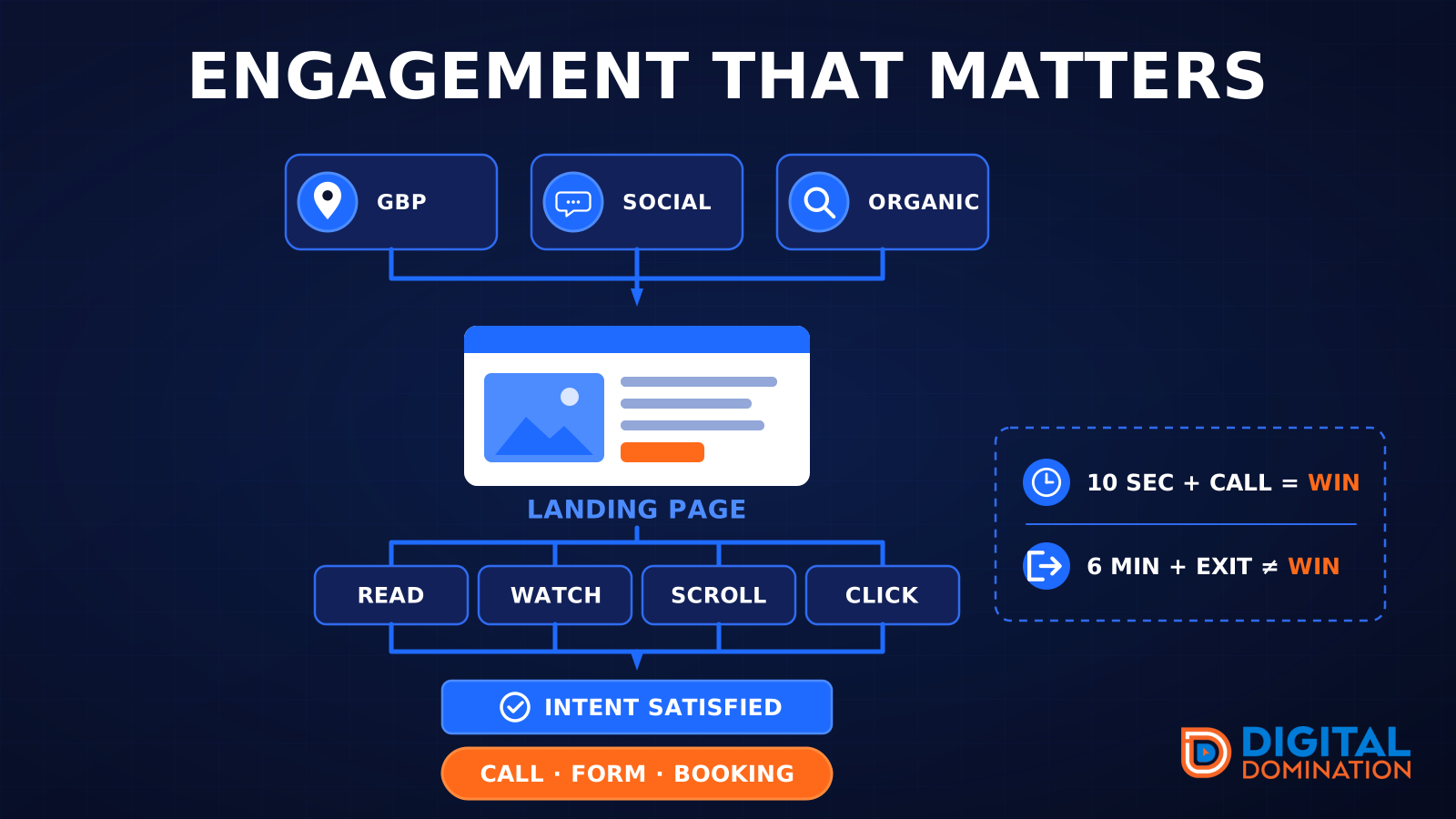
Search Console shows which queries each store page earns impressions for, whether Google associates you with 'dispensary open late', 'dispensary that takes debit' or a brand name, and whether your domain or the marketplace ranks for your own products. GA4 shows what visitors did: menu clicks, orders started and placed, directions, calls, and where the age gate or the menu embed lost them. The POS and loyalty platform close the loop with first-time customers, the 'how did you hear about us' answer, basket size and repeat rate by store. Read it the same way every month:
- ▸Impressions but few clicks: fix the title, the hours and the proof that shows in the snippet.
- ▸Clicks but few orders or direction requests: check speed, the age gate, the out-the-door price and the payment answer.
- ▸Orders but few repeat visits: that is product, wait time or service, not SEO, and the POS will show which.
- ▸Annotate every change with its date, then compare GeoGrid rank, GBP calls and directions, orders and revenue before choosing the next one.
Instagram is rented ground: brand store locators, Leafly, Weedmaps and the city subreddit
Instagram is rented ground for a dispensary. Accounts disappear for cannabis content with little warning, and Meta will not sell you a promoted post to recover the audience. Publish there, but own the relationship through the loyalty and SMS list (inside TCPA and your state's rules), a YouTube or TikTok channel of factual budtender education, and a LinkedIn page for the company. Google's Search Console now reports supported social and video platform properties, a sign of how far social content and search discovery have converged.
The mentions that corroborate a dispensary come from places other niches do not have. Every brand you carry runs a store locator; ask to be listed with your exact name, address and hours. Weedmaps, Leafly, Yelp and Apple Maps must agree with the profile to the letter. The local alt-weekly's best dispensary vote, the state dispensary association's member directory and the chamber of commerce are real links. City and state cannabis subreddits hold long 'best dispensary in' threads that AI assistants read; participate as the store, disclosed, answering questions honestly. Axios reported in August 2026 that Reddit's share of visible ChatGPT Search citations fell roughly 86 percent, while OpenAI keeps a Reddit data partnership, so treat Reddit as one corroborating source among many rather than the plan.
A 90-day roadmap that lands before Green Wednesday
Green Wednesday, the day before Thanksgiving, and the weekend after it are the biggest sales days of the fall, and 4/20 is the biggest of the year. Start this roadmap in late August and the foundation is stable before the November rush; start in January and it lands before April. The four blocks:
- ▸Days 1-14, baseline: GeoGrid scan for 'dispensary near me', 'dispensary open now' and 'dispensary delivery'; audit every profile field, hour and attribute per store; hunt duplicate listings from rebrands; test the age gate, the menu embed and Core Web Vitals on the homepage and menu page; inventory license, lab and membership proof; set GA4 events and cross-domain measurement with the menu vendor; connect the POS.
- ▸Days 15-30, foundation: correct categories, hours and services on every profile; publish a store page per location with the license number, hours, pickup and delivery facts; rebuild the age gate as a lightweight modal; move the menu iframe off the homepage; implement the Store schema graph with the license identifier; consolidate the popups.
- ▸Days 31-60, relevance: publish the first-visit, ID, purchase-limit, payment and ordering pages, the category explainers and the brand pages; start the pickup-window review ask with service-only replies; request listings on every brand store locator; align Weedmaps, Leafly, Yelp and Apple Maps; post factual education to YouTube and the owned SMS list.
- ▸Days 61-90, refine: pull high-impression, low-click queries from Search Console; find high-traffic, low-order pages in GA4; compare first-time and repeat customers by store in the POS; publish the Green Wednesday and Black Friday deals page early with dated Offer schema; recheck Core Web Vitals and the agentic check with the deals popup live; measure GeoGrid movement; set holiday hours before the rush.
One dispensary, one license, described the same way everywhere
The store that won the 9:52 pm search did not have better flower. It had the clearer entity: a profile whose hours were true, a page that loaded past the age gate and proved the license, schema that let machines confirm both, reviews that repeated the pickup experience in customer language, and marketplaces and brand locators that agreed. Build your dispensary as one entity across the Google Business Profile, the website, Store schema, reviews, the owned list, Weedmaps and Leafly, brand store locators and the threads where customers compare stores, then use Search Console, GA4, GeoGrid data and the POS to make it more relevant and more prominent every month. At Digital Domination that is the work behind our guarantee: top 3 in the Google Map Pack in 12 weeks or you do not pay.
Start by seeing where you stand. Our free GeoGrid scan checks 169 points across your market for the searches that fill the pickup window, so you can see whether the regular sitting in a dark parking lot eleven minutes away would ever have found you.
Keep reading
Related guides
- ▸Garage door local SEO
- ▸Google Business Profile API delays
- ▸Google Business Profile photo verification
Put it into action
Frequently Asked Questions
Which Google Business Profile category should a cannabis dispensary use?
Use Cannabis store as the primary category. If you hold a medical license and Google offers a medical dispensary category in your market, add it as a secondary. Do not add categories the license does not cover, such as Vaporizer store or Herb shop; they blur what Google understands the business to be and pull in searches you cannot serve.
Can a dispensary have a Google Business Profile if it cannot run Google Ads?
Yes. A licensed dispensary can hold and fully optimize a Google Business Profile and compete in the Map Pack even though Google Ads will not accept THC product promotion. Expect Google's content rules to reject some posts and product listings about regulated products, so keep the profile focused on facts: hours, categories, services, attributes and photos of the store.
Is there a cannabis-specific schema type, or should we use Store?
Schema.org has no dispensary type, so anchor on Store, a subtype of LocalBusiness, and state that the business is a licensed cannabis dispensary through additionalType or the description. Attach the state license number as an identifier PropertyValue, give every store its own node with a permanent @id, and connect services, delivery areas, deals and people to those ids. Schema is not a ranking boost by itself; it makes the facts on the page unambiguous.
Does our Dutchie, Jane or Weedmaps menu embed hurt our SEO?
An iframe menu keeps every product on the vendor's domain, so none of that content counts as yours, and it loads heavy scripts that slow the page. Keep it off the homepage, reserve its height on the menu page, and ask the vendor about a native or API integration that renders products on your own domain. Then check Search Console to see whether your site or the marketplace ranks for your own products.
Should a dispensary publish prices, and should they include tax?
Publish them, and say plainly whether the listed price includes excise and sales tax or whether tax is added at the register. Out-the-door surprises are a common complaint in dispensary reviews, and AI assistants compare stores on stated prices and deals. Keep the deals page dated and current, and write promotions in language your compliance officer approves, since several states restrict giveaways and the word 'free'.
How does the age gate affect PageSpeed and Google?
An age gate injected by JavaScript after the page paints causes layout shift and delays the largest visible element, and a gate that redirects to a separate verification URL can keep crawlers and AI agents from ever seeing your content. Serve it as a lightweight modal in the initial HTML with the page rendered underneath, remember the answer with a cookie, and confirm in Search Console that Google indexes the real page.
How do we earn reviews without breaking cannabis marketing rules?
Ask in person at the pickup window and in the post-purchase message from your loyalty platform, with nothing of value attached, because Google bans incentivized reviews and most state regulators ban gifts that promote cannabis. Reply to every review about the service and the visit, never about effects, and keep replies free of health language. Steady weekly reviews beat a burst before a holiday.
Ready to dominate your map?
Top 3 in the Google Map Pack in 12 weeks, or you don't pay.