
Google tests AI local results with no call, website or directions buttons
A live Google AI Overview test removes the tap-to-act features local buyers use. Here is what to require before you pay for Maps or AI SEO.
What changed and who it hits
On November 10, 2026, Search Engine Roundtable reported a mobile Google AI Overview local-pack test where the normal local action buttons were missing. The test, credited to observations from Joy Hawkins and replicated by Barry Schwartz, showed local results without the usual call, website, directions, reviews, photos, address and hours inside the first AI local result box.
For a plumber, roofer, HVAC company, dentist, med spa, attorney, landscaper or any other local service business, that is not a small design tweak. Those buttons are often the shortest path between a search and a lead. If a buyer sees your name but cannot tap Call, Directions or Website from the first box, some people may never take the next step.
Follow-up coverage from Maps Agent on November 11 emphasized the right level of concern: Google has not confirmed a full rollout. Treat this as a live test, not a permanent change. Still, a live test is enough reason to ask harder questions of anyone selling you local SEO, Maps SEO or AI SEO.
Why missing buttons create money friction
Local search is not just visibility. It is a series of tiny actions. A person searches, compares a few options, checks trust signals and taps the easiest next step. Every extra tap can create doubt, distraction or abandonment.
The risk is not that nobody will find you. The risk is that people find you, hesitate and leave before they reach your Google Business Profile or website. That changes the job of local SEO from winning a rank screenshot to proving that visibility turns into calls, direction requests, website visits, booking clicks and form fills.
If Google keeps testing layouts that answer more of the search inside AI Overviews, owners should watch the actions closest to revenue:
- ▸Calls from Google Business Profile
- ▸Direction requests from Google Business Profile
- ▸Website clicks from Google Business Profile
- ▸Booking, quote and contact form completions
- ▸Messages, if you use messaging
- ▸Calls from your website after a Google visit
This is a test, not a reason to panic
The Maps Agent follow-up was important because it separated a live observation from a confirmed product change. Google tests interface changes constantly. Some tests disappear. Some come back months later. Some reach only certain searchers, markets, devices or business types.
That means you should not rebuild your entire marketing plan around one screenshot. You should, however, use this moment to tighten measurement. If your local SEO provider only talks about ranking positions, they are answering the old question. The new question is whether those rankings create trackable buyer actions across Google Maps, mobile search and AI Overviews.
A practical response has three parts:
- ▸Do not assume the test is permanent
- ▸Do not ignore it because it is only a test
- ▸Audit whether your current reporting proves lead actions
- ▸Make your profile and website easier to choose when buttons are harder to find
The buying question has changed
For years, many local SEO sales conversations sounded simple: Can you rank me in the Map Pack? That still matters. Google's local ranking factors are relevance, distance and prominence, so showing up near the right searcher for the right service is still the foundation.
But if AI local results sometimes hide direct action buttons, rank alone becomes a weaker promise. A business could appear in an AI local box and still lose the lead if the searcher has to work too hard to call, navigate or compare trust signals.
Before you pay for Maps SEO or AI SEO, require a provider to explain how they connect visibility to action. They should be able to show where you rank, where you appear, what profile actions happen, what website actions happen and how those items change after work is done. If they cannot connect those dots, you are buying hope, not accountability.
Five things to check on your profile this week
You cannot control every Google test, but you can control whether your Google Business Profile is complete, accurate and convincing once a buyer reaches it. RankCues covered the issue through the lens of getting more calls from Google Business Profile when the call button vanishes, which is the right owner-level mindset: reduce every avoidable reason a buyer would give up.
Open your profile as a customer would on your phone. Search your core service and city, tap through from Search and Maps, and look for friction. Do not only check from your office, because distance affects local results.
Use this quick profile check:
- ▸Confirm your primary phone number is correct and answered during business hours
- ▸Make sure your website URL goes to the best local service or location page, not a confusing home page
- ▸Check that your primary category matches your main money service
- ▸Add or update services so they describe what customers actually search for
- ▸Review your hours, holiday hours and service area for accuracy
- ▸Add recent photos that show real work, staff, vehicles, office or location cues
- ▸Read your first screen of reviews and note whether they mention your core services
What to require from a local SEO provider
If an agency or consultant says they can help with AI local results, ask them to be specific. AI SEO should not mean vague content promises or a monthly report with a few keyword positions. For a local business, it should include Maps visibility, Google Business Profile actions and website conversion tracking.
You do not need to understand every technical detail. You do need to require plain-English reporting that separates impressions from actions. Seeing your business name is not the same as calling, requesting directions or booking.
Before you sign, ask for these items:
- ▸A baseline report showing where you appear in Maps across your real service area
- ▸Tracking for Google Business Profile calls, website clicks and direction requests
- ▸A plan to improve relevance, distance coverage and prominence signals
- ▸A website conversion plan for calls, forms, bookings and quote requests
- ▸A process for monitoring mobile search and AI Overview changes
- ▸Clear reporting that compares visibility to actual lead actions
- ▸An explanation of what they can control and what Google may change without notice
What to do about it this week
The best response is not complicated. Make the next step obvious everywhere a customer might land. If the first AI local result hides buttons, your Business Profile, website and landing pages need to do more of the conversion work.
Start with your most valuable service and your most valuable city or neighborhood. Search from a mobile phone. Look at what a buyer sees before they call you. Then fix the weak points that make the decision harder.
Here is a practical owner-level action list:
- ▸Call your own listed number from your profile and confirm it rings correctly
- ▸Click your website link from your profile and check whether the page loads fast on mobile
- ▸Put a visible tap-to-call button near the top of your mobile website
- ▸Make your service area and main services obvious without scrolling far
- ▸Add a short trust section near the top, such as licensing, insurance, years in business or specialties if accurate
- ▸Check your contact form on your phone and confirm someone receives the submission
- ▸Ask recent happy customers for honest reviews that mention the service performed and city when natural
How to track whether hidden buttons cost leads
If Google hides action buttons in some AI local tests, your reporting must become more specific. A broad traffic chart will not tell you whether the problem is visibility, profile engagement or website conversion. You need to watch each step separately.
Set a weekly habit. Look at your Google Business Profile performance, website analytics, call tracking if you use it and booking or form data. The goal is not to obsess over daily movement. The goal is to spot whether impressions rise while actions stay flat or fall.
Ask your provider to report these items in one simple view:
- ▸Maps visibility by area, not just one city-center rank
- ▸Google Business Profile calls, website clicks and direction requests
- ▸Website visits from Google sources
- ▸Phone calls from your website
- ▸Form fills and booking completions
- ▸Top service pages visited from local searches
- ▸Notes on any visible Google layout changes during the reporting period
Why your website matters more when Google adds friction
A missing Website button in an AI local result does not make your website less important. It makes the website link, once found, more important. The visitor who reaches your site after extra effort is likely evaluating whether you are the safest choice.
Your site should answer three questions fast: Do you handle my problem? Do you serve my area? Can I contact you right now? If those answers are buried, you are adding friction on top of Google's friction.
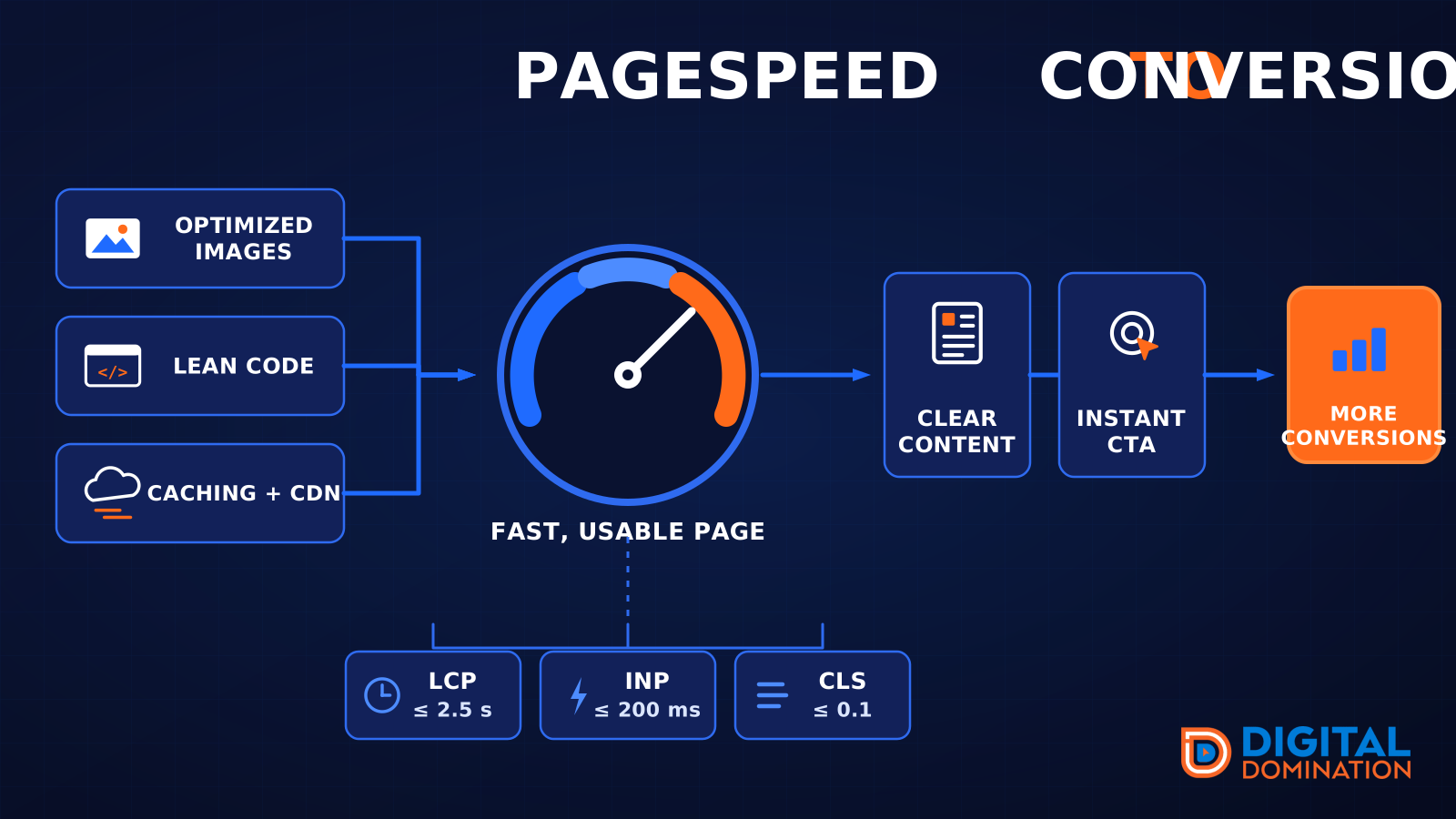
Technical basics also matter because slow pages lose impatient mobile visitors. Google's Core Web Vitals good thresholds are LCP 2.5 s, INP 200 ms and CLS 0.1 at the 75th percentile of field data. You do not have to memorize those terms, but your provider should know how to check them and explain whether your site is slow, jumpy or hard to tap.
This week, look at these website items on your phone:
- ▸The phone number is visible near the top
- ▸The main call-to-action is clear and easy to tap
- ▸The page states the service and city clearly
- ▸Reviews or trust signals appear before the visitor gets tired
- ▸The form is short enough to complete on a phone
- ▸The page does not shift around while loading
- ▸The site does not bury contact details in the footer only
Red flags in Maps and AI SEO proposals
This news should make owners more careful buyers. A provider who only promises rankings may not be prepared for a search experience where Google changes the buttons, layout and path to action. You need someone who can measure both visibility and buyer behavior.
Be especially cautious of anyone who treats AI Overview placement as a guaranteed switch they can flip. Google has not confirmed a full rollout of this buttonless local-pack test, and no provider controls Google's interface. Good providers explain risk, track outcomes and adapt work when the search page changes.
Watch for these warning signs:
- ▸They guarantee AI Overview placement without explaining limits
- ▸They only show one rank from one location
- ▸They do not track calls, website clicks or direction requests
- ▸They call impressions the same thing as leads
- ▸They do not audit your Google Business Profile before selling work
- ▸They ignore your website conversion path
- ▸They cannot explain relevance, distance and prominence in plain English
- ▸They avoid discussing reporting until after you sign
The decision for local owners
Search Engine Roundtable's report, the Maps Agent follow-up and the RankCues discussion all point to the same practical lesson: local visibility is only valuable when it produces buyer action. If Google tests AI local results with fewer buttons, owners should not accept SEO reporting that stops at rankings.
Digital Domination is a Las Vegas local SEO agency serving local service businesses nationally, so our view is simple: pay for systems that measure how visibility becomes calls, direction requests, website clicks and bookings. If you are comparing providers, ask how they handle Maps, AI Overviews, mobile search, your Business Profile and your website as one connected path.
If you want to understand how AI search can affect local lead generation, the page at digitaldomination.ai/ai-seo/ explains our AI SEO approach for local service businesses, including how visibility, content, Google Business Profile work and conversion tracking fit together. If you want to see how you show up across your real market first, start with the free GeoGrid scan at digitaldomination.ai/scan/.
Keep reading
Related guides
- ▸How to Rank Higher on Google Maps in 2026
- ▸How To Rank In Surrounding Cities Google Maps
- ▸How to Remove Google Reviews 2026
Put it into action
Frequently Asked Questions
Is Google removing call buttons from local results?
Google has not confirmed a full rollout. Search Engine Roundtable reported a mobile AI Overview local-pack test where call, website, directions and other details were missing, and Maps Agent emphasized that it should be treated as a live test.
Will this affect my Google Business Profile calls?
It could, if buyers see an AI local result without an easy Call button and never click through to your profile. That is why you should track Google Business Profile calls, website clicks and direction requests separately instead of only watching rankings.
Should I stop paying for local SEO because of this test?
No, but you should raise your standards. Local SEO should prove visibility and lead actions across Maps, mobile search, AI Overviews and your website, not just send a rank report.
What should I ask my SEO company about AI local results?
Ask how they track Maps visibility across your service area, Google Business Profile actions, website calls, form fills and bookings. Also ask how they monitor Google layout changes and what they can realistically control.
How can I protect my business if Google hides action buttons?
Make your Google Business Profile complete and accurate, then make your mobile website easy to call from. Check your phone number, hours, services, photos, reviews, website link and contact form this week.
Do reviews still matter if AI Overviews hide review details?
Yes. Reviews still support prominence and help buyers choose you once they reach your profile or website. Keep asking real customers for honest reviews that naturally mention the service and location.
How do I know if my rankings are creating leads?
Compare Maps visibility with Google Business Profile calls, direction requests, website clicks and website conversions. If rankings improve but actions do not, you may have a profile, website or tracking problem.
What is a GeoGrid scan for local SEO?
A GeoGrid scan checks how your business ranks from many points across a market instead of from one location. Digital Domination's scan checks 169 points across a market, which helps show where you are visible and where competitors are beating you.
The Local SEO Trinity
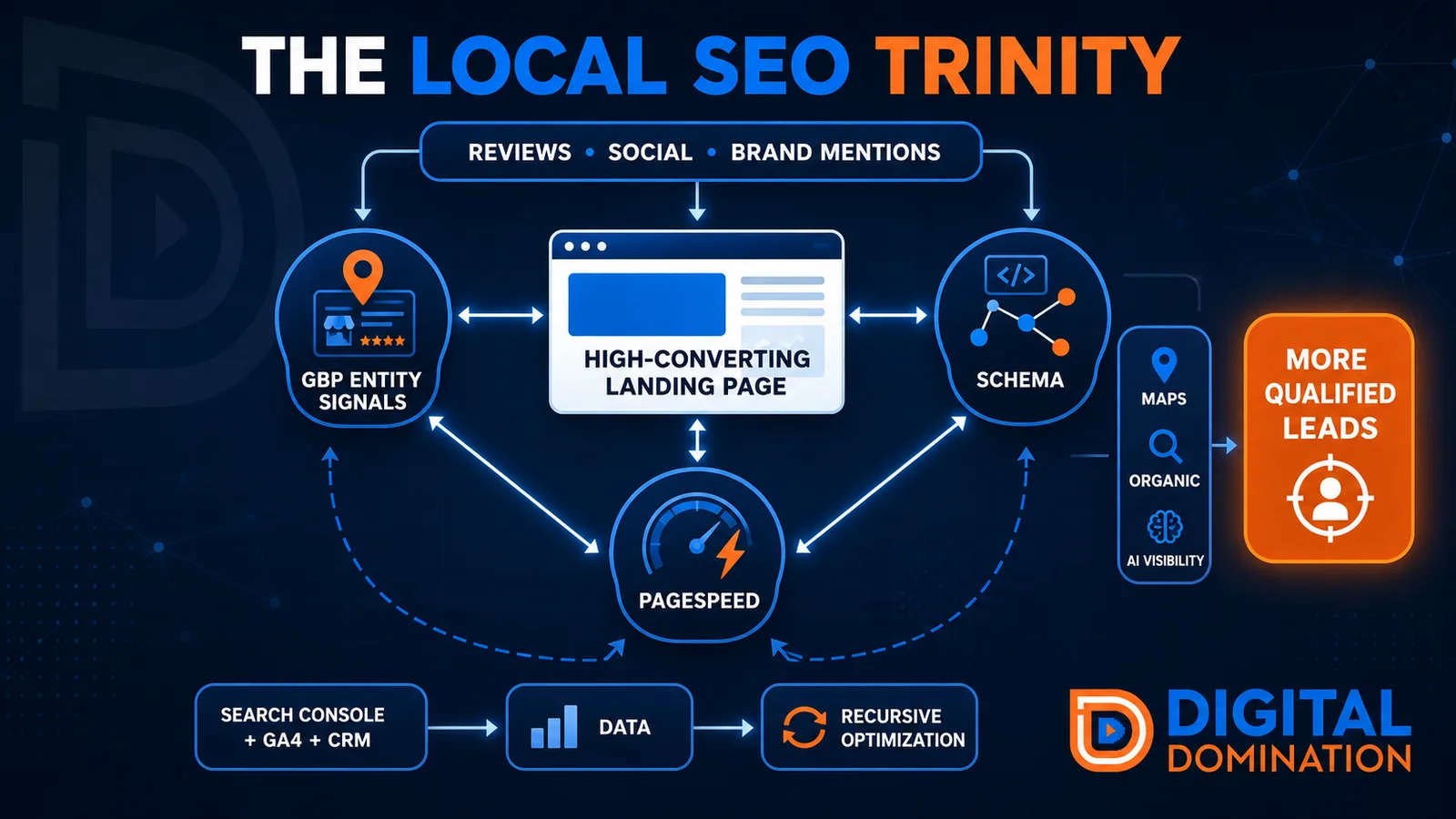
Think of a three-legged stool. Your Google profile, your website, and your reviews all have to hold you up. If one leg is short, the whole thing wobbles.
GBP entity signals
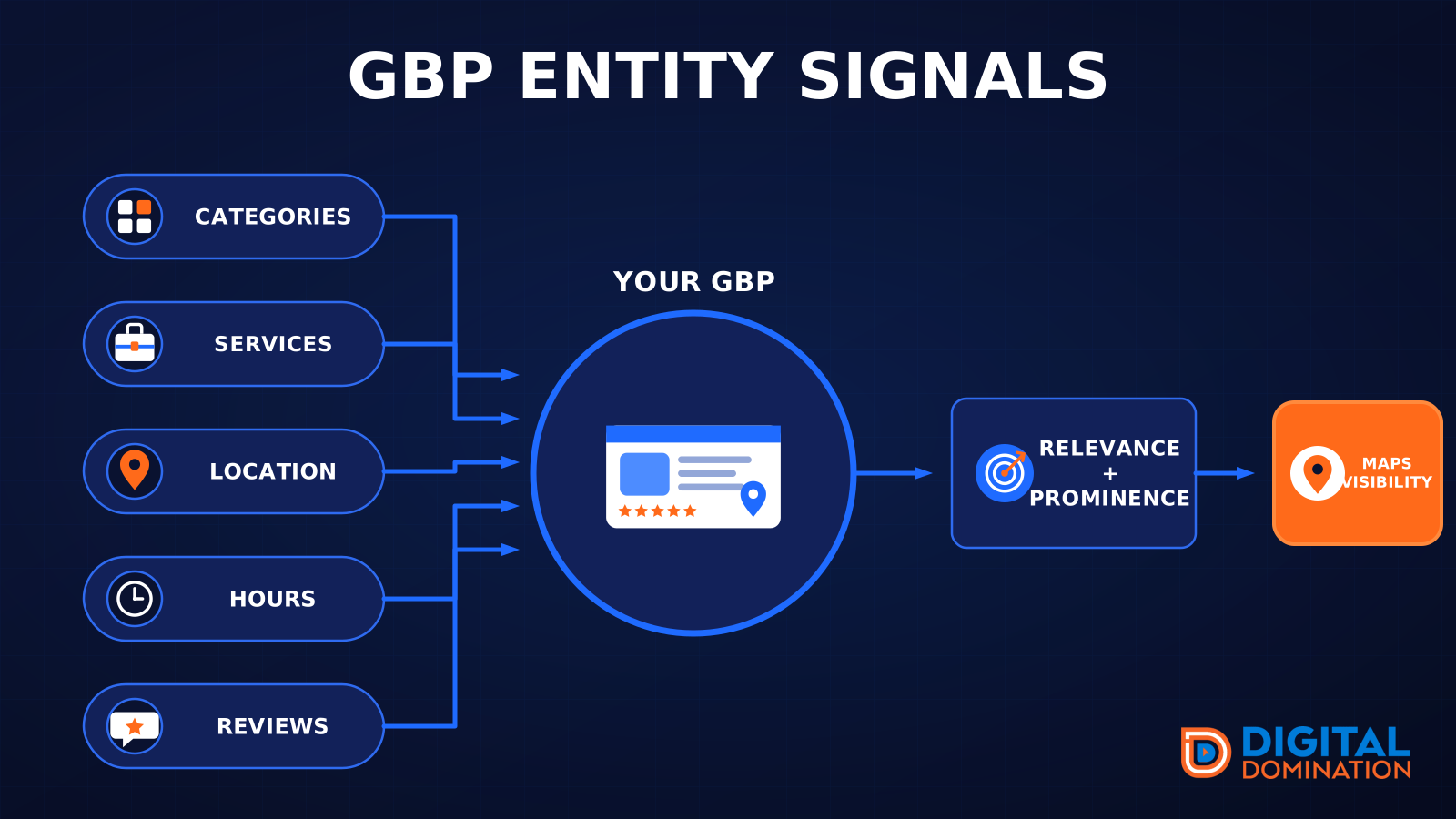
This leg is your Google Business Profile. GBP means Google Business Profile. It covers your categories, your services, your location, your hours, and your reviews. Google uses those facts to decide who to show.
Your Google profile is your storefront sign. If the sign is missing, or it names the wrong shop, people drive past.
PageSpeed to conversion
This leg is your website, above all on a phone. Small images, lean code, and caching make a page fast. A fast, clear page is what turns a visit into a call. Phone speed is one of the 12 Trinity checks because a slow page loses the call before anyone sees your offer.
Your website is the showroom. If the door sticks, people leave before they look around.
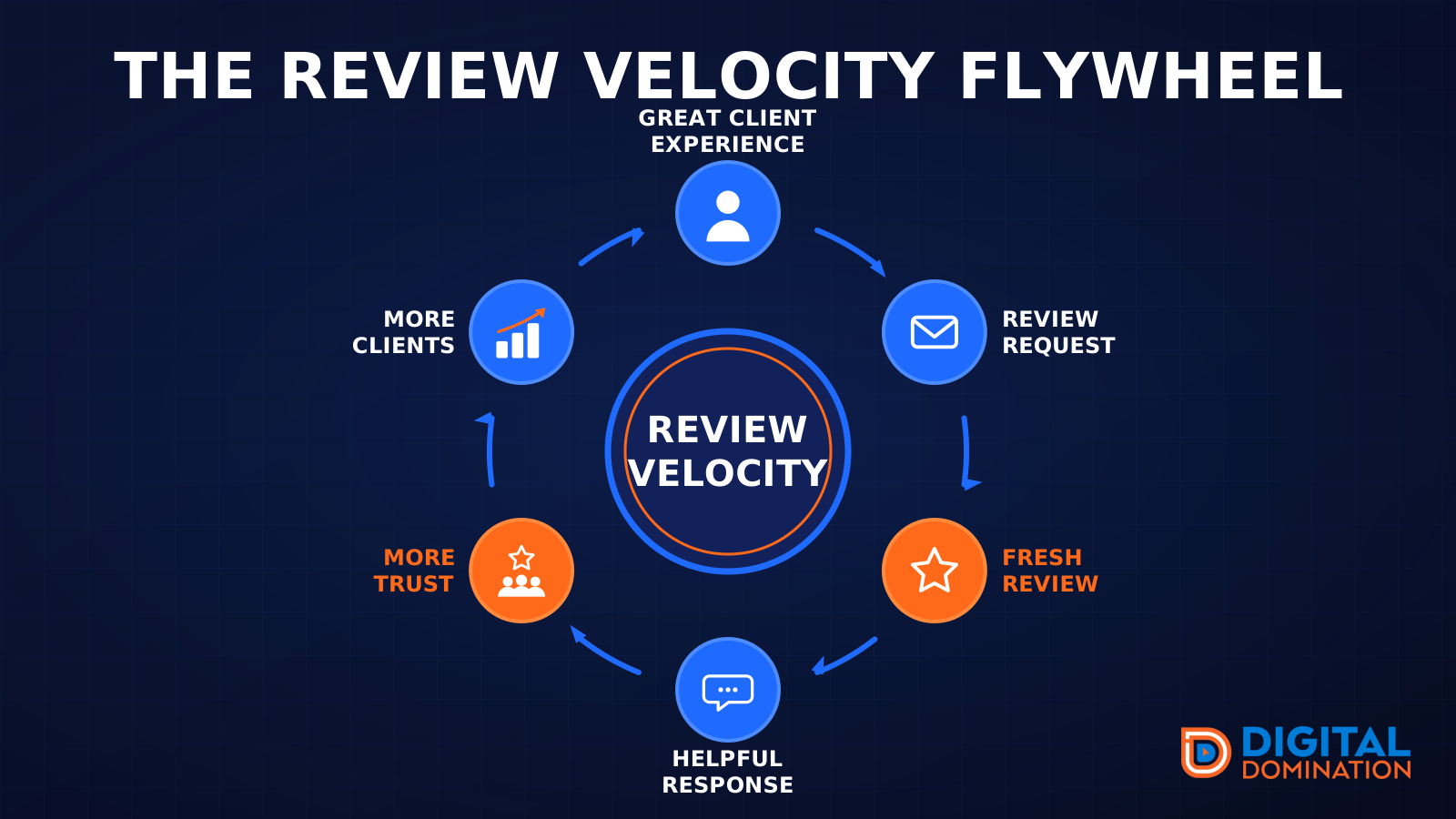
The review velocity flywheel
This leg is reviews and reputation. A good visit leads to a review request, then a fresh review, then a helpful reply, then more trust, then more customers. When the scan can find your Google listing, it shows your rating, your recent reviews, and how many you answered.
Reviews are word of mouth. One kind word helps. A steady stream of real reviews, and a reply from you, helps more.
How this turns into revenue
Being found in more searches leads to more calls. More calls lead to more booked jobs. More booked jobs lead to more revenue.
Example numbers, not a real business: 40 calls from search in a month, a 25 percent close rate, and a $400 average job. That is 10 booked jobs. That is $4,000. The math is the lesson. It is not a promise.
The full page has a box where you can type your own average job value and close rate.
One real story, from our car dealership case study: Medina Auto Group went from invisible on Google Maps to dominating every high-intent search across their market. The turnaround spanned all four of their rooftops at once. The same page says the team eliminated 89 unfair one-star reviews that had been dragging the dealership's reputation down and keeping it out of the Map Pack. It also says: “Results described here are exceptional and non-typical. Outcomes vary based on market conditions, competition, and implementation. No guarantees are made regarding earnings, rankings, or conversions.”
Free strategy call
More booked jobs start with a clear plan
Book a free strategy call. We look at your Google profile, your website, and your reviews, and we tell you what to fix first.
Free. You pick the time. A real person shows up.