
Google Business Profile AI summaries: What to fix now
Some local knowledge panels are showing AI Overview-style business summaries. Here is what local owners should audit before Google describes the business for them.
What changed and who it hits
On September 17, 2026, Search Engine Roundtable reported that some Google local knowledge panels tied to Google Business Profiles are now showing an "AI Overview" label. The example, first shared by Ben Fisher and then replicated by Barry Schwartz, included a "Show more" button that opened an AI Mode-style follow-up experience.
That matters because the business description was not simply a clean copy of the profile owner's preferred wording. Search Engine Roundtable noted that the generated description appeared to pull partly from outdated site content. SEO Weekly covered the same sighting that day and reported that others were seeing the behavior too, sometimes on mobile instead of desktop.
If you run a local service business, this is not a small cosmetic test. A customer may now see Google's AI-written summary before they call, book, click to your site or compare you with a competitor. That summary can shape whether you look current, relevant and trustworthy.
Why this matters for local leads
For years, many owners treated the Google Business Profile as the main public record for local search. You updated your hours, categories, services, photos and reviews, then watched your Map Pack ranking. That still matters, but this test points to a broader problem: Google may summarize your business from more than the fields you directly edit.
Google's local ranking factors are relevance, distance and prominence. An AI summary does not replace those factors, but it can affect how a searcher reacts after you appear. Ranking on the map is less valuable if the panel above your profile says you offer an old service, misses your core service or describes you in vague terms.
The risk is simple: the customer may never reach the point where they read your full website or call your office. They may make a snap decision based on a machine-written summary that was assembled from stale or mixed signals.
Where Google may be getting the story
The reported examples do not prove every source Google uses for these summaries. Still, a local owner can make a practical assumption: if Google can crawl it, index it, read it or connect it to your entity, it may influence how your business is described.
That means your website, your Google Business Profile, your reviews and third-party mentions all need to tell the same current story. If one page says you handle emergency water heater repair and another says you stopped taking emergency calls, an AI summary may not choose the version you prefer.
Start with the places that commonly send mixed signals about a local business:
- ▸Homepage headline and first paragraph
- ▸Main service pages
- ▸Old blog posts and old location pages
- ▸Google Business Profile services and categories
- ▸Review themes and owner responses
- ▸Directory listings and local citations
- ▸Social profiles and short bios
- ▸Appointment, booking and contact pages
Five things to check on your profile this week
You do not need to wait for Google to show the AI label on your own profile. Treat this as a cleanup week. The goal is to make your core business facts boringly consistent everywhere a machine or customer might look.
Here are the five profile items to check first:
- ▸Your primary category matches the service you most want to win, not a broad or outdated label.
- ▸Your additional categories are accurate and not stuffed with services you barely provide.
- ▸Your service list uses plain customer language, such as drain cleaning, roof repair or AC installation.
- ▸Your business description is current, specific and free of old claims, old cities or old service lines.
- ▸Your hours, holiday hours, appointment links and phone number match what customers actually experience.
Clean up stale website content
The most uncomfortable detail in the Search Engine Roundtable report was that the generated business description appeared to pull partly from outdated site content. That is a warning sign for any business that has changed services, moved locations, dropped a product line or rewritten its brand positioning over time.
Do a simple search of your own site. Look for old service pages, archived posts, staff bios, city pages and FAQ pages that no longer match how the business operates. If a page is still useful, update it. If it is misleading and has no current purpose, ask your web or SEO provider whether it should be revised, redirected or removed.
Pay special attention to content that makes strong promises or names specific services. An old page that says you offer 24-hour emergency service can cause real friction if your office now schedules next-day appointments only.
This week, review these website areas for stale information:
- ▸Homepage opening copy
- ▸Header and footer service lists
- ▸Top navigation labels
- ▸Service area pages
- ▸Old blog posts that still rank
- ▸FAQ answers
- ▸Schema or structured data added by a developer
- ▸Booking pages and form confirmation text
Make reviews support the right summary
Reviews are not just social proof. They are a large body of customer language about what your business does, where you do it and how well you do it. If your recent reviews mention the wrong service mix, or if all your useful reviews are old, Google may have fewer current signals to understand the business.
You should never script reviews or pressure customers to use exact wording. But you can make the review request more helpful by asking customers to describe the service they received and the city or neighborhood where appropriate. A natural review that says "fixed our slab leak in Henderson" gives clearer context than "great company."
Owner responses matter too. If you reply with generic thank-you notes, you miss a chance to reinforce accurate service language in a natural way. Keep it human, but be specific.
When reviewing your review profile, look for these issues:
- ▸Recent reviews mention services you no longer prioritize.
- ▸Important services have little or no recent review language.
- ▸Owner responses use vague copy and paste replies.
- ▸Complaints reveal confusion about hours, service area or appointment types.
- ▸Reviews on other platforms describe the business differently than Google reviews.
What to do about it
The owner-level response is not panic. It is source control. You want every important public source to answer the same basic questions: what you do, who you serve, where you serve them and how a customer should take the next step.
Do not start by trying to write for AI. Start by making the business clear for people. If a homeowner, patient, client or property manager can understand your best services in a few seconds, Google has cleaner material to work with too.
Take these concrete steps this week:
- ▸Search your business name on desktop and mobile, then check whether any AI Overview-style label appears on the local panel.
- ▸Click "Show more" if it appears and read the full summary like a customer would.
- ▸Write down any wrong service, old location, outdated hours or vague description.
- ▸Update your Google Business Profile fields first, especially categories, services, description, hours and links.
- ▸Update your highest-visibility website pages so the first screen clearly states your current services and service area.
- ▸Ask recent happy customers for honest reviews that mention the actual service performed.
- ▸Send screenshots of any bad AI summary to your SEO provider and ask what source may have caused it.
Questions to ask your SEO provider
This change is also a good way to test whether your SEO provider is only watching rankings or actually managing your local search presence. A Map Pack report is useful, but it does not tell you whether Google's AI-written description is helping or hurting conversion.
Ask direct questions. You do not need a technical explanation full of jargon. You need to know what they audit, what they can fix and how quickly they will flag an issue if Google summarizes the business incorrectly.
Use these questions in your next SEO check-in:
- ▸Do you check how our business appears in the local knowledge panel, not just where it ranks?
- ▸Do you test our brand searches on both desktop and mobile?
- ▸Do you review AI Overview-style summaries if they appear?
- ▸What sources do you compare when Google describes our business incorrectly?
- ▸How do you clean up outdated content on our website that could confuse Google?
- ▸Do our GBP categories, services and website pages match each other?
- ▸Can you show us screenshots from different parts of our service area?
- ▸How do you report conversion risks, not just ranking movement?
Rank tracking alone is not enough
Local ranking still matters. If you are not visible near your customers, fewer people can choose you. But this news shows why visibility and presentation have to be managed together.
A business can rank well and still lose the click if the profile summary is weak, stale or confusing. A business can also have a clean Google Business Profile while the website quietly sends old signals that make the AI summary worse. Owners should look at the entire search result, not only the position number.
At Digital Domination, we look at local search from the customer's view across a market, not just from one office computer. Our GeoGrid scan checks 169 points across a market, which helps show how visibility changes by neighborhood. For this specific AI summary issue, that kind of location-aware review should be paired with manual checks of how the business panel reads on desktop and mobile.
When checking your visibility, make sure you review:
- ▸Map Pack position for priority searches
- ▸How the local knowledge panel describes the business
- ▸Whether an AI Overview-style label appears
- ▸What happens after tapping or clicking "Show more"
- ▸Whether mobile and desktop show different experiences
- ▸Whether searchers in different parts of town see different competitors
If the AI summary is wrong
If Google writes an inaccurate summary, you may not have a direct edit button for that exact text. That is frustrating, but it does not mean you are powerless. The practical fix is to correct the sources Google may be reading and reduce conflicts across your public presence.
Start with the obvious owned assets: your Google Business Profile and website. Then review major third-party profiles, old citations, social bios and review responses. If the wrong detail appears in several places, clean it everywhere you can. If it appears only on one old page, fix that page before making broader changes.
Keep screenshots with dates. If the summary changes later, you will want a record of what appeared, what you changed and whether the issue improved. This also helps your SEO provider avoid guessing.
Use this process when the summary is wrong:
- ▸Capture screenshots on desktop and mobile.
- ▸Copy the exact wording that is wrong or stale.
- ▸Find where that wording, or a similar claim, appears online.
- ▸Correct owned sources first, including GBP and your website.
- ▸Update or request edits to third-party profiles where possible.
- ▸Recheck the panel over time instead of expecting an instant change.
The business decision this points to
This test is another reminder that local SEO is no longer just about getting into the Map Pack. The customer may see a Google-written explanation of your business before they decide whether you are worth calling. If that explanation is clear and current, it can support the sale. If it is wrong, it can quietly send the lead elsewhere.
Digital Domination is a Las Vegas local SEO agency serving local service businesses nationally. If you want help understanding how AI search is changing local visibility, our AI SEO service page at digitaldomination.ai/ai-seo/ explains how we approach AI search visibility, local intent, content cleanup and the way your business is represented in AI-driven results.
If you want to start with the local visibility side, get the free GeoGrid scan at digitaldomination.ai/scan/.
Keep reading
Related guides
- ▸Local SEO services for HVAC companies
- ▸Local SEO services in Henderson
- ▸Local SEO services in Las Vegas
Put it into action
Frequently Asked Questions
Why is my Google Business Profile showing an AI Overview?
Google appears to be testing AI Overview-style summaries in some local knowledge panels tied to Google Business Profiles. Search Engine Roundtable reported the sighting on September 17, 2026, and SEO Weekly noted that others were seeing similar behavior.
Can I edit the AI summary on my Google Business Profile?
There may not be a direct edit field for the AI-written summary. The practical approach is to update the sources Google may use, including your Google Business Profile, website, reviews and third-party business information.
What should I do if Google's AI summary is wrong?
Take screenshots, write down the exact wrong wording and look for that same information on your site, profile or other listings. Correct owned sources first, then ask your SEO provider to identify and clean up conflicting third-party information where possible.
Does this change my local SEO strategy?
It should broaden your local SEO strategy. Ranking in the Map Pack still matters, but you also need to audit how Google describes your business before a customer calls, books or clicks.
Could old website content affect my Google Business Profile summary?
The Search Engine Roundtable report noted an example where the generated description appeared to pull partly from outdated site content. That is why local businesses should review old service pages, blog posts, location pages and FAQs for stale claims.
Should I ask customers to use keywords in reviews?
Do not script reviews or pressure customers to use exact phrases. It is reasonable to ask for an honest review that mentions the service they received and their general location if they are comfortable sharing it.
Why do I see the AI summary on mobile but not desktop?
SEO Weekly reported that some people saw the behavior on mobile rather than desktop. Google tests features unevenly, so owners should check both devices and capture screenshots when something appears.
What should my SEO provider be checking now?
Your provider should check your local panel, not just your rank. They should review desktop and mobile results, compare your GBP against your website, look for stale content and tell you whether Google's summary matches the business you actually run.
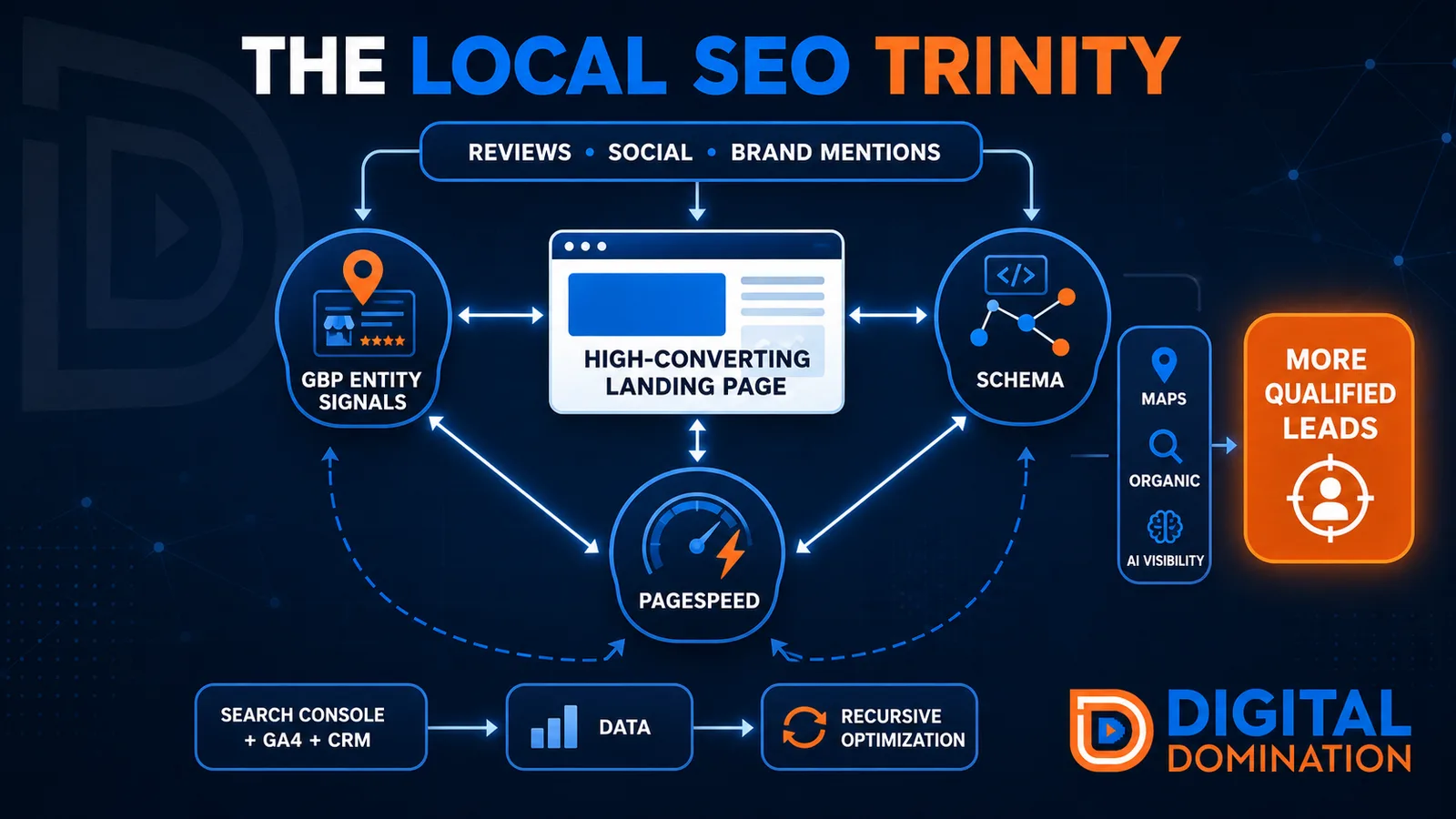
The Local SEO Trinity
Think of a three-legged stool. Your Google profile, your website, and your reviews all have to hold you up. If one leg is short, the whole thing wobbles.
GBP entity signals
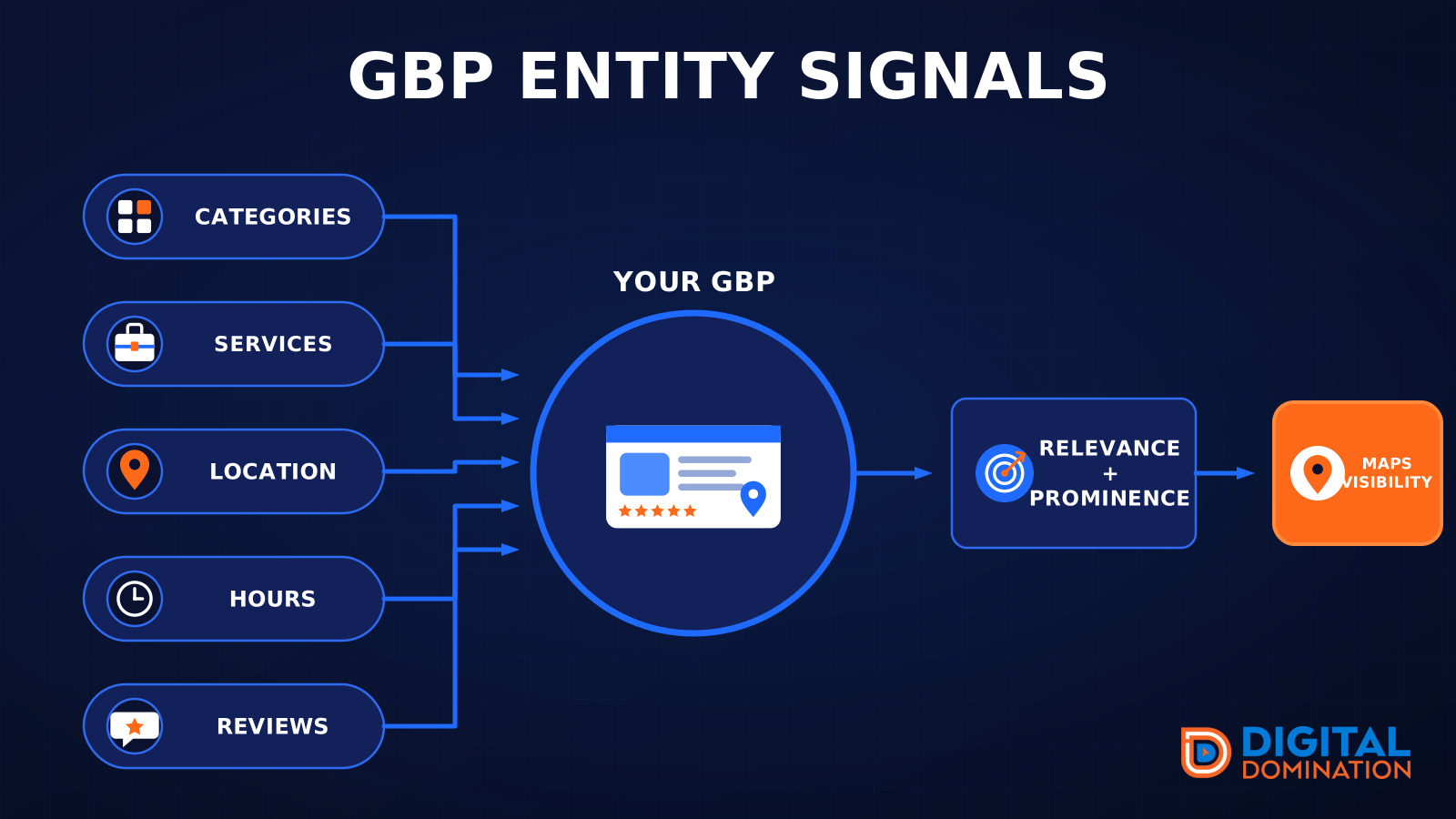
This leg is your Google Business Profile. GBP means Google Business Profile. It covers your categories, your services, your location, your hours, and your reviews. Google uses those facts to decide who to show.
Your Google profile is your storefront sign. If the sign is missing, or it names the wrong shop, people drive past.
PageSpeed to conversion
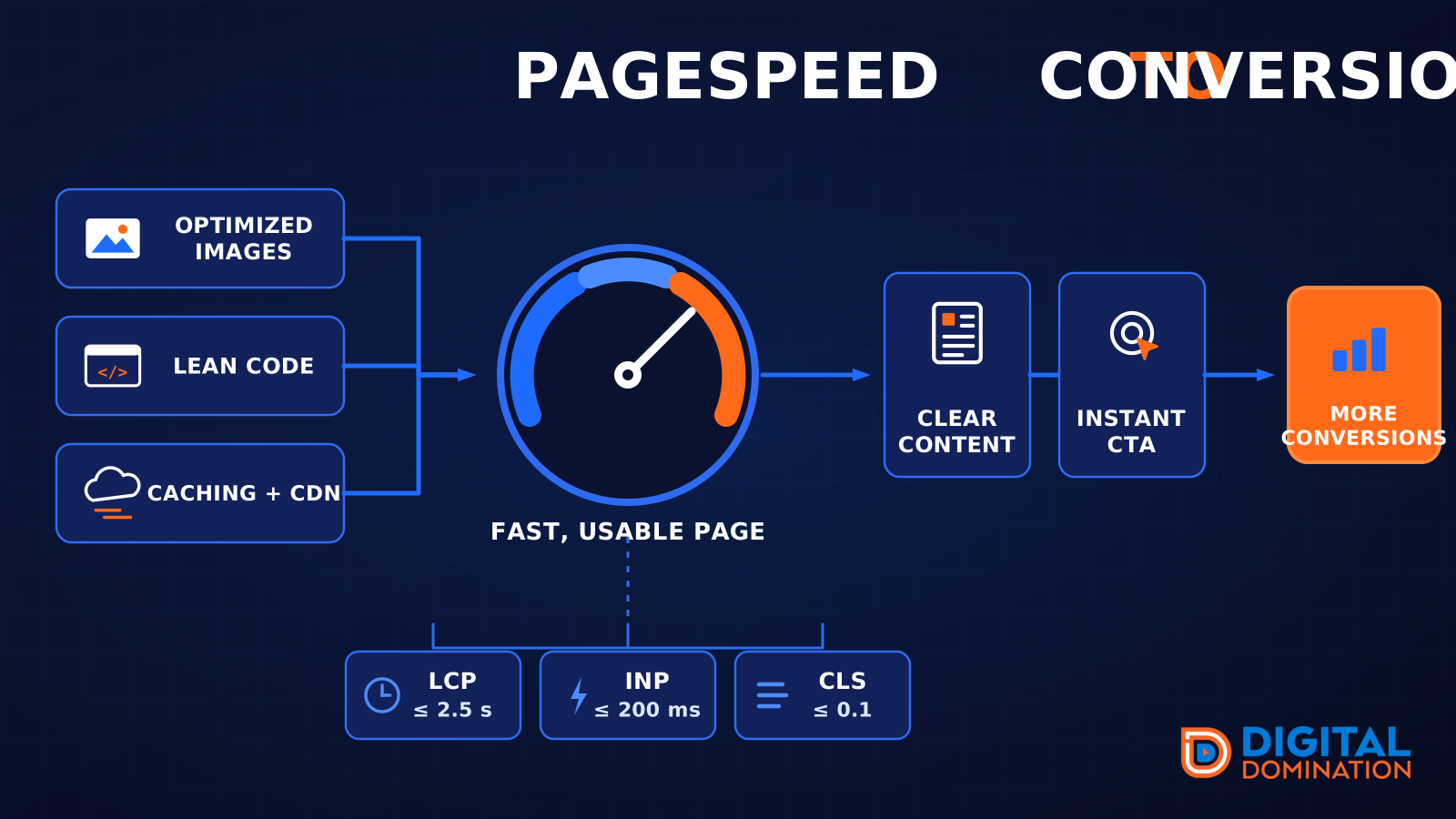
This leg is your website, above all on a phone. Small images, lean code, and caching make a page fast. A fast, clear page is what turns a visit into a call. Phone speed is one of the 12 Trinity checks because a slow page loses the call before anyone sees your offer.
Your website is the showroom. If the door sticks, people leave before they look around.
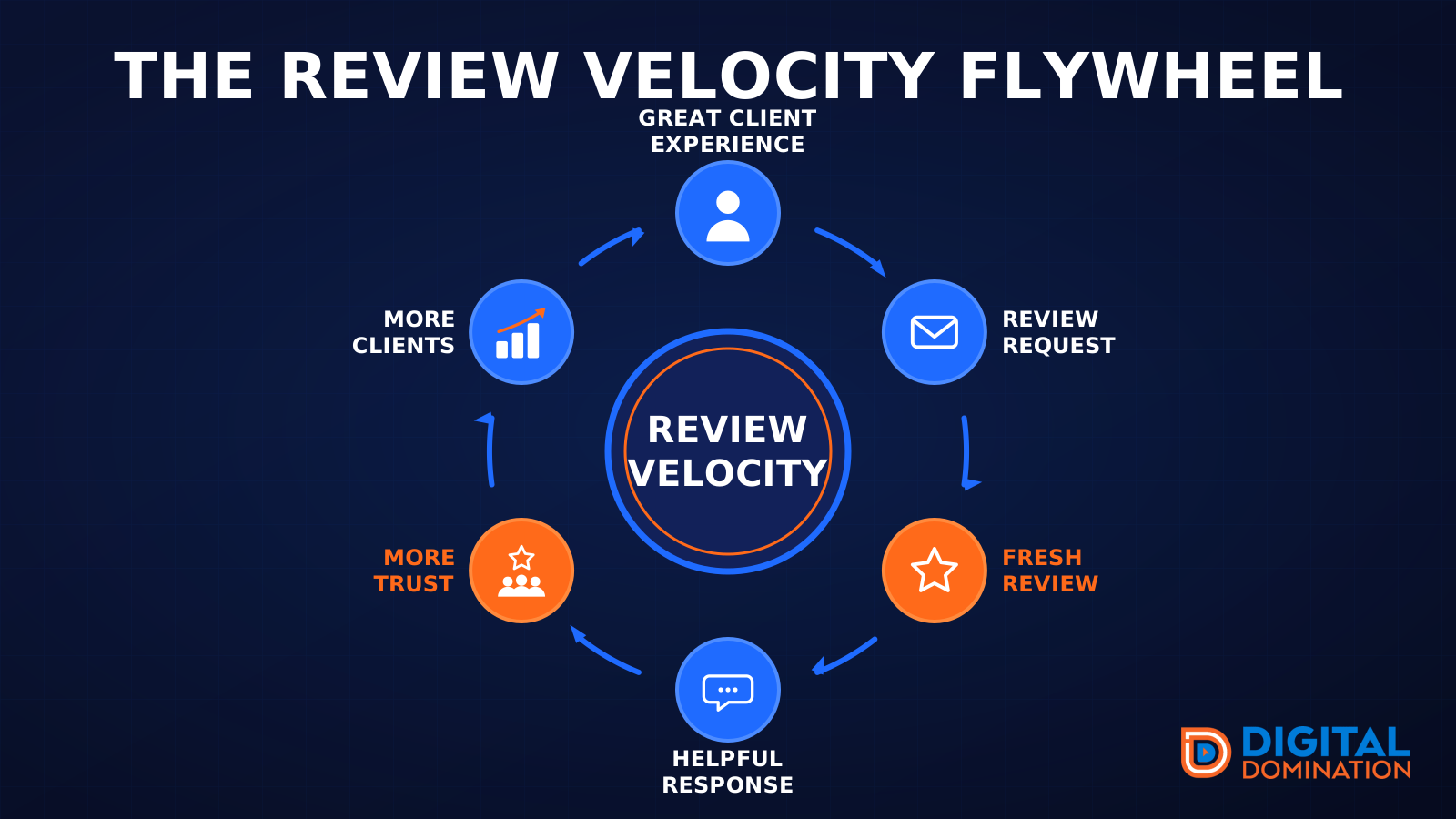
The review velocity flywheel
This leg is reviews and reputation. A good visit leads to a review request, then a fresh review, then a helpful reply, then more trust, then more customers. When the scan can find your Google listing, it shows your rating, your recent reviews, and how many you answered.
Reviews are word of mouth. One kind word helps. A steady stream of real reviews, and a reply from you, helps more.
How this turns into revenue
Being found in more searches leads to more calls. More calls lead to more booked jobs. More booked jobs lead to more revenue.
Example numbers, not a real business: 40 calls from search in a month, a 25 percent close rate, and a $400 average job. That is 10 booked jobs. That is $4,000. The math is the lesson. It is not a promise.
The full page has a box where you can type your own average job value and close rate.
One real story, from our car dealership case study: Medina Auto Group went from invisible on Google Maps to dominating every high-intent search across their market. The turnaround spanned all four of their rooftops at once. The same page says the team eliminated 89 unfair one-star reviews that had been dragging the dealership's reputation down and keeping it out of the Map Pack. It also says: “Results described here are exceptional and non-typical. Outcomes vary based on market conditions, competition, and implementation. No guarantees are made regarding earnings, rankings, or conversions.”
Free strategy call
More booked jobs start with a clear plan
Book a free strategy call. We look at your Google profile, your website, and your reviews, and we tell you what to fix first.
Free. You pick the time. A real person shows up.