
Google Business Profile book buttons may be breaking
A new Book Online button can help a ready customer schedule, but only if it sends them to the right place. Some profiles appear to be routing customers into broken booking flows.
What changed today
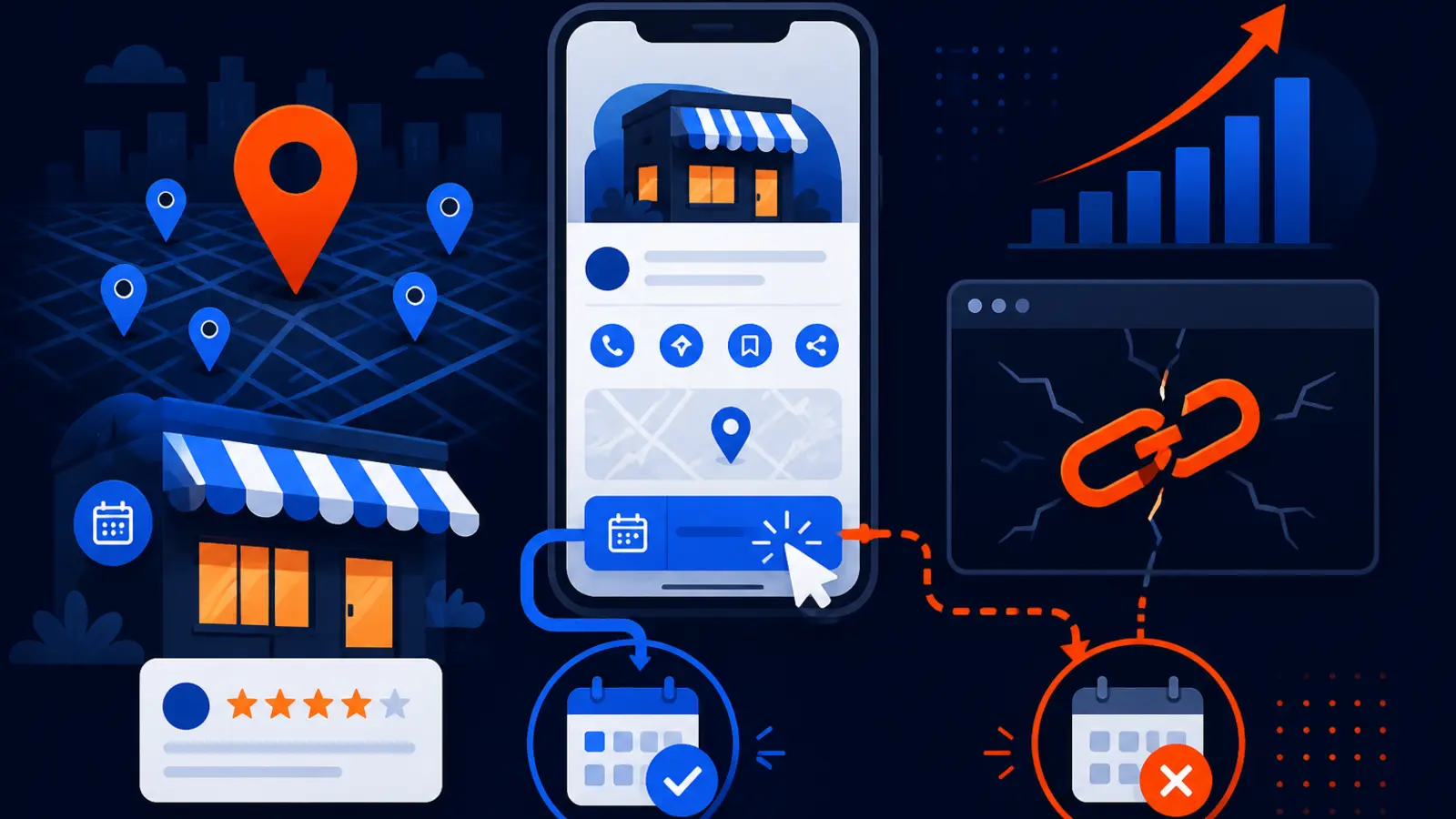
Search Engine Roundtable reported on November 9, 2026 that Google appears to be adding booking links or Book Online buttons to some Google Business Profiles, including cases where the business did not have special booking software connected. SEO Daily also reported on November 6 that some of these buttons routed users into Google’s maps or reserve flow and returned a 500 error, while other profiles worked when a valid booking or contact link was already set up.
For appointment-based local businesses, this is not just a visual change on your listing. It can affect the person who has already found you, compared your reviews, checked your hours and decided to book. If that person taps Book Online and lands on an error, the search win can turn into a lost job.
This matters most for businesses where the next step is an appointment, estimate, consultation, class, visit or reservation. That includes service businesses, health and wellness providers, beauty businesses, home service companies, legal and financial offices, repair shops and any local business that depends on scheduled customer action.
Why a broken booking button is different from a ranking problem
Most Google Business Profile SEO conversations focus on visibility. Owners ask whether they rank in the Map Pack, whether their categories are correct and whether they have enough recent reviews. Those are important, but they are not the whole job.
Google’s local ranking factors are relevance, distance and prominence. Once you have earned visibility, the profile still has to convert the searcher. A broken Book Online button sits at the bottom of the funnel, where the customer is no longer just browsing. They are trying to act.
That is why this issue deserves a different kind of audit. It is not enough to look at your dashboard and say the profile is optimized. Someone needs to check what the public actually sees in Google Search and Google Maps, especially on a phone.
A booking failure can create several practical problems for an owner:
- ▸A customer assumes your business is not taking appointments
- ▸A customer tries once, sees an error and chooses a competitor
- ▸Your staff never knows the lead existed
- ▸Your ad or SEO spend gets blamed for a problem caused by the profile experience
- ▸Your reporting shows views and clicks, but the phone is quieter than expected
What the reports say so far
Search Engine Roundtable’s November 9 report described Google appearing to add booking links to Business Profiles automatically. The key concern for owners is that the button may appear even when they did not knowingly connect a dedicated scheduling platform.
SEO Daily’s November 6 report focused on the failure mode. Some listings showed a booking button that led into a Google maps or reserve flow and then produced a 500 error. Other profiles appeared to work when the business had a valid booking or contact link configured.
The practical takeaway is simple. You should not assume that your Google Business Profile is fine because you did not change anything. Google can test, adjust or display profile features in ways owners do not immediately notice.
Based on the two reports, owners should watch for these patterns:
- ▸A Book Online button appearing where you did not expect one
- ▸A booking button that opens a Google-hosted flow instead of your site
- ▸A 500 error after the customer taps through
- ▸A working button on one device but a different experience on another
- ▸A button that works in Search but behaves differently in Maps
Who should check this first
Every local business should look at its public profile this week, but some should treat this as urgent. If customers normally book without calling first, a broken button can interrupt a high-intent lead at the worst possible time.
This is especially important if you have changed booking tools, redesigned your website, changed your phone system or switched marketing vendors. Old links can remain in circulation, third-party providers can stay connected and Google can display actions that are not obvious from the owner dashboard.
Prioritize the check if your business depends on any of these actions:
- ▸Appointment requests
- ▸Online estimates
- ▸Consultation bookings
- ▸Table reservations
- ▸Class or session scheduling
- ▸Service calls
- ▸Intake forms
- ▸New patient or new client forms
Five things to check on your profile this week
Do not make this complicated. Pull out your phone, search your business the way a customer would and follow every visible action button. If you have multiple locations, check each location separately because Google Business Profile features can vary from one profile to another.
Use an incognito browser or a phone that is not logged into the owner account if possible. You want the public customer experience, not the admin view. Also check both Google Search and Google Maps because the buttons and flow can differ.
Here are the checks to run this week:
- ▸Search your exact business name on mobile and tap the Book Online button if it appears
- ▸Open your listing in Google Maps and test the same booking action there
- ▸Confirm the button goes to the correct booking, contact or appointment page
- ▸Watch for a Google reserve flow, blank screen, redirect loop or 500 error
- ▸Check whether an old scheduling provider still appears anywhere on the profile
- ▸Test after business hours because some booking flows change based on availability
- ▸Ask one staff member to test from their own phone and send a screenshot
- ▸Write down what happened, the device used and the date of the test
What to do about it if the button is wrong
If your Book Online button is sending customers to the wrong place, treat it like a broken phone line. It may not be visible from inside your normal workflow, but it can block booked jobs before your team ever hears about them.
Start with the basics inside your Google Business Profile. Confirm the website link, appointment link, booking link and contact links are current. If you use a scheduling provider, log into that provider and confirm that the public booking page is live, mobile-friendly and not restricted to logged-in users.
If you find an error, take screenshots before making changes. Capture the public listing, the button, the destination URL if visible and the error message. This gives your agency, web person or booking software support team something concrete to investigate.
Work through these owner-level actions:
- ▸Update your appointment link in Google Business Profile if it is outdated
- ▸Remove or disconnect booking providers you no longer use
- ▸Replace a broken scheduling link with a simple contact or request form while you troubleshoot
- ▸Make sure your booking page works on mobile without a customer account
- ▸Add a clear phone number near the top of the booking page
- ▸Ask your provider to document what was changed and when
- ▸Retest Search and Maps after every change
What your GBP SEO provider should be checking
If you are paying for Google Business Profile SEO, this is the kind of issue your provider should catch. Optimization is not only category selection, posts, photos and review prompts. It also includes the public path a customer takes from discovery to contact.
Ask your provider how often they check the live profile from a customer’s point of view. The answer should include mobile Search and Google Maps, not just screenshots from the management dashboard. The management view can look clean while the public listing has a conversion problem.
A responsible GBP SEO workflow should include checks like these:
- ▸Public mobile testing of call, website, directions and booking buttons
- ▸Verification of booking links after website or software changes
- ▸Documentation of third-party booking providers connected to the profile
- ▸Screenshots when buttons appear, disappear or change labels
- ▸Fast escalation when a Google-hosted flow returns an error
- ▸Location-by-location testing for multi-location businesses
- ▸Clear notes on who owns each booking destination
Why mobile testing matters most
Local searches often happen from a phone at the moment of need. A homeowner with a leaking water heater, a parent looking for an urgent appointment or a driver searching for a nearby repair shop may not give you a second chance if the first tap fails.
Desktop checks are still useful, but they do not replace mobile testing. Google may show different buttons, layouts or flows depending on the device, query, account state or surface. Your dashboard can also differ from what a customer sees in the wild.
When you test, slow down and behave like a normal customer. Do not stop at the first click. Follow the path until you can actually request an appointment, submit a form, call the office or see the correct scheduling screen.
For mobile testing, pay special attention to these points:
- ▸Does the Book Online button appear above or below other actions
- ▸Does it open your website, a third-party scheduler or a Google flow
- ▸Does the page load without pinching, zooming or logging in
- ▸Can a first-time customer complete the next step
- ▸Is there a backup phone number if booking fails
The hidden problem with third-party booking providers
Many appointment businesses use a booking tool, customer relationship system, practice management platform or reservation provider. Those tools can be helpful, but they also create another place where the customer journey can break.
The most common issue is not malicious or mysterious. A business changes software, cancels an old account, updates its website or changes staff access, but the old booking connection remains visible somewhere. A customer taps a button that the owner no longer thinks about.
This is why documentation matters. You should know which tools are connected to your Google Business Profile, who has admin access, what public URL each button uses and who is responsible for fixing it when it breaks.
Make a simple booking provider inventory with these fields:
- ▸Provider name
- ▸Login owner inside your company
- ▸Public booking URL
- ▸Locations connected
- ▸Services or appointment types shown
- ▸Date last tested
- ▸Support contact for the provider
Do not confuse activity with a working customer path
A profile can look active and still have a broken conversion path. You might have fresh photos, regular posts, new reviews and correct hours, but a customer who taps the wrong button still hits a wall.
This is also why reporting needs context. Profile views, direction requests and website clicks are useful signals, but they do not prove that appointment-ready customers can complete the next step. The only way to know is to test the action buttons and forms yourself.
For a local business owner, the best question is not, Is my profile optimized? The better question is, Can a real customer find me, trust me and book without friction? That question forces your SEO work to connect visibility with revenue-producing actions.
What this means for buying Google Business Profile SEO
If you are comparing GBP SEO providers, this news gives you a practical question to ask before you sign. Ask whether they check live buttons in Search and Maps, verify booking links, document third-party booking connections and fix dead-end paths. If they only talk about rankings and never mention conversion checks, that is a gap.
The goal is not to panic over every Google test. Google changes local results constantly. The goal is to have a process that catches problems while they are still small, especially when the issue sits between a ready customer and your calendar.
Good GBP SEO should cover both visibility and action. For an appointment-based business, that means the profile needs to be discoverable, trusted and functional. The Book Online button is part of that functional layer.
The bottom line for local business owners
The Book Online button reports from Search Engine Roundtable and SEO Daily are a reminder that your Google Business Profile is not a set-it-and-forget-it asset. It is a live customer doorway. When Google adds or changes a button, your business may feel it before your dashboard explains it.
Digital Domination is a Las Vegas local SEO agency serving local service businesses nationally, and this is exactly the type of issue we look for when reviewing a Google Business Profile. If you want to understand what should be checked in a proper GBP campaign, visit digitaldomination.ai/google-business-profile-seo/. That page explains our Google Business Profile SEO service, including how we approach profile optimization, local visibility and the customer actions that turn searches into leads. To see how your business shows across your market, start with the free GeoGrid scan at digitaldomination.ai/scan/.
Keep reading
Related guides
- ▸Local SEO services for HVAC companies
- ▸Local SEO services for plumbers
- ▸Local SEO services in Henderson
Put it into action
Frequently Asked Questions
Why is there a Book Online button on my Google Business Profile?
Google appears to be showing booking links or Book Online buttons on some Google Business Profiles, according to Search Engine Roundtable. In some cases, owners may not have knowingly connected special booking software. Check your public listing in Search and Maps to see where the button sends customers.
Can a Google Business Profile Book Online button break?
Yes. SEO Daily reported cases where a booking button routed users into a Google maps or reserve flow and returned a 500 error. Other profiles worked when a valid booking or contact link was set up, so the issue may vary by profile.
How do I test my Google Business Profile booking button?
Search your business name on a phone, open the public profile and tap Book Online if it appears. Then repeat the test inside Google Maps. Follow the path until you reach a real appointment page, contact form, phone prompt or error screen.
What should I do if my GBP booking button goes to an error?
Take screenshots of the listing, the button and the error. Then check your Google Business Profile links and any connected booking provider. If needed, replace the booking link with a working contact page while your provider or agency investigates.
Can my agency see this from the Google Business Profile dashboard?
Not always. The dashboard may not show the same experience a customer sees in mobile Search or Google Maps. Your provider should test the live public profile, not only the admin view.
Should I remove online booking from my Google Business Profile?
Not if it works and helps customers schedule. Online booking can be useful for appointment-based businesses, but it needs routine testing. If the button is broken, use a working contact or appointment page until the problem is fixed.
Does this affect my local rankings?
The reports are about booking buttons and customer flow, not a confirmed ranking factor change. Google’s local ranking factors are relevance, distance and prominence. Even so, a broken button can still cost leads after the ranking has already done its job.
How often should I check my Google Business Profile buttons?
Check the main buttons at least whenever you change your website, booking software, hours, phone system or marketing provider. For appointment-based businesses, a quick weekly mobile check is a practical habit. Test Search and Maps because they may not behave exactly the same.
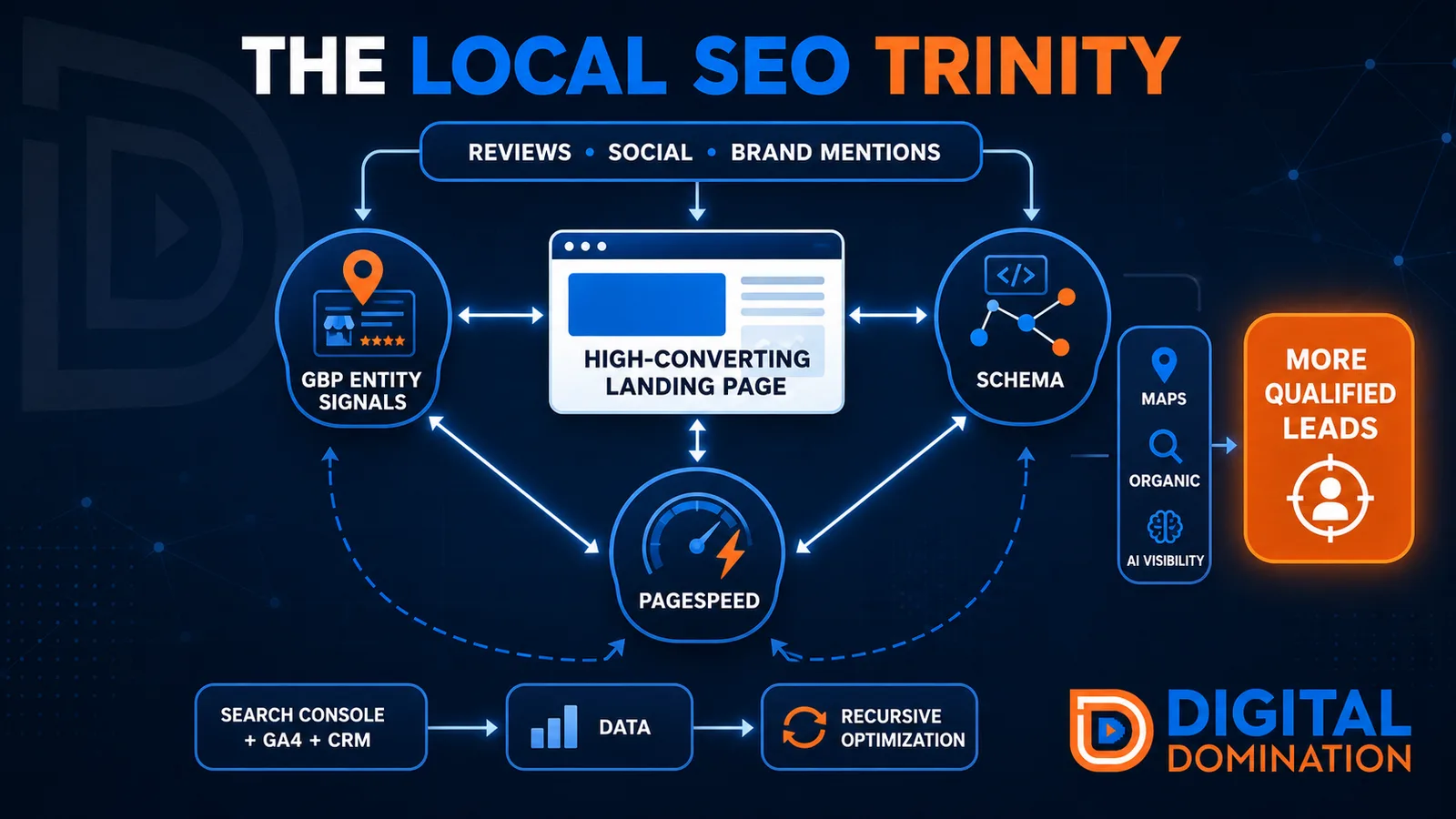
The Local SEO Trinity
Think of a three-legged stool. Your Google profile, your website, and your reviews all have to hold you up. If one leg is short, the whole thing wobbles.
GBP entity signals
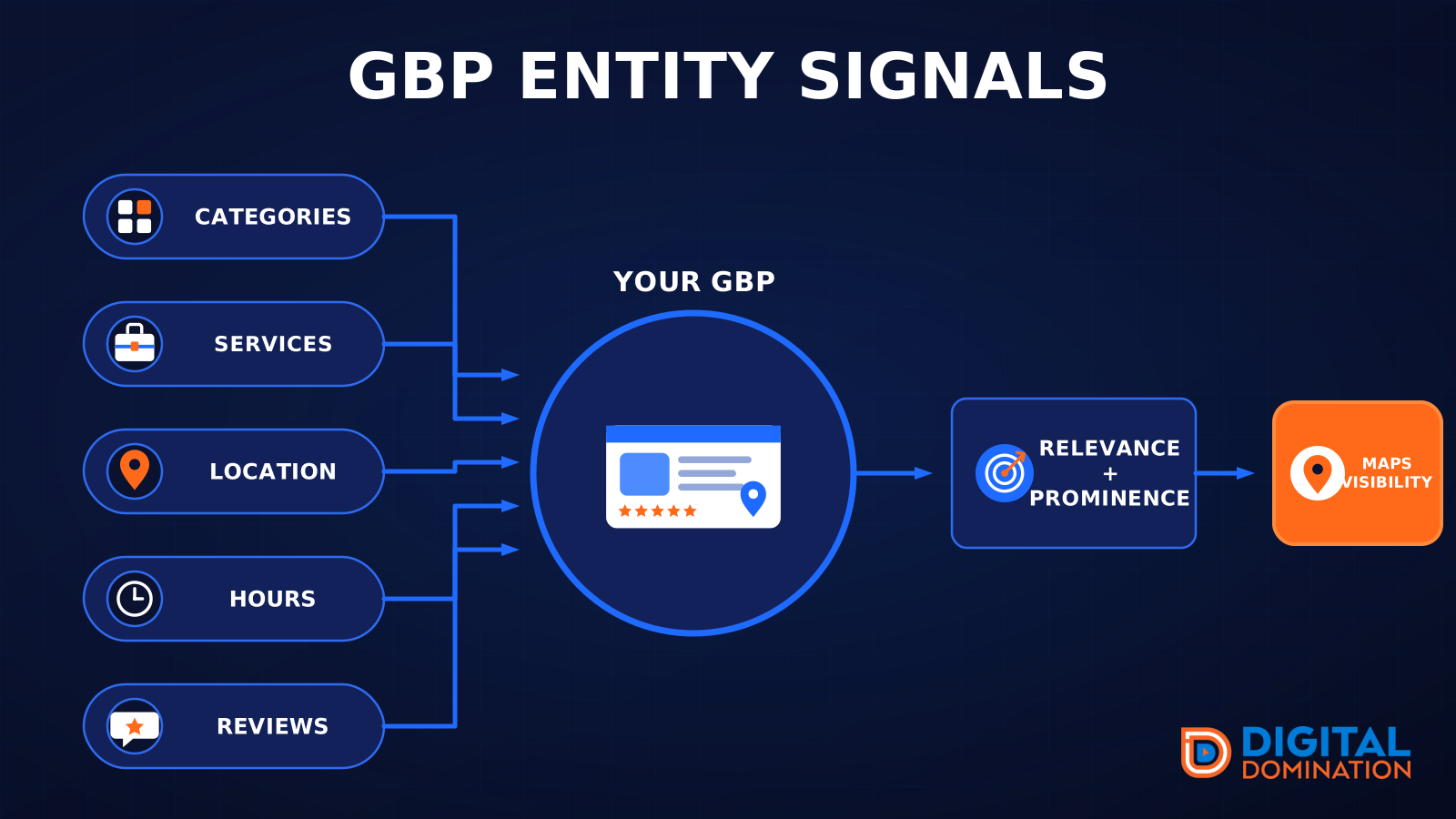
This leg is your Google Business Profile. GBP means Google Business Profile. It covers your categories, your services, your location, your hours, and your reviews. Google uses those facts to decide who to show.
Your Google profile is your storefront sign. If the sign is missing, or it names the wrong shop, people drive past.
PageSpeed to conversion
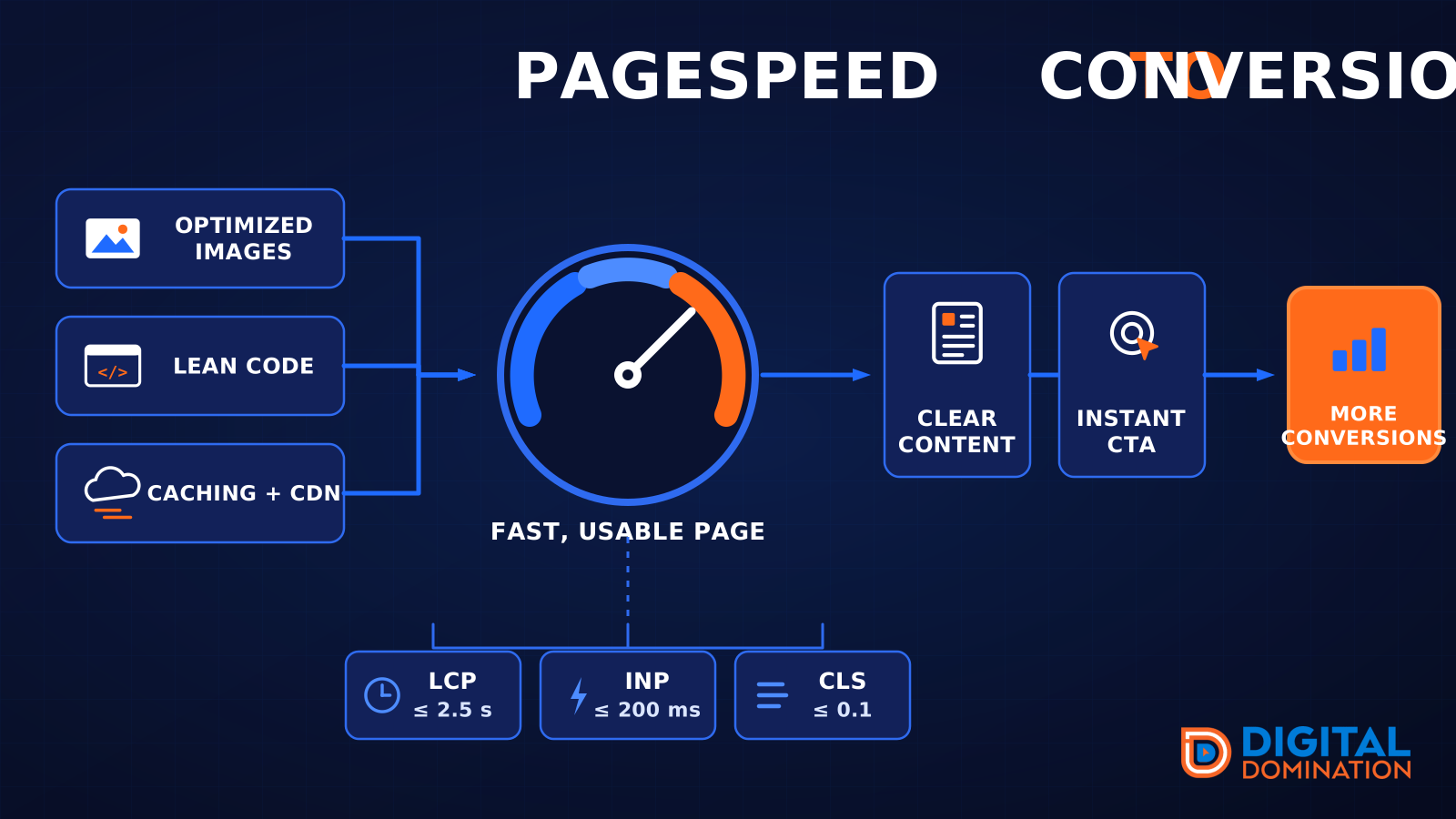
This leg is your website, above all on a phone. Small images, lean code, and caching make a page fast. A fast, clear page is what turns a visit into a call. Phone speed is one of the 12 Trinity checks because a slow page loses the call before anyone sees your offer.
Your website is the showroom. If the door sticks, people leave before they look around.
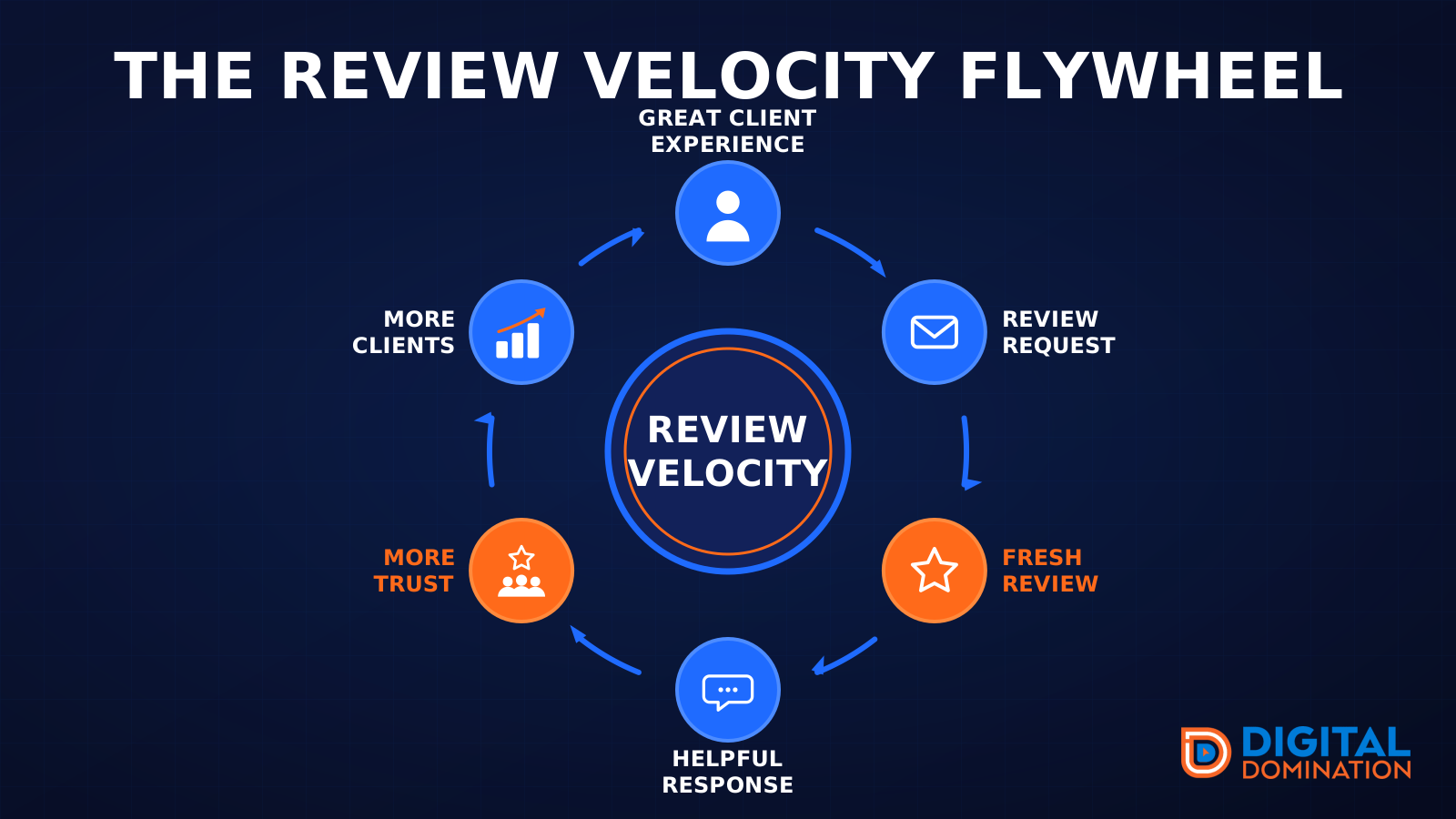
The review velocity flywheel
This leg is reviews and reputation. A good visit leads to a review request, then a fresh review, then a helpful reply, then more trust, then more customers. When the scan can find your Google listing, it shows your rating, your recent reviews, and how many you answered.
Reviews are word of mouth. One kind word helps. A steady stream of real reviews, and a reply from you, helps more.
How this turns into revenue
Being found in more searches leads to more calls. More calls lead to more booked jobs. More booked jobs lead to more revenue.
Example numbers, not a real business: 40 calls from search in a month, a 25 percent close rate, and a $400 average job. That is 10 booked jobs. That is $4,000. The math is the lesson. It is not a promise.
The full page has a box where you can type your own average job value and close rate.
One real story, from our car dealership case study: Medina Auto Group went from invisible on Google Maps to dominating every high-intent search across their market. The turnaround spanned all four of their rooftops at once. The same page says the team eliminated 89 unfair one-star reviews that had been dragging the dealership's reputation down and keeping it out of the Map Pack. It also says: “Results described here are exceptional and non-typical. Outcomes vary based on market conditions, competition, and implementation. No guarantees are made regarding earnings, rankings, or conversions.”
Free strategy call
More booked jobs start with a clear plan
Book a free strategy call. We look at your Google profile, your website, and your reviews, and we tell you what to fix first.
Free. You pick the time. A real person shows up.