
Google Business Profile offers now need active checks
Google has documented how offers can appear on Business Profiles, including in AI Overviews. Local owners should treat this as a revenue and reputation issue, not just a listing detail.

What changed and who it hits
Google has published a new Business Profile help document explaining that customers may see special offers, discounts and promotional badges on a business placesheet in Google Search. The document, titled Manage offers on your Business Profile and dated November 6, 2026, says those offers can also appear inside Search AI Overviews.
This matters most for local service businesses, restaurants, retailers, clinics, salons, home service companies and any business that depends on calls, appointments, bookings or online orders from Google. If a customer sees a discount on your Google listing, they may assume your staff approved it, your website supports it and your checkout process will honor it.
Search Engine Roundtable covered the new Google Business Profiles Manage Offers Help Document on November 6, 2026, and SearchPrex included the change in its Local SEO News & Updates 2026: Google Maps & GBP roundup on November 7, 2026. The practical takeaway is simple: your Google Business Profile is no longer just name, address, phone number, hours and reviews. It can also carry live promotional messages that affect expectations before a customer calls you.
Where these offers can come from
Google's documentation says offers on a Business Profile can come from several places. That is the part owners should pay close attention to, because not every offer is created directly in the Google Business Profile dashboard.
The obvious source is a GBP offer post that someone on your team or your marketing provider created. But Google also says offers may come from authorized third-party partners, and from promotions Google finds through linked social profiles. That means a stale promo on a connected social account, an old booking vendor relationship or a partner feed can potentially create a customer-facing offer on Google.
This week, your job is to trace every source that could be feeding an offer into your profile:
- ▸Active GBP offer posts in your Business Profile dashboard
- ▸Linked social profiles that mention specials, discounts or seasonal promotions
- ▸Ordering, booking, delivery or appointment platforms connected to your business
- ▸Old marketing vendors that may still have access or partner status
- ▸Franchise, marketplace or aggregator profiles that list your business
Why a wrong discount is not a small GBP problem
A bad offer on Google is not just a cosmetic issue. It can change the conversation at the counter, over the phone or at the estimate stage. The customer is not thinking about data feeds or third-party providers. They are thinking, Google showed me this deal.
For a local business, that creates several risks. A discount you never approved can cut margin. An old booking link can send the customer to a former provider. A promotional badge can push staff into an awkward dispute. If your employee refuses to honor what the customer saw, the review risk becomes real, even if the listing information was wrong.
This is especially important before holiday demand, storm season, tax season, back-to-school periods or any seasonal rush in your industry. High volume makes small listing errors more expensive because more people see them before your team catches the problem.
Five things to check on your profile this week
You do not need to be technical to start. Open your Business Profile as a customer would, then check the owner dashboard, your connected platforms and your social accounts. Do the search from a phone, because many customers will see your offer there first.
Use this short checklist before your next busy sales period:
- ▸Search your business name on Google and look for offer badges, discounts or promotional text
- ▸Click into your placesheet and scan every visible action button, including order, book, reserve, call and website
- ▸Review all GBP posts and remove expired offers, unclear discounts and promos with missing terms
- ▸Check linked social profiles for old sale language that Google could interpret as a current offer
- ▸List every third-party ordering, booking or marketing partner that has ever handled promotions for you
What Google says about third-party removals
The most important owner protection in Google's new help document is the removal requirement for third-party providers. Google's Manage offers on your Business Profile document says third-party providers must remove unauthorized or inaccurate offers within 5 business days after the business requests removal.
That does not mean you should wait until a customer complains. It means you should have a clean paper trail ready. If an offer is wrong, contact the provider directly, state that the offer is unauthorized or inaccurate, identify the business location, include screenshots and ask for removal under Google's documented rule.
When you send that request, make it specific and easy to act on:
- ▸Business name and location
- ▸Screenshot of the offer as it appears on Google
- ▸The exact reason the offer is unauthorized, inaccurate or expired
- ▸The correct promotion status, such as no current discount or new terms apply
- ▸A clear request for removal within 5 business days
Why AI Overviews make this harder to ignore
The new wrinkle is that Google says these offers can appear in Search AI Overviews. That does not mean every customer will see an AI Overview for your business. It does mean promotional information can move beyond the standard Business Profile layout and appear in a summary-style search experience.
For owners, the practical issue is visibility. If a customer asks Google about the best place to book, order or buy near them, an AI Overview may summarize information before that person ever scrolls through your full listing. If the offer is wrong there, the expectation is already set.
Do a few plain-English searches that match how your customers think. Search your business name plus coupon, discount, special, appointment, booking, order online, near me and your main service. If an AI Overview appears, read it like a customer and screenshot anything that is wrong or confusing.
What to do about it
Treat this like a weekly revenue protection task, not a once-a-year listing cleanup. A few minutes of checking can prevent a bad front-desk argument, a lost booking or a review from someone who thought your business changed the rules after they arrived.
Start with actions an owner or manager can complete without a technical tool:
- ▸Assign one person to review visible Google offers every week during busy seasons
- ▸Remove expired GBP offer posts instead of leaving them as historical content
- ▸Update social profile bios and recent posts if they mention old promotions
- ▸Audit booking and ordering links to confirm they go to your current provider
- ▸Ask every third-party partner whether they can publish offers tied to your listing
- ▸Save screenshots when something looks wrong so you can document the issue
- ▸Keep a simple spreadsheet of active promotions, start dates, end dates and approved channels
What GBP management should include now
If you pay someone to manage local SEO or your Google Business Profile, offer monitoring should now be part of the conversation. The profile is not set-and-forget. It is a live customer acquisition asset that Google can enrich with information from partners, posts and connected web sources.
Good GBP management should cover more than categories, photos and review replies. It should include checks for the promotional content customers actually see before they contact you.
Ask your provider whether these items are included:
- ▸Regular review of visible offers in Google Search and Google Maps
- ▸Cleanup of expired GBP posts and promotional copy
- ▸Audit of linked social profiles that mention discounts or specials
- ▸Review of third-party booking, ordering and partner links
- ▸Screenshots of AI Overview visibility when relevant searches trigger them
- ▸Clear escalation steps when an unauthorized offer appears
- ▸Location-by-location checks for multi-location businesses
Do not confuse offer visibility with local ranking
Google's local ranking factors are relevance, distance and prominence. Offers do not replace those fundamentals. You still need accurate categories, strong service pages, consistent business information, quality reviews and a profile that clearly matches what the customer is searching for.
But rankings are only part of the story. Once a customer sees your listing, the offer can influence whether they call, book, order or walk away. A wrong offer can also create friction after the conversion, which is where margin and reviews can get damaged.
This is the difference between local SEO visibility and local SEO control. Visibility helps you show up. Control helps make sure what people see is accurate enough to turn that visibility into a good customer interaction.
How to talk to staff and vendors
This change should not live only with the owner or marketing person. Front-desk staff, dispatchers, estimators, cashiers and booking teams need to know what to do when a customer references a Google offer. The wrong response can turn confusion into a complaint.
Vendors also need clear boundaries. If a booking platform, delivery app, coupon partner or agency can publish promotional content connected to your business, ask for written confirmation of what they control and how removal requests are handled.
Use these simple scripts and internal rules this week:
- ▸Tell staff to ask where the customer saw the offer before accepting or rejecting it
- ▸Create an internal list of approved current promotions
- ▸Give managers permission to screenshot customer claims for review
- ▸Ask vendors to confirm whether they are an authorized third-party offer source
- ▸Require vendors to provide a removal contact and expected turnaround time
- ▸Remove access for old agencies, contractors or platforms you no longer use
Should you pay for this kind of GBP management
For many local businesses, the answer is yes if Google is a meaningful source of calls, bookings, routes, reservations or orders. Paying for GBP management is not only about posting photos or replying to reviews. It is about making sure the customer-facing version of your business stays accurate while Google, partners and connected profiles keep changing.
If your business runs frequent promotions, uses third-party booking or ordering tools, has multiple locations, works with franchise or marketplace platforms, or depends on seasonal demand, active monitoring is easier to justify. If you rarely get customers from Google and never run offers, you may be able to handle a simple monthly check yourself.
The decision should be based on risk. Ask what one wrong discount, one bad review, one lost high-value booking or one outdated partner link could cost you in frustration and staff time. Then compare that with the discipline of having someone check the profile, document issues and push vendors to fix inaccurate offers.
The local SEO decision this news points to
Google's new offer documentation is a reminder that your Business Profile is a living sales surface, not a directory listing you finish once. Search Engine Roundtable's coverage and SearchPrex's local SEO update both point to the same operational reality: owners need to know what Google is showing before customers force the issue.
At Digital Domination, we look at this from the perspective of a Las Vegas local SEO agency serving local service businesses nationally. If you want help with the broader profile work behind this issue, our Google Business Profile SEO service page explains what goes into profile optimization, local visibility, review signals, posting, category work and ongoing management. You can find it at digitaldomination.ai/google-business-profile-seo/.
If you want to see how your business currently appears across your market, start with a free GeoGrid scan. Digital Domination's GeoGrid scan checks 169 points across a market, so you can see where your profile is visible and where it needs work: digitaldomination.ai/scan/.
Keep reading
Related guides
- ▸Local Service Ads Vs Search Ads
- ▸Most local business websites still lack LocalBusiness schema
- ▸LocaliQ vs Townsquare Interactive for local SEO
Put it into action
Frequently Asked Questions
Why is Google showing offers on my Business Profile?
Google says offers can appear on a Business Profile from GBP offer posts, authorized third-party partners or promotions found through linked social profiles. The goal is to show customers useful promotional information, but that creates risk if the source is outdated or incorrect.
Can Google show my business offers in AI Overviews?
Yes, Google's Manage offers on your Business Profile document says offers can appear in Google Search, including inside Search AI Overviews. That means an inaccurate promotion may be seen before a customer opens your full listing.
How do I remove a wrong offer from my Google Business Profile?
First identify where the offer came from: your GBP posts, a linked social profile or a third-party provider. If it came from a third party, Google's documentation says the provider must remove unauthorized or inaccurate offers within 5 business days after you request removal.
What should I send a third-party provider to remove a bad offer?
Send your business name, location, a screenshot of the offer and a clear explanation of why it is unauthorized, inaccurate or expired. Ask for removal within 5 business days and keep the email or support ticket for your records.
Can old social media posts create Google offers?
Google says promotions found through linked social profiles can be a source for offers. Review bios, pinned posts, recent posts and seasonal promo language on any social profile connected to your business.
Should my local SEO company monitor Google offers?
If Google brings you calls, bookings, orders or appointments, offer monitoring should be part of GBP management. The provider should check live offers, third-party links, GBP posts, linked social profiles and AI Overview visibility where relevant.
Do offers help my Google Maps ranking?
Google's local ranking factors are relevance, distance and prominence. Offers are more about conversion and customer expectations than replacing core local SEO work, but a wrong offer can still hurt revenue and reviews.
The Local SEO Trinity
Think of a three-legged stool. Your Google profile, your website, and your reviews all have to hold you up. If one leg is short, the whole thing wobbles.
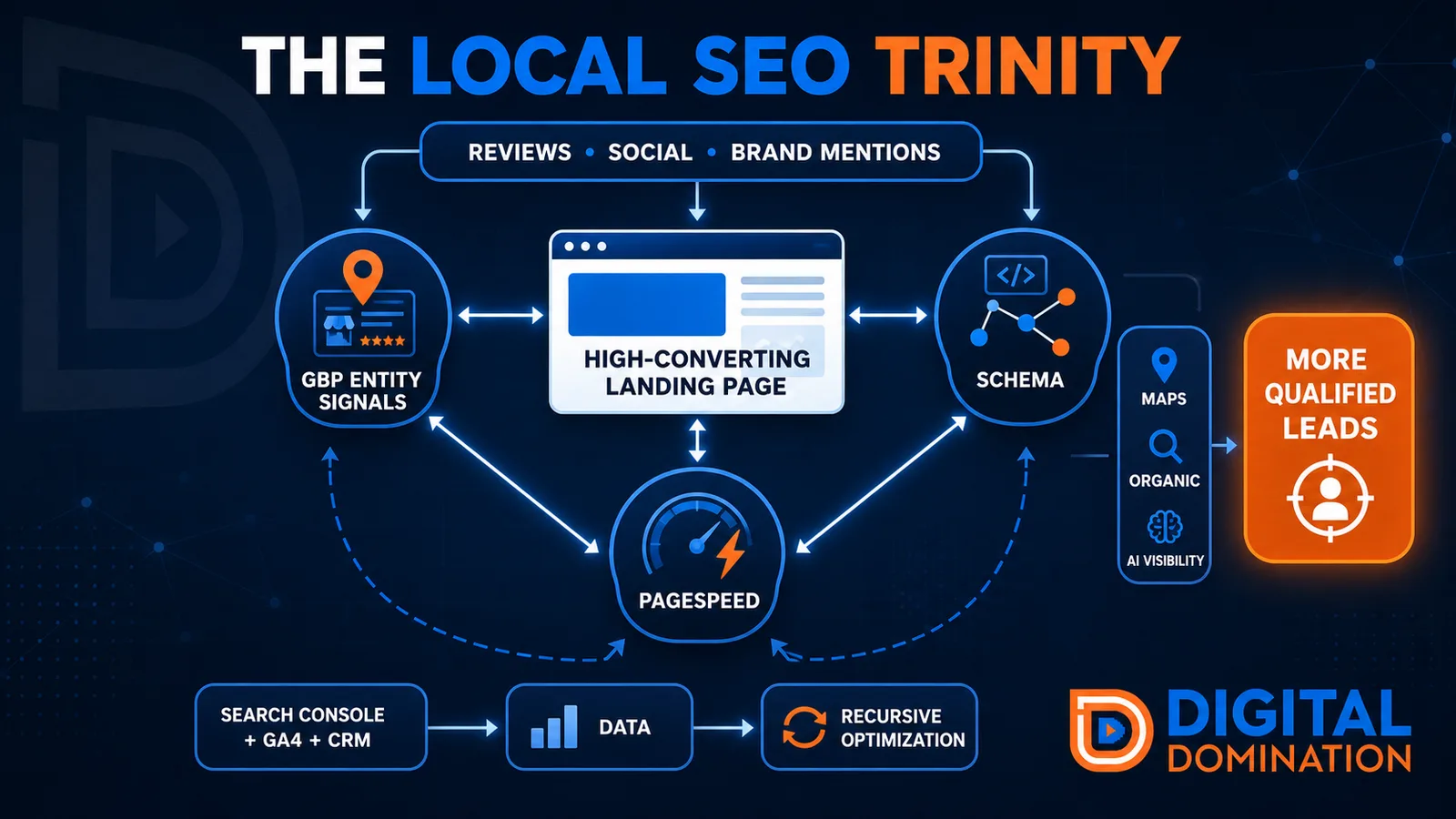
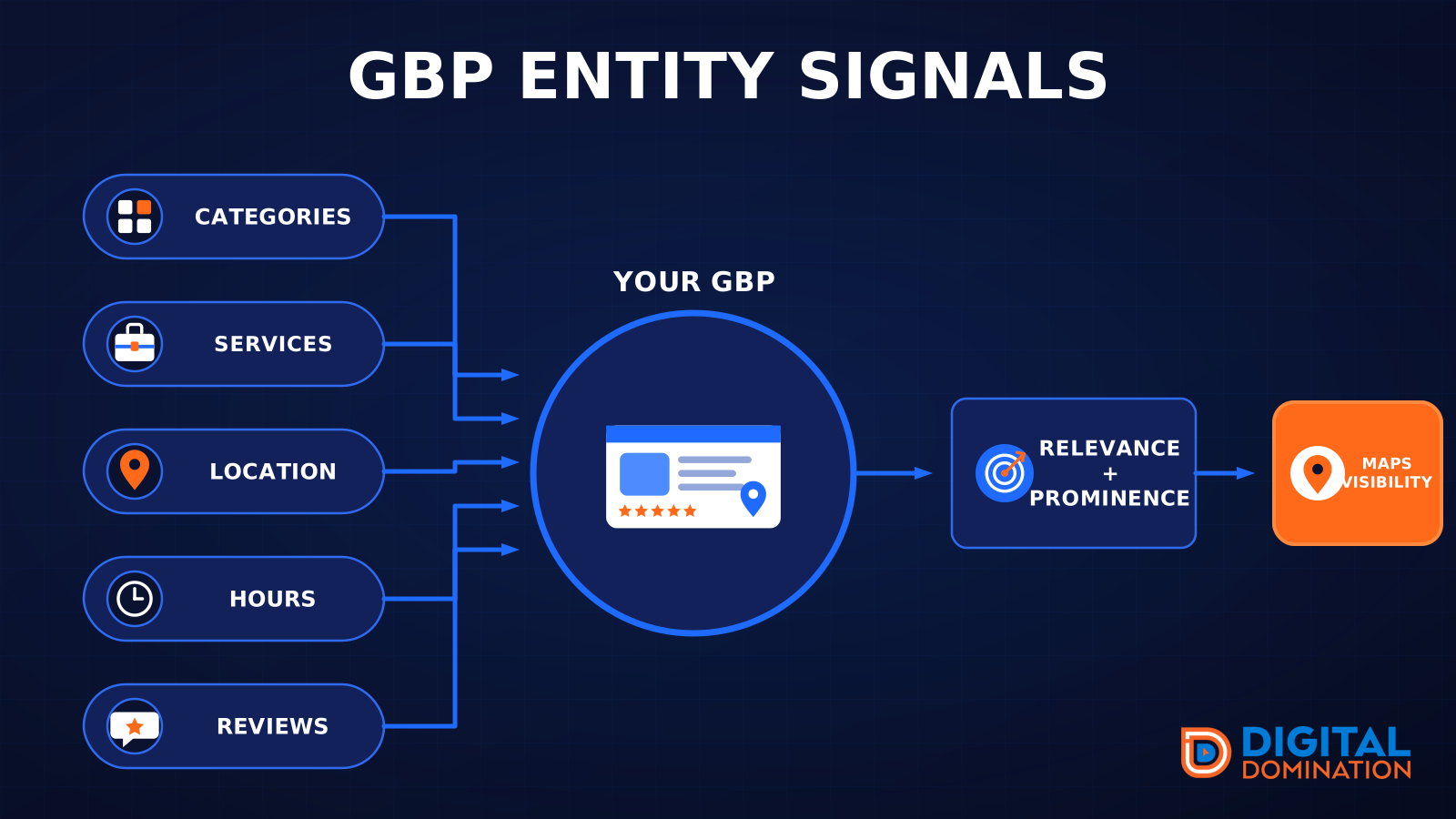
GBP entity signals
This leg is your Google Business Profile. GBP means Google Business Profile. It covers your categories, your services, your location, your hours, and your reviews. Google uses those facts to decide who to show.
Your Google profile is your storefront sign. If the sign is missing, or it names the wrong shop, people drive past.
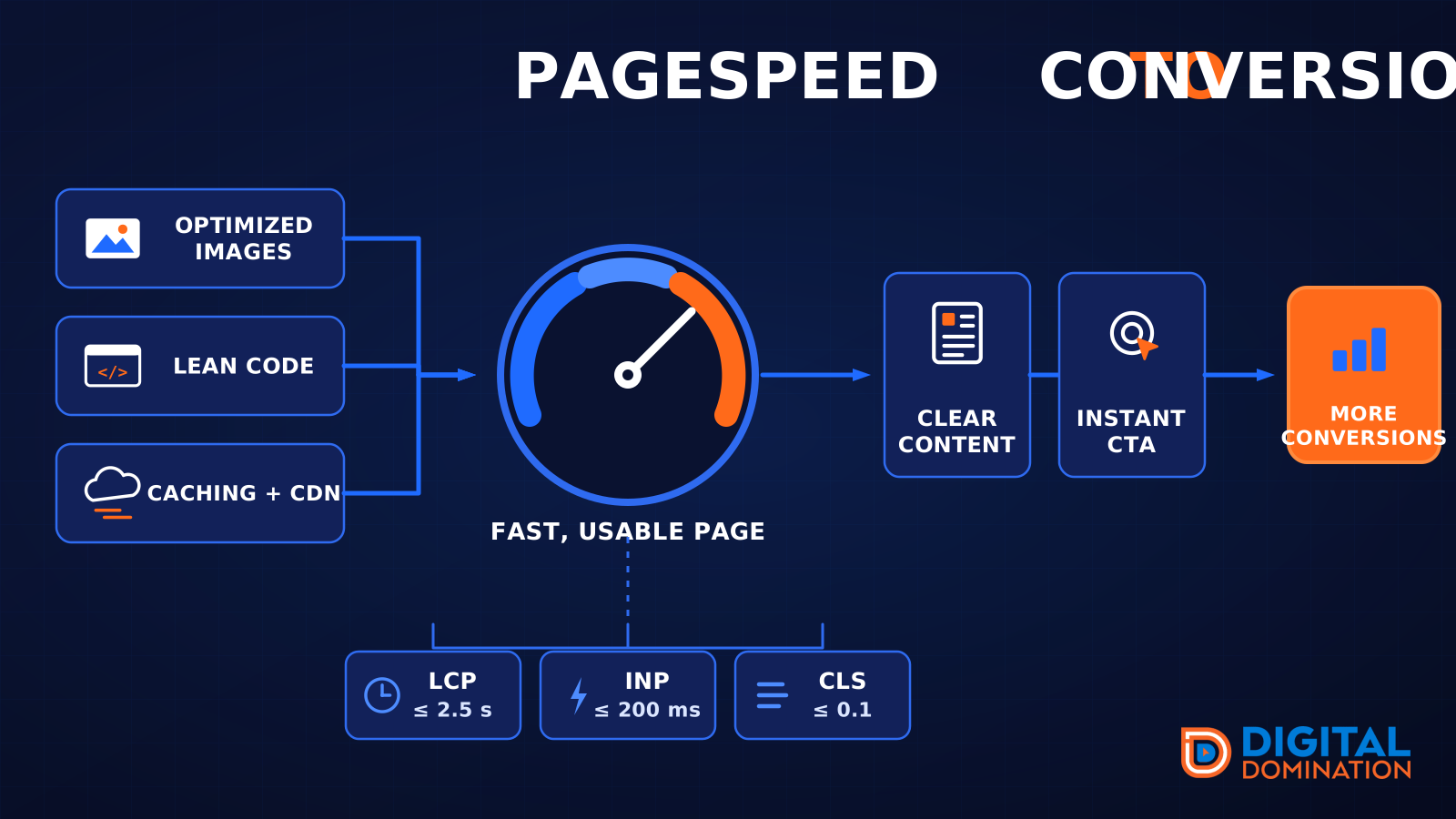
PageSpeed to conversion
This leg is your website, above all on a phone. Small images, lean code, and caching make a page fast. A fast, clear page is what turns a visit into a call. Phone speed is one of the 12 Trinity checks because a slow page loses the call before anyone sees your offer.
Your website is the showroom. If the door sticks, people leave before they look around.
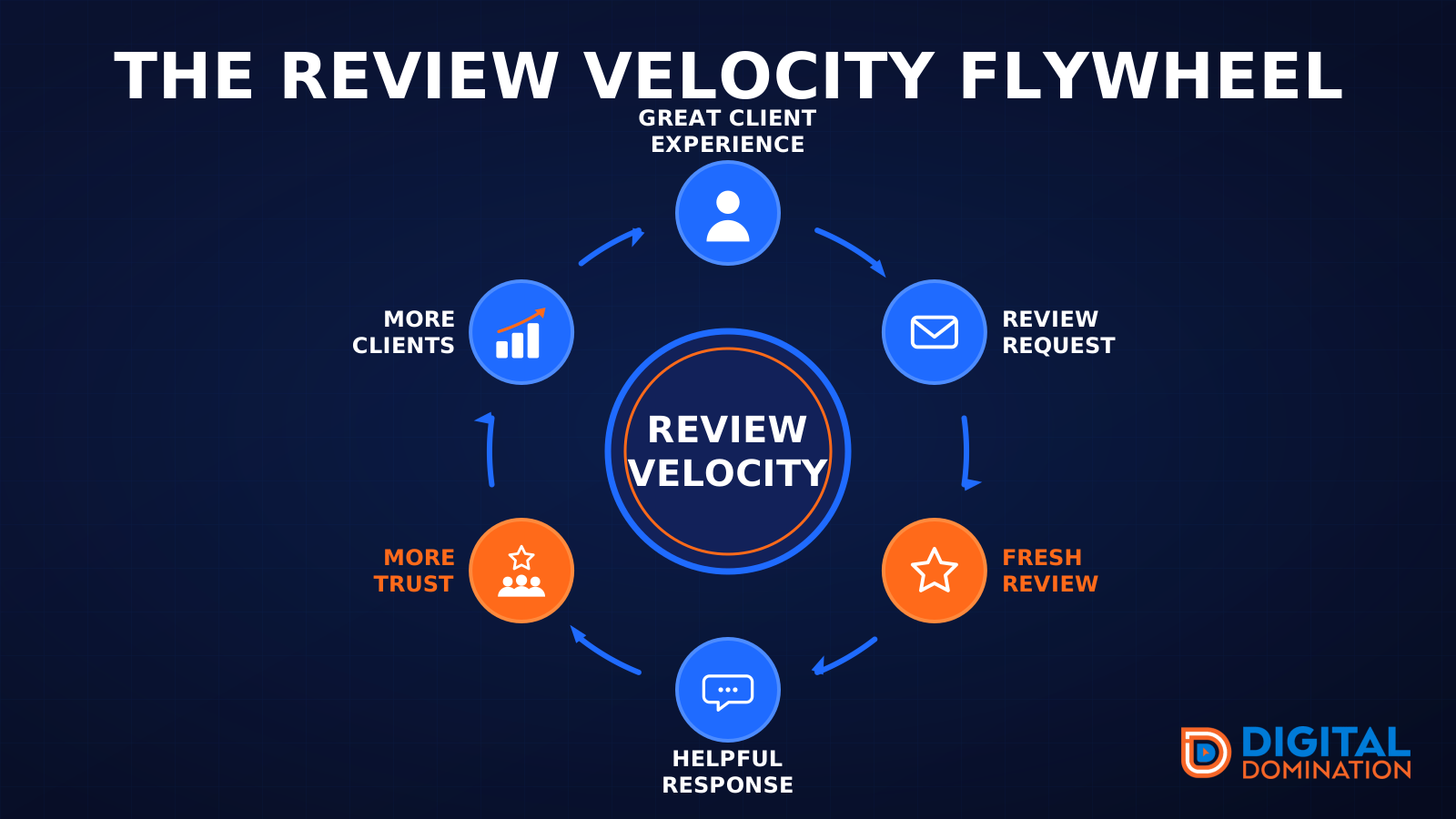
The review velocity flywheel
This leg is reviews and reputation. A good visit leads to a review request, then a fresh review, then a helpful reply, then more trust, then more customers. When the scan can find your Google listing, it shows your rating, your recent reviews, and how many you answered.
Reviews are word of mouth. One kind word helps. A steady stream of real reviews, and a reply from you, helps more.
How this turns into revenue
Being found in more searches leads to more calls. More calls lead to more booked jobs. More booked jobs lead to more revenue.
Example numbers, not a real business: 40 calls from search in a month, a 25 percent close rate, and a $400 average job. That is 10 booked jobs. That is $4,000. The math is the lesson. It is not a promise.
The full page has a box where you can type your own average job value and close rate.
One real story, from our car dealership case study: Medina Auto Group went from invisible on Google Maps to dominating every high-intent search across their market. The turnaround spanned all four of their rooftops at once. The same page says the team eliminated 89 unfair one-star reviews that had been dragging the dealership's reputation down and keeping it out of the Map Pack. It also says: “Results described here are exceptional and non-typical. Outcomes vary based on market conditions, competition, and implementation. No guarantees are made regarding earnings, rankings, or conversions.”
Free strategy call
More booked jobs start with a clear plan
Book a free strategy call. We look at your Google profile, your website, and your reviews, and we tell you what to fix first.
Free. You pick the time. A real person shows up.