
Google Maps now puts Message next to Call on Business Profiles
If your Google Business Profile has messaging turned on, the chat path may now be as visible as your phone number in Maps. That makes setup, staffing and follow-up a local SEO issue, not just an admin setting.
What changed in Google Maps
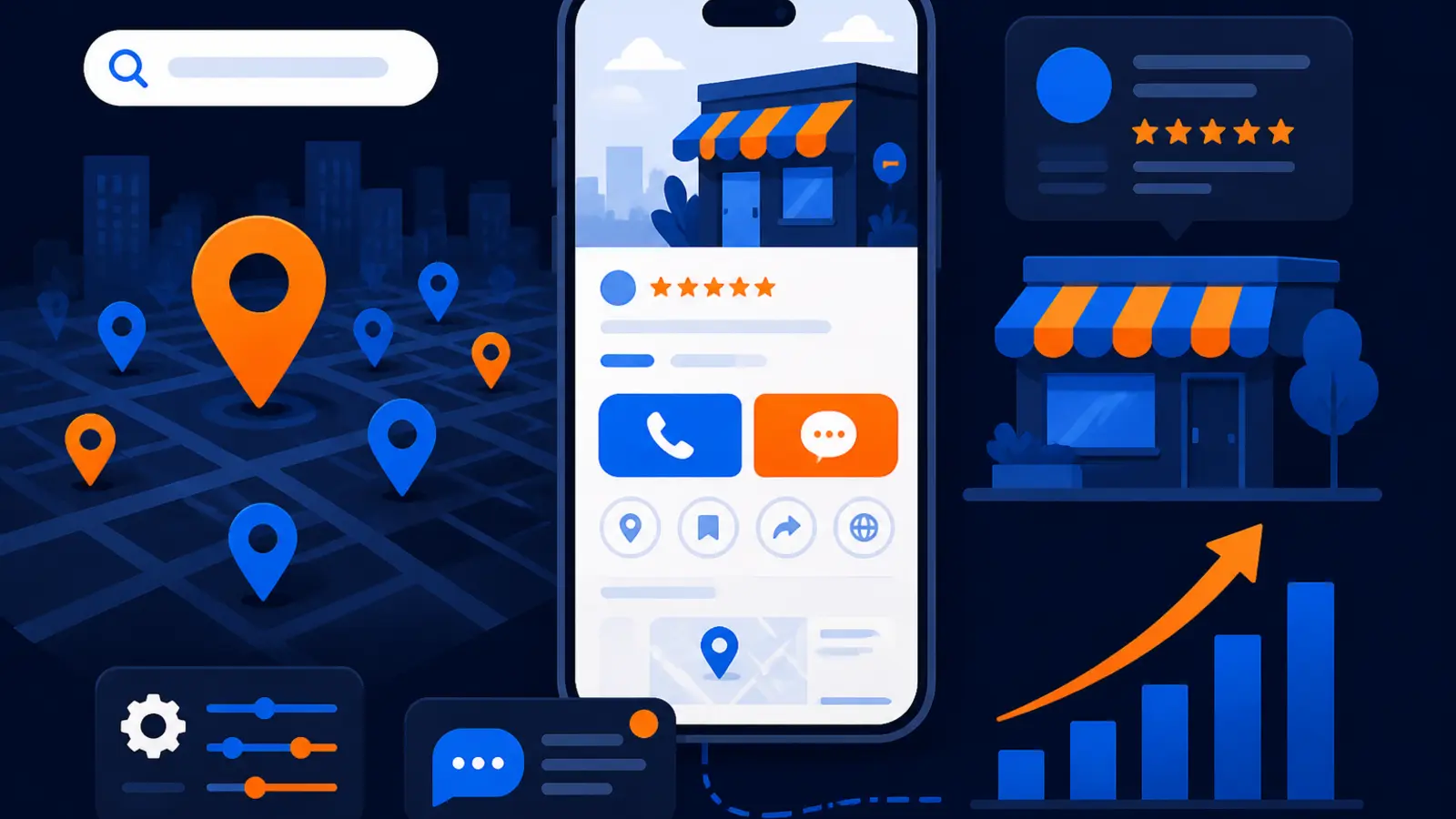
Google has moved Business Profile messaging into a much more visible spot in Google Maps. In its Google Small Business Bulletin, Holiday Checklist & New Features, published in the Google Business Profile Help Community on November 5, Google said messaging is now surfaced prominently in Maps on both Android and iOS.
For local business owners, the important change is simple: a Message button can now appear next to Call on your Business Profile. Instead of being buried lower in the listing, messaging is now sitting beside the action most owners care about most.
Search Engine Roundtable covered the rollout on November 6 in Google Expands Business Messaging To Google Maps On iOS & Android, noting that the button routes customers to the business’s linked chat channel. That can include WhatsApp or SMS/text if the profile is configured that way.
This hits any local service business where buyers compare a few nearby options before contacting one: plumbers, roofers, HVAC companies, dentists, med spas, attorneys, pest control companies, home service contractors and similar businesses. If someone finds you in Maps and sees Message beside Call, your chat setup just became part of your first impression.
Why this matters for local leads
This is not just a convenience update. It changes where a potential customer may choose to start the conversation. A person who does not want to call from work, is comparing several businesses, or wants to send a photo of a problem may tap Message instead of Call.
That creates a new risk. A broken link, an old WhatsApp number, a staff phone no one checks, or an SMS inbox without ownership can now sit beside your main phone button at the exact moment someone is deciding who gets the job.
Before you pay for more visibility, you should make sure every visible contact path can actually handle leads. Higher rankings can create more missed opportunities if the contact buttons send buyers into a dead end.
The risk is highest in businesses where the first response often decides the next step:
- ▸Emergency services where speed matters
- ▸Appointment-based businesses with limited availability
- ▸Contractors who need photos before quoting
- ▸Medical, legal and financial offices where callers may prefer privacy
- ▸Multi-location businesses with different staff at each location
Should you turn on messaging now
The short answer is yes, if you can staff it. If you cannot respond consistently, audit it first and decide whether to keep it off until the process is ready.
Messaging can be useful because it meets customers where they are. Some people will not call. Some people want to ask one quick question. Some people want to send a photo, address or preferred appointment time without waiting on hold.
But messaging is not magic. It is another front-door lead path. If you turn it on without ownership, it can create frustration and make your business look unresponsive.
Use this simple decision rule before enabling or keeping messaging active:
- ▸Turn it on if a real person checks it during business hours
- ▸Turn it on if the linked channel is already part of your daily workflow
- ▸Turn it on if your team knows what questions to ask next
- ▸Pause it if messages go to one owner’s personal phone and are often missed
- ▸Pause it if customers cannot tell when they should expect a reply
- ▸Pause it if the linked WhatsApp or text number is outdated
Five things to check on your profile this week
This is a practical update, so treat it like a checklist. You do not need to be technical to review the basics. Open your Google Business Profile from a phone, look at it like a customer and test what happens when you tap the contact buttons.
Do the test on both a phone where you are logged into the business account and a phone where you are not. The customer view is what matters.
Here are the checks to run this week:
- ▸Confirm whether the Message button appears next to Call in Google Maps
- ▸Tap Message and confirm it opens the correct WhatsApp, SMS/text or linked chat channel
- ▸Send a test message and verify who receives it
- ▸Check whether the first reply is fast, helpful and written in your brand voice
- ▸Make sure your staff knows what to do when a Maps message arrives
What your SEO provider should be responsible for checking
Your SEO provider does not need to run your front desk. But if they manage or advise on your Google Business Profile, they should be responsible for checking whether the profile’s visible contact paths are accurate and conversion-ready.
Local SEO is not only about showing up. Google’s local ranking factors are relevance, distance and prominence, but a ranking win only helps if the person who finds you can reach you. The profile experience after the click matters to your business, even when it is not a ranking factor in the narrow technical sense.
A competent local SEO provider should review messaging as part of GBP management, especially now that the button is more visible in Maps. At minimum, they should be able to tell you what is live, what channel it opens and whether it matches your operations.
Ask your SEO provider to check these items:
- ▸Whether messaging is enabled on each managed Business Profile
- ▸Which chat channel the Message button opens
- ▸Whether the phone number or WhatsApp account belongs to the right location or team
- ▸Whether the visible Call and Message options match the business’s preferred intake process
- ▸Whether profile edits, services and descriptions set the right expectations before a customer messages
- ▸Whether tracking and reporting separate calls from messages where possible
- ▸Whether staff have a simple handoff process for messages that need quotes, appointments or follow-up
What your staff should be responsible for checking
There is a line between SEO setup and daily operations. Your SEO provider can help you find and fix profile issues, but your staff must own response quality. A message button that opens the right channel still fails if no one replies or if replies are confusing.
Treat Maps messages like calls. They are not casual comments. They are often buying signals from people who found you while comparing options nearby.
The staff process should be simple enough that it survives a busy day. If only one person knows how messages work, the system is fragile.
Assign clear ownership for these basics:
- ▸Who checks messages during business hours
- ▸Who covers messages when the main person is at lunch, on a job or off shift
- ▸What information to ask for before booking or quoting
- ▸When to move the conversation from text to phone
- ▸How to mark or log the lead in your CRM, calendar or job system
- ▸How to handle spam, sales pitches or messages outside your service area
What to do about it this week
Do not wait for a perfect system. The right move is to test the current setup, remove obvious problems and make one person accountable for follow-up. You can refine the process after you know the channel works.
Start with the customer journey. Search for your business in Google Maps from a mobile device, tap your listing, then tap the same buttons a buyer would tap. If Message appears beside Call, test it immediately.
If you find a problem, fix the path before you drive more traffic to the profile. A paid campaign, review push or SEO campaign can create more waste if the contact route is broken.
Here is the owner-level action plan:
- ▸Open your Business Profile in Google Maps on a phone
- ▸Check whether Message appears next to Call
- ▸Tap Message and confirm the correct channel opens
- ▸Send a test message from a phone that is not used to manage the profile
- ▸Confirm who receives the message and how quickly they see it
- ▸Write a short reply template for common first questions
- ▸Decide what happens if a message comes in after hours
- ▸Tell your SEO provider what you found and ask them to document the setup
Do not confuse more contact options with better local SEO
Adding messaging does not replace the fundamentals. Your Business Profile still needs accurate categories, services, hours, photos, reviews, location details and consistent business information across the web.
Google’s local results are built around relevance, distance and prominence. Messaging does not change where your office is, what you do or how well-known your business is. But it can affect how many people who already find you actually start a conversation.
That is why this update belongs in the conversion side of local SEO. Rankings get you seen. Contact paths turn that visibility into calls, messages and appointments.
If you are evaluating your local SEO, ask two separate questions. First, are we visible in the right parts of the market for the right searches. Second, when a buyer finds us, is the profile making it easy to contact the right person.
How this fits with Google’s wider profile changes
This messaging update is part of a broader pattern: Google is continuing to make Business Profiles more active and more central to customer decisions. Your profile is no longer just a name, address and phone number listing. It is a storefront, contact hub and trust signal inside Google Search and Maps.
Search Engine Journal also reported on November 6, in Google Gemini Business Profile Tools Are Coming To Workspace, that Google is bringing more Business Profile assistance into Workspace through Gemini tools. Owners do not need to chase every new feature, but they should understand the direction: Google wants business information, customer actions and profile management to be easier to handle inside its ecosystem.
That makes regular profile audits more important. When Google changes the placement of a button, adds a management tool or changes how owners edit information, your profile can look different to customers even if you did nothing.
For a local owner, the practical takeaway is to make Google Business Profile review a monthly habit. Check these visible items regularly:
- ▸Primary category and service categories
- ▸Hours, holiday hours and special closures
- ▸Phone number and message path
- ▸Website link and appointment link
- ▸Photos that show current work, staff, vehicles or office space
- ▸Services, service areas and business description
- ▸Reviews, owner responses and unanswered questions
When messaging can hurt more than help
Messaging is not right for every business in every season. If you are understaffed, booked out or dealing with a high volume of after-hours inquiries, a more visible Message button can expose operational gaps.
For example, a two-truck plumbing company may prefer calls during business hours because dispatch needs to ask urgent questions quickly. A med spa may prefer messages because clients often ask about services privately before booking. Neither approach is automatically right or wrong.
The mistake is letting Google Maps choose the customer path by default while the business has no process behind it. If Message is active, it should be intentional.
Consider pausing or restructuring messaging if any of these are true:
- ▸Messages are not checked every business day
- ▸The linked channel belongs to a former employee or old location
- ▸Customers regularly ask questions your team cannot answer by text
- ▸Your staff gives inconsistent prices, availability or service answers
- ▸You have no way to record message leads
- ▸After-hours messages create expectations you cannot meet
Make the contact path as strong as the ranking path
This Google Maps change turns Business Profile messaging from a hidden setting into a visible buyer action. If Message now sits beside Call, the question is not only whether you rank. It is whether your profile sends real prospects to a channel your team can handle.
Digital Domination is a Las Vegas local SEO agency serving local service businesses nationally. From our perspective, this is exactly the kind of change owners should audit before spending more money to get found. Visibility and intake have to work together.
If you want to understand how profile optimization, categories, services, reviews, photos and contact paths fit together, visit digitaldomination.ai/google-business-profile-seo/. That page explains our Google Business Profile SEO service in plain words and what should be checked when your goal is to win more local searches.
You can also start with a free market check. Digital Domination’s GeoGrid scan checks 169 points across a market so you can see where your business shows up in Google Maps, not just from one location. Get the free scan at digitaldomination.ai/scan/.
Keep reading
Related guides
Put it into action
Frequently Asked Questions
Why is there a Message button next to Call on my Google Business Profile?
Google said in its Google Small Business Bulletin that Business Profile messaging is now surfaced more prominently in Google Maps on Android and iOS. If your profile has messaging configured, customers may see Message beside Call and use it to reach your linked chat channel.
Should I turn on Google Business Profile messaging for my local business?
Turn it on if someone on your team can monitor and answer it during business hours. If messages go to an old number, a personal phone or an inbox no one checks, fix that before making messaging active.
Does the Google Maps Message button help my rankings?
Messaging is mainly a contact and conversion feature, not a replacement for local SEO fundamentals. Google’s local ranking factors are relevance, distance and prominence, but a clean message path can help more people who already find you become leads.
Where do Google Business Profile messages go?
They go to the chat channel linked to your profile, which may include WhatsApp or SMS/text if configured that way. You should test the button from Google Maps and confirm exactly who receives the message.
What should my SEO company check after this Google Maps update?
Your SEO provider should confirm whether messaging is enabled, which channel it opens and whether the contact path matches your location and intake process. They should also flag broken links, old numbers and profile settings that could cause missed leads.
Can I turn off messaging on my Google Business Profile?
Yes, if you cannot staff it reliably, it may be better to turn it off until you have a process. A visible Message button can hurt the customer experience if buyers do not get a timely answer.
Is WhatsApp supported for Google Business Profile messaging?
According to Google’s announcement and Search Engine Roundtable’s coverage, the Message button can route customers to linked chat channels, including WhatsApp or SMS/text, when configured. Test your profile on a mobile device to confirm what customers actually see.
How often should I audit my Google Business Profile contact buttons?
Check Call, Message, website and appointment links at least monthly and any time staff, phone numbers or locations change. Also check before busy seasons, paid campaigns or major SEO pushes so new visibility does not create missed leads.
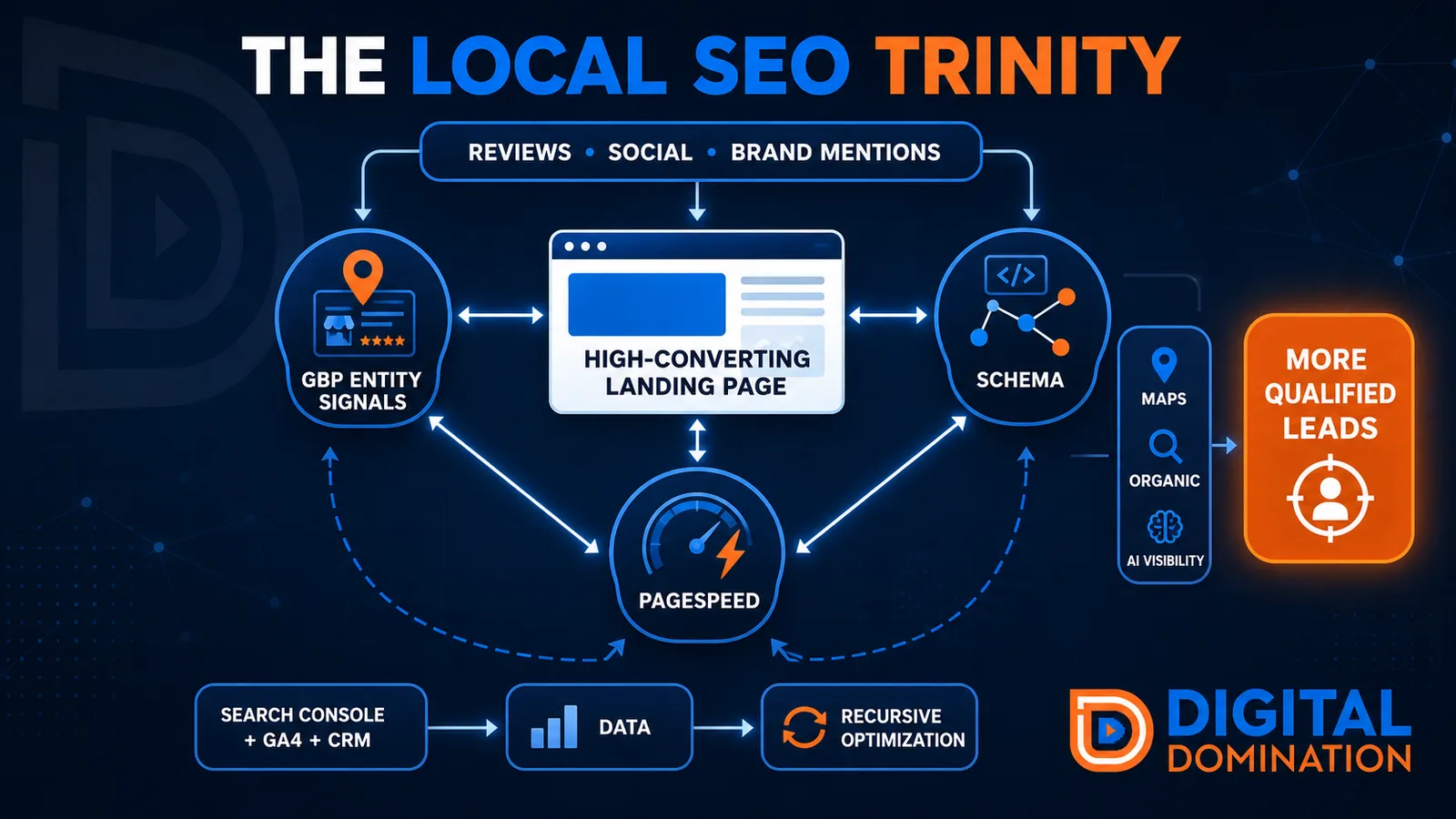
The Local SEO Trinity
Think of a three-legged stool. Your Google profile, your website, and your reviews all have to hold you up. If one leg is short, the whole thing wobbles.
GBP entity signals
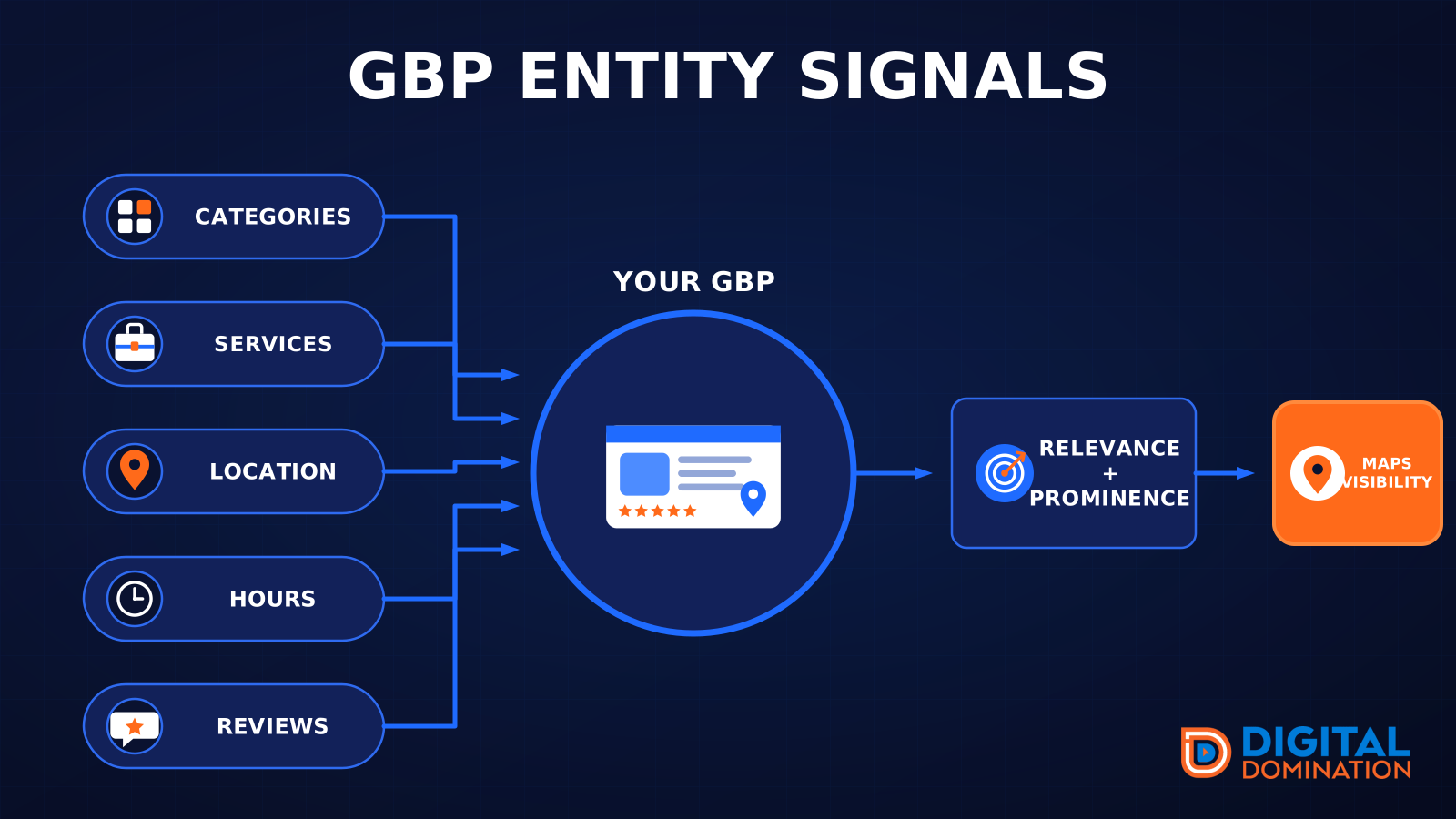
This leg is your Google Business Profile. GBP means Google Business Profile. It covers your categories, your services, your location, your hours, and your reviews. Google uses those facts to decide who to show.
Your Google profile is your storefront sign. If the sign is missing, or it names the wrong shop, people drive past.
PageSpeed to conversion
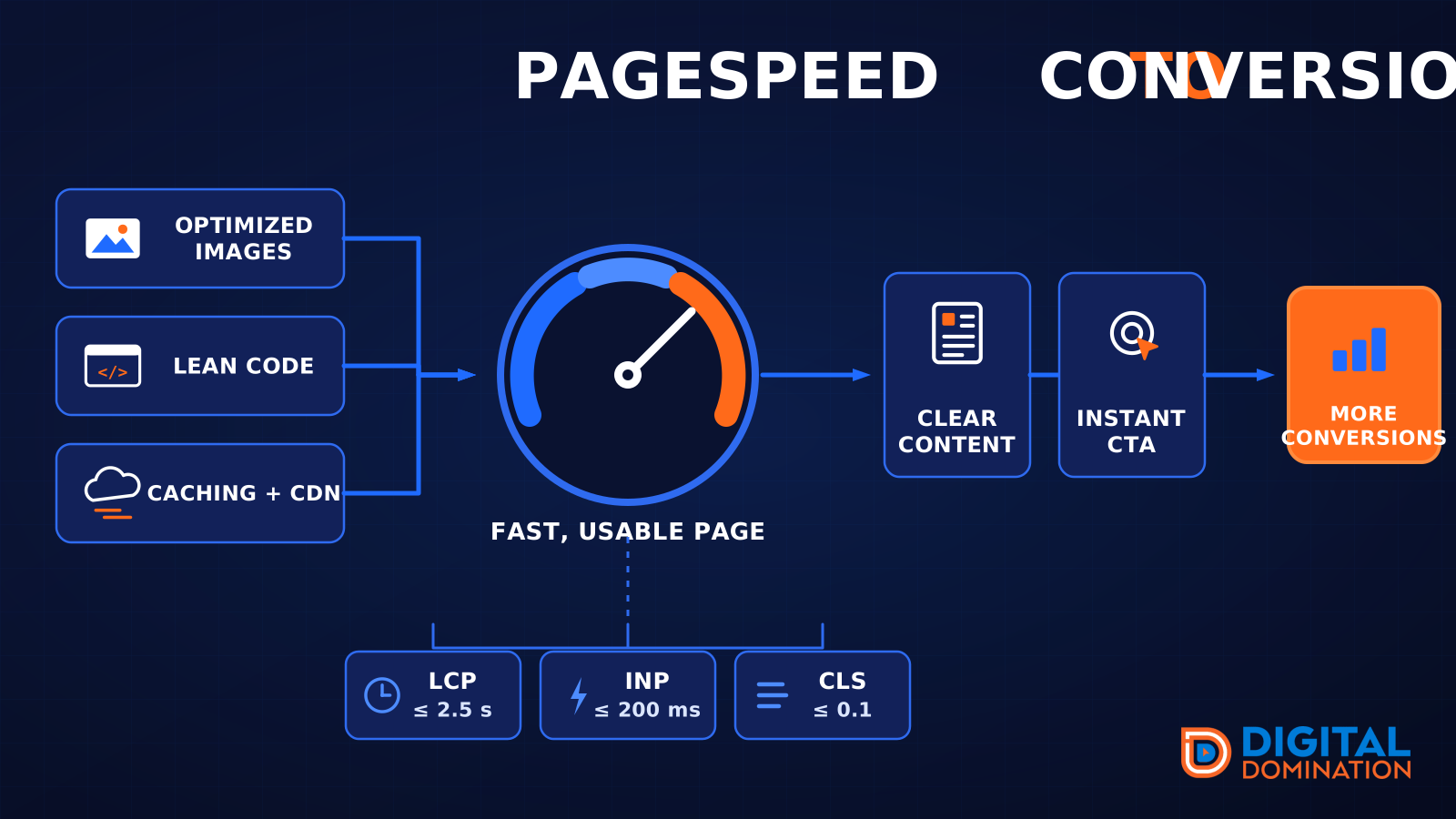
This leg is your website, above all on a phone. Small images, lean code, and caching make a page fast. A fast, clear page is what turns a visit into a call. Phone speed is one of the 12 Trinity checks because a slow page loses the call before anyone sees your offer.
Your website is the showroom. If the door sticks, people leave before they look around.
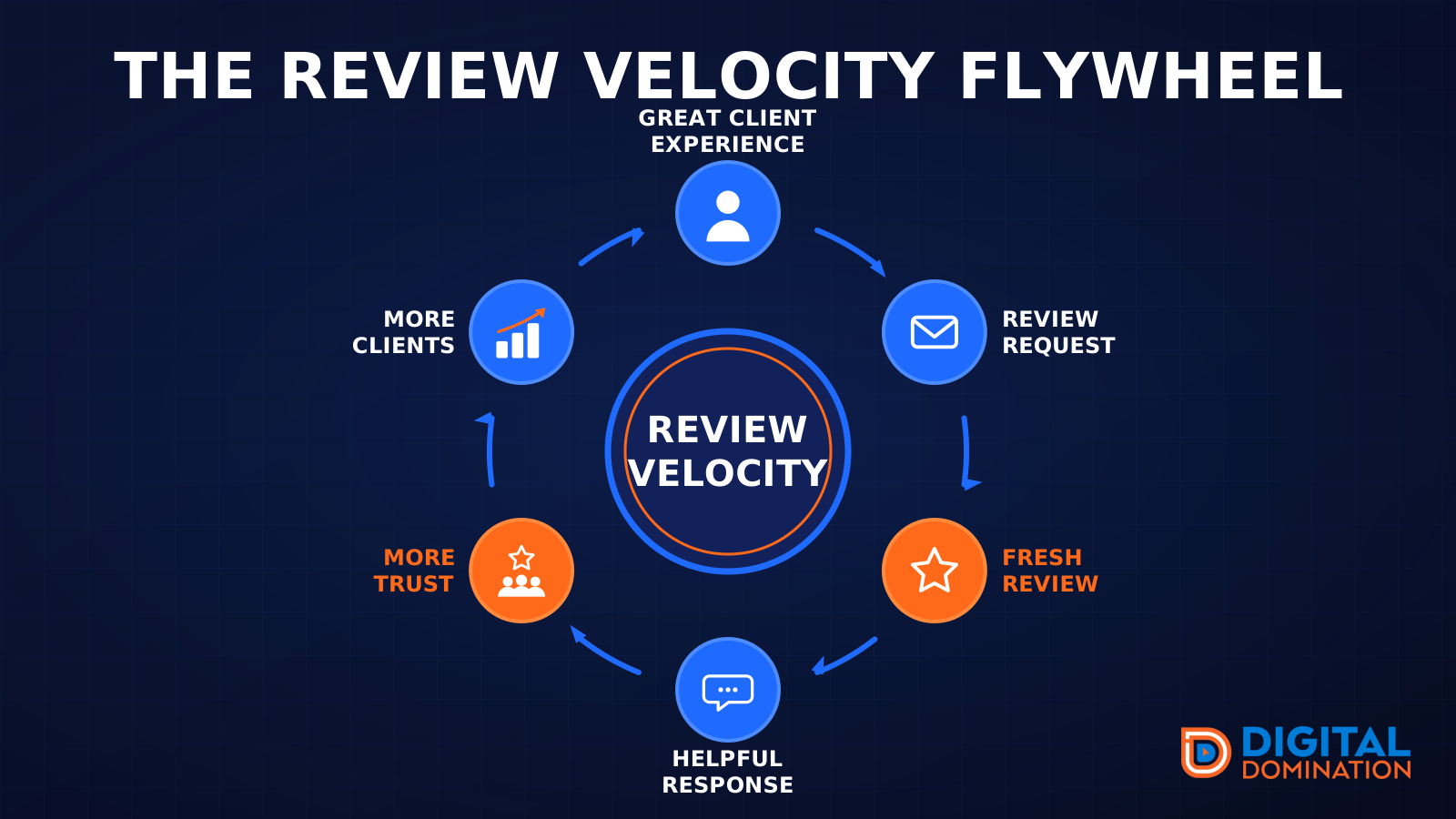
The review velocity flywheel
This leg is reviews and reputation. A good visit leads to a review request, then a fresh review, then a helpful reply, then more trust, then more customers. When the scan can find your Google listing, it shows your rating, your recent reviews, and how many you answered.
Reviews are word of mouth. One kind word helps. A steady stream of real reviews, and a reply from you, helps more.
How this turns into revenue
Being found in more searches leads to more calls. More calls lead to more booked jobs. More booked jobs lead to more revenue.
Example numbers, not a real business: 40 calls from search in a month, a 25 percent close rate, and a $400 average job. That is 10 booked jobs. That is $4,000. The math is the lesson. It is not a promise.
The full page has a box where you can type your own average job value and close rate.
One real story, from our car dealership case study: Medina Auto Group went from invisible on Google Maps to dominating every high-intent search across their market. The turnaround spanned all four of their rooftops at once. The same page says the team eliminated 89 unfair one-star reviews that had been dragging the dealership's reputation down and keeping it out of the Map Pack. It also says: “Results described here are exceptional and non-typical. Outcomes vary based on market conditions, competition, and implementation. No guarantees are made regarding earnings, rankings, or conversions.”
Free strategy call
More booked jobs start with a clear plan
Book a free strategy call. We look at your Google profile, your website, and your reviews, and we tell you what to fix first.
Free. You pick the time. A real person shows up.