
Google Maps SEO in Las Vegas
Practical Google Business Profile work for Las Vegas companies that need more visibility in the local Map Pack without shortcuts that violate Google's rules.
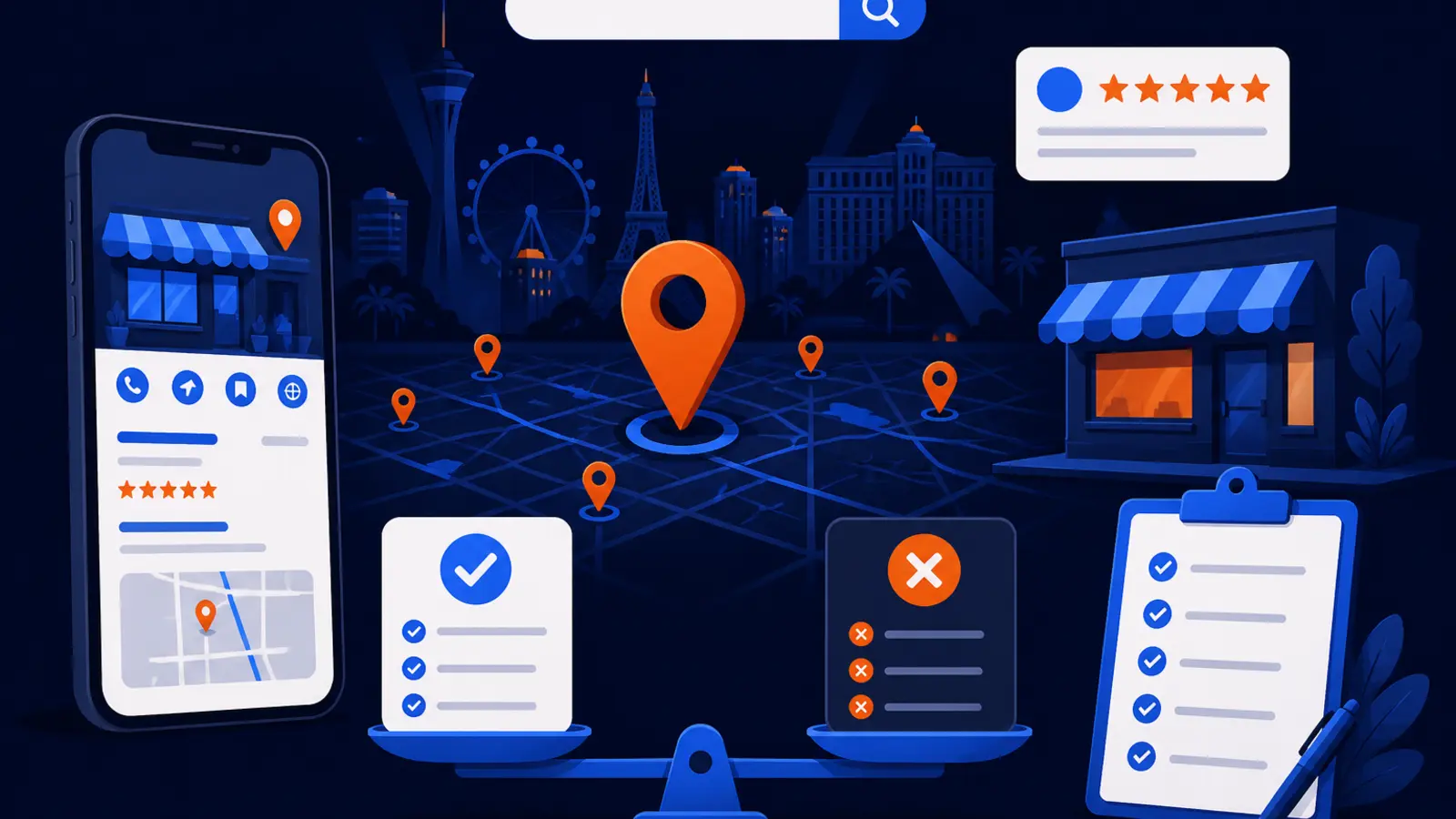
Can a provider get your Las Vegas business into the Map Pack?
Yes, the right Google Maps SEO provider can improve your odds of ranking in the local Map Pack by fixing the parts of your Google Business Profile, website, reviews, and local signals that Google uses to understand your business. No provider can buy you a better local ranking from Google, and any company promising a paid shortcut is not being straight with you.
Google Business Profile Help says local results are mainly based on relevance, distance, and prominence. Google also says there is no way to request or pay Google for a better local ranking. That means the work should be practical, rules-based, and measurable, not mysterious.
For a Las Vegas business, the expected work usually starts with access, verification, category selection, service setup, service area cleanup, review process improvement, photo and profile activity, website alignment, and tracking across the actual neighborhoods or ZIP codes you serve. The timeline depends on your starting point, competition, verification status, and how Google reviews your edits.
Why Las Vegas Maps visibility matters
Las Vegas is a local market with residents, tourists, conventions, and service businesses all competing for attention. The Las Vegas Convention and Visitors Authority Research Center reports 38,545,700 Las Vegas visitors, 5,988,200 convention delegates, and 150,300 hotel rooms based on 2025 data. That does not mean every trade serves tourists, but it does show why local search visibility is valuable in this market.
A homeowner searching for an electrician in Summerlin, a visitor searching for a barber near the Strip, or a property manager searching for HVAC help in Henderson may all see different Map Pack results. That is why a serious campaign should look beyond one keyword typed from one office computer.
A good Las Vegas Maps SEO plan should answer these practical questions:
- ▸Where do you rank from different points across the service area?
- ▸Which searches matter most for your trade?
- ▸Is your profile complete and accurate?
- ▸Are your categories and services aligned with what customers actually buy?
- ▸Are reviews growing without prohibited incentives?
What Google says affects local rankings
Google Business Profile Help says businesses with complete and accurate Business Profile information are more likely to show up in local search results. Google lists full address, business hours, business category, and attributes as profile information that helps customers know what a business does, where it is, and when they can visit.
Google also says the categories selected for a Business Profile affect local ranking, and the primary category should be the specific category that best describes the business. This is one of the first places a provider should look, because a vague or wrong primary category can confuse Google and customers.
For most local businesses, the profile should be checked against the way customers search. The goal is not to stuff every possible phrase into the profile. The goal is to make the business easy for Google and customers to understand.
The core ranking inputs should translate into concrete work:
- ▸Relevance: your categories, services, website, and profile match the search.
- ▸Distance: Google understands where you are located or where you serve customers.
- ▸Prominence: your reputation, visibility, and trust signals support your profile.
- ▸Accuracy: your hours, address settings, phone, and business details are current.
Start with access, verification, and profile control
Before any serious Maps SEO work begins, you need control of the correct Google Business Profile. If a former employee, old agency, franchise account, or duplicate listing controls the profile, the first job is cleanup and access.
Google Business Profile Help says verification methods are automatically determined by Google and depend on business type, public information, region, or business hours. Most postcard verification codes arrive within 14 days, and verification codes expire after 30 days. If Google asks for video verification, Google says the recording must be live, unedited, unique, complete, at least 30 seconds long, and recorded and uploaded from a mobile device through the Business Profile. Google says video verification review can take up to 5 business days after upload.
This is one reason timelines vary. A verified profile with clean access can move faster than a profile stuck in verification or ownership disputes.
At the start, you should be able to confirm these items:
- ▸You know who owns and manages the profile.
- ▸The business name matches the real-world business name.
- ▸The phone number reaches the business.
- ▸The website listed is the right website.
- ▸The address or hidden address setting matches how the business serves customers.
- ▸There are no obvious duplicates creating confusion.
Set categories, services, and service areas carefully
Categories are not a place to guess. Google Business Profile Help says the primary category should be the specific category that best describes the business. A Las Vegas garage door company, dentist, med spa, mobile mechanic, law firm, or restaurant needs category choices that reflect its actual business model.
Services matter too. Google Business Profile Help says service businesses can add services to a Business Profile, group services into categories, and add service details such as descriptions and prices. If your services are blank, outdated, or too thin, customers may not understand what you do, and Google has less useful information to work with.
Service areas also need care. Google Business Profile Help says a service-area business can set up to 20 service areas based on cities, postcodes, or other areas served. Google also says a service-area business cannot set its service area as a radius around the business and should keep the overall area within about two hours of driving time from where the business is based. If a business does not serve customers at its business address, Google says it should remove the address from the profile.
A provider should clean this up in a way that reflects the real business:
- ▸Choose the most specific primary category.
- ▸Use secondary categories only when they are accurate.
- ▸Add services customers actually buy.
- ▸Group services in a way customers understand.
- ▸Set service areas by real places, not a radius.
- ▸Hide the address when customers are not served there.
Reviews, photos, and ongoing profile activity
Reviews are part of how customers decide whether to call. Google Business Profile Help says reviews show next to a Business Profile in Maps and Search. Google also says incentives such as free or discounted goods or services in exchange for reviews are prohibited.
That means a provider should help you ask real customers for honest reviews, not buy reviews, gate unhappy customers, or offer discounts for five-star ratings. A strong process can be simple: ask every legitimate customer, make the request easy, respond professionally, and learn from patterns in feedback.
Photos and profile updates should also reflect the real business. For a local service company, that may include team photos, jobsite photos, vehicles, equipment, and storefront images where appropriate. For a shop or office, it may include interior, exterior, staff, products, and customer-facing areas.
Healthy review and profile activity should look like this:
- ▸Real customers are asked consistently.
- ▸No discounts or gifts are offered for reviews.
- ▸Responses sound human and professional.
- ▸Photos show the real business.
- ▸The profile stays current when hours, services, or locations change.
What to expect from a Google Maps SEO provider
A reliable provider should give you a clear starting point, a plan, and reporting you can understand without needing to be technical. You should not have to accept vague statements like, "rankings are moving" without seeing where and for what searches.
Google Business Profile performance reporting includes directions, calls, website clicks, messages, bookings, products, menus, and offers metrics, according to Google Business Profile Help. Those numbers do not replace ranking data, but they help show whether visibility is turning into customer actions.
For a Las Vegas campaign, map tracking should be location-based. A single ranking from one point in town does not explain how you show up across North Las Vegas, Summerlin, Spring Valley, Enterprise, Henderson, or the Strip area.
Use these checkpoints to judge whether the work is real:
- ▸You receive a baseline ranking map before major work begins.
- ▸The provider explains which searches are being tracked.
- ▸Profile edits are documented.
- ▸Review requests follow Google's rules.
- ▸Reports show rankings by location, not just one average.
- ▸Calls and other customer actions are reviewed.
- ▸The plan changes when the data shows a problem.
Questions to ask before you sign
Before you hire a Google Maps SEO provider in Las Vegas, ask questions that force clear answers. You are not looking for jargon. You are looking for a process you can verify and a provider willing to follow Google's rules.
Ask these questions before you commit:
- ▸Do you need owner access to my Google Business Profile?
- ▸How will you handle verification if Google asks for it?
- ▸Which primary category do you recommend and why?
- ▸How will you choose service areas for my business?
- ▸Do you use incentives to get reviews?
- ▸Will I see rankings across my actual service area?
- ▸What actions are included in the first month?
- ▸How often will I receive reports?
- ▸What happens if Google rejects or delays profile edits?
- ▸Can you explain what I should do myself if I choose the DIY path?
Typical timelines you should expect
Some work can happen quickly, but Google Maps SEO is not always instant. Google Business Profile Help says edits to a verified Business Profile usually take up to 10 minutes to review, but sometimes take up to 30 days. Verification can also add time, especially when postcard or video verification is required.
In the first few days, a provider can usually audit access, profile accuracy, categories, services, service areas, reviews, photos, website alignment, and local ranking coverage. If the profile is verified and clean, initial edits can often be submitted quickly. If the profile is not verified, the verification process becomes the first bottleneck.
After setup, the next stage is measurement and adjustment. Rankings can change by search term, neighborhood, competitor activity, and profile strength. This is why weekly tracking is more useful than a one-time screenshot.
A practical timeline usually has these stages:
- ▸Access and audit.
- ▸Verification or ownership cleanup if needed.
- ▸Category, service, and service area corrections.
- ▸Review process and photo improvements.
- ▸Website and profile alignment.
- ▸Weekly ranking and call tracking.
- ▸Ongoing adjustment based on real search results.
When DIY is enough
The DIY path can be a good fit if you already have access to the correct Google Business Profile, understand your business categories, and have time to manage the profile consistently. It also helps if your market is not extremely competitive or you only need basic cleanup.
A business owner can handle many of the basics without an agency. You can confirm your hours, update services, choose accurate categories, request reviews properly, add photos, and watch performance reporting inside the profile. The work is not magic, but it does require consistency and attention to Google's rules.
DIY is usually more realistic when these are true:
- ▸You control the correct profile.
- ▸Your business is already verified.
- ▸You can make edits without delay.
- ▸You understand your real service area.
- ▸You have time to ask for reviews correctly.
- ▸You can read performance reports monthly.
- ▸You are comfortable tracking rankings manually or with software.
When a Las Vegas provider makes sense
Hiring help makes more sense when Maps visibility is tied directly to phone calls, booked jobs, walk-ins, or appointments. It also makes sense when your competitors are active, your profile has history problems, you serve many parts of the valley, or you need reporting that shows what is happening across the market.
Digital Domination works with Las Vegas businesses using a 169-point GeoGrid scan that checks 169 real Google results across the service area. The Maps Domination Program includes weekly GeoGrid tracking reports with visual proof of rankings and call volume. Pricing is set per market on a qualification call. Results vary.
Digital Domination also offers one client per trade per service area, which means territory exclusivity. The work aims to improve Map Pack visibility. Results vary. Google Partner and Meta Business Partner badges are shown on Digital Domination's roster page.
If you are comparing providers, look for these fit signals:
- ▸They show you where you rank before asking you to decide.
- ▸They explain the Google rules clearly.
- ▸They do not promise to pay Google for placement.
- ▸They track rankings across your service area.
- ▸They connect Maps work to calls and customer actions.
- ▸They are clear about whether your trade and territory are available.
Get a Las Vegas plan before you spend
If you want help with Google Maps SEO in Las Vegas, visit Digital Domination's Las Vegas page. It explains the local Maps Domination Program, the qualification process, and how reporting works for eligible businesses.
If you are not ready to talk yet, start with the free GeoGrid scan page. The scan shows how your business appears across 169 real Google results in your service area, so you can see whether the problem is profile setup, location coverage, competition, or something else.
The best next step is simple: see where you rank now, confirm what needs to be fixed, and decide whether DIY or a managed Las Vegas Maps SEO campaign is the better use of your time.
Keep reading
Related guides
- ▸What results to expect from Google Maps SEO, and when
- ▸What to expect in your first month of Google Maps SEO
- ▸What to look for when hiring a Google Maps SEO provider
Put it into action
Frequently Asked Questions
How long does Google Maps SEO take in Las Vegas?
It depends on verification, competition, profile quality, and where you need to rank. Some profile edits can be reviewed quickly, but Google Business Profile Help says edits can sometimes take up to 30 days. A serious campaign should track progress weekly across your real service area.
Can I pay Google to rank higher in the Map Pack?
No. Google Business Profile Help says there is no way to request or pay Google for a better local ranking. A provider should improve relevance, distance signals where possible, and prominence without claiming to buy placement from Google.
What should a Google Maps SEO company do first?
The first step should be access and diagnosis. That means confirming ownership of the correct Google Business Profile, checking verification, reviewing categories, services, address settings, service areas, reviews, photos, and baseline rankings.
Do service-area businesses in Las Vegas need to show an address?
Not always. Google Business Profile Help says a business that does not serve customers at its business address should remove the address from its Business Profile. A service-area business should set real service areas rather than using a radius.
Are reviews important for Google Maps SEO?
Reviews matter because they appear next to your profile in Maps and Search and influence customer decisions. Google prohibits incentives such as free or discounted goods or services in exchange for reviews. The safe approach is to ask real customers consistently and respond professionally.
Can I do Google Maps SEO myself?
Yes, if you have profile access, can handle verification and edits, and have time to manage categories, services, service areas, reviews, photos, and reporting. DIY is harder when the market is competitive, the profile has access problems, or you need to track rankings across many parts of Las Vegas.
What is a GeoGrid scan for Google Maps rankings?
A GeoGrid scan checks how your business ranks from many points across the service area instead of from one location. Digital Domination's free GeoGrid scan checks 169 real Google results, which helps show where you are visible and where competitors are winning.
The Local SEO Trinity
Think of a three-legged stool. Your Google profile, your website, and your reviews all have to hold you up. If one leg is short, the whole thing wobbles.
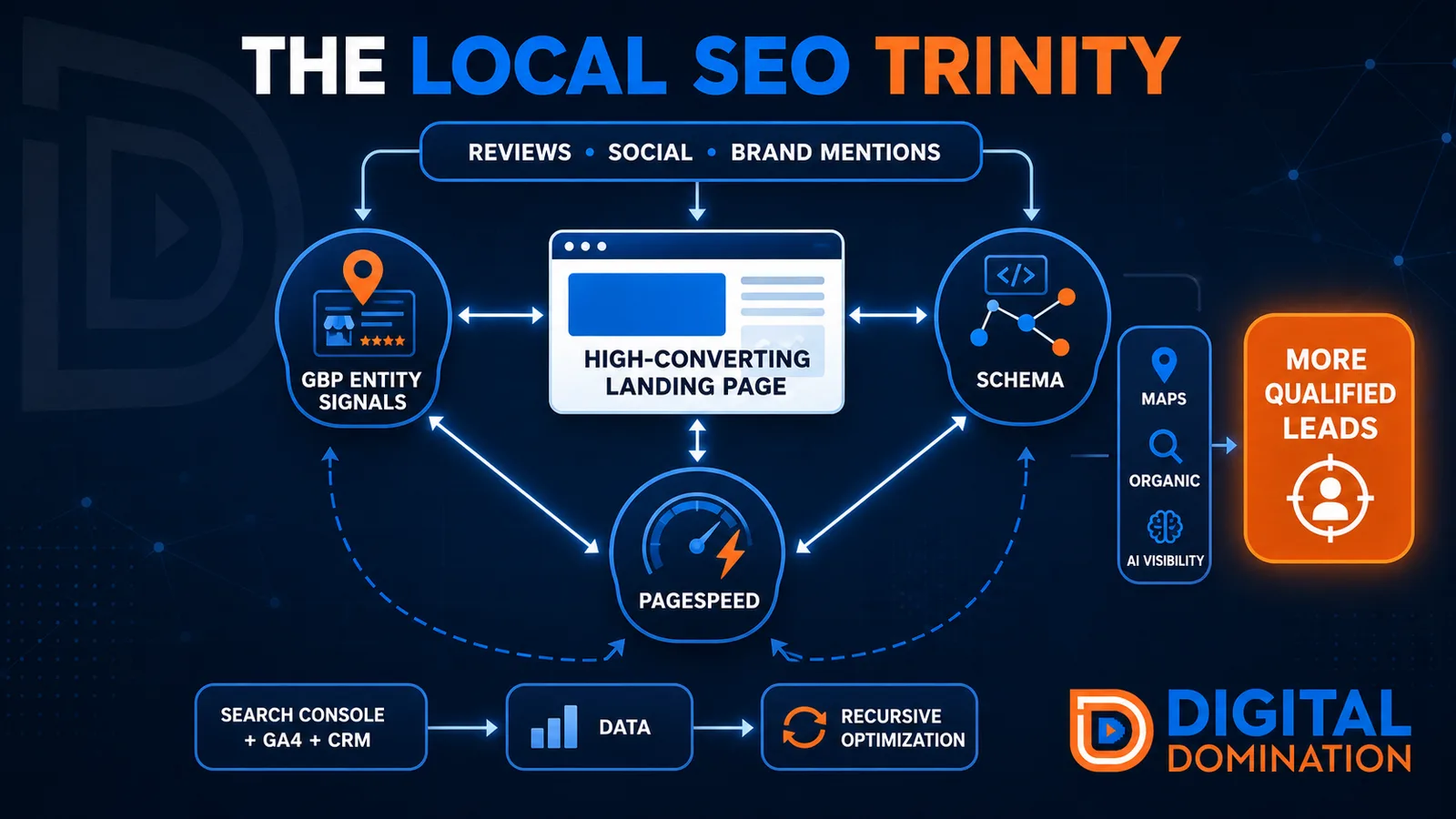
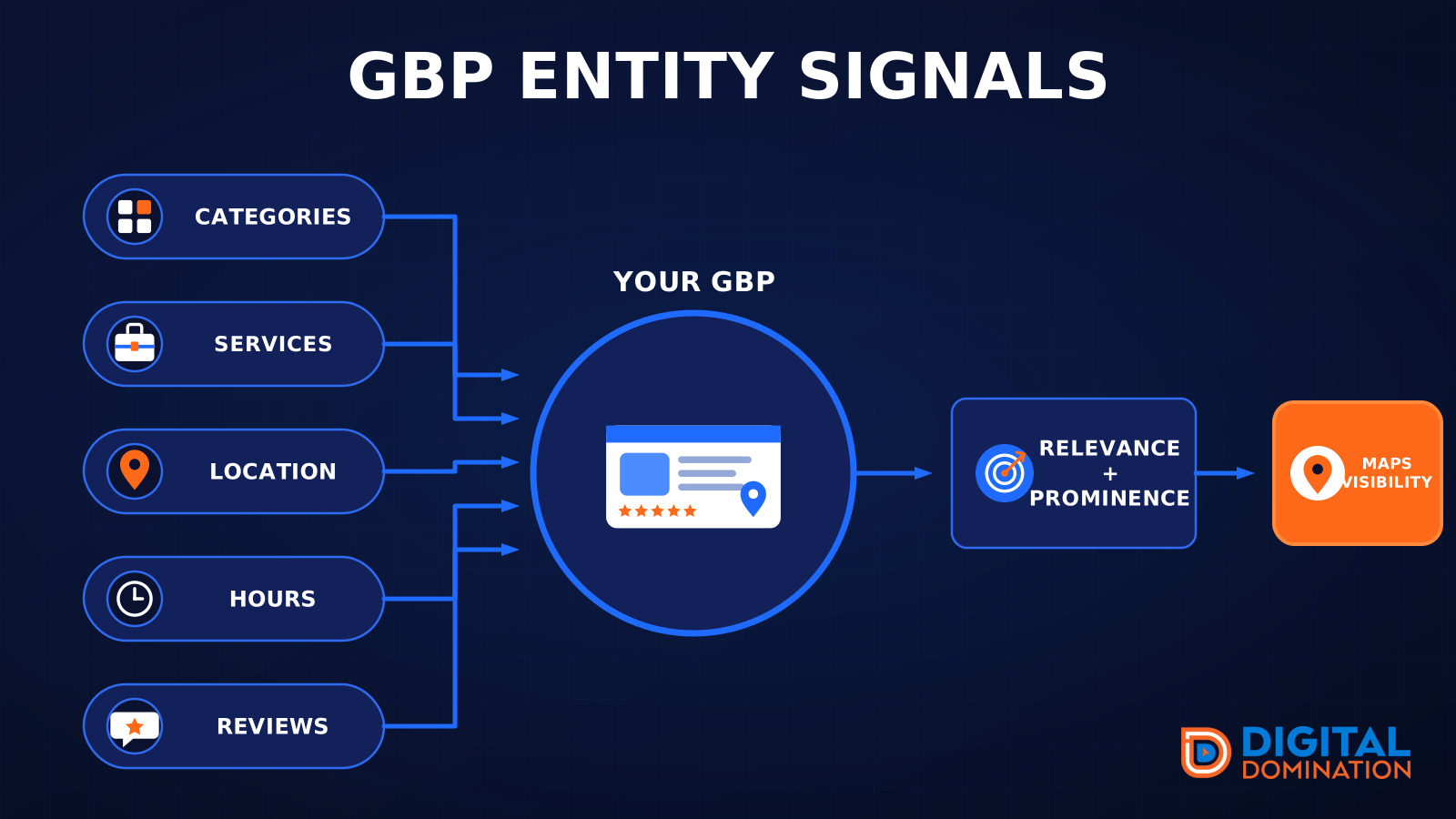
GBP entity signals
This leg is your Google Business Profile. GBP means Google Business Profile. It covers your categories, your services, your location, your hours, and your reviews. Google uses those facts to decide who to show.
Your Google profile is your storefront sign. If the sign is missing, or it names the wrong shop, people drive past.
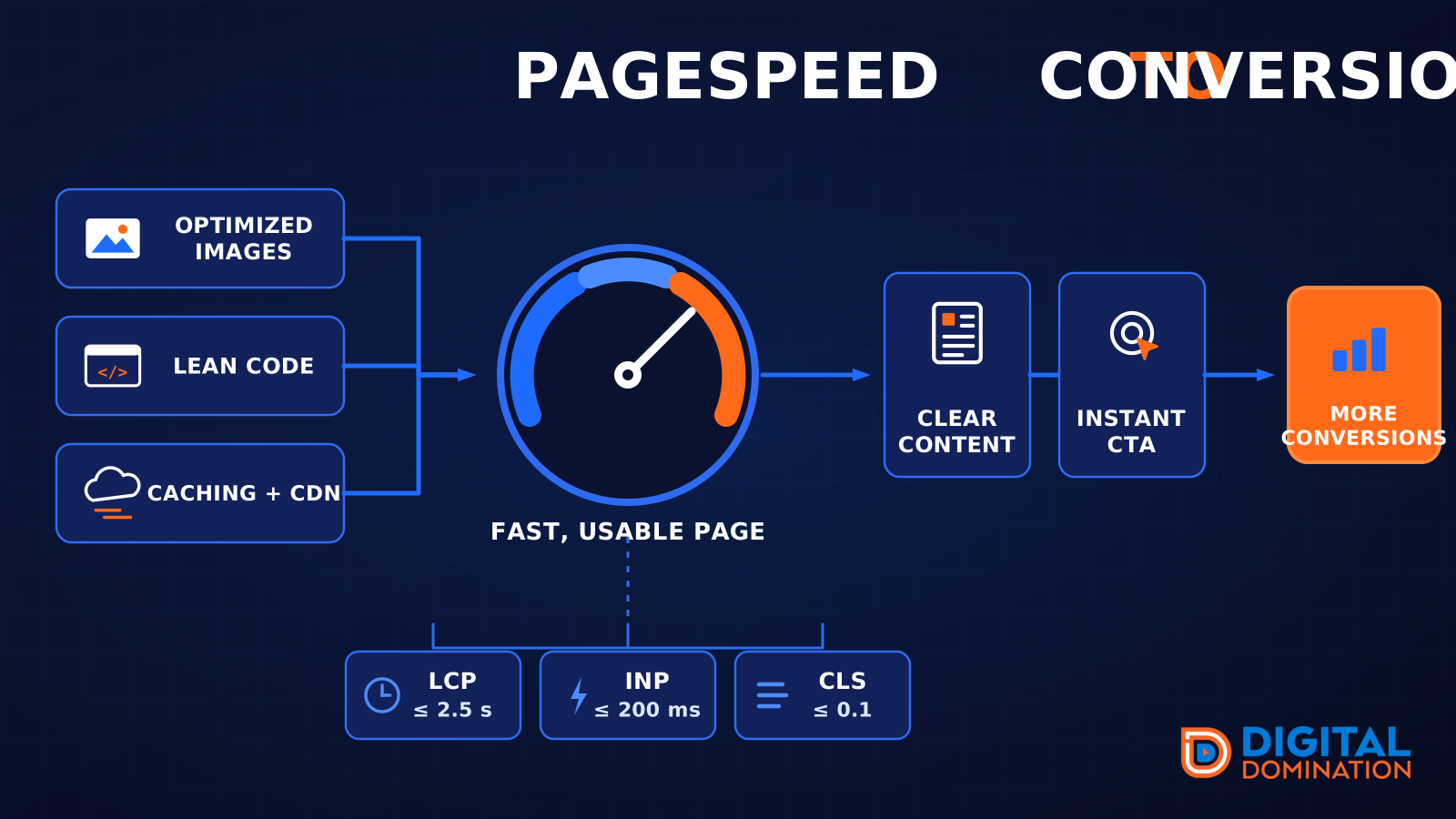
PageSpeed to conversion
This leg is your website, above all on a phone. Small images, lean code, and caching make a page fast. A fast, clear page is what turns a visit into a call. Phone speed is one of the 12 Trinity checks because a slow page loses the call before anyone sees your offer.
Your website is the showroom. If the door sticks, people leave before they look around.
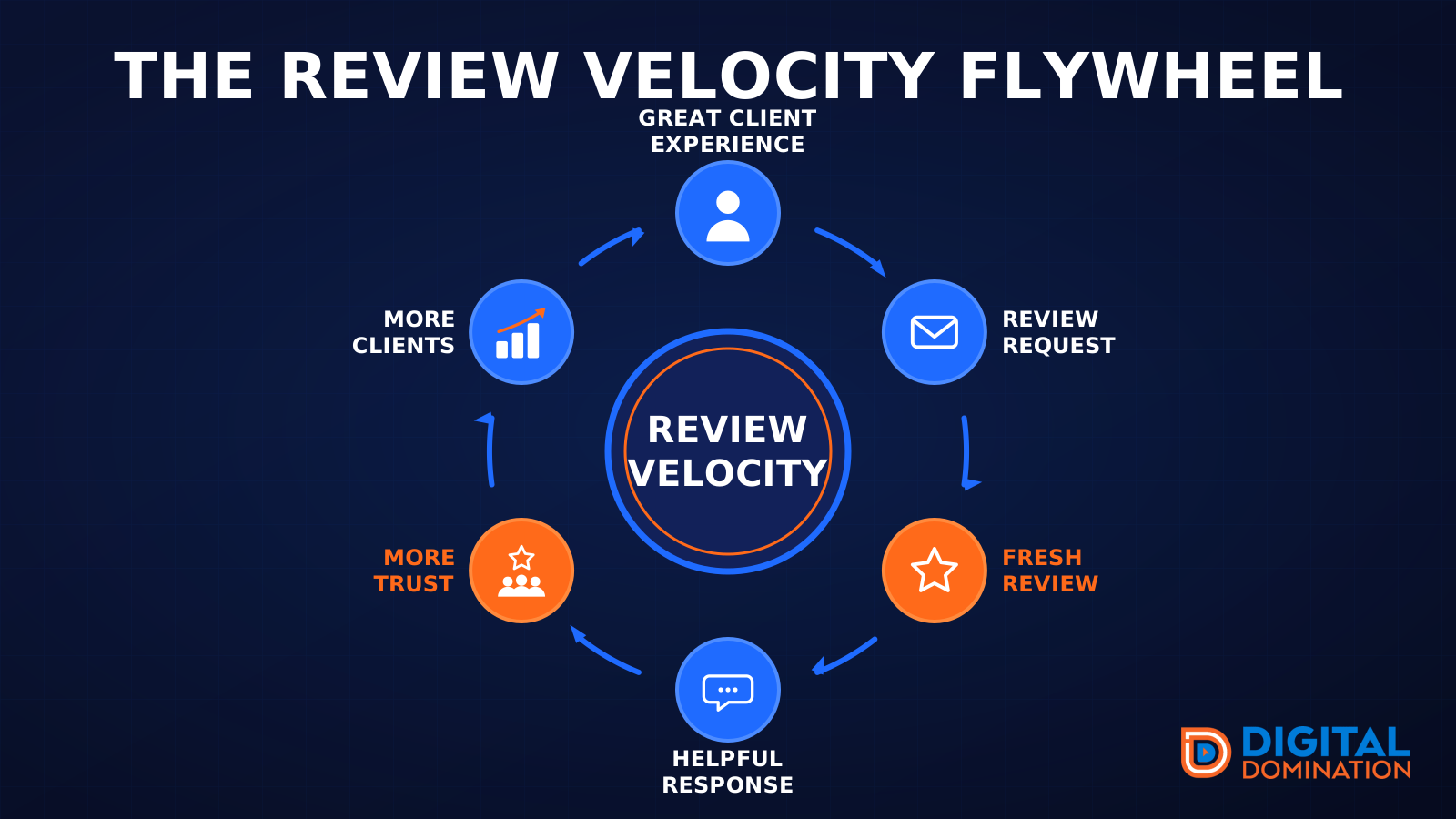
The review velocity flywheel
This leg is reviews and reputation. A good visit leads to a review request, then a fresh review, then a helpful reply, then more trust, then more customers. When the scan can find your Google listing, it shows your rating, your recent reviews, and how many you answered.
Reviews are word of mouth. One kind word helps. A steady stream of real reviews, and a reply from you, helps more.
How this turns into revenue
Being found in more searches leads to more calls. More calls lead to more booked jobs. More booked jobs lead to more revenue.
Example numbers, not a real business: 40 calls from search in a month, a 25 percent close rate, and a $400 average job. That is 10 booked jobs. That is $4,000. The math is the lesson. It is not a promise.
The full page has a box where you can type your own average job value and close rate.
One real story, from our car dealership case study: Medina Auto Group went from invisible on Google Maps to dominating every high-intent search across their market. The turnaround spanned all four of their rooftops at once. The same page says the team eliminated 89 unfair one-star reviews that had been dragging the dealership's reputation down and keeping it out of the Map Pack. It also says: “Results described here are exceptional and non-typical. Outcomes vary based on market conditions, competition, and implementation. No guarantees are made regarding earnings, rankings, or conversions.”
Free strategy call
More booked jobs start with a clear plan
Book a free strategy call. We look at your Google profile, your website, and your reviews, and we tell you what to fix first.
Free. You pick the time. A real person shows up.