
What to expect in your first month of Google Maps SEO
The first 30 days are usually about cleanup, verification, tracking, and trust signals. Here is what should happen before Map Pack rankings and leads start moving.

The short answer: month one is foundation work
In the first 30 days of Google Maps SEO, you should expect setup, cleanup, verification checks, profile accuracy work, review process fixes, tracking setup, and baseline reporting. You should not expect a trustworthy provider to promise instant Map Pack movement just because they changed a few fields in your Google Business Profile.
Google Business Profile Help says there is no way to request or pay for a better local ranking on Google. Google also says local results are mainly based on relevance, distance, and prominence. That means the first month is about helping Google understand what your business is, where it serves customers, and why it deserves trust compared with nearby competitors.
For a local business owner, the best way to judge month one is not only by new leads. Early leads can happen, but the cleaner buying question is this: did the SEO company remove confusion, build the right tracking, and start the work Google actually uses to evaluate local businesses? In month one, you should see these early pieces come together:
- ▸Your profile is verified or the verification path is clear
- ▸Business name, address, phone, hours, categories, and services are reviewed
- ▸Incorrect or risky profile fields are corrected
- ▸A legal review request process is started
- ▸Ranking baselines are captured by search location, not just one keyword
- ▸Profile edits and pending changes are documented
- ▸You understand what is waiting on Google review windows
Why Google Maps SEO rarely looks dramatic in week one
The first week can feel quiet because some of the most important work is administrative. If your profile is not verified, Google Business Profile Help says performance data is available only for verified Business Profiles. That means calls, website clicks, direction requests, messages, bookings where applicable, views, and searches are not fully useful until verification is handled.
Verification itself can take time. Google Business Profile Help says verification reviews take up to 5 business days after verification steps are completed, with longer reviews on rare occasions. If your profile needs reverification after an ownership change, address adjustment, or other sensitive update, that waiting period can affect how quickly other work becomes visible.
A good provider should explain this plainly instead of acting like every delay is mysterious. Week one often includes these less flashy but important steps:
- ▸Confirming who owns or manages the Google Business Profile
- ▸Checking whether the profile is verified
- ▸Identifying pending edits or previous rejected changes
- ▸Making sure the business name matches real-world branding
- ▸Checking whether the address or service area is set correctly
- ▸Reviewing whether profile access is controlled by the business
What should be cleaned up first
The most important profile fields are not always the most exciting ones. Google Business Profile Help says relevance is how well a Business Profile matches the search, and complete business information helps Google match the profile to relevant searches. That makes your basic data a ranking foundation, not a formality.
The business name deserves special caution. Google Business Profile Help says the Business Profile name should match the business name on real-world signage, stationery, and branding. Whitespark's Local Search Ranking Factors contributor survey ranked keywords in the Google Business Profile business title among the top Local Pack and Maps factors, but that does not mean an owner should stuff keywords into the name. If the words are not part of the real business name, the risk is not worth it.
Category selection also matters. Google Business Profile Help says Business Profile categories affect local ranking, and businesses should not select a category for every product or service. In the first month, you should expect a thoughtful category review, not a random list of everything you sell.
The cleanup should usually cover these items:
- ▸Primary category fit
- ▸Secondary category fit
- ▸Business name compliance
- ▸Address and service area accuracy
- ▸Hours and holiday hours
- ▸Phone number and website destination
- ▸Predefined and custom services
- ▸Photos, description, and profile completeness
What to expect from category and service work
Categories tell Google what kind of business you are. Services help describe what you provide. Those two are related, but they are not the same thing. A plumber should not use categories to list every possible repair. A profile should use categories to identify the business type, then use services to explain specific work.
Google Business Profile Help says categories affect local ranking and warns businesses not to select a category for every product or service. Google for Developers says businesses can add predefined and custom services to a Business Profile for services provided in a store or at customer locations. In practical terms, month one should include both restraint and detail.
This is one of the places where DIY owners often make mistakes. They either choose too many categories, choose a broad category because it sounds bigger, or skip services because they do not look important. Your first month should bring those fields into a clean structure:
- ▸One best-fit primary category
- ▸Only relevant secondary categories
- ▸Services that match real work you perform
- ▸Service wording that customers actually understand
- ▸No categories added just to chase unrelated searches
- ▸No service list that promises work you do not provide
The review process should start early, but stay compliant
Reviews are part of local trust. Google Business Profile Help says prominence is based on information such as website links and reviews, and more reviews and positive ratings can help local ranking. That is why a review process usually starts in the first month, even though review growth takes time.
The review process must be clean. Google Business Profile Help prohibits offering free or discounted goods or services in exchange for customers posting reviews, changing reviews, or removing negative reviews. A proper first-month plan should help you ask real customers for honest reviews without incentives, pressure, or review gating.
If you are comparing DIY against hiring help, this is a fair dividing line. The DIY path suits an owner who can consistently ask customers for reviews, follow Google's rules, and stay patient. Managed SEO suits an owner who wants that process built into a broader 12-week execution plan with tracking and accountability.
In month one, a compliant review plan should include these basics:
- ▸A direct way for customers to leave a review
- ▸A simple request message that does not offer rewards
- ▸A repeatable staff process
- ▸A plan for responding to reviews professionally
- ▸No filtering customers based on expected rating
- ▸No discounts, gifts, or favors tied to reviews
Why edits can take longer than you expected
A lot of first-month frustration comes from waiting on Google to process changes. Google Business Profile Help says edits to a verified Business Profile usually take up to 10 minutes to review, but can take up to 30 days. Google also says a pending Business Profile edit means the edit is still under review.
That means a provider can do the right work and still wait for Google to show it publicly. This is especially important when correcting categories, hours, services, addresses, or other fields that affect how customers see the business. The answer is not to keep changing the same field every few hours. The answer is to document what was changed, when it was changed, and whether Google accepted it.
Suggested edits are another issue. Google Business Profile Help says when a suggested edit requires review, the business may have 4 days to accept or reject it before Google may publish the update if public information supports it. In the first month, someone should be watching for this because public edits can create bad data.
Expect your provider to track these edit situations:
- ▸Edits that were submitted
- ▸Edits that are pending
- ▸Edits that were accepted
- ▸Edits that were rejected
- ▸Suggested edits from Google or the public
- ▸Fields that should not be repeatedly changed without a reason
What tracking should be in place before you judge results
You cannot judge Google Maps SEO by checking one search from your phone in your parking lot. Google Business Profile Help says distance refers to how far each business is from the customer who is searching, and Google uses what it knows about the customer location if the customer does not share a location. That means two people in the same town can see different Map Pack results.
Month one should create a baseline that shows where you rank across the service area, not just at your office or shop. This is why a GeoGrid view is useful. Digital Domination's Free GeoGrid scan checks 169 real Google results across the service area, giving a clearer picture than a single manual search.
Performance data also has timing limits. Google Business Profile Help says Business Profile performance data is available only for verified profiles, and the searches metric is updated at the start of each month and might take up to 5 days to appear. If you are judging the first 30 days, remember that some Google metrics naturally lag.
The first tracking setup should make these items clear:
- ▸Where you rank from different points in the service area
- ▸Which search terms are being tracked
- ▸Whether the profile is verified enough to show performance data
- ▸Calls, website clicks, directions, messages, and bookings where applicable
- ▸Baseline visibility before major work compounds
- ▸Which metrics update daily, weekly, or monthly
Concrete checkpoints you can verify in the first 30 days
Even if rankings have not moved yet, you should not be left guessing. A serious month-one campaign produces visible checkpoints. Some are inside the Google Business Profile, some are in reports, and some are in the way your team is now asking customers for reviews.
These checkpoints are practical for a nontechnical owner. You do not need to understand every ranking factor. You only need to know whether the important setup work happened, whether Google is still reviewing anything, and whether the next steps are clear.
Use this list to check whether month one is on track:
- ▸You know who has owner and manager access to the profile
- ▸The business name matches real-world branding
- ▸The primary category has been reviewed and explained
- ▸Services have been added or cleaned up
- ▸Incorrect hours, phone numbers, or website links have been corrected
- ▸Pending edits are visible and documented
- ▸A compliant review request process is active
- ▸You have a baseline ranking map for the service area
- ▸You know which metrics are too early to judge
- ▸You have a written plan for the next 30 days
Questions to ask before you sign
Before you hire a Google Maps SEO provider, ask questions that reveal whether they understand the first 30 days. You are not looking for a magic button. You are looking for a team that can separate what they control from what Google controls, then show steady execution.
These questions are especially useful before signing a managed local SEO agreement:
- ▸How will you verify the current state of my Google Business Profile?
- ▸Which fields will you review before making changes?
- ▸How do you choose the primary category?
- ▸How do you handle pending edits or rejected edits?
- ▸How will you ask for reviews without breaking Google's rules?
- ▸How will you measure rankings across my actual service area?
- ▸What should I expect before leads increase?
- ▸What parts of the first month depend on Google review windows?
- ▸How often will I see proof of work and ranking movement?
- ▸What happens if a competitor or customer suggests a bad profile edit?
When the DIY path makes sense
Not every business needs a managed Google Maps SEO program on day one. The DIY path can make sense for an owner who has time, patience, and enough attention to detail to keep the profile clean. Google provides help documents for verification, categories, edits, services, performance data, reviews, and profile updates, and those are useful starting points.
DIY is a better fit when the owner can personally handle the routine work without letting it drift. If you are in a less competitive market, have a stable location, and already get steady customer reviews, you may be able to make basic improvements yourself before hiring help.
The DIY path usually suits an owner who can do these things consistently:
- ▸Verify the profile and keep access secure
- ▸Keep business data consistent
- ▸Choose categories carefully
- ▸Add accurate services
- ▸Request reviews without incentives
- ▸Monitor suggested edits
- ▸Wait through Google review windows
- ▸Check performance data without overreacting to short-term swings
When a managed 12-week plan is a better fit
A managed plan is usually a better fit when the opportunity is valuable, the market is competitive, or the owner cannot afford to treat Maps visibility as a side project. The first 30 days still involve setup and waiting, but the work is tied to a larger execution window instead of random profile changes.
Digital Domination's Maps Domination Program is built around a clear outcome: top 3 in the Google Map Pack in 12 weeks or you do not pay. Pricing for the program is set per market on a qualification call and tied to the ranking outcome. Digital Domination also works with one client per trade per service area, so territory exclusivity is part of the model.
The managed path makes more sense when you want these pieces handled for you:
- ▸A 169-point GeoGrid scan before strategy decisions
- ▸Weekly GeoGrid tracking reports with visual proof of rankings and call volume
- ▸Profile cleanup tied to ranking outcomes
- ▸Review process support
- ▸Local competition checks by service area
- ▸A 12-week execution plan instead of isolated tasks
- ▸One client per trade per service area
Next step: see where you really rank before you decide
The first month of Google Maps SEO should feel organized, not magical. You should know what was fixed, what is pending with Google, what is being measured, and what still needs time. If an agency only talks about quick wins and cannot explain verification, edit review windows, categories, reviews, distance, and tracking, keep asking questions.
If you want a managed path, visit Digital Domination's Get Ranked page. It explains the Maps Domination Program, the ranking guarantee, the one-client-per-trade territory model, and how qualification works. If you want to see your current visibility first, start with the Free GeoGrid scan page, which checks 169 real Google results across your service area.
Keep reading
Related guides
- ▸Marketing a Practice in Nevada vs California
- ▸Online reputation management near me
- ▸Online Reputation Management Vs Doing Local SEO Yourself Diy With Free
Put it into action
Frequently Asked Questions
What happens in the first month of Google Maps SEO?
The first month is usually profile cleanup, verification checks, category review, service updates, review process setup, and tracking. Rankings and leads can move early, but the main goal is to build a clean foundation and establish a baseline.
Why are my Google Business Profile edits still pending?
Google Business Profile Help says a pending edit means the edit is still under review. Edits to a verified profile usually take up to 10 minutes to review, but they can take up to 30 days.
Can I pay Google to rank higher in the Map Pack?
No. Google Business Profile Help says there is no way to request or pay for a better local ranking on Google. Local rankings are mainly based on relevance, distance, and prominence.
How long does Google Business Profile verification take?
Google Business Profile Help says verification reviews take up to 5 business days after verification steps are completed. Longer reviews can happen on rare occasions, so verification can affect the first-month timeline.
Should I add keywords to my Google Business Profile name?
Be careful. Google Business Profile Help says your profile name should match the business name on real-world signage, stationery, and branding. Even though Whitespark's contributor survey ranked keywords in the business title as an important local factor, adding words that are not your real business name can create risk.
When should I expect Google Maps leads to increase?
Some businesses see movement early, but the first 30 days are often too soon to judge the full campaign by leads alone. A better early test is whether tracking is in place, the profile is cleaned up, reviews are being requested correctly, and Google review windows are being managed.
Can I do Google Maps SEO myself?
Yes, if you can verify the profile, keep business information consistent, choose categories carefully, request reviews without incentives, and monitor edits. DIY is harder when the market is competitive or when you need a structured 12-week plan tied to a ranking outcome.
What report should I get in the first month?
You should get a baseline view of rankings across your service area, not just one manual search. You should also see what profile fields were reviewed, which edits are pending, and what customer actions are being tracked, such as calls, website clicks, directions, messages, and bookings where applicable.
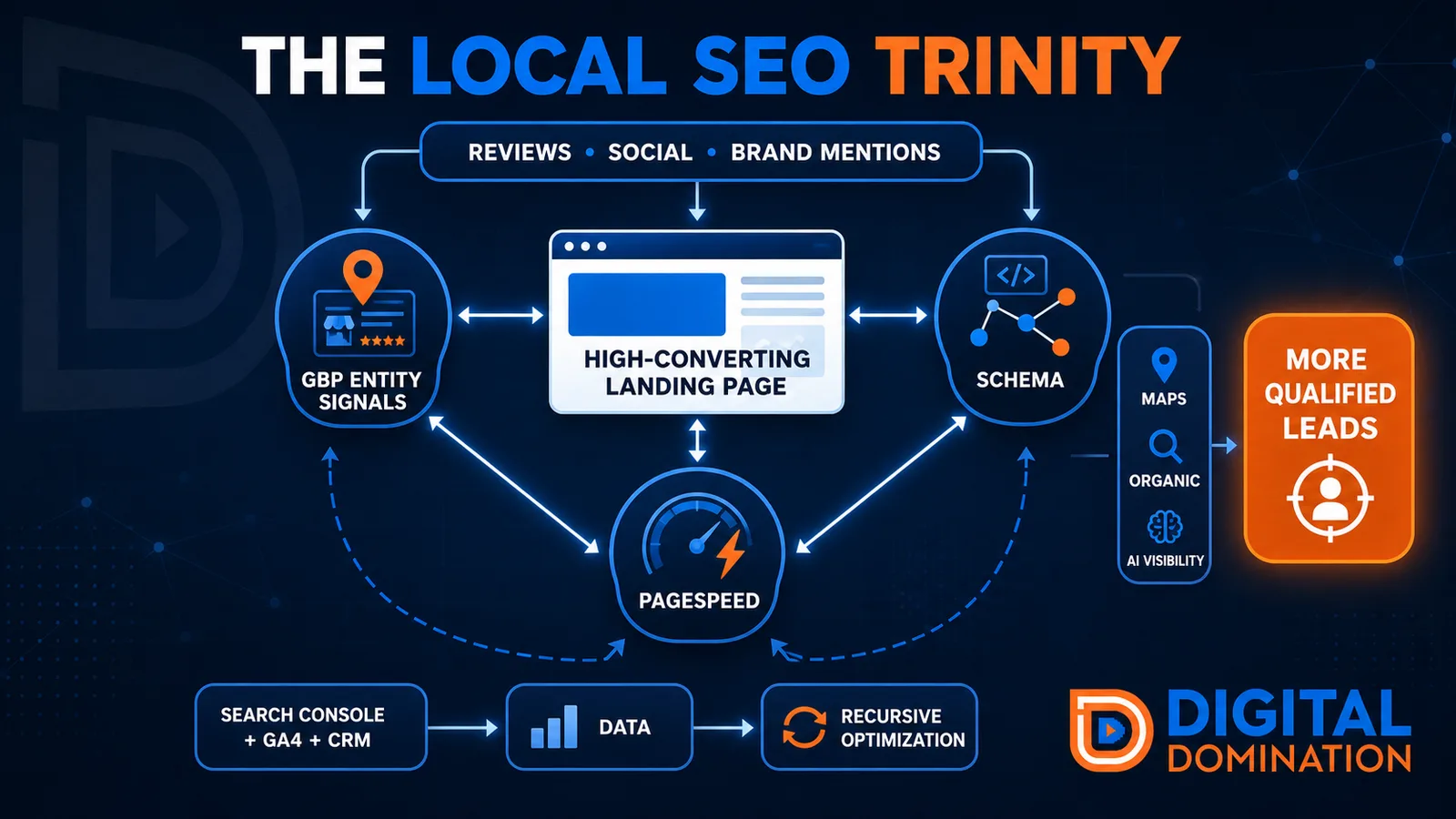
The Local SEO Trinity
Think of a three-legged stool. Your Google profile, your website, and your reviews all have to hold you up. If one leg is short, the whole thing wobbles.
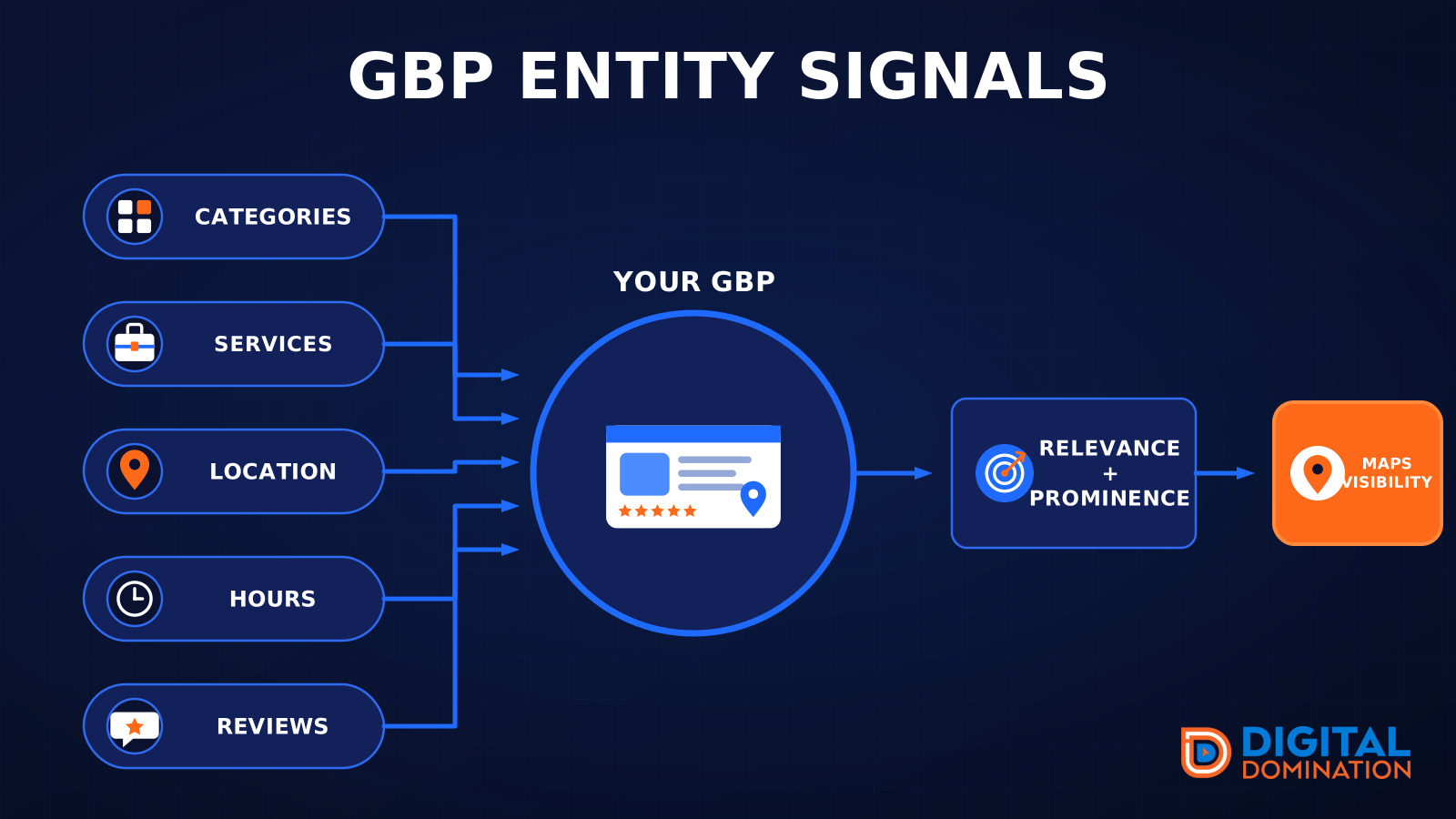
GBP entity signals
This leg is your Google Business Profile. GBP means Google Business Profile. It covers your categories, your services, your location, your hours, and your reviews. Google uses those facts to decide who to show.
Your Google profile is your storefront sign. If the sign is missing, or it names the wrong shop, people drive past.
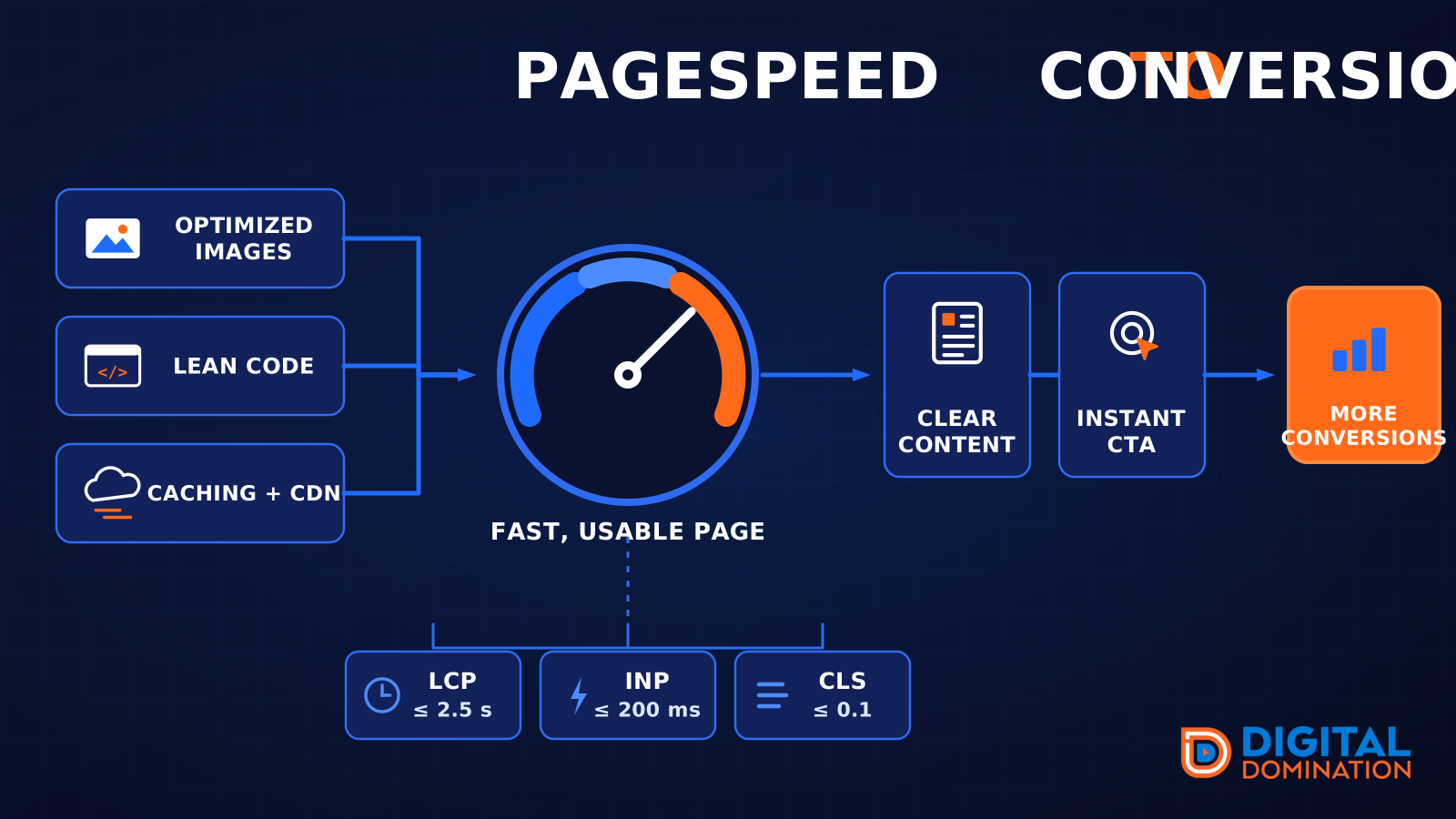
PageSpeed to conversion
This leg is your website, above all on a phone. Small images, lean code, and caching make a page fast. A fast, clear page is what turns a visit into a call. Phone speed is one of the 12 Trinity checks because a slow page loses the call before anyone sees your offer.
Your website is the showroom. If the door sticks, people leave before they look around.
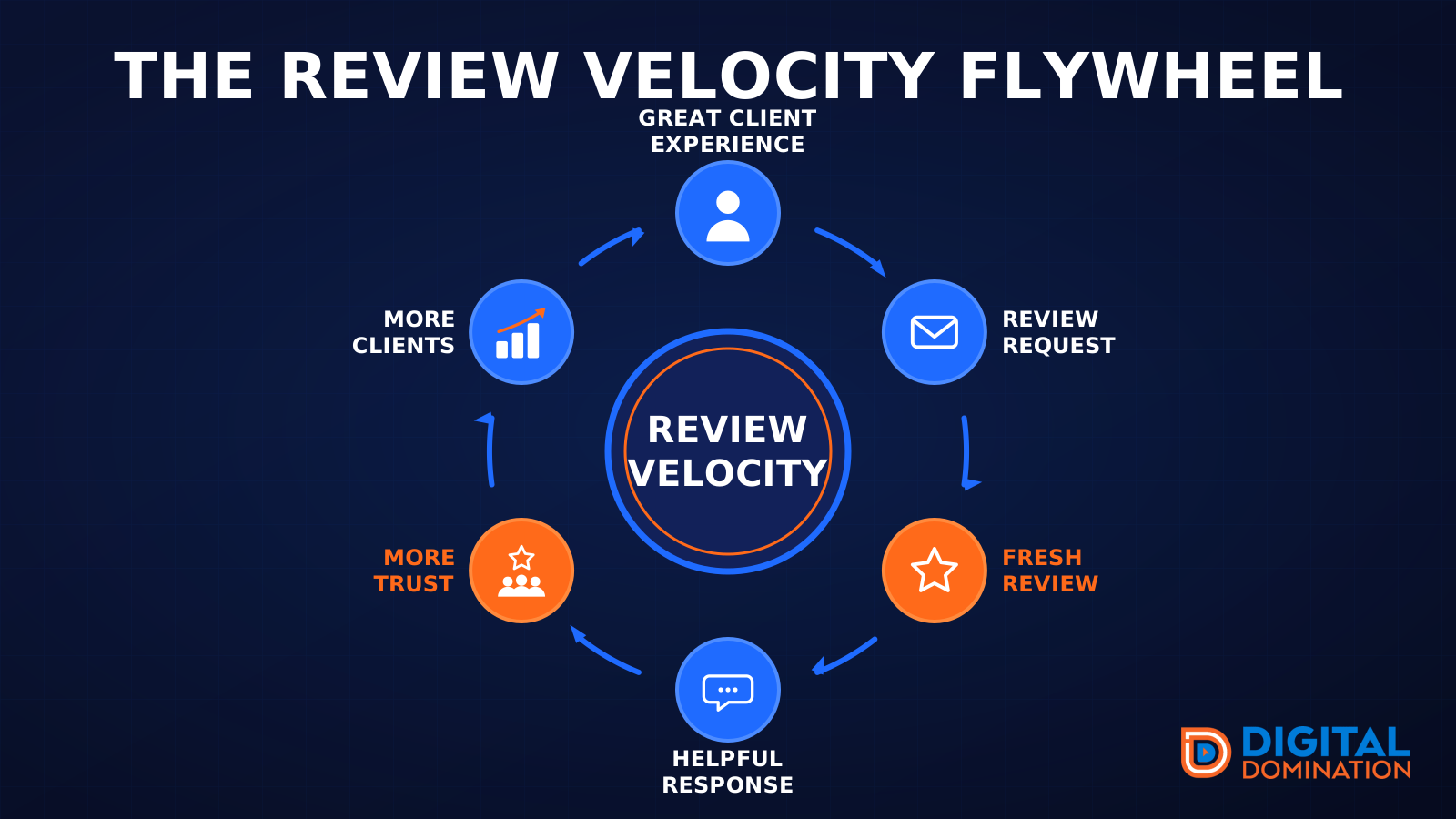
The review velocity flywheel
This leg is reviews and reputation. A good visit leads to a review request, then a fresh review, then a helpful reply, then more trust, then more customers. When the scan can find your Google listing, it shows your rating, your recent reviews, and how many you answered.
Reviews are word of mouth. One kind word helps. A steady stream of real reviews, and a reply from you, helps more.
How this turns into revenue
Being found in more searches leads to more calls. More calls lead to more booked jobs. More booked jobs lead to more revenue.
Example numbers, not a real business: 40 calls from search in a month, a 25 percent close rate, and a $400 average job. That is 10 booked jobs. That is $4,000. The math is the lesson. It is not a promise.
The full page has a box where you can type your own average job value and close rate.
One real story, from our car dealership case study: Medina Auto Group went from invisible on Google Maps to dominating every high-intent search across their market. The turnaround spanned all four of their rooftops at once. The same page says the team eliminated 89 unfair one-star reviews that had been dragging the dealership's reputation down and keeping it out of the Map Pack. It also says: “Results described here are exceptional and non-typical. Outcomes vary based on market conditions, competition, and implementation. No guarantees are made regarding earnings, rankings, or conversions.”
Free strategy call
More booked jobs start with a clear plan
Book a free strategy call. We look at your Google profile, your website, and your reviews, and we tell you what to fix first.
Free. You pick the time. A real person shows up.