
Google Business Profile post view counts are back
Owners can finally see which Google Posts are being seen in Search and Maps, but the smartest move is not to post more. It is to post with a clearer reason.
What changed and who it affects
Google Business Profile posts now show view counts again at the individual post level. Google announced the change in its September 10, 2026 Small Business Bulletin in the Google Business Profile Help Community, calling the feature Google Posts Reporting.
The new reporting shows views for individual updates, offers and events inside the Business Profile dashboard. The counts cover posts from the past rolling 18 months and combine views from Google Search and Google Maps.
This matters most for local service businesses that have been publishing posts without knowing whether anyone saw them. Plumbers, roofers, dentists, med spas, HVAC companies, attorneys, landscapers and other local businesses can now compare post types instead of guessing.
The feature is rolling out globally, but there is one important catch for agencies and multi-location brands. Search Engine Journal and PPC Land both reported that post view counts are not yet available through the Business Profile API, so the data cannot be automatically pulled into most reporting dashboards yet.
Why this is bigger than another dashboard metric
For years, many owners treated Google Business Profile posts as a chore. Someone would add a holiday message, a service announcement or a promotion, then move on with no clear idea whether the post was helping.
Post view counts do not prove that a post generated a phone call, booking or sale. They do give you a first filter. If nobody is seeing a post, it is hard to argue that the message is doing much work.
Google’s local ranking factors are relevance, distance and prominence. Posts are not a magic ranking switch, but they can help your profile look current, explain what you offer and give searchers another reason to choose you. The new reporting makes that effort easier to judge.
A practical owner should use this change to answer three simple questions.
- ▸Which posts actually get seen in Search and Maps
- ▸Which services or offers attract more attention
- ▸Which topics are not worth repeating in the same format
Which Google Business Profile posts are worth publishing now
The short answer: publish posts that help a nearby buyer make a decision. Do not publish just to prove that your profile is active.
The best posts usually match a real customer question, a timely need or a service that is profitable enough to deserve attention. A generic “call us today” update may be easy to write, but it gives you very little to learn from when the view count appears.
Now that you can compare visibility by post, start treating GBP posts like small local tests. You are not trying to become a publisher. You are trying to find the topics Google users notice when they see your business in Search or Maps.
For most local service businesses, these post types are worth testing first.
- ▸Service spotlight posts for your highest-value services
- ▸Seasonal posts tied to urgent local demand
- ▸Offer posts with a clear deadline or condition
- ▸Event posts for open houses, clinics, workshops or community appearances
- ▸Before-and-after style updates where your industry allows them
- ▸Customer education posts that answer a common buying question
- ▸Hiring or team updates only when they support trust or availability
Five things to check on your profile this week
The new reporting is useful only if your profile is clean enough to make the data meaningful. Before you draw conclusions from one popular post or one weak post, check the basics.
You do not need special software for this first pass. Open your Business Profile dashboard, review the posts that now show view counts and look for patterns that a real customer would understand.
Use this quick checklist before you change your posting plan.
- ▸Confirm that recent updates, offers and events are showing view counts in your dashboard
- ▸Look back across the rolling 18 months where data is available
- ▸Compare posts by topic, not only by date
- ▸Check whether posts with photos appear to be getting more visibility than text-heavy posts
- ▸Note which service areas, services or seasonal themes show up most often in your higher-view posts
How to read post views without fooling yourself
A view count is not the same as a lead. It is a visibility signal. That distinction matters because owners can easily start chasing the posts that get seen instead of the posts that bring the right customers.
For example, a funny community post may get more views than a post about emergency repairs. That does not automatically make it more valuable. If you run a service business, a smaller number of views on a high-intent service post may be more useful than a larger number of views on a general update.
Also remember that Google combines Search and Maps views in this reporting. You are not seeing separate counts for each surface. That means the number tells you the post was seen somewhere in Google’s local experience, not exactly where or why.
When reviewing views, sort posts into practical buckets.
- ▸High views and high business value: repeat the theme with a fresh angle
- ▸High views and low business value: use sparingly unless it builds trust
- ▸Low views and high business value: improve the title, photo and timing
- ▸Low views and low business value: stop posting that format
Offers, updates and events should not be judged the same way
Google’s new reporting covers updates, offers and events, but those post types serve different jobs. Comparing all of them as if they are identical can lead to bad decisions.
An offer post should be judged by whether it gets enough attention to justify running that offer again. It should also be clear, specific and easy to understand. If the offer is vague, the view count will not tell you much.
An update post is better for service announcements, new availability, helpful reminders and seasonal education. An event post is useful only when there is a real date-based reason for someone to care.
Use different expectations for each type.
- ▸Offers: test the service, the timing and the clarity of the promotion
- ▸Updates: test customer questions, seasonal problems and service explanations
- ▸Events: test whether people care about a specific date, class, clinic or appearance
- ▸Recurring posts: test whether the same theme keeps earning views or goes stale
What to do about it
Start with a simple 30-day plan. You do not need to publish daily. You need enough clean examples to see what your local audience notices.
Pick a handful of services you actually want more calls for, then write posts around those services in plain language. Use photos that make the post feel real, not generic. If you serve a specific city or neighborhood, say so naturally when it helps the customer understand availability.
Check the view counts weekly, but do not panic over one slow post. Local visibility moves with seasonality, search demand, competition and how often your profile appears for relevant searches.
Here is a practical owner-level plan you can start this week.
- ▸Publish one service spotlight post for a priority service
- ▸Publish one seasonal or problem-based update tied to current demand
- ▸Publish one offer only if you can explain it clearly in one sentence
- ▸Use a real photo when possible, such as your team, truck, office, equipment or completed work
- ▸Write the first line like a customer question or urgent need
- ▸Record the post topic, date, type and view count in a simple spreadsheet
- ▸After a few weeks, repeat the strongest theme with a different photo and wording
What agencies and multi-location brands still cannot automate
The missing API access is the frustrating part of this rollout. PPC Land reported that Google has not made the post view counts available through the Business Profile API yet. Search Engine Journal also highlighted that limitation.
That means agencies, franchisors and multi-location operators may need to check post views manually inside the dashboard for now. If you manage one location, that is not a big burden. If you manage many locations, it slows down reporting and makes clean comparisons harder.
Owners should still ask their marketing provider to review the data. Just understand why the numbers may not instantly appear in your normal monthly report.
Until API access exists, use a lighter reporting process.
- ▸Review a sample of locations manually
- ▸Track top-viewed posts by location and topic
- ▸Flag offers or services that perform across multiple markets
- ▸Avoid overbuilding a custom report that may change when API access arrives
Common mistakes to avoid now that views are visible
The return of post view counts will tempt some businesses to post more often without posting better. That is usually the wrong lesson.
A profile full of thin updates can make your business look busy, but not necessarily helpful. A better post gives a searcher one useful reason to call, book, request an estimate or keep reading your profile.
The other mistake is treating views as a complete performance report. You still need to compare views with calls, bookings, messages, website visits and real customer conversations where you can.
Avoid these common errors.
- ▸Posting generic holiday messages with no customer value
- ▸Repeating the same offer every week without testing a new angle
- ▸Judging a post only by views instead of business value
- ▸Using stock images that look like every competitor
- ▸Ignoring older posts in the 18-month window
- ▸Letting expired offers or events create confusion
How this fits with your local SEO work
Google Posts should support your larger local SEO strategy. They should not replace accurate categories, strong service pages, consistent reviews, clean citations, helpful photos or a complete Business Profile.
Think of posts as a way to keep your profile aligned with current demand. If air conditioning repair is surging in your market, your post can speak to that. If you are booking roof inspections after storms, your post can make that service obvious. If you have a new patient special, an offer post can make the next step clear.
The new view counts simply tell you which messages are getting exposure inside Google’s local surfaces. Over time, that can help you decide which services deserve more attention across your profile, website and ads.
Your weekly local SEO rhythm can stay simple.
- ▸Check post views
- ▸Check calls, bookings and direction requests
- ▸Check which search terms are showing in your profile insights where available
- ▸Refresh photos tied to active services
- ▸Make sure your website page matches the service you are promoting
The bottom line for local business owners
Google Business Profile post view counts are back, and that gives local owners a useful piece of feedback that has been missing. The winners will not be the businesses that post the most. They will be the ones that use the data to publish clearer service messages, better offers and more timely updates.
If you have ignored GBP posts because they felt like a blind channel, this is a good week to look again. Review the rolling 18 months, find the themes people actually saw and build a simple posting plan around services you want more of.
Digital Domination is a Las Vegas local SEO agency serving local service businesses nationally, and we look at GBP activity as one piece of the larger Map Pack picture. If you want to see how your business shows up across your market, start with the free GeoGrid scan at digitaldomination.ai/scan/
Keep reading
Related guides
- ▸When To Choose A Free Trinity Website Audit Instead Of Doing Local SEO
- ▸When To Choose AI Search Optimization Instead Of Doing Local SEO Yours
- ▸When To Choose Case Studies Instead Of Doing Local SEO Yourself Diy Wi
Put it into action
Frequently Asked Questions
Where do I see Google Business Profile post view counts?
Look inside your Google Business Profile dashboard where you manage posts. Google’s September 10, 2026 Small Business Bulletin says Google Posts Reporting adds view counts to individual posts, including updates, offers and events.
Do Google Post view counts include Google Search and Google Maps?
Yes. Google says the view counts combine views from Google Search and Google Maps. The reporting does not split the number by surface, so treat it as total local visibility for that post.
How far back do Google Business Profile post views go?
The new reporting covers posts from the past rolling 18 months. That means the window keeps moving, so older posts will eventually fall out of the available reporting period.
Are Google Post view counts available in the Business Profile API?
Not yet. PPC Land and Search Engine Journal both reported that the metric is not available through the Business Profile API at rollout. Agencies and multi-location businesses may need to check the dashboard manually for now.
Do more Google Post views mean better local rankings?
Not necessarily. Google’s local ranking factors are relevance, distance and prominence, and a post view count is only a visibility metric. Use it to learn what people see, then compare that with calls, bookings and other business outcomes.
What type of Google Business Profile post should I publish first?
Start with a service you actually want more customers for. Write a clear service spotlight or seasonal problem post, use a real photo and make the next step obvious. After views appear, compare it with other topics before deciding what to repeat.
Should I post offers on my Google Business Profile?
Yes, if the offer is clear and tied to a real service people want. Avoid vague discounts or repeated promotions that never change. With post-level views back, you can compare whether offers get more attention than normal updates.
How often should a local business publish Google Posts now?
Most owners should focus on consistency and quality instead of daily posting. A simple weekly rhythm is enough to test service topics, seasonal updates and occasional offers. Review view counts over time rather than judging one post by itself.
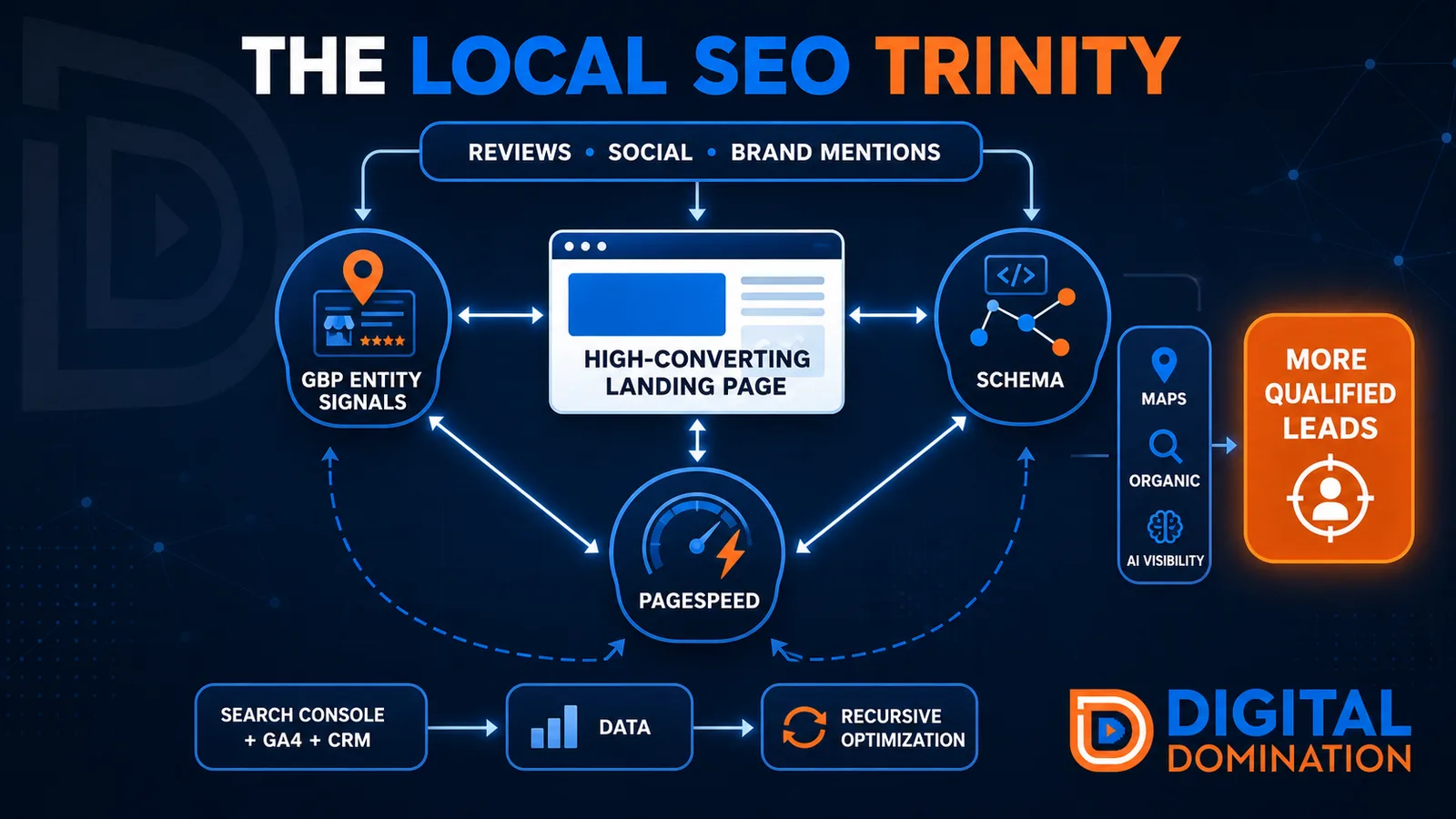
The Local SEO Trinity
Think of a three-legged stool. Your Google profile, your website, and your reviews all have to hold you up. If one leg is short, the whole thing wobbles.
GBP entity signals
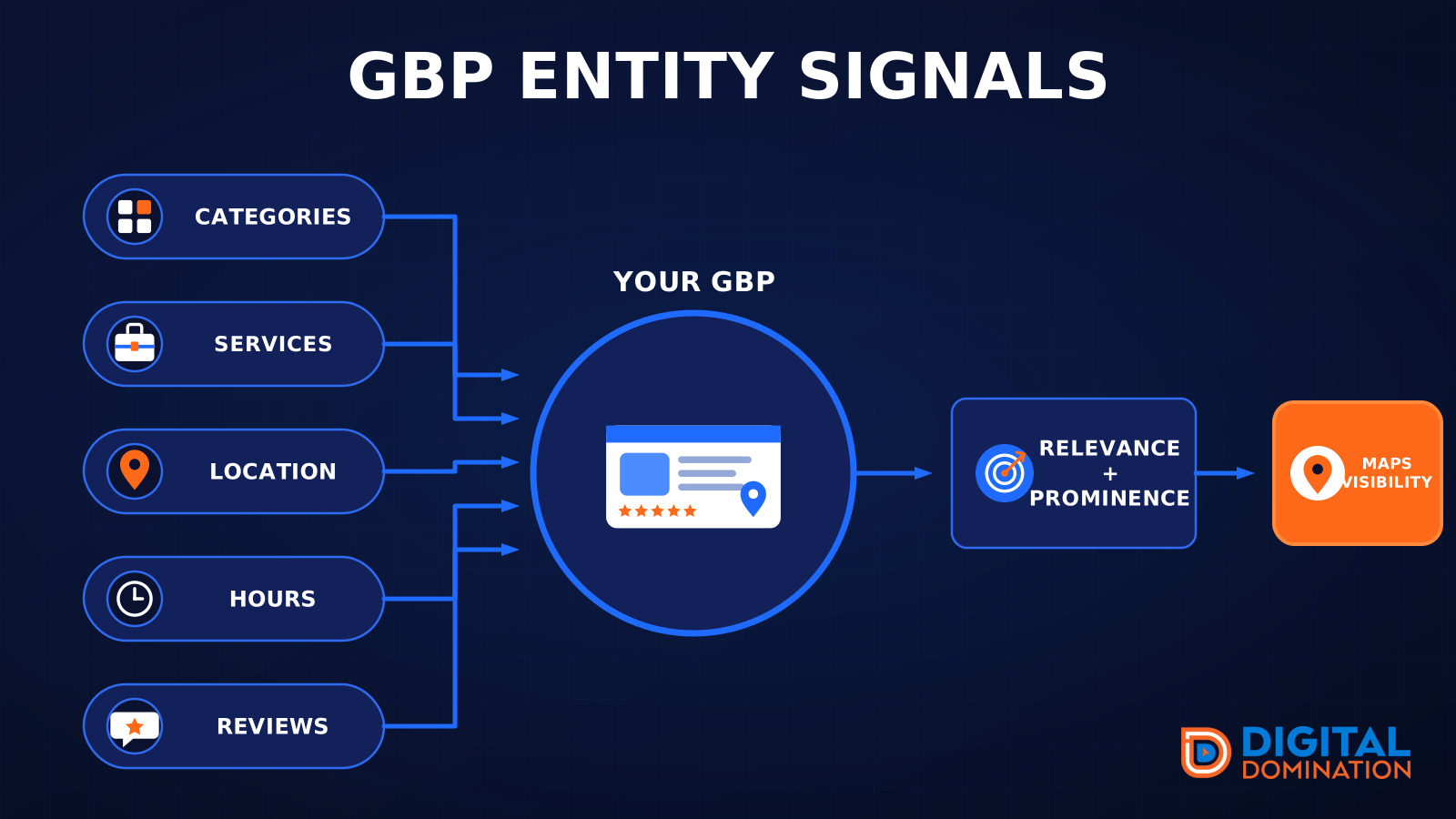
This leg is your Google Business Profile. GBP means Google Business Profile. It covers your categories, your services, your location, your hours, and your reviews. Google uses those facts to decide who to show.
Your Google profile is your storefront sign. If the sign is missing, or it names the wrong shop, people drive past.
PageSpeed to conversion
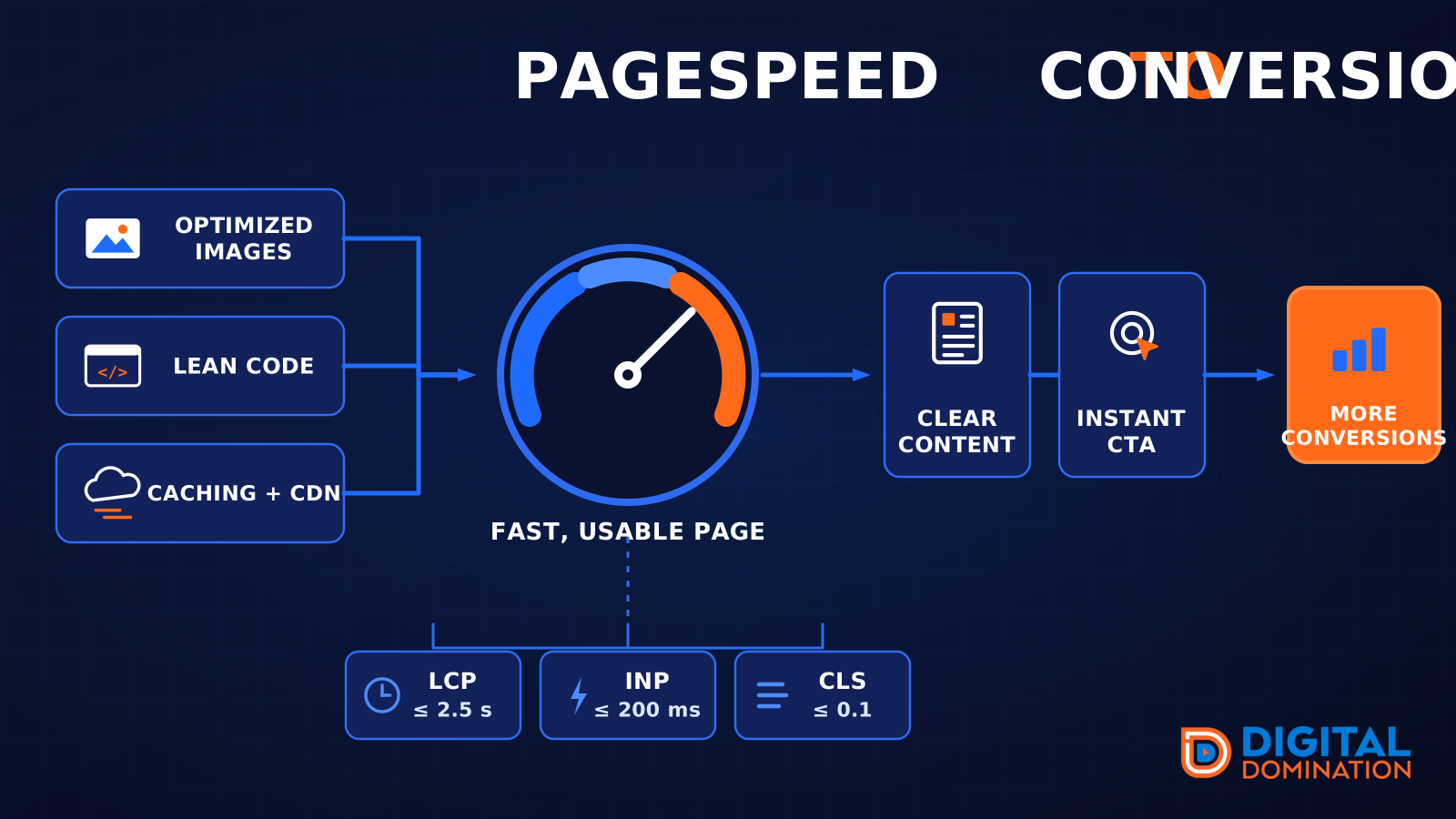
This leg is your website, above all on a phone. Small images, lean code, and caching make a page fast. A fast, clear page is what turns a visit into a call. Phone speed is one of the 12 Trinity checks because a slow page loses the call before anyone sees your offer.
Your website is the showroom. If the door sticks, people leave before they look around.
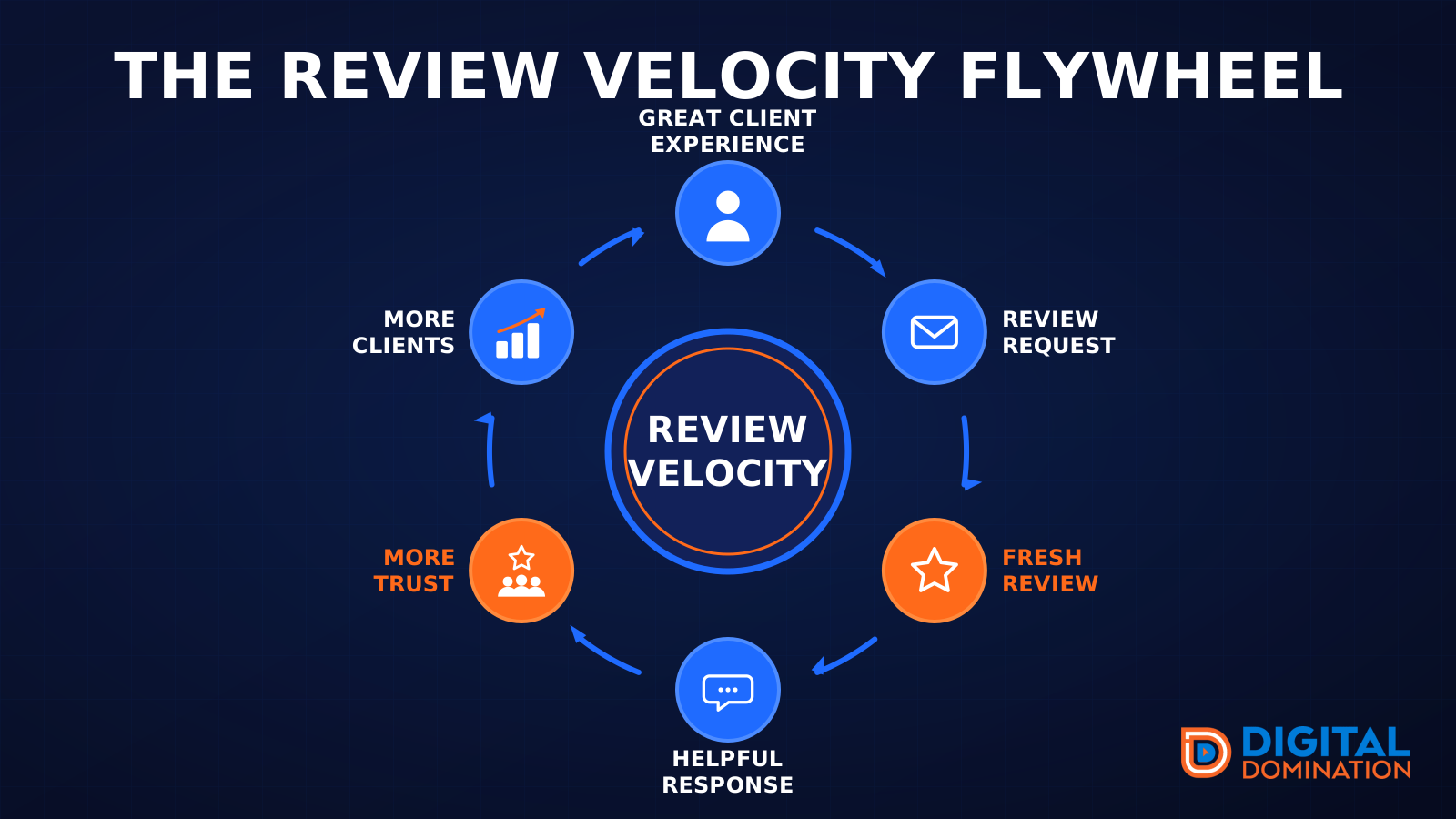
The review velocity flywheel
This leg is reviews and reputation. A good visit leads to a review request, then a fresh review, then a helpful reply, then more trust, then more customers. When the scan can find your Google listing, it shows your rating, your recent reviews, and how many you answered.
Reviews are word of mouth. One kind word helps. A steady stream of real reviews, and a reply from you, helps more.
How this turns into revenue
Being found in more searches leads to more calls. More calls lead to more booked jobs. More booked jobs lead to more revenue.
Example numbers, not a real business: 40 calls from search in a month, a 25 percent close rate, and a $400 average job. That is 10 booked jobs. That is $4,000. The math is the lesson. It is not a promise.
The full page has a box where you can type your own average job value and close rate.
One real story, from our car dealership case study: Medina Auto Group went from invisible on Google Maps to dominating every high-intent search across their market. The turnaround spanned all four of their rooftops at once. The same page says the team eliminated 89 unfair one-star reviews that had been dragging the dealership's reputation down and keeping it out of the Map Pack. It also says: “Results described here are exceptional and non-typical. Outcomes vary based on market conditions, competition, and implementation. No guarantees are made regarding earnings, rankings, or conversions.”
Free strategy call
More booked jobs start with a clear plan
Book a free strategy call. We look at your Google profile, your website, and your reviews, and we tell you what to fix first.
Free. You pick the time. A real person shows up.