
Google gives restaurants control of third-party ordering links
Restaurants can now decide which ordering providers show on their Google Business Profile, which makes local SEO a revenue-control issue, not just a ranking issue.
What changed for restaurants on Google
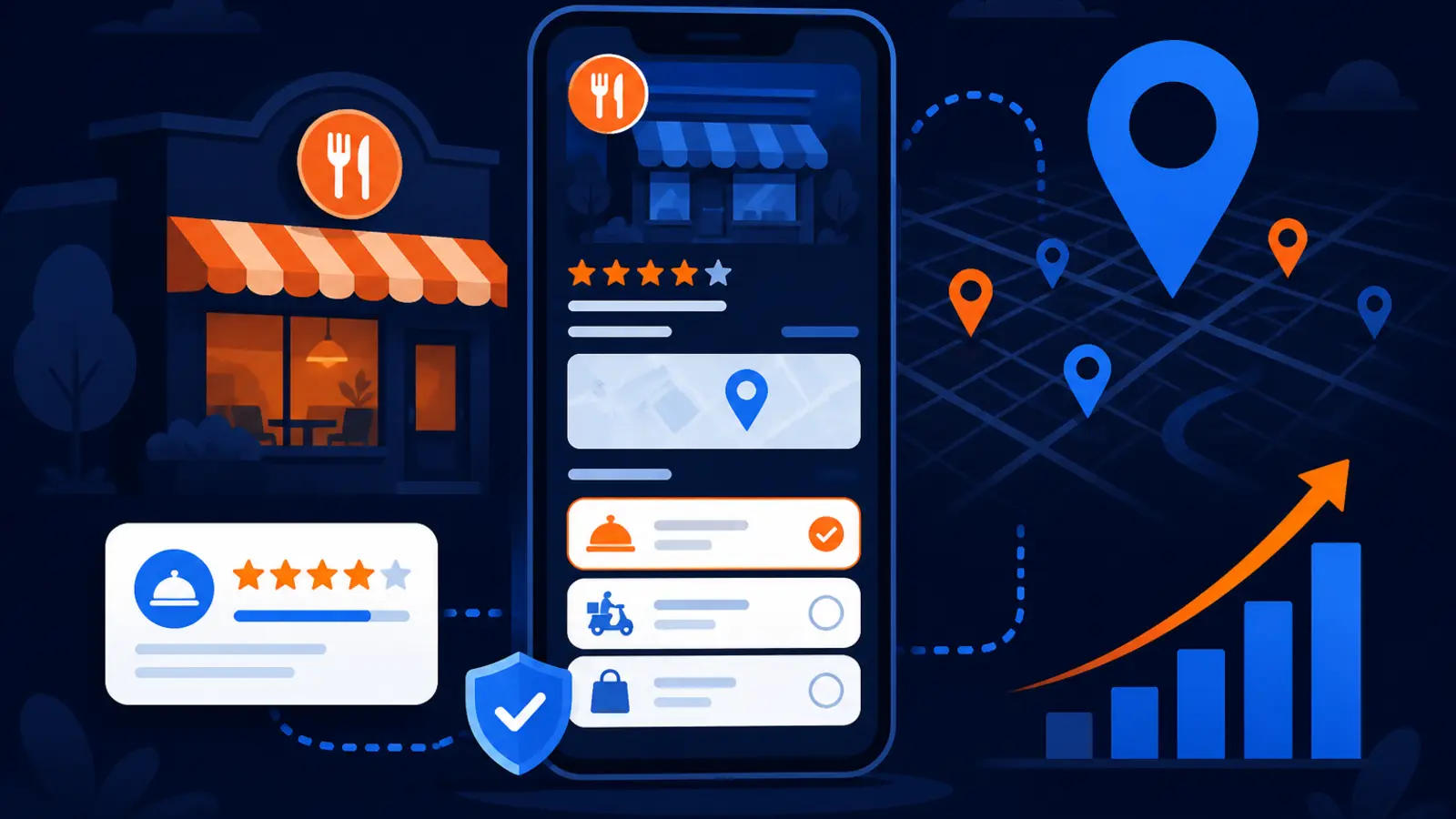
Google has added controls that let restaurants manage third-party ordering providers inside their Google Business Profile. Search Engine Roundtable reported on October 28, 2026 that restaurants can now opt out of specific ordering providers instead of asking the delivery platform to remove or disconnect the feed. Google's own Business Profile Help page, updated October 29, 2026, says owners can manage online ordering options for pickup and delivery from the profile dashboard.
This hits restaurants, cafes, bakeries, bars with food, ghost kitchens, franchise operators and any local food business where a Google searcher can click an order button before visiting the website. If your profile shows a third-party order link, that link can shape the sale, the margin and the customer experience before your staff ever speaks to the customer.
The practical change is simple: the order buttons on your profile need to be treated like your phone number, hours and address. If they are wrong, stale or pointed at the wrong partner, your local visibility can send buyers into a channel you do not control.
Why this is more than a profile setting
For years, many restaurant owners treated Google Business Profile ordering links as something that just appeared. A delivery platform connected a feed, Google displayed an option and the restaurant often had to work through the provider to fix what showed up. That created friction when menus were outdated, pickup was mishandled or fees made the order unattractive.
Now the owner has a more direct say. That matters because local SEO does not stop when the customer finds you. The real business result happens when the searcher calls, books, requests directions or orders. For restaurants, the order button may be the conversion path.
A restaurant owner should look at each order path through three questions:
- ▸Does this link send customers to the provider we prefer?
- ▸Is the menu accurate on that provider?
- ▸Does the order type match how we actually operate right now?
- ▸Are fees, prep times and availability creating complaints?
- ▸Would we rather send customers to our own ordering system?
The source of the update
Search Engine Roundtable covered the change under the headline Google Business Profiles Finally Adds Third-Party Ordering Controls. The report pointed to new options that let businesses opt out of providers directly from the Business Profile interface.
Lisa Landsman also posted on LinkedIn on October 28, 2026 that this was one of the most frequent requests Google heard from restaurant operators. Her post framed the update as a way for restaurants to share accurate ordering choices with customers and manage third-party provider visibility more directly.
Google Business Profile Help now has a page titled Manage online ordering options. That documentation says eligible businesses can manage food ordering options and choose which providers appear. SearchPrex also reported on October 29, 2026 that Google added ordering controls and Messenger links, while noting that some profiles may be asked for an EIN in certain account situations.
The owner takeaway from those sources is clear: this is not a rumor or a small test you can ignore. If you run a restaurant, Google now expects your ordering setup to be managed inside the profile, not left to chance.
Where the money can leak
A hungry customer searching on Google usually wants speed. If they see your restaurant, scan the photos, check the rating and tap Order, they may never land on your website. That means the Google order path may decide whether you keep the order, lose the customer or accept a sale with poor economics.
This is especially important if you have different prices, menus or availability by channel. Maybe your direct ordering platform has the cleanest menu. Maybe one delivery provider still shows discontinued items. Maybe a marketplace offers delivery when your kitchen cannot support it during peak hours.
Common order-link problems to look for this week include:
- ▸Old menu items that still show on one provider
- ▸Wrong pickup hours or delivery windows
- ▸Ordering links for providers you no longer prefer
- ▸Promos that do not match your current offer
- ▸Prices that create customer confusion
- ▸Unavailable locations tied to the wrong profile
- ▸Delivery options showing when you only want pickup
Five things to check on your profile this week
Do not wait for a customer complaint to find out where Google is sending orders. Open your Google Business Profile the same way a customer would see it in Search and Maps, then compare that experience with what you want to happen operationally.
Here are five checks every restaurant owner or manager should make this week:
- ▸Search your restaurant name on Google and tap every visible Order, Pickup or Delivery option.
- ▸Open your Business Profile dashboard and look for online ordering options tied to third-party providers.
- ▸Compare each provider's menu, prices, hours and item availability against your current in-house menu.
- ▸Opt out of any provider that is stale, operationally messy or not part of your preferred order strategy.
- ▸Write down which ordering channel you want to be the primary path, then make sure your staff and marketing team know it.
What this means for local SEO work
Local SEO has often been measured by rankings, calls and direction requests. Those still matter. Google's local ranking factors remain relevance, distance and prominence, so the basics of profile accuracy, reviews, categories and local authority are still part of the work.
But restaurant SEO needs to include conversion-path auditing. Ranking higher in the Map Pack does not help much if the click goes to the wrong ordering channel. A profile can look successful in a ranking report while still sending real buyers into a low-control path.
Your local SEO provider should be able to answer these questions:
- ▸Which order buttons appear on the profile from different devices?
- ▸Which providers show in Google Search and Google Maps?
- ▸Are pickup and delivery options consistent with the restaurant's operations?
- ▸Do menu links, website links and ordering links point to the intended destinations?
- ▸Is the profile being checked after major menu, hour or provider changes?
How to decide which ordering links should stay
This is not always as simple as turning every third-party platform off. Some restaurants depend on delivery marketplaces for discovery. Others want to move more guests toward direct ordering. The right answer depends on your margins, staffing, kitchen flow, delivery coverage and customer habits.
Start with control. If a provider's menu is often wrong, if support is slow or if orders cause staff confusion, that link may be costing more than it brings in. If a provider reliably brings incremental orders and the economics work, it may still deserve a place on the profile.
Use these owner-level criteria before removing or keeping a provider:
- ▸Menu accuracy
- ▸Order profitability
- ▸Customer service quality
- ▸Refund and complaint history
- ▸Kitchen workflow fit
- ▸Pickup versus delivery reliability
- ▸Strategic value for new-customer discovery
What to do about it
Make this a short, repeatable audit rather than a one-time cleanup. Assign one person to own the profile, even if an agency helps with SEO. That person should know which ordering providers are approved, which menu is current and what the preferred customer path should be.
Then check the profile after any change to hours, holidays, menu items, delivery coverage or platform relationships. A restaurant can update its website and still have Google sending people to an old path if nobody checks the live profile experience.
This week, take these concrete steps:
- ▸Log in to the Google account that manages the restaurant's Business Profile.
- ▸Review the online ordering controls in the dashboard.
- ▸Disable any provider you do not want customers using from Google.
- ▸Test the customer experience from a phone, not only a desktop computer.
- ▸Place a small internal test order if your system allows it, then confirm the staff sees the order correctly.
- ▸Save screenshots of the profile before and after changes for your records.
- ▸Add ordering-link checks to your monthly marketing or operations meeting.
Do not forget the rest of the profile
Ordering controls are important, but they sit inside the larger Google Business Profile experience. A customer who is deciding where to eat will still look at hours, photos, reviews, menu information, attributes and recent updates. If those are neglected, better order-link control will not fix the whole conversion problem.
Restaurants should also watch the website experience connected to the profile. If the profile sends a customer to your site first, that page needs to load quickly and make ordering obvious. Google's Core Web Vitals good thresholds are LCP 2.5 s, INP 200 ms and CLS 0.1 at the 75th percentile of field data. You do not need to be a developer to ask whether your ordering page feels fast and stable on a phone.
Along with order links, review these profile basics:
- ▸Primary category and secondary categories
- ▸Holiday hours and special hours
- ▸Menu link and website link
- ▸Recent food and interior photos
- ▸Review responses
- ▸Attributes such as dine-in, takeout and delivery
- ▸Location-specific details for multi-location restaurants
The decision this news puts in front of owners
This update forces a useful question: when someone finds your restaurant on Google, are the buttons sending them where you actually want them to go? If you cannot answer that, your profile is not fully under control.
It also raises the bar for SEO help. A provider that only reports rankings is missing part of the job. For a restaurant, the Google Business Profile is not just a visibility asset. It is a storefront, a menu board and, now more clearly, an order-routing system.
At Digital Domination, we look at Google Business Profiles from the perspective of local revenue paths, not just rank positions. Our Google Business Profile SEO service page at digitaldomination.ai/google-business-profile-seo/ explains how profile optimization, category work, review strategy, conversion checks and local visibility fit together for service-area and local businesses. If you want to see how your restaurant or local business appears across the map, start with the free GeoGrid scan at digitaldomination.ai/scan/.
Keep reading
Related guides
- ▸When To Choose Google Maps Optimization Services Instead Of Doing Loca
- ▸When To Choose Google Maps SEO Instead Of Doing Local SEO Yourself Diy
- ▸When To Choose Google Review Management Instead Of Doing Local SEO You
Put it into action
Frequently Asked Questions
How do I remove a third-party ordering link from my Google Business Profile?
Log in to the Google account that manages your Business Profile and look for the online ordering options in the profile dashboard. Google's Business Profile Help page says eligible restaurants can manage providers for pickup and delivery there. If a provider is not wanted, use the available controls to opt out or remove it from the ordering options.
Can restaurants choose which delivery apps show on Google?
Yes, Google has added controls that let restaurants manage which third-party ordering providers appear on their Business Profile. Search Engine Roundtable reported that this means owners no longer have to rely only on the delivery platform to disconnect a feed. Availability can depend on profile eligibility and how the ordering provider is connected.
Why are wrong order links showing on my restaurant's Google profile?
Order links can appear because a third-party provider has a connected feed or because prior ordering settings were never cleaned up. The new controls are meant to give restaurant operators a more direct way to manage those links. Check both Google Search and Google Maps because customers may see ordering options in either place.
Should I turn off all third-party ordering links on Google?
Not automatically. Some providers may bring useful orders, while others may create stale menus, poor service issues or weak margins. Review each provider based on accuracy, profitability, operational fit and whether it supports your current ordering strategy.
Will changing order links affect my Google ranking?
Google's known local ranking factors are relevance, distance and prominence. Ordering links are more of a conversion and customer-experience issue than a simple ranking switch. Still, a cleaner profile can help customers take the right action after they find you.
Who should audit Google Business Profile order buttons?
The owner or manager should know the preferred ordering setup, but your local SEO provider should also check the live conversion paths. Ranking reports alone do not show whether customers are being sent to the right provider. For restaurants, order-button audits should be part of ongoing profile management.
What should I check after changing online ordering settings?
Search your restaurant on a phone and test what customers see in Google Search and Google Maps. Confirm the right providers appear, the menu is current and pickup or delivery options match your operations. Also tell your staff what changed so they can spot customer issues quickly.
The Local SEO Trinity
Think of a three-legged stool. Your Google profile, your website, and your reviews all have to hold you up. If one leg is short, the whole thing wobbles.
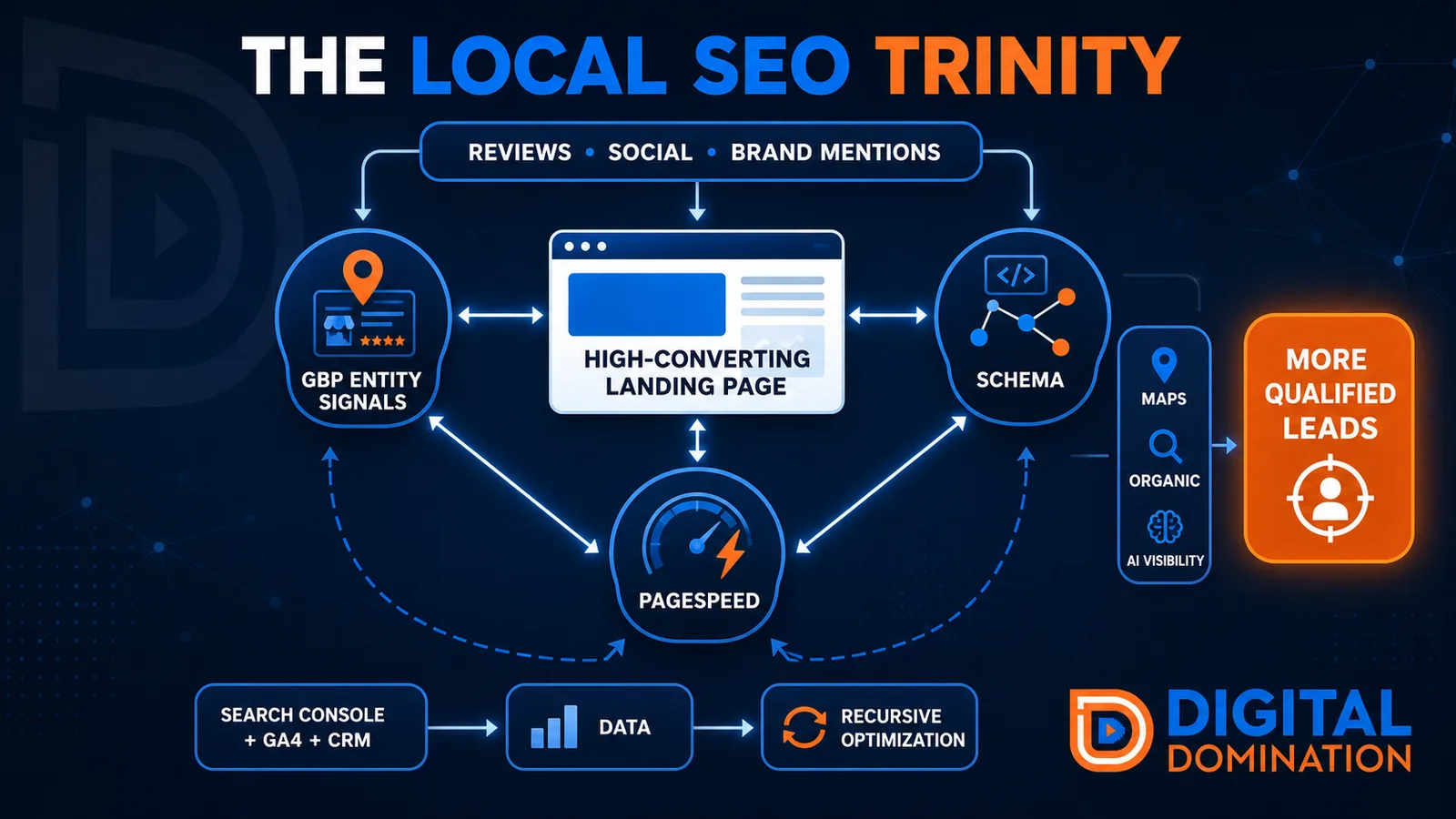
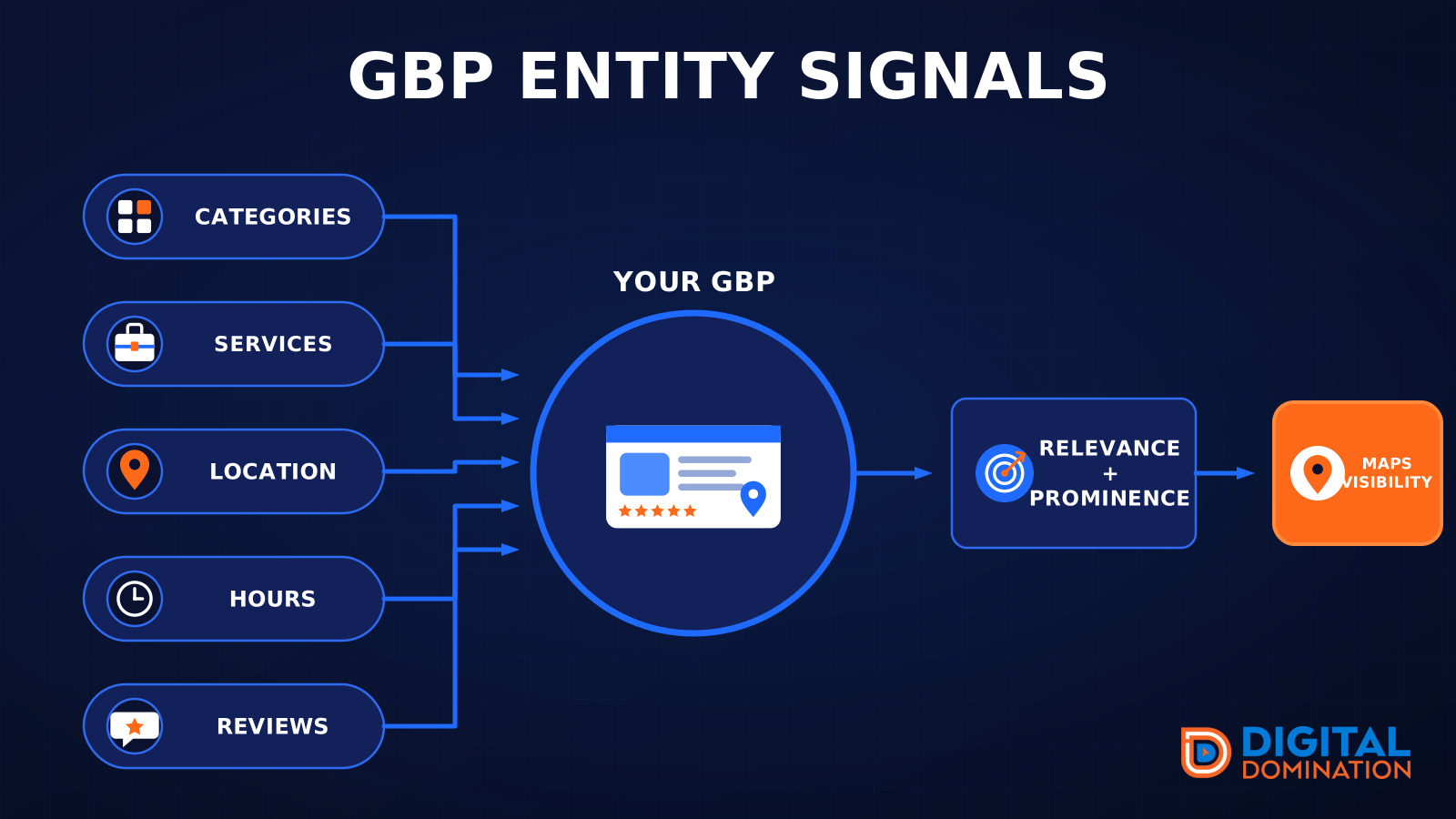
GBP entity signals
This leg is your Google Business Profile. GBP means Google Business Profile. It covers your categories, your services, your location, your hours, and your reviews. Google uses those facts to decide who to show.
Your Google profile is your storefront sign. If the sign is missing, or it names the wrong shop, people drive past.
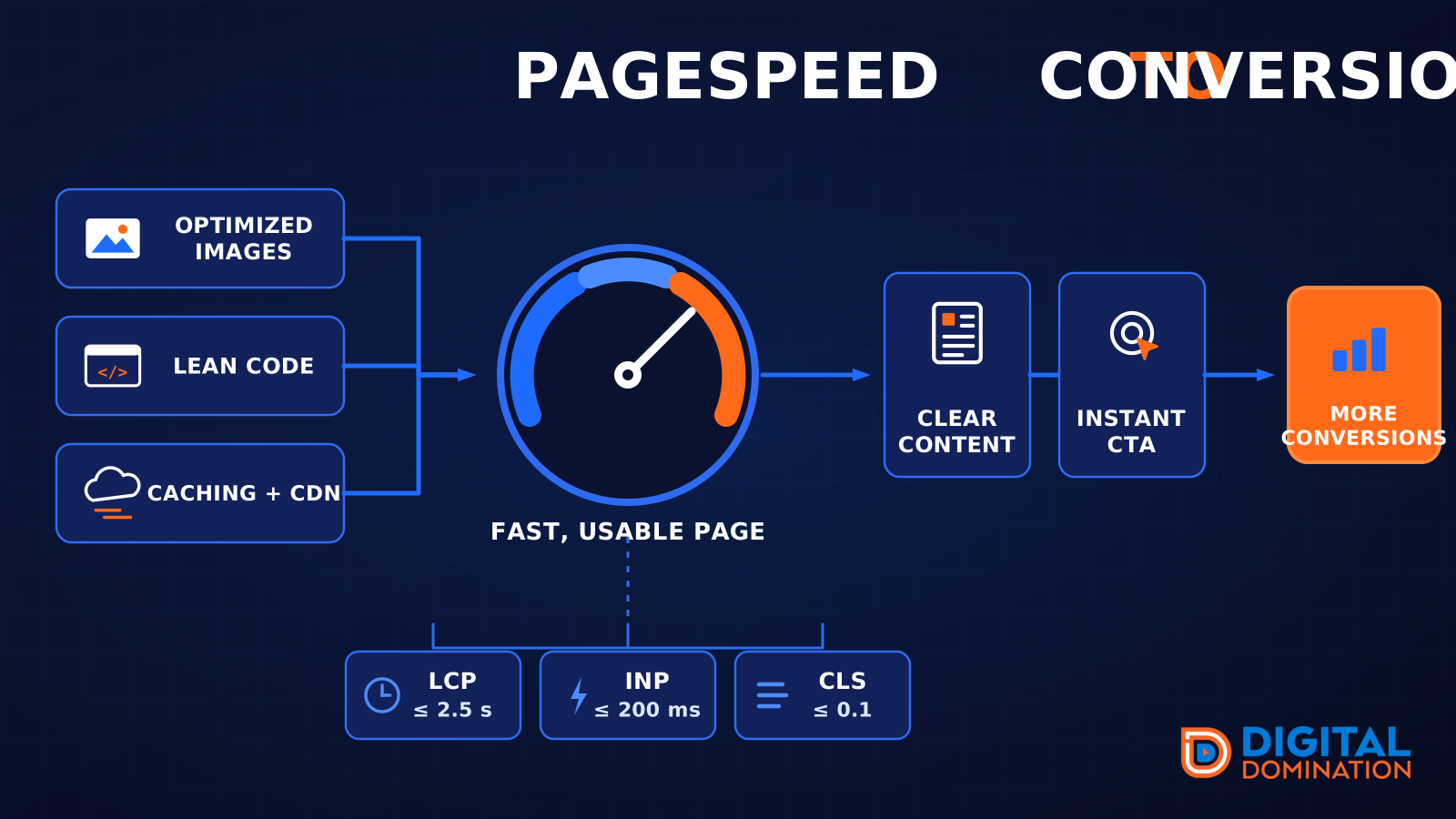
PageSpeed to conversion
This leg is your website, above all on a phone. Small images, lean code, and caching make a page fast. A fast, clear page is what turns a visit into a call. Phone speed is one of the 12 Trinity checks because a slow page loses the call before anyone sees your offer.
Your website is the showroom. If the door sticks, people leave before they look around.
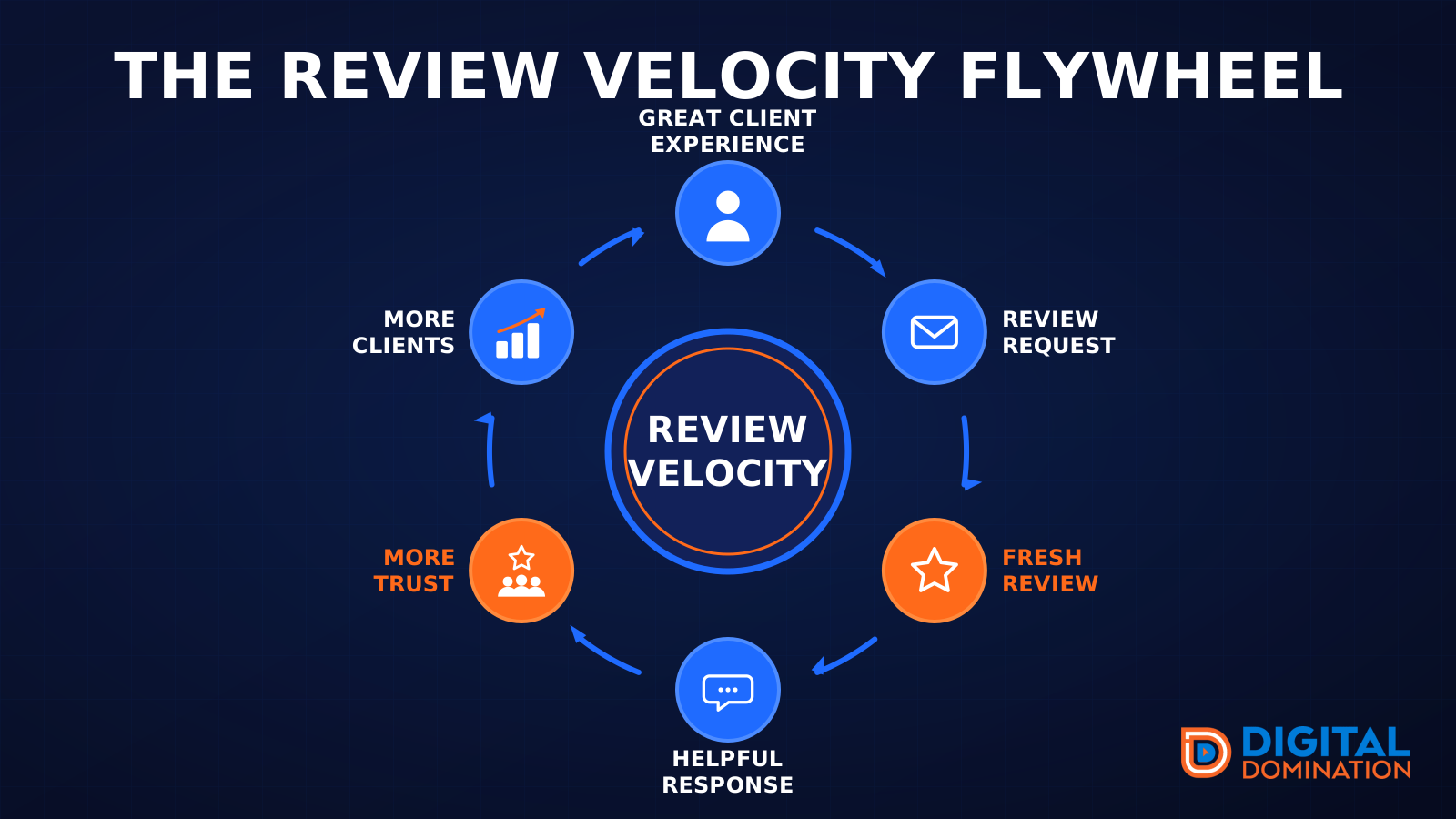
The review velocity flywheel
This leg is reviews and reputation. A good visit leads to a review request, then a fresh review, then a helpful reply, then more trust, then more customers. When the scan can find your Google listing, it shows your rating, your recent reviews, and how many you answered.
Reviews are word of mouth. One kind word helps. A steady stream of real reviews, and a reply from you, helps more.
How this turns into revenue
Being found in more searches leads to more calls. More calls lead to more booked jobs. More booked jobs lead to more revenue.
Example numbers, not a real business: 40 calls from search in a month, a 25 percent close rate, and a $400 average job. That is 10 booked jobs. That is $4,000. The math is the lesson. It is not a promise.
The full page has a box where you can type your own average job value and close rate.
One real story, from our car dealership case study: Medina Auto Group went from invisible on Google Maps to dominating every high-intent search across their market. The turnaround spanned all four of their rooftops at once. The same page says the team eliminated 89 unfair one-star reviews that had been dragging the dealership's reputation down and keeping it out of the Map Pack. It also says: “Results described here are exceptional and non-typical. Outcomes vary based on market conditions, competition, and implementation. No guarantees are made regarding earnings, rankings, or conversions.”
Free strategy call
More booked jobs start with a clear plan
Book a free strategy call. We look at your Google profile, your website, and your reviews, and we tell you what to fix first.
Free. You pick the time. A real person shows up.