
FBI SEO poisoning alert: what local business owners should require before hiring an SEO or WordPress vendor
The warning is not just for IT teams. If you pay someone to improve rankings, publish pages, add plugins or manage WordPress, security and search quality now belong in the same conversation.

What changed, and who this hits
On November 16, the Federal Bureau of Investigation and IC3 issued a FLASH warning titled Gootloader Malware Using SEO Poisoning and Compromised Websites to Gain Initial Access. The warning said attackers used compromised WordPress websites and search engine optimization techniques to place attacker-controlled pages next to legitimate search results.
The FBI said it identified more than 1,000 infected WordPress sites and 216 attacker-controlled domains tied to more than $28 million in ransomware payments. The U.S. Department of Justice separately announced on November 12 that Gootloader malware infrastructure had been disrupted in an international cyber operation. Search Engine Roundtable summarized the warning for the search industry on November 17 under the headline FBI: SEO Poisoning Led To $28 Million In Ransomware Payments.
This matters for local business owners because the same tools used for normal SEO work can be abused. Pages, plugins, redirects, schema, blog posts and backlinks can help a real business get found, but they can also be used to hide spam, lure searchers or pass trust to harmful pages. If you own a roofing company, dental office, law firm, HVAC shop or med spa, this is now part of your buying decision when you hire website help.
What SEO poisoning means in plain English
SEO poisoning is when attackers manipulate search results so a dangerous or fake page appears for searches that look normal. The searcher thinks they are clicking a helpful result, but the page is designed to trick them, deliver malware, capture credentials or move them toward a download.
For a local business owner, the scary part is that the site owner may not know the site is being used this way. A hacked WordPress site can still look fine on the home page while hidden pages, strange folders or injected code sit behind the scenes. Customers may never see the problem until Google, a browser, a security scanner or a victim flags it.
Here are the owner-level signs that your website may be involved in something you did not approve:
- ▸Google shows odd pages from your domain that you never published.
- ▸Search results include foreign language titles, casino terms, fake software pages or legal document downloads tied to your site.
- ▸Your WordPress admin has users you do not recognize.
- ▸Your SEO report shows new pages or backlinks you never requested.
- ▸Visitors report browser warnings, redirects or downloads after clicking your result.
- ▸Your web host sends a malware or spam abuse notice.
Why WordPress maintenance is now an SEO decision
Many local owners still treat SEO and WordPress maintenance as separate purchases. One vendor works on rankings. Another updates plugins. A third built the site years ago and no one is sure who owns the logins. The FBI warning is a reminder that those lines are no longer clean.
If an SEO vendor can publish pages, install tracking scripts, edit schema, add plugins, build location pages or create redirects, that vendor has access to assets attackers want. If a WordPress vendor updates plugins but does not understand search visibility, they may clean malware without checking whether Google has indexed spam pages from the attack.
Local SEO is built on trust signals. Google's local ranking factors are relevance, distance and prominence. A compromised site can damage relevance by adding unrelated content, damage prominence if search results show spam, and damage trust with customers who see warnings or weird pages. The site may still rank for some terms, but the brand is carrying hidden risk.
Five things to check on your website this week
You do not need to become a cybersecurity expert to ask better questions. Start with visible items you can verify, then ask your vendor to explain anything you do not recognize. The goal is not panic. The goal is to make sure your site is not being used as someone else's search asset.
Check these items before you approve new SEO work or renew a WordPress maintenance plan:
- ▸Search your business name plus site:yourdomain.com and scan the results for pages you did not create.
- ▸Log in to WordPress and review all administrator users, especially old emails, former employees and unknown accounts.
- ▸Open your plugin list and ask what each plugin does, who approved it and when it was last updated.
- ▸Review recent pages, posts and media uploads for content that does not match your business.
- ▸Ask your vendor for a list of redirects, schema changes and tracking scripts they have added.
- ▸Check Google Search Console for security issues, manual actions and strange indexed pages.
- ▸Ask your web host whether malware scanning and backups are active on your account.
Questions to ask before hiring an SEO vendor
A good local SEO provider should be comfortable answering security questions. They do not need to sound like a corporate IT department, but they should have a process for access, publishing, plugin changes, backups and cleanup. If the answer is, We just make pages and build links, keep asking.
The important question is not whether a vendor can get pages indexed. The question is whether they can help you grow without turning your site into an unmanaged publishing system. Local SEO work often touches your website, your Google Business Profile, call tracking, analytics, review tools and sometimes CRM forms. That is a lot of access.
Ask these questions before you sign:
- ▸Who will have admin access to my WordPress site, and will each person use their own login?
- ▸Do you require strong passwords and two-factor authentication for admin accounts?
- ▸Will you install or remove plugins without written approval?
- ▸Do you keep a change log for pages, plugins, schema, redirects and tracking scripts?
- ▸How do you check whether new content is indexed correctly and not mixed with spam?
- ▸What happens if Google Search Console reports a security issue?
- ▸Do you provide a backup and rollback plan before major website changes?
- ▸Can I revoke access immediately if we stop working together?
Questions to ask before hiring a WordPress vendor
WordPress maintenance is not just pressing an update button. It should include ownership cleanup, plugin control, backups, monitoring and a way to coordinate with whoever handles SEO. If your maintenance provider does not know what pages are being created for SEO, and your SEO provider does not know what plugins are installed, the gap becomes your risk.
This is especially important for local service businesses with old websites. Many sites have themes, plugins and admin users left over from past agencies, freelancers, booking tools, chat widgets and form builders. Every old access point is another place to check.
Before you hire or renew a WordPress maintenance vendor, ask for clear answers to these points:
- ▸Will you remove unused admin accounts, themes and plugins?
- ▸How often do you update WordPress core, themes and plugins?
- ▸Do you test the site after updates, including forms, phone links and booking buttons?
- ▸Do you scan for malware and hidden files, not just broken pages?
- ▸Do you monitor file changes that were not part of approved work?
- ▸Can you restore the site from a clean backup if an update or infection causes trouble?
- ▸Will you coordinate with my SEO vendor before removing pages, redirects or schema?
Do not buy rankings without change control
Rankings are not a separate thing floating outside your business. To improve rankings, vendors may edit title tags, create service pages, add city pages, adjust internal links, add schema, connect tools and change how your site is crawled. That can be normal, useful work. It also needs basic change control.
Change control simply means you know what changed, who changed it, why it changed and how to reverse it if needed. Local owners should not accept mystery work on their domain. If a vendor says the details are proprietary, that should not include hiding edits made to your own website.
A simple monthly change log can protect both the business and the vendor. It also helps you catch a compromise faster because unexpected changes stand out. At minimum, your SEO or website provider should be able to show the date, the person, the page or setting changed, and the reason for the change.
What to do about it this week
The practical response is not to stop SEO or avoid WordPress. The practical response is to require security hygiene as part of search work. The FBI and IC3 warning makes one thing clear: attackers understand search behavior, and they use trusted sites to reach people. That means your vendor selection should include both visibility and site integrity.
Set aside one hour this week to reduce your risk before the holiday rush, the next campaign or your next round of content work. If you have a vendor, send them the list. If you do not, use it as your intake checklist when interviewing one.
Take these owner-level actions now:
- ▸Confirm who owns your domain, hosting, WordPress admin, Google Business Profile and Google Search Console accounts.
- ▸Remove old vendor and employee accounts that no longer need access.
- ▸Turn on two-factor authentication where available, especially for WordPress, hosting and Google accounts.
- ▸Ask for a current backup confirmation and a restore plan in writing.
- ▸Request a list of all plugins, tracking scripts, redirects and schema currently in use.
- ▸Check Google Search Console for security issues, manual actions and unusual indexed pages.
- ▸Pause any vendor who wants admin access but will not explain what they plan to change.
- ▸Put approvals in writing before new pages, plugins or redirects go live.
How this affects local rankings and customer trust
Local SEO still depends on being the best, most relevant answer near the customer. Your Google Business Profile, website content, reviews, citations and links all support that. But when your site is compromised, the search result itself can become a trust problem.
A customer who sees a strange title under your domain may wonder if the business is still active. A customer who gets a browser warning may call a competitor. A search engine that detects spam or hacked content may treat parts of the site differently until the issue is cleaned up. Even if the problem started with an attacker, the customer sees your name on the result.
Technical health also matters because slow, unstable pages hurt the user experience. Google's Core Web Vitals good thresholds are LCP at 2.5 seconds, INP at 200 milliseconds and CLS at 0.1 at the 75th percentile of field data. Those numbers are not the same as malware protection, but they point to the same buying principle: website quality, search performance and customer trust should be managed together.
How to judge a vendor answer
You do not need perfect technical language. You need a vendor who gives specific, checkable answers. A strong answer names the tool, the process, the approval step and the person responsible. A weak answer tells you not to worry without showing the process.
Be careful with vendors who promise rankings while brushing off access controls. Also be careful with vendors who only talk about security scans but do not understand how local pages, Google Business Profile work, schema and content affect search. This news sits right between those two worlds.
Use these signals when comparing vendors:
- ▸Good answer: We use named user accounts, two-factor authentication and a written change log.
- ▸Weak answer: Everyone here uses the same admin login because it is easier.
- ▸Good answer: We ask before installing plugins and document why each one is needed.
- ▸Weak answer: We add whatever tools help rankings and clean it up later.
- ▸Good answer: We review indexed pages in Google Search Console and investigate anything unusual.
- ▸Weak answer: If the site looks fine, there is no problem.
- ▸Good answer: You own the accounts, and we can be removed without disrupting the business.
- ▸Weak answer: We have to own everything for SEO to work.
The buying decision has changed
The FBI and IC3 warning, the DOJ disruption announcement and Search Engine Roundtable's search industry coverage all point to the same lesson for local owners: visibility without control is not a safe strategy. If someone is going to work on your rankings, they also need to respect your website as a business asset that can be abused.
At Digital Domination, we look at local SEO from the perspective of a Las Vegas agency serving local service businesses nationally. Before you commit to a campaign, you should know where you rank, what your site is showing to search engines, and whether the work being proposed is clean and accountable. The page at digitaldomination.ai/trinity-scan/ explains the Trinity Scan, which reviews local visibility, website issues and trust signals before you decide on SEO work.
If you want a simple starting point, Digital Domination's GeoGrid scan checks 169 points across your market so you can see where you show up in Google Maps from different locations. Start with the free GeoGrid scan at digitaldomination.ai/scan/.
Keep reading
Related guides
- ▸How To Choose A Law Firm Marketing Agency
- ▸How Do I Choose the Best Local SEO Company in 2026?
- ▸How to compare Google Maps SEO quotes
Put it into action
Frequently Asked Questions
What is SEO poisoning on a WordPress site?
SEO poisoning is when attackers use search optimization tactics to make a harmful or fake page show up in search results. On WordPress, that can involve hacked pages, hidden files, spam posts, redirects or injected code. The site owner may not notice it from the home page.
Did the FBI say local business websites are being hacked for SEO?
The FBI and IC3 warned that Gootloader used compromised WordPress sites and SEO techniques to place attacker-controlled pages near legitimate search results. The warning was not limited to local businesses, but local businesses commonly use WordPress and hire vendors to add pages, plugins and SEO content. That makes the lesson directly relevant when choosing a provider.
Should I stop doing SEO because of the FBI warning?
No. The safer move is to require better controls around the SEO work. Ask who has access, what changes are being made, how plugins are approved, whether backups exist and how your vendor checks for strange indexed pages.
How can I tell if my WordPress site was used for SEO poisoning?
Search your domain in Google using site:yourdomain.com and look for pages you did not create. Also check Google Search Console for security issues, manual actions and unusual indexed pages. If you see strange titles, foreign language pages, casino terms, fake downloads or redirects, ask your host or website vendor to investigate.
What should I ask an SEO company before giving WordPress access?
Ask whether each person gets a unique login, whether two-factor authentication is required, and whether plugin, page, redirect and schema changes are documented. You should also ask how they handle backups and what happens if Google reports a security issue. A serious vendor should answer without making you feel difficult.
Can hacked SEO pages hurt my Google rankings?
They can hurt visibility, trust and cleanup time. Google's local ranking factors are relevance, distance and prominence, and hacked pages can confuse relevance or damage how searchers perceive your brand. If Google or browsers flag the site, the business may also lose calls while the issue is being fixed.
Who is responsible if my SEO vendor installs something unsafe?
The legal answer depends on your contract, but the business usually carries the public-facing damage because the site and domain show your brand. That is why approvals, access control, backups and change logs matter before work begins. Do not give admin access to any vendor who will not explain what they plan to change.
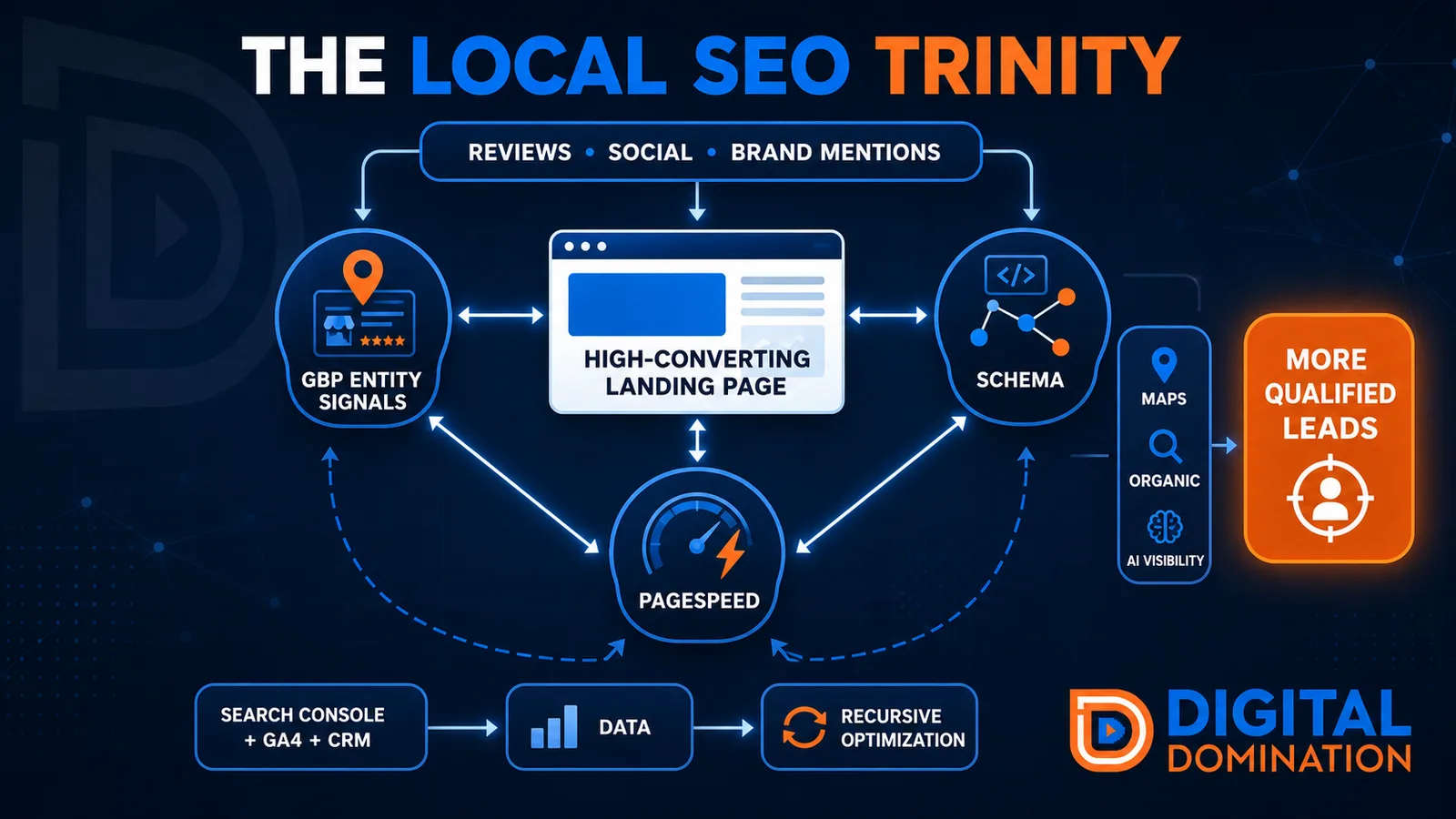
The Local SEO Trinity
Think of a three-legged stool. Your Google profile, your website, and your reviews all have to hold you up. If one leg is short, the whole thing wobbles.
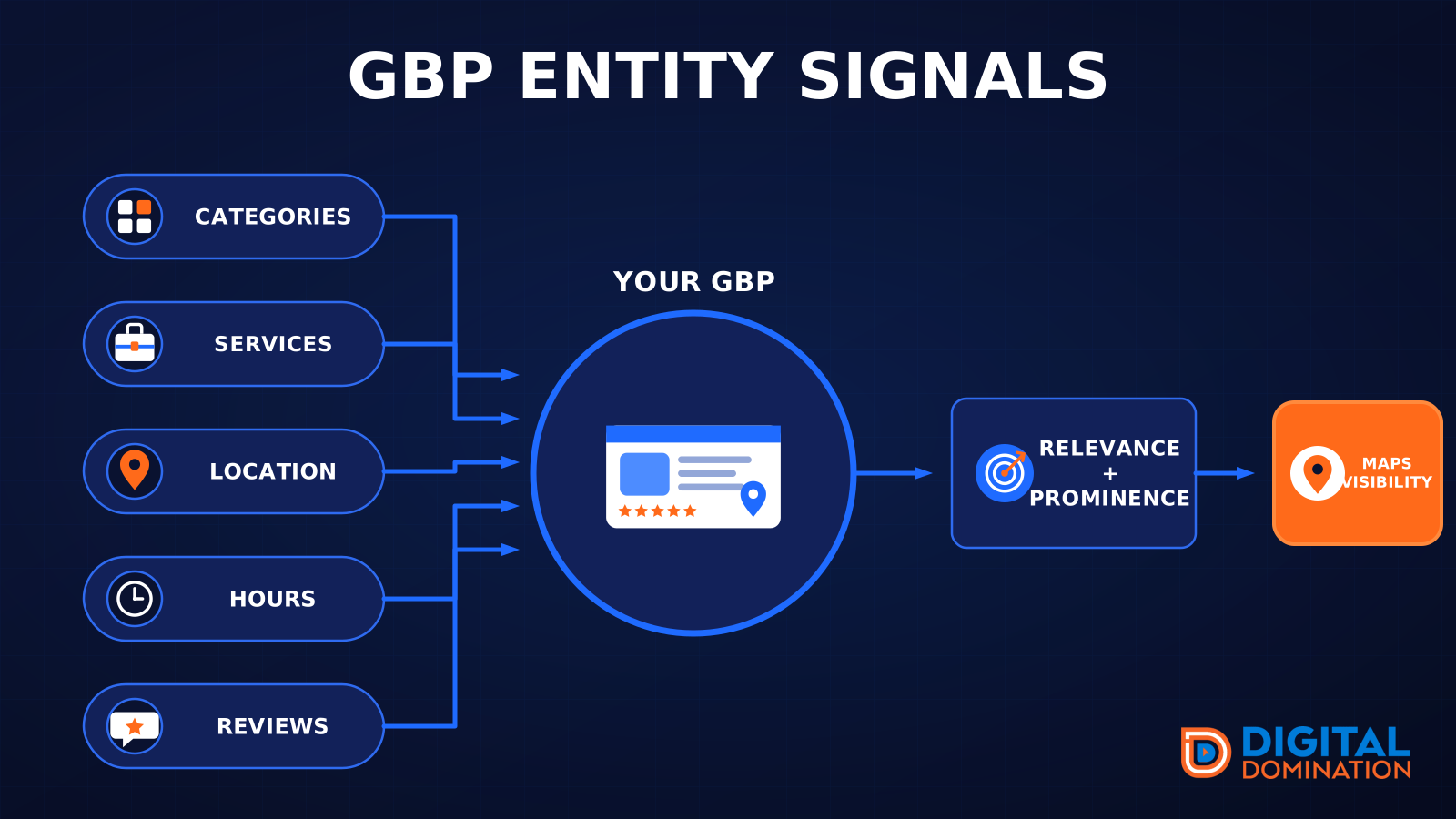
GBP entity signals
This leg is your Google Business Profile. GBP means Google Business Profile. It covers your categories, your services, your location, your hours, and your reviews. Google uses those facts to decide who to show.
Your Google profile is your storefront sign. If the sign is missing, or it names the wrong shop, people drive past.
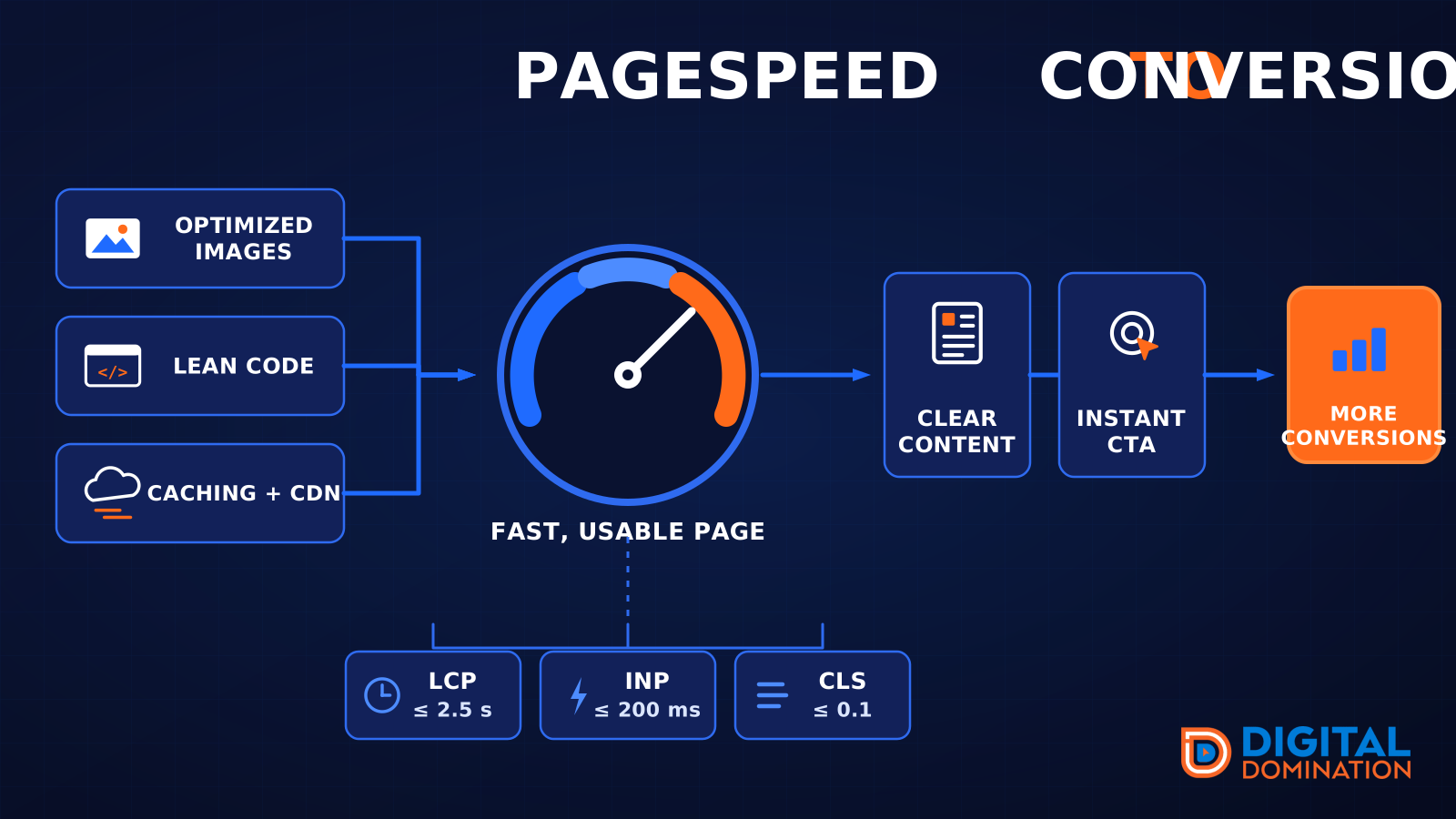
PageSpeed to conversion
This leg is your website, above all on a phone. Small images, lean code, and caching make a page fast. A fast, clear page is what turns a visit into a call. Phone speed is one of the 12 Trinity checks because a slow page loses the call before anyone sees your offer.
Your website is the showroom. If the door sticks, people leave before they look around.
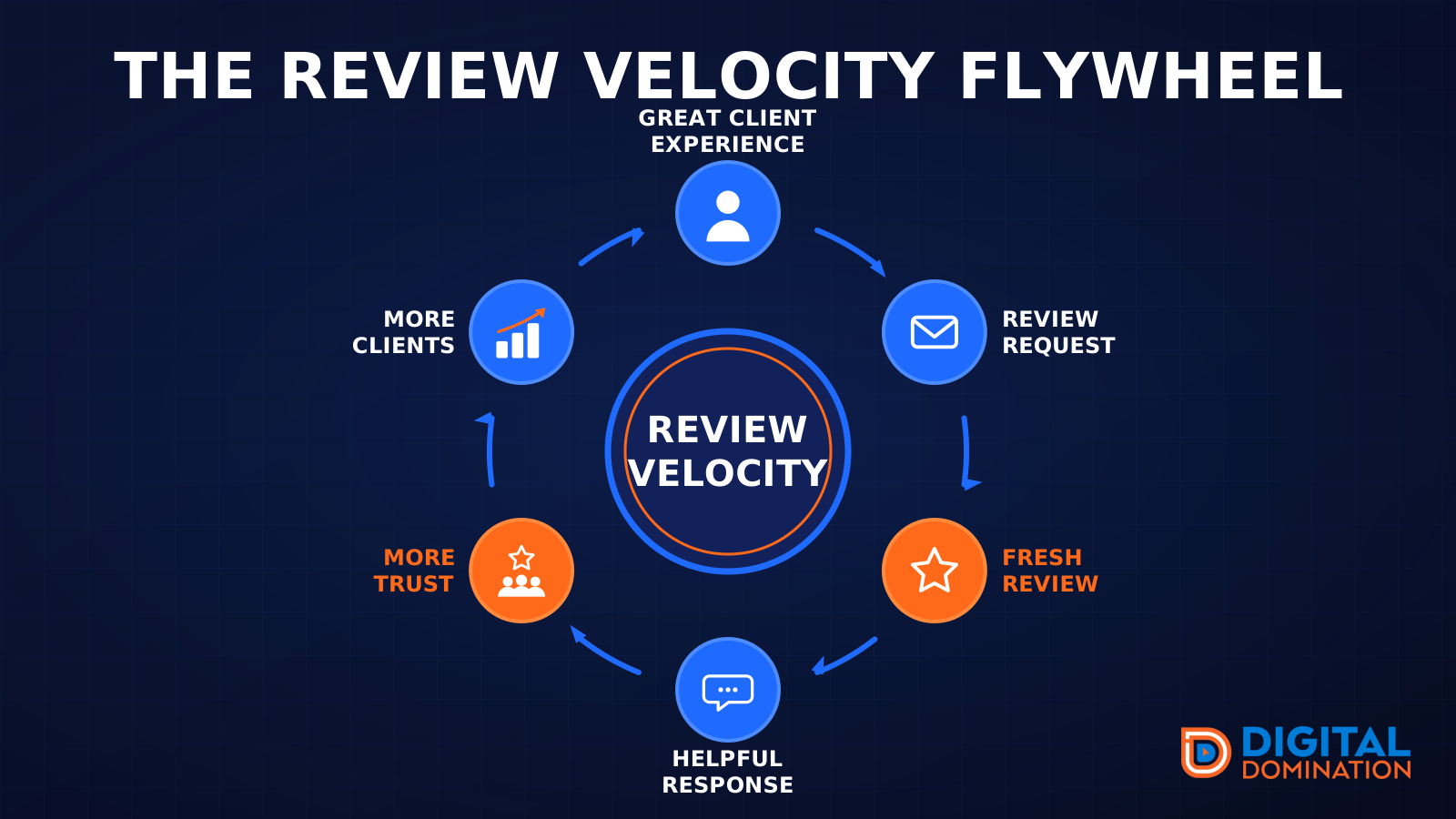
The review velocity flywheel
This leg is reviews and reputation. A good visit leads to a review request, then a fresh review, then a helpful reply, then more trust, then more customers. When the scan can find your Google listing, it shows your rating, your recent reviews, and how many you answered.
Reviews are word of mouth. One kind word helps. A steady stream of real reviews, and a reply from you, helps more.
How this turns into revenue
Being found in more searches leads to more calls. More calls lead to more booked jobs. More booked jobs lead to more revenue.
Example numbers, not a real business: 40 calls from search in a month, a 25 percent close rate, and a $400 average job. That is 10 booked jobs. That is $4,000. The math is the lesson. It is not a promise.
The full page has a box where you can type your own average job value and close rate.
One real story, from our car dealership case study: Medina Auto Group went from invisible on Google Maps to dominating every high-intent search across their market. The turnaround spanned all four of their rooftops at once. The same page says the team eliminated 89 unfair one-star reviews that had been dragging the dealership's reputation down and keeping it out of the Map Pack. It also says: “Results described here are exceptional and non-typical. Outcomes vary based on market conditions, competition, and implementation. No guarantees are made regarding earnings, rankings, or conversions.”
Free strategy call
More booked jobs start with a clear plan
Book a free strategy call. We look at your Google profile, your website, and your reviews, and we tell you what to fix first.
Free. You pick the time. A real person shows up.