
Thin local pages can weaken your whole site's trust
Google's latest warning is aimed at scaled, low-value pages. Local businesses should audit city, suburb and service-area pages before they hurt the pages that actually drive calls.

What changed, and who should pay attention
On September 7, 2026, Google Search Advocate John Mueller said that low-value programmatic SEO can cause Google’s systems to lose faith in a site overall, not only in the generated pages. Search Engine Roundtable covered the warning in its report, Google Can Lose Faith In Sites Based On Low Value Programmatic SEO. Mueller made the point on Bluesky, where he wrote from the @johnmu.com account about the broader trust issue created by low-value scaled pages.
This hits local businesses that have built city pages, suburb pages, service-area pages, neighborhood pages or location pages from a template. If those pages say almost the same thing with only the city name swapped out, they are not just weak pages. They may be a signal that the whole website is trying to rank without helping real customers.
For a plumber, roofer, dentist, med spa, HVAC company or attorney, that risk matters because the pages you care about most are usually not experimental SEO pages. They are your homepage, core service pages, contact page and Google Business Profile landing page.
Google’s spam policy now spells out the risk
Google Search Central’s Spam policies for Google web search, updated August 28, 2026, define scaled content abuse as generating many pages mainly to manipulate rankings rather than help users. Google’s documentation includes AI-generated pages that add little value, but the issue is not limited to AI. A human-written template can still be low value if it exists mostly to catch city searches.
PinMeTo also covered Mueller’s comments in Programmatic SEO can cost a whole site Google’s trust, framing the issue as a site-level trust problem. That is the key shift for local owners. The question is no longer only, Did these pages rank? The better question is, Do these pages make our business look more useful, more real and more trustworthy to Google and customers?
The practical test is simple. If a customer in that city landed on the page, would they learn anything specific enough to choose you, call you or avoid calling you if you are not the right fit?
Why local sites are especially exposed
Local SEO has always created pressure to make more pages. Owners want to rank in every city they serve, every suburb nearby and every service combination people search for. The temptation is to create a page for every city plus every service, then fill each page with the same blocks of text.
That approach is risky because local relevance is not created by repeating a city name. Google’s local ranking factors are relevance, distance and prominence. Your website can support relevance and prominence, but it cannot fake distance, and it cannot make a thin page useful just by naming a place.
Watch for these common patterns on your own site:
- ▸Pages where only the city name changes.
- ▸Pages with the same headline structure across dozens of locations.
- ▸Pages that claim service in an area without proof you actually work there.
- ▸Pages that have no local photos, staff details, reviews, directions or job examples.
- ▸Pages made only because a keyword tool showed search volume.
The difference between useful local pages and thin local pages
A useful local page answers a real local question. It explains what you offer in that city, who you serve, whether there are limits, what customers should know before booking and how to contact the right team. It may include local proof, such as a real job type, a service boundary, a nearby landmark, a parking note or a staff member assigned to that area.
A thin local page feels interchangeable. It might say, Best service in City, trusted professionals, affordable solutions and contact us today, without saying anything a customer in that city could not read on every other page.
You do not need a documentary for every town. You do need a reason for each page to exist beyond ranking. If you cannot explain that reason in one sentence, the page probably needs work, consolidation or removal.
Five things to check on your city pages this week
Set aside one hour and open your city, suburb and service-area pages in separate tabs. Do not start with rankings. Start with usefulness. Pretend you are a customer who lives in that place and needs to know whether your business is the right choice.
Check these items page by page:
- ▸Does the page say exactly what service is available in that city?
- ▸Does it include proof that you know or serve that area?
- ▸Does it explain any local limits, trip fees, service windows or scheduling notes?
- ▸Does it avoid copy that appears word for word on your other city pages?
- ▸Does it give a customer a clear next step, such as call, book or request an estimate?
What thin pages can do to your money pages
The scary part of Mueller’s September 7 comment is that Google may lose faith in the site overall. For a local business, that means thin pages may affect more than the exact URLs you generated. They can make your domain look less reliable, less original and less focused.
Your money pages are the pages that lead directly to calls, forms and booked jobs. They usually include your homepage, main service pages, financing page, specials page, booking page and contact page. If Google becomes less confident in the overall site, those pages may have a harder time competing, even if they were not part of the programmatic rollout.
This is why a city-page cleanup is not just housekeeping. It is risk management. You are protecting the pages that already have a business purpose.
What to do about it now
Do not delete everything in a panic. Some local pages are valuable. The goal is to separate pages that help customers from pages that exist only to create a ranking target.
Use this owner-level cleanup plan:
- ▸Make a spreadsheet of every city, suburb, neighborhood and service-area page.
- ▸Mark each page as keep, improve, combine or remove.
- ▸Keep pages with clear local value and real customer usefulness.
- ▸Improve pages that serve real areas but are too generic.
- ▸Combine pages that cover overlapping suburbs with no meaningful difference.
- ▸Remove or noindex pages that are clearly made only to rank and add no customer value.
- ▸Update internal links so important service pages still get attention.
How to add real local value without overcomplicating it
You do not need expensive research for every page. You need details that a real customer would recognize as useful. The best local content often comes from your office manager, dispatcher, estimator, technician or owner. They know which towns call most, what questions people ask and where service expectations differ.
Add practical details that are true and easy to verify:
- ▸Service boundaries, including places you do and do not serve.
- ▸Typical appointment availability by area, if it differs.
- ▸Local photos from your team, vehicles or completed work where appropriate.
- ▸Common customer questions from that city or suburb.
- ▸Relevant licensing, permits or property-type notes.
- ▸Driving, parking or access notes for customers who visit you.
- ▸Testimonials or review snippets only when you have permission and they are genuine.
How AI fits into this warning
Google’s spam policy does not ban AI content just because AI helped create it. The issue is whether scaled content is made mainly to manipulate rankings and whether it adds little value. AI can make the problem worse because it allows a business to produce many pages quickly, often before anyone checks whether those pages are useful.
If your agency or employee used AI to produce location pages, review them as if they were written by a stranger who knows nothing about your business. Look for confident but vague language. Look for repeated claims. Look for city references that sound local but are not actually helpful.
Use AI cautiously for support tasks like outlining, editing or turning your real notes into clearer language. Do not use it as a factory for hundreds of near-identical pages.
What not to do after reading the warning
This news will cause some owners to swing too far in the other direction. The answer is not to avoid local landing pages forever. The answer is to make fewer, better pages that match real markets, real services and real customer decisions.
Avoid these reactions:
- ▸Do not mass publish more pages before auditing the ones you have.
- ▸Do not hide thin pages in navigation and assume Google will ignore them.
- ▸Do not spin the same copy with synonyms and call it unique.
- ▸Do not make fake local offices or fake staff pages.
- ▸Do not create pages for areas you barely serve unless you can explain the value.
- ▸Do not judge a page only by whether it once ranked.
How this connects to your Google Business Profile
Your website and Google Business Profile should tell the same local story. If your profile says you serve a focused area but your website has thin pages for every town across a wide region, the site can feel inconsistent. That inconsistency can weaken customer trust even before Google evaluates it.
Review the landing page connected to your Google Business Profile. It should clearly explain your main service area, primary services and next step. If you use a location page as the profile website link, make sure it is one of your strongest pages, not a thin template.
For service-area businesses, be especially careful with pages that imply you have offices where you do not. Customers notice that, and Google has many reasons to distrust local signals that feel inflated.
A practical way to decide which locations deserve a page
A location deserves its own page when there is enough customer value to support it. That value might come from meaningful demand, a real crew presence, unique service information, specific local proof or a different buying situation. If all you can say is that you also serve that city, the city may belong in a service-area section instead of its own page.
Ask these questions before building or keeping a location page:
- ▸Do we regularly serve customers there?
- ▸Can we name real services, limits or scheduling details for that area?
- ▸Can we add original text that is not just a city swap?
- ▸Can a customer make a better decision after reading this page?
- ▸Does this page support our brand, or does it make us look generic?
- ▸Would we proudly send this page to a real prospect?
The bottom line for local business owners
Mueller’s warning, the Search Engine Roundtable report, the PinMeTo coverage and Google Search Central’s spam policy all point to the same practical lesson. More pages are not automatically more visibility. Low-value scaled pages can make Google trust the whole site less.
At Digital Domination, we see this through a local SEO lens. A good local site should help Google understand where you are relevant, help customers understand why to choose you and avoid pages that only exist to chase city keywords. If you are not sure whether your location pages are helping or hurting, start by checking how your business appears across your real service area. Our GeoGrid scan checks 169 points across a market so you can see where you are actually visible in Google Maps. You can start with a free GeoGrid scan at digitaldomination.ai/scan/.
Keep reading
Related guides
- ▸Local SEO services in Las Vegas
- ▸Local SEO services near me
- ▸Local SEO services vs doing local SEO yourself
Put it into action
Frequently Asked Questions
Can city pages hurt my whole website rankings?
Yes, that is the risk Google’s John Mueller warned about on September 7, 2026. If many city pages are low value and mainly built to manipulate rankings, Google’s systems may lose trust in the site overall, not only those pages.
What is a thin local page?
A thin local page is a city, suburb or service-area page that adds little useful information for a real customer. It often repeats the same copy as other pages and changes only the location name.
Should I delete all of my service-area pages?
No. Some service-area pages are useful and worth keeping. Audit them first, then improve pages with real local value, combine pages that overlap and remove pages that exist only to rank.
Does Google penalize AI-written local pages?
Google’s spam policy focuses on scaled content abuse, not AI by itself. AI-generated pages can be a problem when they are produced in large numbers mainly to manipulate rankings and add little value for users.
How do I know if a location page has real value?
Ask whether a customer in that city would learn something specific and useful from the page. Strong pages include real service details, local proof, clear limits, helpful answers and a direct next step.
Can programmatic SEO still be safe for local businesses?
It can be safer when each page is based on real business information and customer usefulness, not just keyword variations. The more pages you create, the more careful you need to be about originality, accuracy and purpose.
What should I do first after this Google warning?
Make a list of every city, suburb and service-area page on your website. Mark each one keep, improve, combine or remove based on whether it helps a real customer and supports your actual service area.
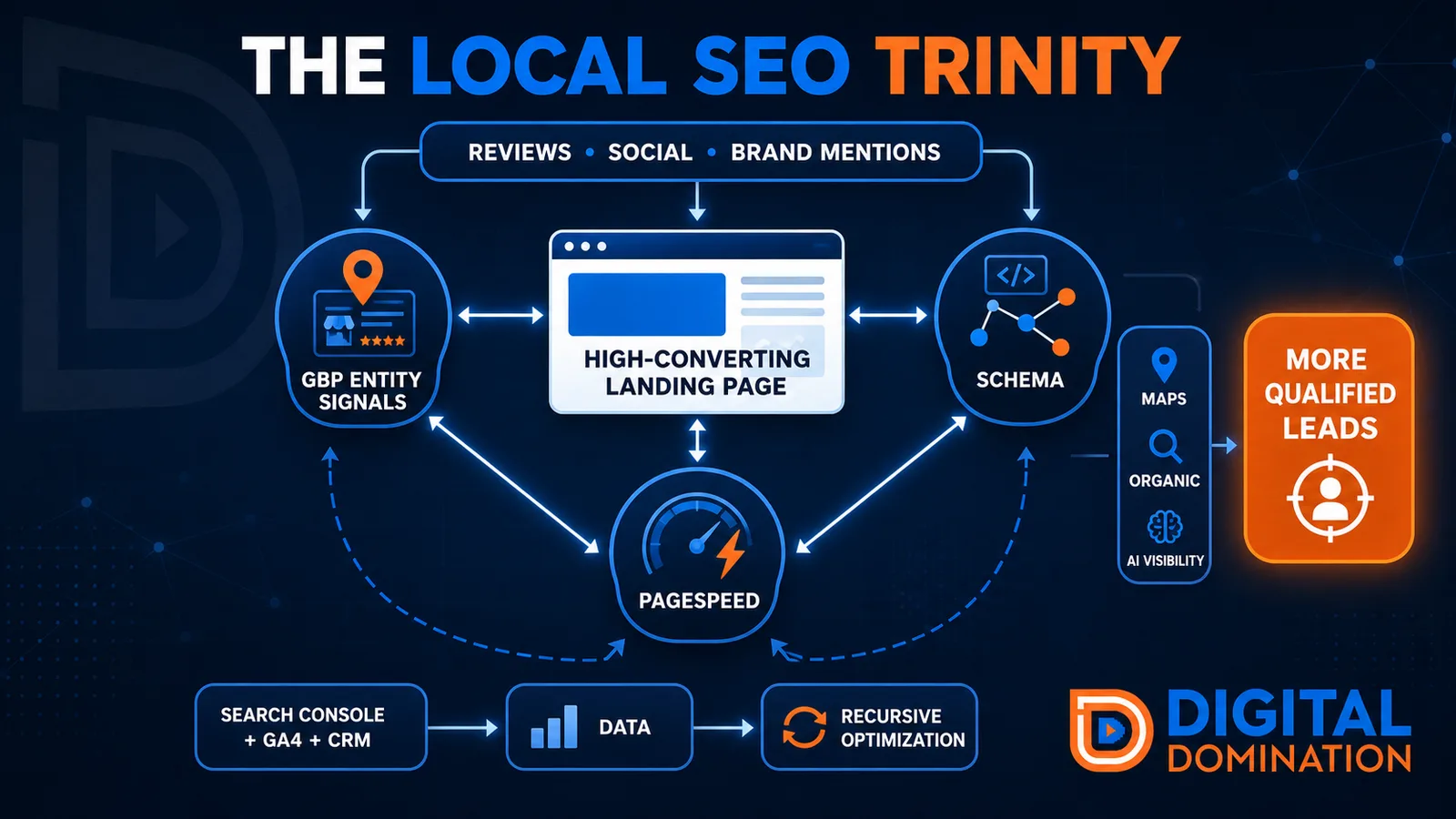
The Local SEO Trinity
Think of a three-legged stool. Your Google profile, your website, and your reviews all have to hold you up. If one leg is short, the whole thing wobbles.
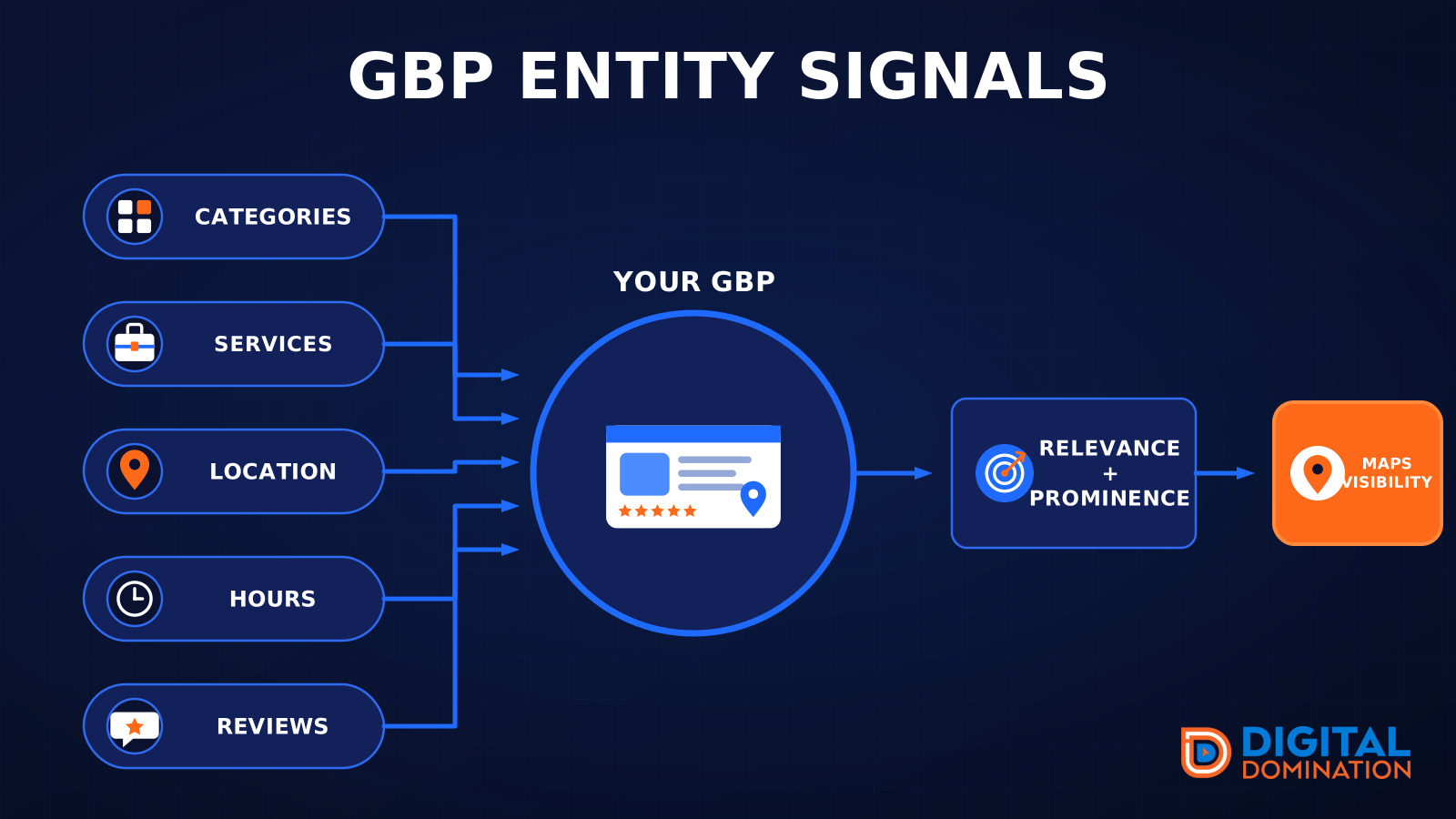
GBP entity signals
This leg is your Google Business Profile. GBP means Google Business Profile. It covers your categories, your services, your location, your hours, and your reviews. Google uses those facts to decide who to show.
Your Google profile is your storefront sign. If the sign is missing, or it names the wrong shop, people drive past.
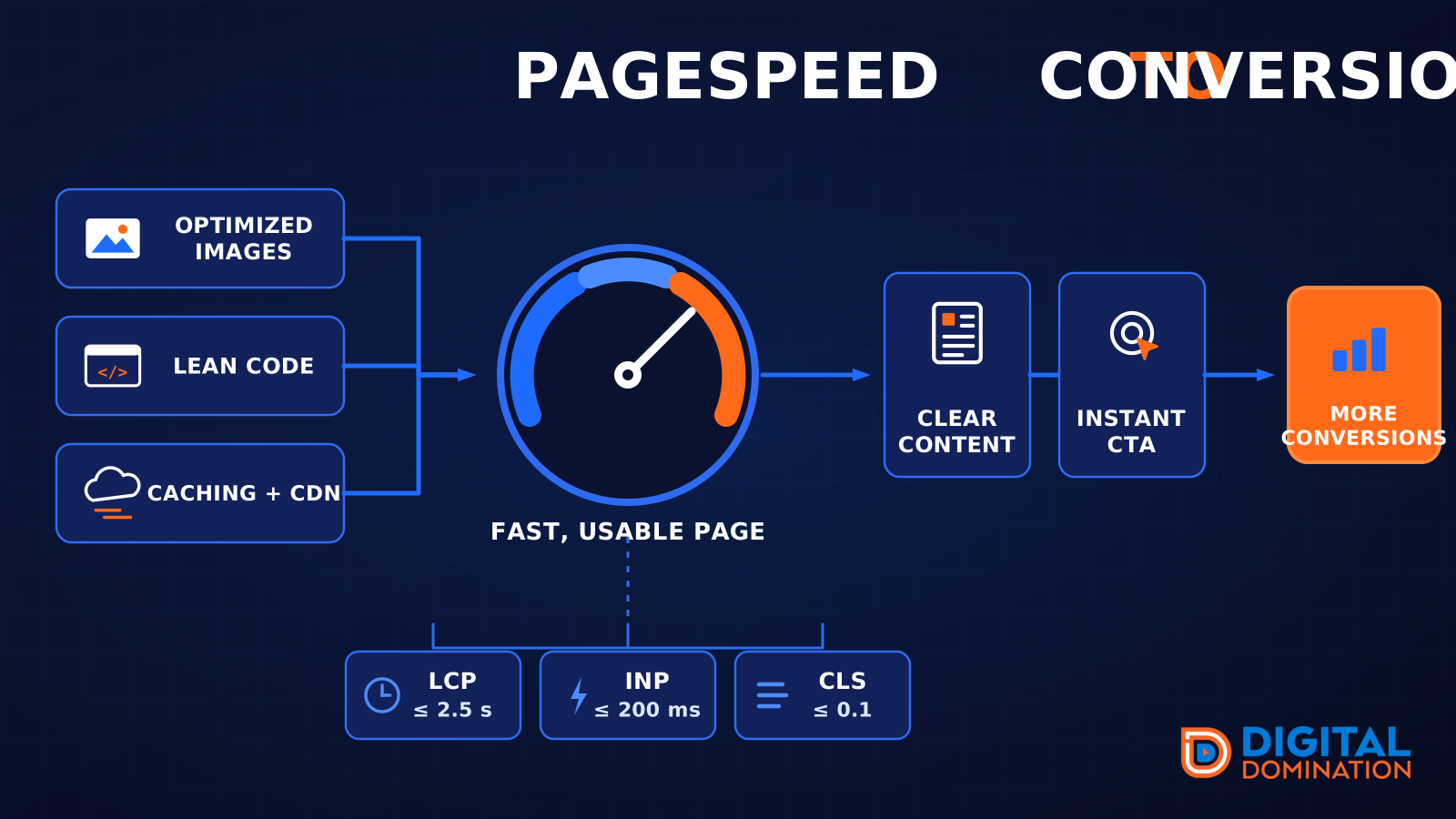
PageSpeed to conversion
This leg is your website, above all on a phone. Small images, lean code, and caching make a page fast. A fast, clear page is what turns a visit into a call. Phone speed is one of the 12 Trinity checks because a slow page loses the call before anyone sees your offer.
Your website is the showroom. If the door sticks, people leave before they look around.
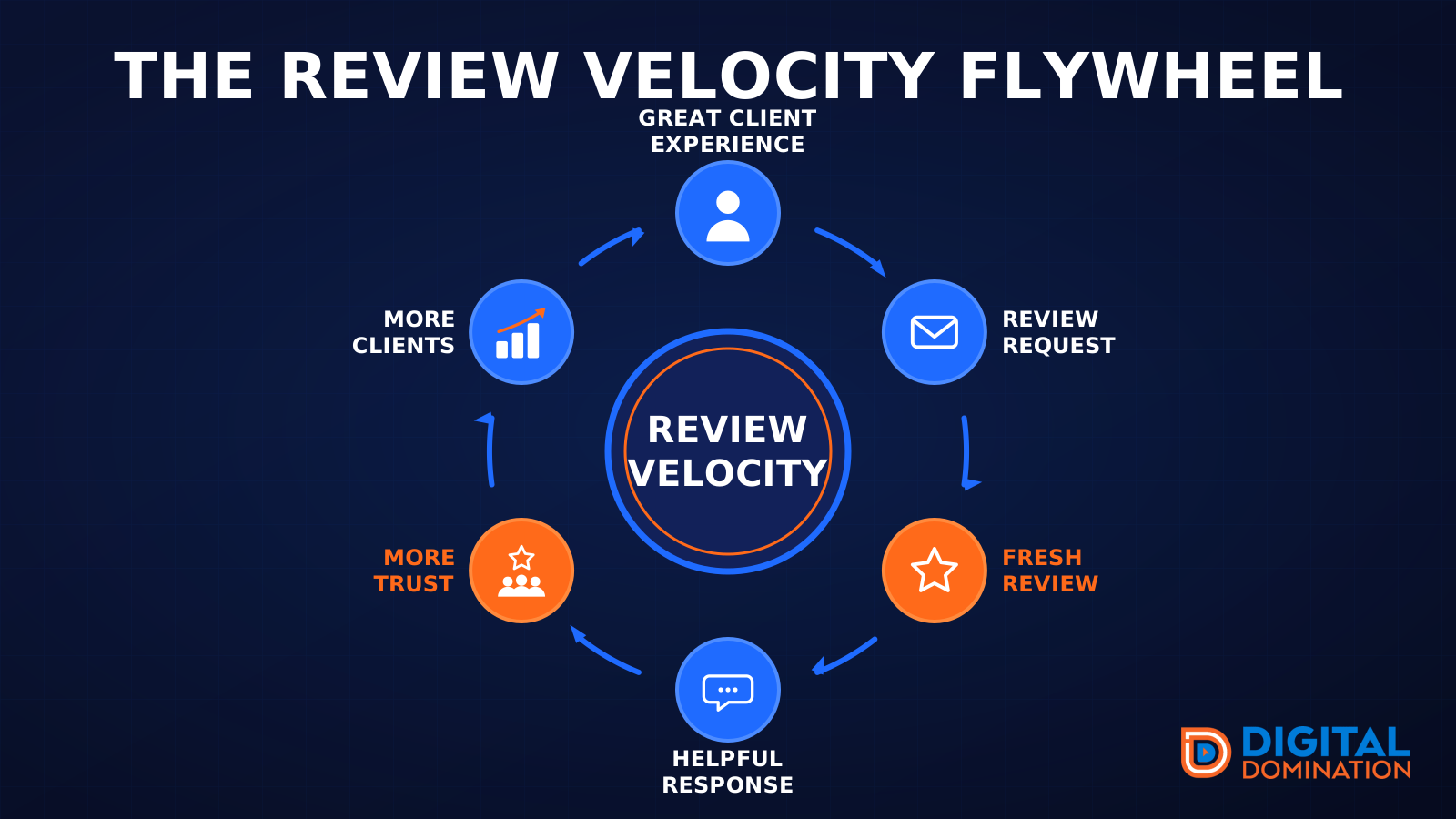
The review velocity flywheel
This leg is reviews and reputation. A good visit leads to a review request, then a fresh review, then a helpful reply, then more trust, then more customers. When the scan can find your Google listing, it shows your rating, your recent reviews, and how many you answered.
Reviews are word of mouth. One kind word helps. A steady stream of real reviews, and a reply from you, helps more.
How this turns into revenue
Being found in more searches leads to more calls. More calls lead to more booked jobs. More booked jobs lead to more revenue.
Example numbers, not a real business: 40 calls from search in a month, a 25 percent close rate, and a $400 average job. That is 10 booked jobs. That is $4,000. The math is the lesson. It is not a promise.
The full page has a box where you can type your own average job value and close rate.
One real story, from our car dealership case study: Medina Auto Group went from invisible on Google Maps to dominating every high-intent search across their market. The turnaround spanned all four of their rooftops at once. The same page says the team eliminated 89 unfair one-star reviews that had been dragging the dealership's reputation down and keeping it out of the Map Pack. It also says: “Results described here are exceptional and non-typical. Outcomes vary based on market conditions, competition, and implementation. No guarantees are made regarding earnings, rankings, or conversions.”
Free strategy call
More booked jobs start with a clear plan
Book a free strategy call. We look at your Google profile, your website, and your reviews, and we tell you what to fix first.
Free. You pick the time. A real person shows up.