
What is included in Google Maps SEO?
A practical buyer's guide for local business owners comparing DIY, freelancers, agencies and Google Maps ranking programs.
The short answer
A good Google Maps SEO service should include Google Business Profile setup and cleanup, category work, service area settings, review growth, photo and content updates, local website improvements, citation cleanup, tracking and clear reporting. It should also include a plan for keeping the profile active after the first round of edits, because Google Maps visibility is not a one-time setup task.
Google Business Profile Help says local results on Search and Maps are mainly based on relevance, distance and prominence. That means a real service should help Google understand what you do, where you serve customers and why your business deserves to be trusted compared with nearby competitors.
It should not promise that someone can pay Google for better Maps rankings. Google Business Profile Help says there is no way to request or pay for a better local ranking on Google. You are paying for skilled work around the profile, website, reviews, tracking and local authority, not a secret button inside Google.
Profile ownership, verification and access
The first thing included should be control. If you do not own or properly manage your Google Business Profile, every other part of Google Maps SEO is built on shaky ground. Google Business Profile Help says a verified Business Profile tells Google the representative is authorized and makes the business more likely to show in search results.
A service provider should check whether the profile is verified, who has access, whether duplicate listings exist and whether the business name, address, phone number and website are correct. This is especially important if you have moved, bought the business, changed phone numbers or worked with more than one marketing vendor.
At minimum, the provider should verify these access and setup points before selling you ranking work:
- ▸The profile is claimed and verified
- ▸The owner account belongs to the business, not only the vendor
- ▸Managers have the right permission level
- ▸The business name follows Google's real-world name rules
- ▸The address or service-area setting matches how customers are served
- ▸Duplicate or outdated listings are identified
Categories, services and business details
Category selection is one of the highest impact parts of Google Maps SEO. Google Business Profile Help says the first category selected is the primary category and a business can select up to 9 more categories. Whitespark's 2026 Local Search Ranking Factors report lists Primary GBP Category as the number 1 local pack and Maps factor in its survey table.
This does not mean stuffing every possible category into the profile. The primary category should match the main money service people search for. Secondary categories should support real services, not confuse Google or customers.
The provider should also fill out the basic details completely. Google Business Profile Help says complete Business Profile information should include the full address if customers can visit, business hours, business category and details such as parking or Wi-Fi availability. The Business Profile description should not exceed 750 characters and should not include URLs or HTML code.
A useful Google Maps SEO plan should include a plain review of these fields:
- ▸Primary category choice
- ▸Secondary category choices
- ▸Business hours and holiday hours
- ▸Services and products listed in the profile
- ▸Business description within Google's limits
- ▸Attributes that matter to customers
- ▸Storefront details when customers visit the location
Service areas and location accuracy
If customers come to your location, the address needs to be accurate. If you go to customers, the profile should be set up as a service-area business in a way that matches reality. Google Business Profile Help says a service-area business can set its service area based on cities, zip codes or other places served.
This part matters because Google Maps is local by design. Distance is one of Google's main local ranking factors, and no service can make a business equally strong everywhere. A provider should be honest about where your business can realistically compete, especially in larger metro areas.
For a service-area business, the provider should check these items:
- ▸Whether the address should show or be hidden
- ▸The cities or zip codes actually served
- ▸Whether service areas are too broad to be useful
- ▸Whether landing pages support important service areas
- ▸Whether tracking shows rankings across the full area, not only near the office
Reviews and reputation work
Reviews are not optional in Google Maps SEO. They affect trust, clicks and customer decisions. BrightLocal's 2026 Local Consumer Review Survey says 97% of consumers read reviews online and 41% always read reviews when browsing for businesses. The same survey says Google's review-site share was 71%.
Google Business Profile Help says businesses can ask customers to leave reviews through a Google link or QR code and can reply to reviews publicly. A Google Maps SEO service should help you build a review process that is steady, ethical and easy for staff to follow.
This should not mean fake reviews, review gating or pressuring customers. It should mean asking real customers at the right time, making the request simple and responding professionally. Digital Domination's 5-Star Review System is one example of a published review product. It is $297/month, has no setup fee, is billed monthly through Stripe and can be canceled anytime.
A real review plan should include these pieces:
- ▸A direct Google review link or QR code
- ▸Staff instructions for when to ask
- ▸Review reply guidance
- ▸A plan for new reviews over time
- ▸A process for handling negative reviews
- ▸Tracking of review growth and rating trends
Photos, videos and ongoing profile activity
Google Business Profile Help says a Business Profile can include photos or videos of the storefront, products and services. For a local business owner, this is not about creating a polished national brand campaign. It is about showing proof that the business is active, real and worth contacting.
A Google Maps SEO provider should tell you what kinds of photos to collect and how often to add them. A dentist may need office, team and treatment-room photos. A roofer may need jobsite, truck, crew and before-and-after style photos when appropriate. A restaurant may need menu items, seating and exterior photos.
The service should make profile activity simple instead of vague. Ask whether these items are included:
- ▸Photo upload schedule
- ▸Guidance on what photos to take
- ▸Video use when helpful
- ▸Posts or updates when appropriate
- ▸Product or service image updates
- ▸Seasonal changes to hours or offerings
Website support for Maps rankings
Your Google Business Profile is the center of Google Maps SEO, but it is not the only part. Whitespark's 2026 Local Search Ranking Factors report groups local ranking factors into Google Business Profile signals, on-page signals, review signals, link signals, behavioral signals, citation signals, personalization signals and social signals.
In plain English, your website should confirm what the profile says. If your Business Profile says you are an emergency plumber in a city, your website should make that service and location clear. If your profile lists several services, your site should have useful pages that explain them.
BrightLocal's 2026 Local Consumer Review Survey says 66% of consumers do further research after reading a positive review and 54% visit the business website after reading positive reviews. That means the website is often the next trust check after someone sees you in Maps.
A Google Maps SEO service should usually include website checks like these:
- ▸Clear service pages
- ▸Clear city or location signals where appropriate
- ▸Consistent name, address and phone information
- ▸Click-to-call buttons on mobile
- ▸A contact page that matches the profile
- ▸Review or trust signals on the site
- ▸Basic technical cleanup that affects local visibility
Citations, links and local trust signals
Citations are mentions of your business information on other websites, directories or local platforms. Links are clickable references from other websites to yours. Both can support prominence, which Google says is one of the main local ranking factors.
This part of the service should be boring in the best way. Your business name, address and phone number should be consistent where customers and search engines are likely to check. The provider should also look for reasonable local trust signals, such as chamber pages, supplier directories, industry directories or community organizations when they make sense.
Be careful with packages that sell huge volumes of low-quality directory submissions as if that alone will rank you. Citations can help clean up confusion, but they are not a substitute for a complete profile, strong category selection, reviews and a website that backs up your services.
Tracking, reporting and proof
You should not have to guess whether Google Maps SEO is working. Google Business Profile Help says performance data can include views, searches, directions, calls, website clicks, messages, bookings, products, menus and offers when those metrics apply to the business.
A useful report should separate activity from results. Activity is what the provider did, such as profile edits, review requests or page updates. Results are what changed, such as visibility across your service area, calls, direction requests and website actions.
Google also says rankings for new businesses can take up to a month to appear in search results and profile edits can take up to 3 days to appear in search results. That is why reporting should be consistent and realistic, not based on checking one keyword from one phone.
Good reporting should include these checkpoints:
- ▸A baseline before work starts
- ▸Local ranking checks from multiple points in the service area
- ▸Business Profile performance data
- ▸Call and website action reporting where available
- ▸A plain summary of work completed
- ▸Next steps for the coming period
- ▸Warnings about issues that need owner input
Seven questions to ask before you sign
Before you hire anyone, ask questions that force clear answers. You are not trying to become an SEO expert. You are trying to learn whether the provider has a real process and whether that process fits your business.
The best answers should be specific to your category, location, competition and starting point. Vague promises usually lead to vague reporting.
Ask these questions before you sign:
- ▸Who will own the Google Business Profile and related accounts?
- ▸Which primary category do you recommend, and why?
- ▸How will you handle reviews without breaking Google's rules?
- ▸Will you improve the website pages that support Maps rankings?
- ▸How will you track rankings across my actual service area?
- ▸What reports will I receive, and how often?
- ▸What work is included after the first setup month?
- ▸What do you need from me to make the campaign work?
When DIY or a cheaper option can make sense
The cheaper or DIY path can make sense for an owner with one location, time to maintain the Business Profile and enough confidence to handle verification, categories, reviews, photos, service areas, website updates and performance reporting without outside execution.
DIY is also more realistic when competition is light, the business serves a small area and the owner is already comfortable updating the website. In that case, the main cost is time and consistency. You still need to follow Google's guidance, avoid shortcuts and check whether your edits actually show up.
DIY or a cheaper provider is usually a better fit when these are true:
- ▸You have one location
- ▸You can log in and update the profile yourself
- ▸You are comfortable requesting and replying to reviews
- ▸You can add real photos regularly
- ▸You can make simple website edits
- ▸You can read performance reports without help
- ▸You are not in a highly competitive local market
What Digital Domination includes in its approach
Digital Domination is built for owners who want outside execution, proof and accountability around Google Maps rankings. The company offers a Free GeoGrid scan that checks 169 real Google results across the service area, so the conversation starts with what customers actually see in different parts of town.
The Maps Domination Program pricing is set per market on a qualification call. Results vary. Digital Domination also offers territory exclusivity, meaning one client per trade per service area. Weekly GeoGrid tracking reports show visual proof of rankings and call volume.
Stronger visibility on Google Maps. The company shows Google Partner and Meta Business Partner badges on its roster page and has 20 years learning how businesses earn attention, authority, trust and rankings online.
If you want to compare professional help against doing it yourself, visit the Get Ranked page on Digital Domination's site. It explains the Maps Domination Program, territory exclusivity and what happens on the qualification call. You can also request the Free GeoGrid scan from the Scan page to see how your business shows up across 169 points before you decide.
Keep reading
Related guides
Put it into action
Frequently Asked Questions
What does Google Maps SEO include?
Google Maps SEO usually includes Google Business Profile setup, verification, category selection, service area settings, reviews, photos, local website updates, citations, tracking and reporting. The goal is to improve relevance, distance and prominence, which Google Business Profile Help says are the main local ranking factors.
Can I pay Google to rank higher on Maps?
No. Google Business Profile Help says there is no way to request or pay for a better local ranking on Google. You can pay a provider to improve your profile, website, reviews and reporting, but not to buy a better Maps position from Google.
How important is the primary Google Business Profile category?
It is very important. Google says the first category selected in Business Profile is the primary category, and Whitespark's 2026 Local Search Ranking Factors report lists Primary GBP Category as the number 1 local pack and Maps factor in its survey table.
Do reviews help Google Maps SEO?
Reviews help because they affect trust and customer behavior, and they are part of the local search conversation. BrightLocal's 2026 Local Consumer Review Survey says 97% of consumers read reviews online, and Google says businesses can ask customers for reviews through a Google link or QR code.
How long does Google Maps SEO take?
It depends on the business, competition and starting point. Google Business Profile Help says rankings for new businesses can take up to a month to appear in search results, and profile edits can take up to 3 days to appear. Competitive markets usually need ongoing work, not just one round of edits.
Should Google Maps SEO include my website?
Yes, in most cases. Your website should support what your Business Profile says about your services and location. BrightLocal's 2026 survey says 54% of consumers visit the business website after reading positive reviews, so the site often becomes the next trust check.
Is Google Maps SEO worth doing myself?
It can be worth doing yourself if you have one location, time to maintain the profile and confidence handling verification, categories, reviews, photos, service areas, website updates and reporting. If the market is competitive or you do not have time to stay consistent, hiring help may be the safer path.
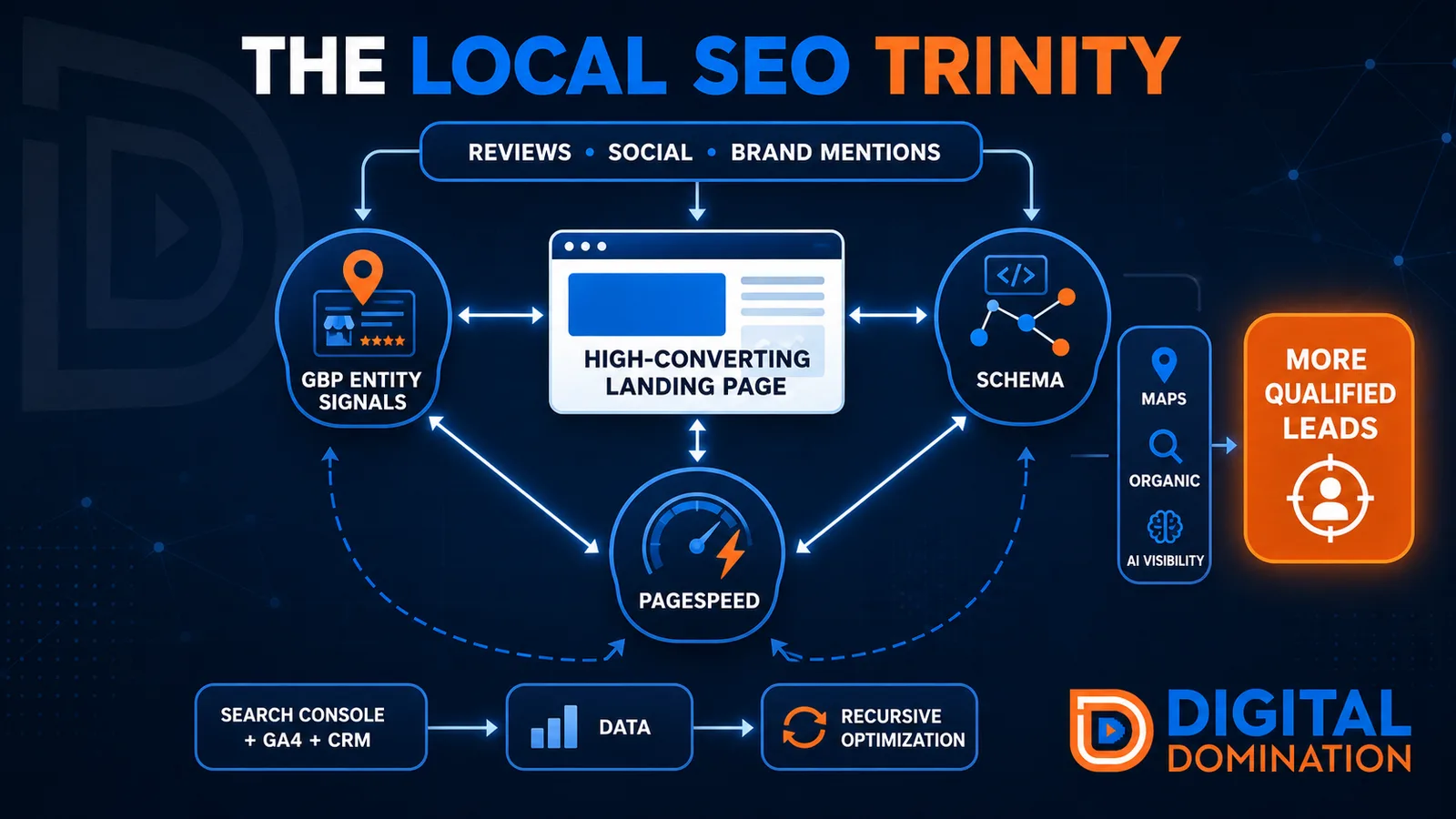
The Local SEO Trinity
Think of a three-legged stool. Your Google profile, your website, and your reviews all have to hold you up. If one leg is short, the whole thing wobbles.
GBP entity signals
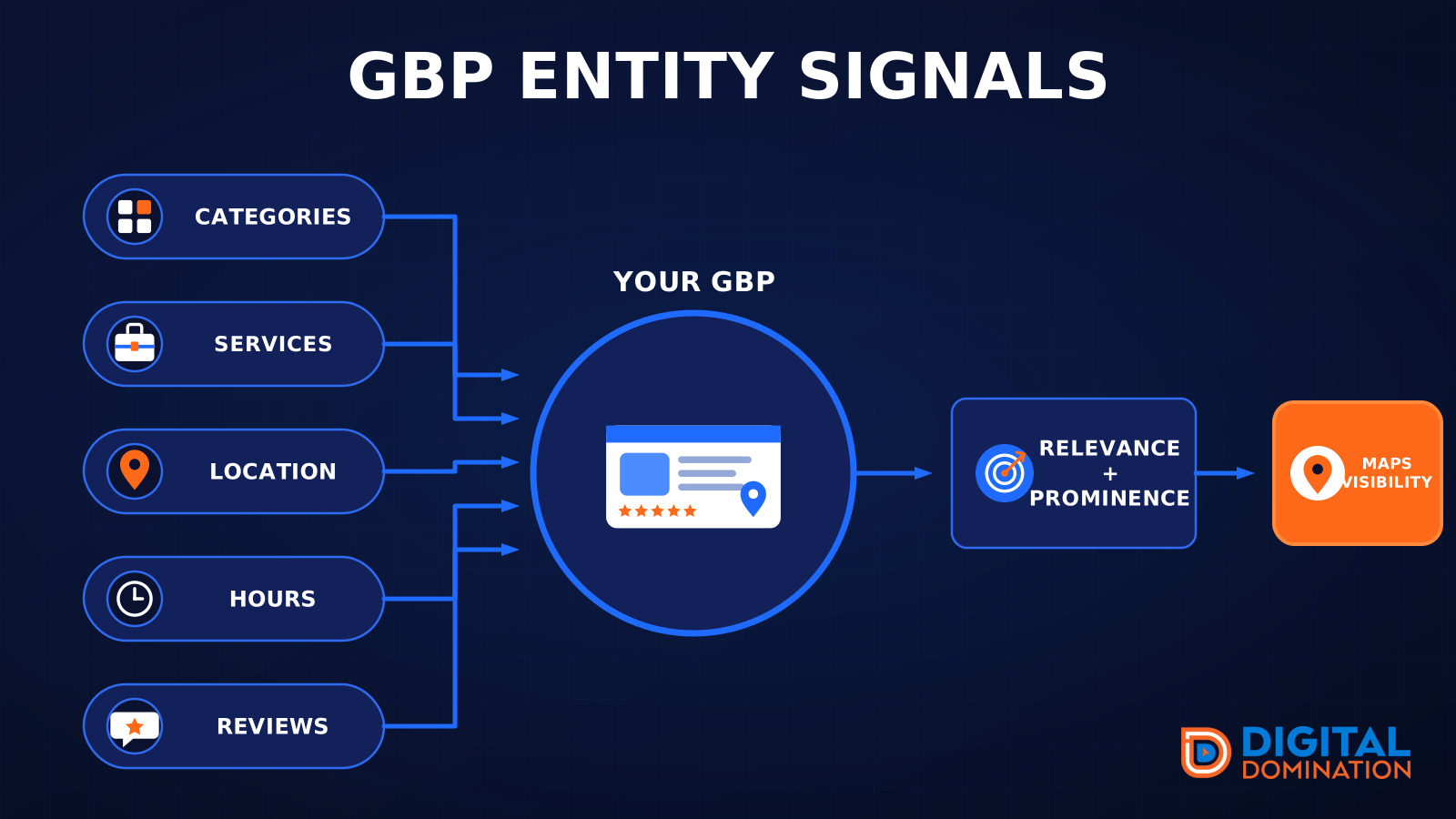
This leg is your Google Business Profile. GBP means Google Business Profile. It covers your categories, your services, your location, your hours, and your reviews. Google uses those facts to decide who to show.
Your Google profile is your storefront sign. If the sign is missing, or it names the wrong shop, people drive past.
PageSpeed to conversion
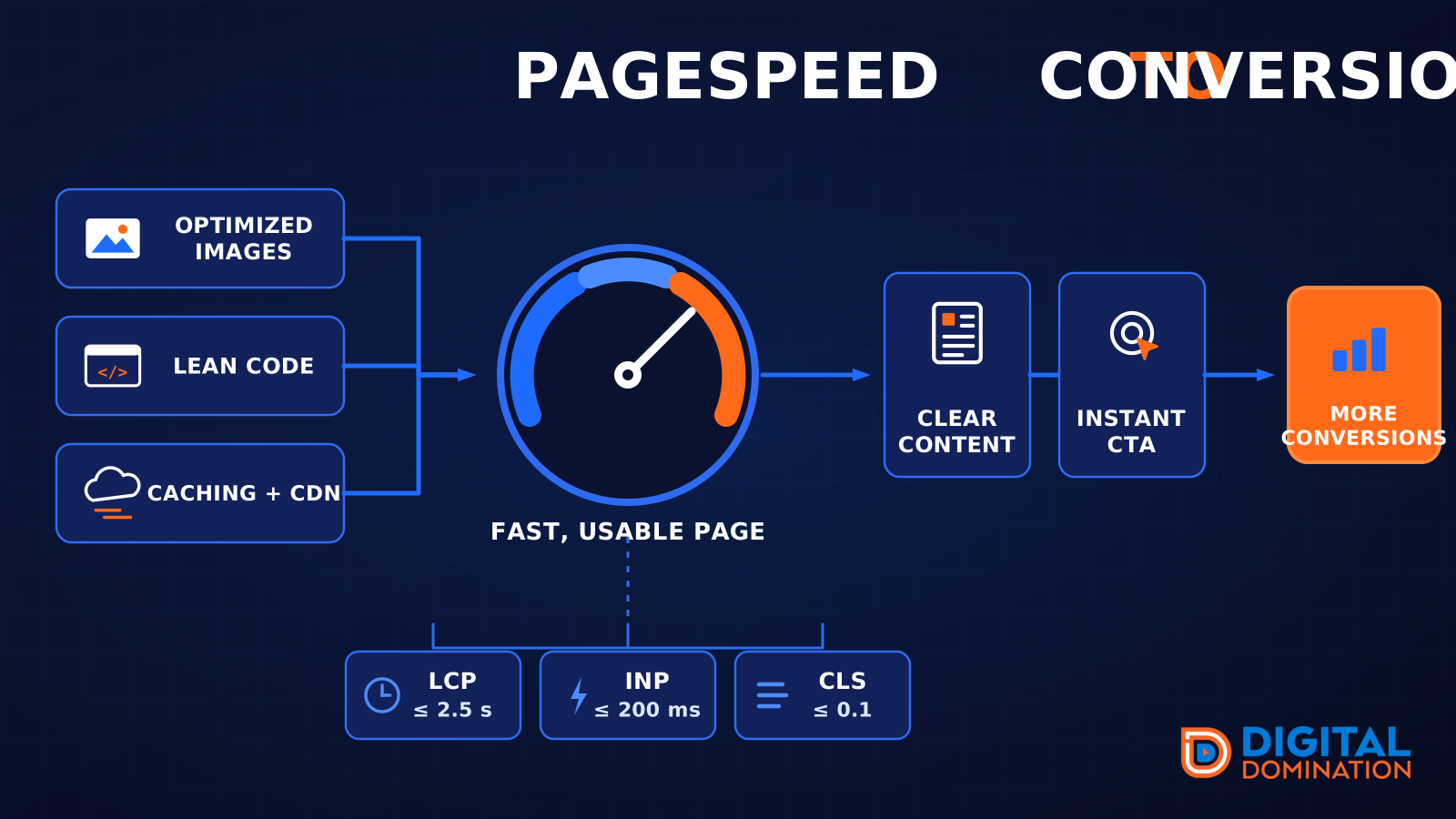
This leg is your website, above all on a phone. Small images, lean code, and caching make a page fast. A fast, clear page is what turns a visit into a call. Phone speed is one of the 12 Trinity checks because a slow page loses the call before anyone sees your offer.
Your website is the showroom. If the door sticks, people leave before they look around.
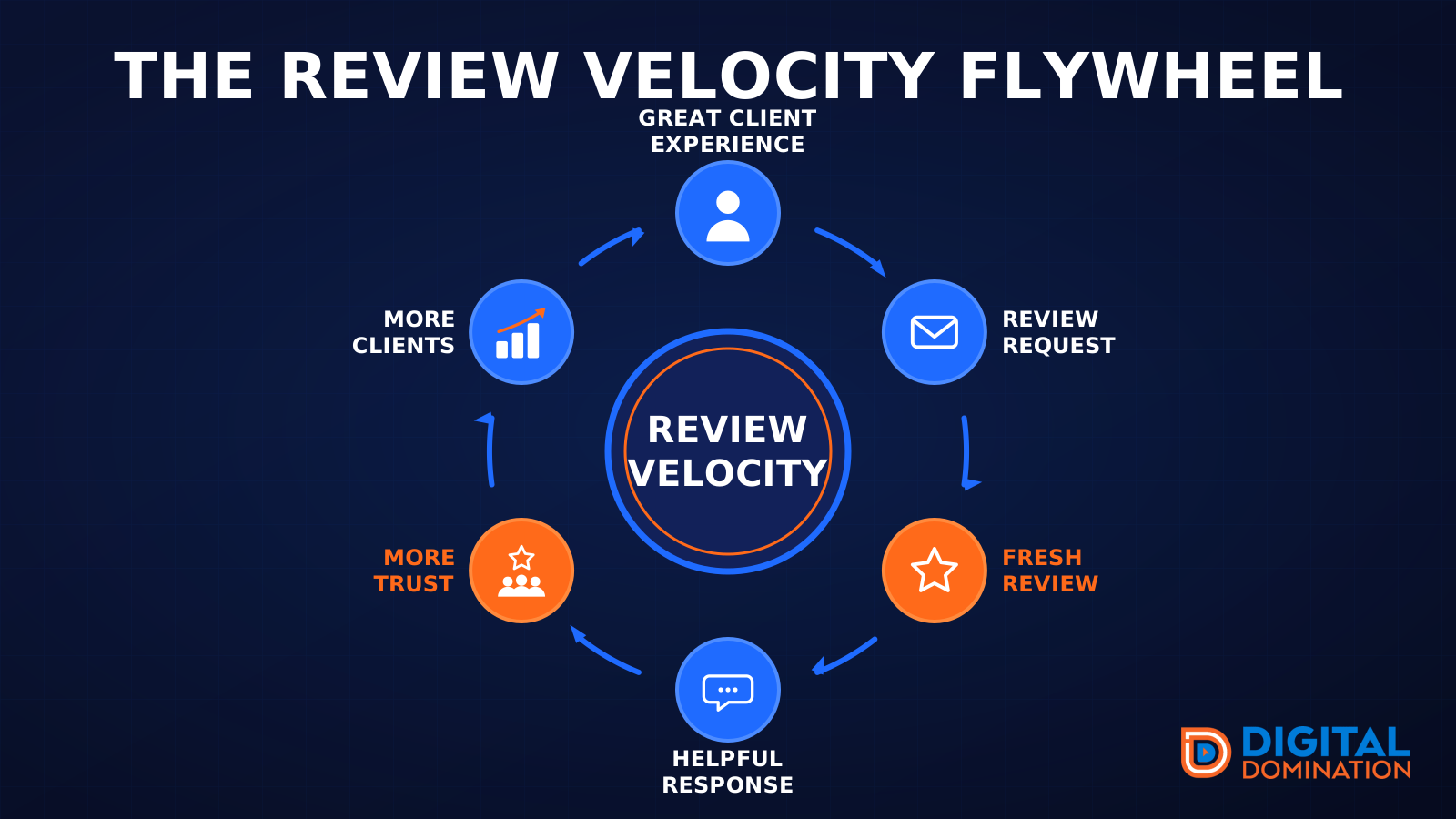
The review velocity flywheel
This leg is reviews and reputation. A good visit leads to a review request, then a fresh review, then a helpful reply, then more trust, then more customers. When the scan can find your Google listing, it shows your rating, your recent reviews, and how many you answered.
Reviews are word of mouth. One kind word helps. A steady stream of real reviews, and a reply from you, helps more.
How this turns into revenue
Being found in more searches leads to more calls. More calls lead to more booked jobs. More booked jobs lead to more revenue.
Example numbers, not a real business: 40 calls from search in a month, a 25 percent close rate, and a $400 average job. That is 10 booked jobs. That is $4,000. The math is the lesson. It is not a promise.
The full page has a box where you can type your own average job value and close rate.
One real story, from our car dealership case study: Medina Auto Group went from invisible on Google Maps to dominating every high-intent search across their market. The turnaround spanned all four of their rooftops at once. The same page says the team eliminated 89 unfair one-star reviews that had been dragging the dealership's reputation down and keeping it out of the Map Pack. It also says: “Results described here are exceptional and non-typical. Outcomes vary based on market conditions, competition, and implementation. No guarantees are made regarding earnings, rankings, or conversions.”
Free strategy call
More booked jobs start with a clear plan
Book a free strategy call. We look at your Google profile, your website, and your reviews, and we tell you what to fix first.
Free. You pick the time. A real person shows up.