
Google Search Console now splits brand, non-brand and visual-search discovery
The update does not move your rankings by itself, but it changes what your SEO report should prove about how new customers find you.
What changed and who it hits
On November 16, 2026, Google added new reporting options to the Search Analytics API for Search Console. Google Search Central described three practical additions: branded versus non-branded query classification, web multimodal search data for Google Lens, Circle to Search and image uploads, and new multi-country or multi-device filters.
This matters most to local business owners who pay someone else to manage SEO, because the change affects reporting proof. Your rankings did not improve because Google added an API feature. But your agency, dashboard or reporting tool now has a cleaner way to show whether people are finding you by your name, by a service search or by a visual search.
Search Engine Roundtable covered the same update on November 16, noting the added branded queries, multimodal data and country or device filters. Search Engine Journal followed on November 17 with coverage focused on branded query data becoming available through the Google Search Console API.
Why branded and non-branded reporting matters
A branded search is when someone searches for your business name, a close variation of it or something clearly tied to your existing reputation. A non-branded search is when someone searches for the service, problem or category without naming you, such as emergency plumber near me, roof repair or family dentist open Saturday.
Both are valuable, but they do not prove the same thing. Branded traffic often reflects awareness you already earned through referrals, trucks, signs, repeat customers, reviews, radio, social media or past work. Non-branded traffic is closer to new-market discovery, because the searcher may not know who to call yet.
Before you judge SEO return, ask your provider to separate these two buckets in the report:
branded searches that include your business name or obvious variations
non-branded searches for services, problems and local intent
mixed or unclear searches that should not be forced into either category
clicks, impressions and average position for each group
month-by-month explanation of what changed and why
- ▸branded searches that include your business name or obvious variations
- ▸non-branded searches for services, problems and local intent
- ▸mixed or unclear searches that should not be forced into either category
- ▸clicks, impressions and average position for each group
- ▸month-by-month explanation of what changed and why
The risk of blended SEO reports
A blended report can make a campaign look stronger than it really is. If a report shows total clicks going up, but most of that increase comes from people searching your exact business name, the campaign may be riding on reputation rather than creating new visibility.
That does not mean branded searches are bad. A healthy local brand should get them. The problem is using branded growth as proof that your SEO provider is winning competitive searches for your core services.
If your current report blends everything together, ask for these questions to be answered in plain English:
How many clicks came from people who already searched our name?
How many came from people searching the service, not the brand?
Which non-branded searches are tied to our most profitable work?
Did non-branded visibility improve in the towns or neighborhoods we care about?
What changed on the site or profile that likely caused the movement?
- ▸How many clicks came from people who already searched our name?
- ▸How many came from people searching the service, not the brand?
- ▸Which non-branded searches are tied to our most profitable work?
- ▸Did non-branded visibility improve in the towns or neighborhoods we care about?
- ▸What changed on the site or profile that likely caused the movement?
Visual search is now part of local discovery
The second part of the update is easy to overlook. Google Search Central says the API can now report web multimodal search data, including discovery from Google Lens, Circle to Search and image uploads. In practical terms, people can find businesses and websites by searching with images, not only typed keywords.
For local businesses, that makes photos more measurable. A customer may use Lens on a product, a repair issue, a style of landscaping, a damaged roof area or a fixture they want replaced. The reporting change gives tools a path to show whether that kind of discovery is producing impressions and clicks.
This does not mean every local business will suddenly get visual-search leads. It does mean your photos, image context and pages are easier to judge as part of search visibility.
Local businesses most likely to care about visual discovery include:
home services with visible before-and-after work
restaurants, bakeries and caterers with strong food photos
dentists, med spas and cosmetic providers with treatment visuals
retailers, showrooms and specialty product sellers
contractors whose work can be identified from photos
- ▸home services with visible before-and-after work
- ▸restaurants, bakeries and caterers with strong food photos
- ▸dentists, med spas and cosmetic providers with treatment visuals
- ▸retailers, showrooms and specialty product sellers
- ▸contractors whose work can be identified from photos
This is not a ranking update
The Search Console API update is a reporting change, not a ranking change. It does not make your business more relevant, closer to the searcher or more prominent. Those remain Google's stated local ranking factors: relevance, distance and prominence.
That distinction matters because some vendors may present the news as if it creates new rankings. It does not. It creates better visibility into how searches are being classified and how people are discovering you across search formats.
The right takeaway is simple: better data should lead to better questions. If your provider can now separate branded and non-branded discovery, you should expect that separation when you discuss return on investment.
Five things to check on your profile this week
This news is about the Search Console API, but local owners do not need to wait for a technical rollout to improve the quality of discovery signals. Your Google Business Profile, website service pages and image library should all make it clear what you do and where you do it.
Start with the assets a real customer sees first, then ask your SEO provider to connect those assets to non-branded and visual-search reporting where possible.
Here are five practical checks to make this week:
Make sure your primary Google Business Profile category matches your main service
Add clear service descriptions that use normal customer language
Upload current photos that show real work, real products or real premises
Name and place photos on relevant pages instead of hiding them in random galleries
Check that your top services each have a dedicated page, not only a short list on the homepage
- ▸Make sure your primary Google Business Profile category matches your main service
- ▸Add clear service descriptions that use normal customer language
- ▸Upload current photos that show real work, real products or real premises
- ▸Name and place photos on relevant pages instead of hiding them in random galleries
- ▸Check that your top services each have a dedicated page, not only a short list on the homepage
What to do about it
If you are paying for SEO, do not ask for a more complicated report. Ask for a clearer one. The goal is not to drown you in Search Console exports. The goal is to know whether your money is helping strangers find you for the services you want to sell.
Ask your provider to create a simple monthly view that separates branded, non-branded and visual-search discovery. Then ask them to explain what they changed that could have influenced each bucket. If the answer is vague, the report is not doing its job.
Your next SEO report should answer these owner-level questions:
Are we getting more non-branded impressions for our priority services?
Are non-branded clicks increasing in the areas we serve?
Which pages are earning non-branded discovery?
Are photos and image-led searches producing any measurable visibility?
Which actions are planned next because of this data?
- ▸Are we getting more non-branded impressions for our priority services?
- ▸Are non-branded clicks increasing in the areas we serve?
- ▸Which pages are earning non-branded discovery?
- ▸Are photos and image-led searches producing any measurable visibility?
- ▸Which actions are planned next because of this data?
How to judge an agency after this update
The standard for SEO reporting just moved toward clarity. An agency does not need to show you every API field, but it should be able to explain the difference between demand you already had and demand the campaign helped create.
For a local business, the most useful conversation is not total traffic. It is whether the campaign is improving visibility for the searches that bring new customers: service terms, problem terms, neighborhood terms and urgent intent terms.
Before renewing or hiring an SEO provider, ask for these reporting commitments:
Separate branded and non-branded Search Console performance
Show local landing pages tied to the non-branded searches they earn
Explain what visual-search data is available and what is not available yet
Separate device or country data when it changes the business decision
Avoid claiming credit for branded traffic without context
- ▸Separate branded and non-branded Search Console performance
- ▸Show local landing pages tied to the non-branded searches they earn
- ▸Explain what visual-search data is available and what is not available yet
- ▸Separate device or country data when it changes the business decision
- ▸Avoid claiming credit for branded traffic without context
Where multi-country and multi-device filters fit
The new multi-country and multi-device filters are less flashy, but they can still matter. If your business serves one city, country filtering may simply help keep the report clean. If you serve border markets, tourist areas or multiple regions, it can help separate useful visibility from noise.
Device filters can also change the story. Many local searches happen on phones, especially when someone needs directions, a call button or fast service. A desktop-heavy report may not reflect how your best customers actually search.
Use these filters when they answer a real business question, not just because the data exists. For example, a contractor may want to know whether mobile non-branded searches are finding emergency service pages, while a showroom may care about desktop research before a visit.
What this means for photos and service pages
Visual-search reporting makes photo quality harder to ignore. If your site uses tiny stock images, outdated project photos or generic graphics, you may be missing a discovery path that competitors can measure more clearly now.
You do not need a studio shoot to start. You need useful images that match what customers search for and what Google can understand in context. Put photos near relevant service copy, use descriptive page headings and avoid dumping every photo into one unorganized gallery.
For visual discovery, improve the basics first:
Use original photos when possible
Show the problem, the process and the finished result
Place images on the matching service page
Add clear surrounding text that explains the job or product
Keep photos current so they reflect what customers can actually buy
- ▸Use original photos when possible
- ▸Show the problem, the process and the finished result
- ▸Place images on the matching service page
- ▸Add clear surrounding text that explains the job or product
- ▸Keep photos current so they reflect what customers can actually buy
The bottom line for local SEO ROI
Yes, your local SEO provider should be required to report non-branded discovery separately before you judge ROI. Branded traffic matters, but it is not the same as winning new visibility from people who did not already have you in mind.
Visual-search visibility should also be reported separately when there is enough data to make it useful. For some businesses, it may be a small signal. For others, especially businesses where photos influence buying decisions, it can become an important way to understand discovery.
At Digital Domination, we look at this news from the perspective of a Las Vegas local SEO agency serving local service businesses nationally. The practical lesson is simple: reports should show where you are being found, how you are being found and whether that discovery lines up with the customers you want.
If you are comparing providers, the local SEO services page at digitaldomination.ai/local-seo-services/ explains our approach to Google Maps visibility, local organic search, Google Business Profile work and service-area growth. If you want to see where you stand first, start with the free GeoGrid scan at digitaldomination.ai/scan/.
Keep reading
Related guides
Put it into action
Frequently Asked Questions
What did Google change in the Search Console API?
Google added reporting options for branded versus non-branded queries, web multimodal search data and multi-country or multi-device filters. Google Search Central announced the change on November 16, 2026. The change affects reporting access through the API, not your rankings by itself.
Does this Google Search Console API update improve my local rankings?
No. This is a reporting update, not a ranking update. Google's local ranking factors are still relevance, distance and prominence, so you still need strong service pages, a complete Google Business Profile and real local prominence.
Why should my SEO report separate branded and non-branded searches?
Branded searches usually come from people who already know your business name. Non-branded searches are more useful for judging whether SEO is helping new customers discover you for services and local intent. If those are blended, you may give too much credit to work that did not create new visibility.
What is visual-search reporting for a local business?
Visual-search reporting can show discovery from search experiences such as Google Lens, Circle to Search and image uploads when the data is available. For a local business, that can help you understand whether photos, products, projects or visual service examples are helping people find you.
Can I see branded query data directly in Google Search Console?
This update is specifically about the Search Analytics API, which is often used by agencies, dashboards and reporting tools. Search Engine Journal covered the branded query data becoming available through the API. If your provider uses a reporting tool, ask whether it now supports the new branded and non-branded breakdown.
Should I fire an SEO agency that does not show non-branded discovery?
Not automatically. First ask whether their reporting tool has implemented the new API options and when they can separate branded from non-branded performance. If they refuse to separate it or cannot explain why it matters, that is a serious reporting problem.
What should I ask my local SEO provider after this update?
Ask for monthly reporting that separates branded clicks, non-branded clicks and visual-search visibility where available. Also ask which pages earned non-branded discovery and what work was done to influence those searches. The answer should be clear enough for a business owner, not just a technician.
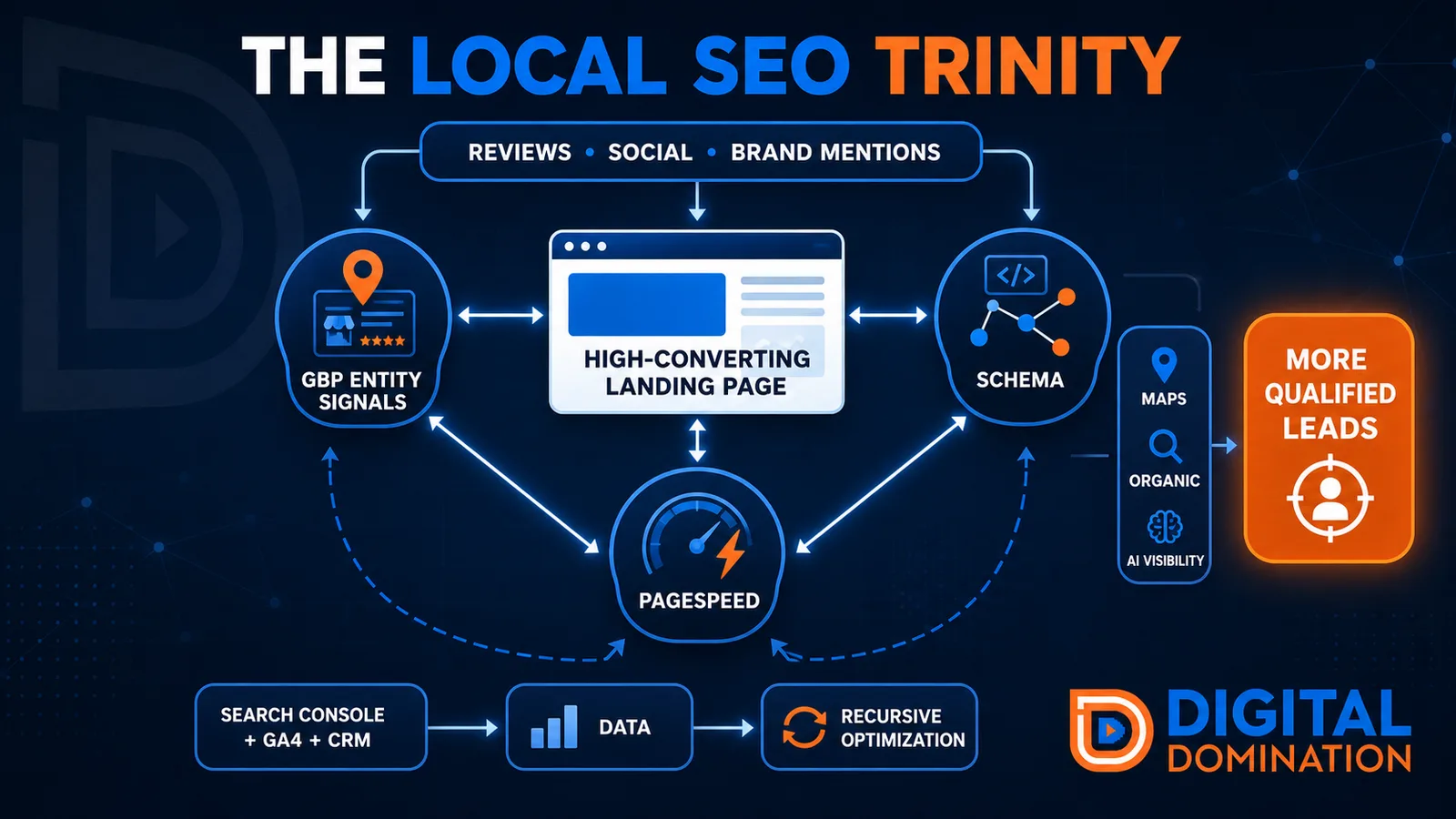
The Local SEO Trinity
Think of a three-legged stool. Your Google profile, your website, and your reviews all have to hold you up. If one leg is short, the whole thing wobbles.
GBP entity signals
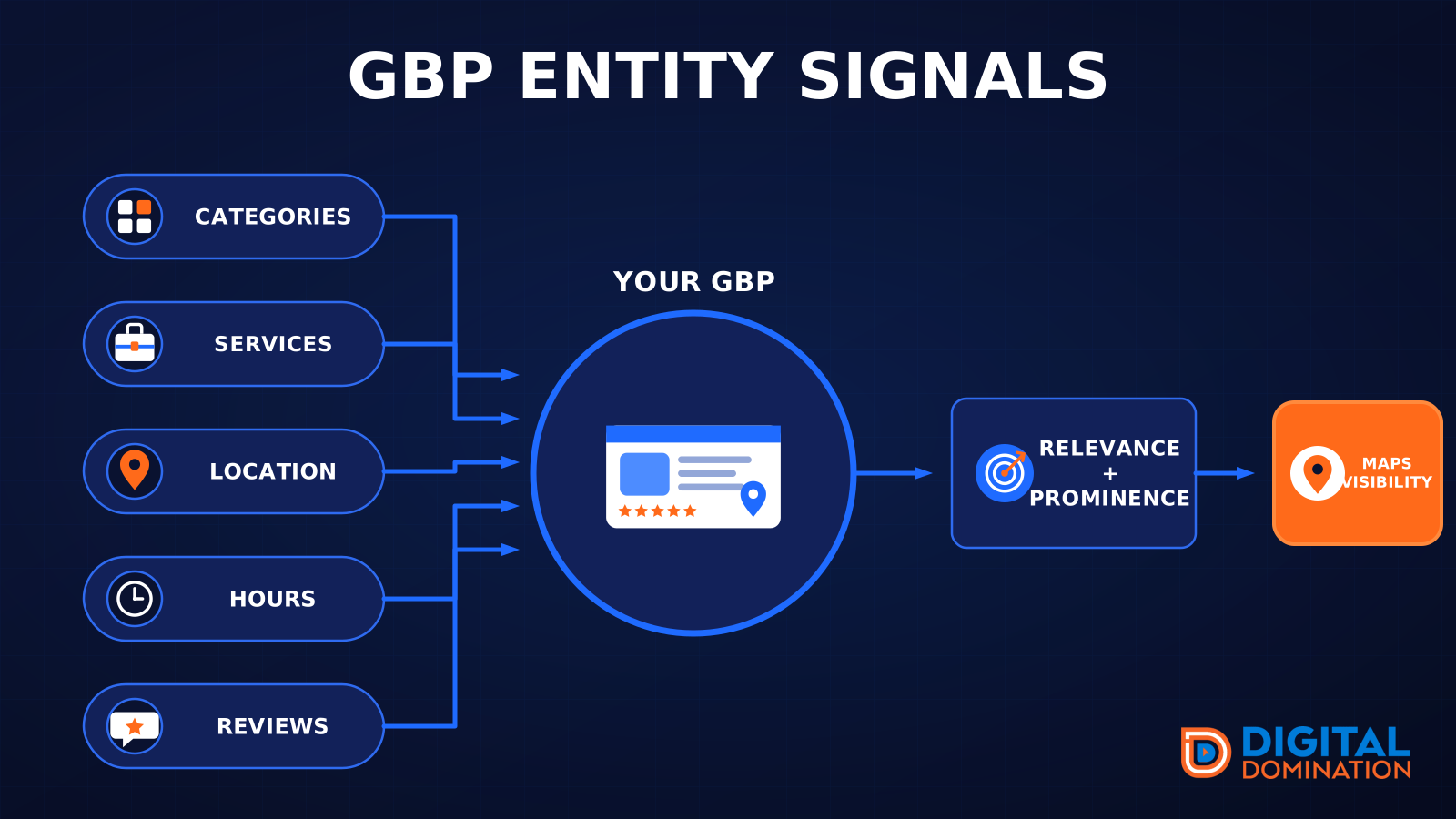
This leg is your Google Business Profile. GBP means Google Business Profile. It covers your categories, your services, your location, your hours, and your reviews. Google uses those facts to decide who to show.
Your Google profile is your storefront sign. If the sign is missing, or it names the wrong shop, people drive past.
PageSpeed to conversion
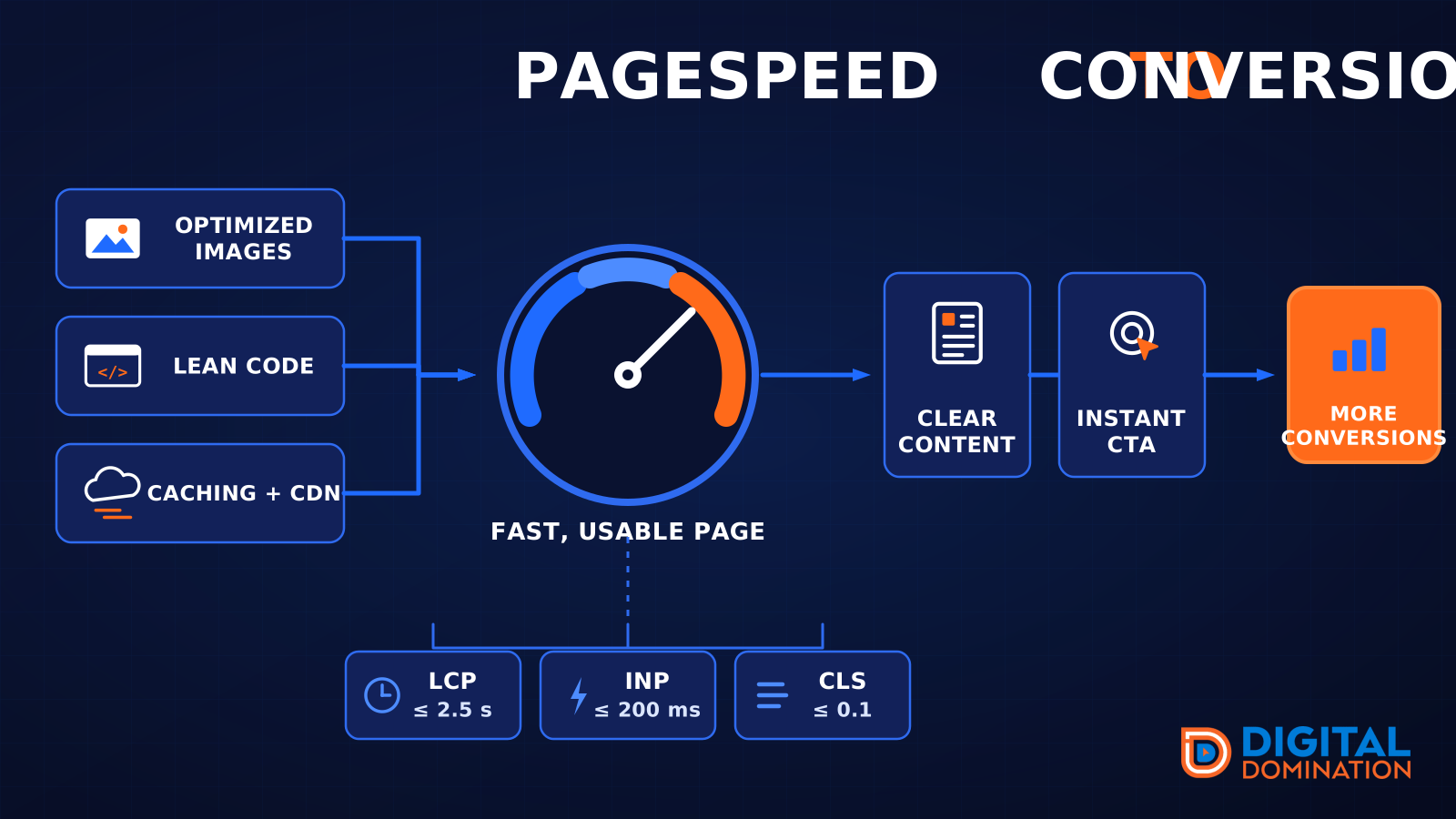
This leg is your website, above all on a phone. Small images, lean code, and caching make a page fast. A fast, clear page is what turns a visit into a call. Phone speed is one of the 12 Trinity checks because a slow page loses the call before anyone sees your offer.
Your website is the showroom. If the door sticks, people leave before they look around.
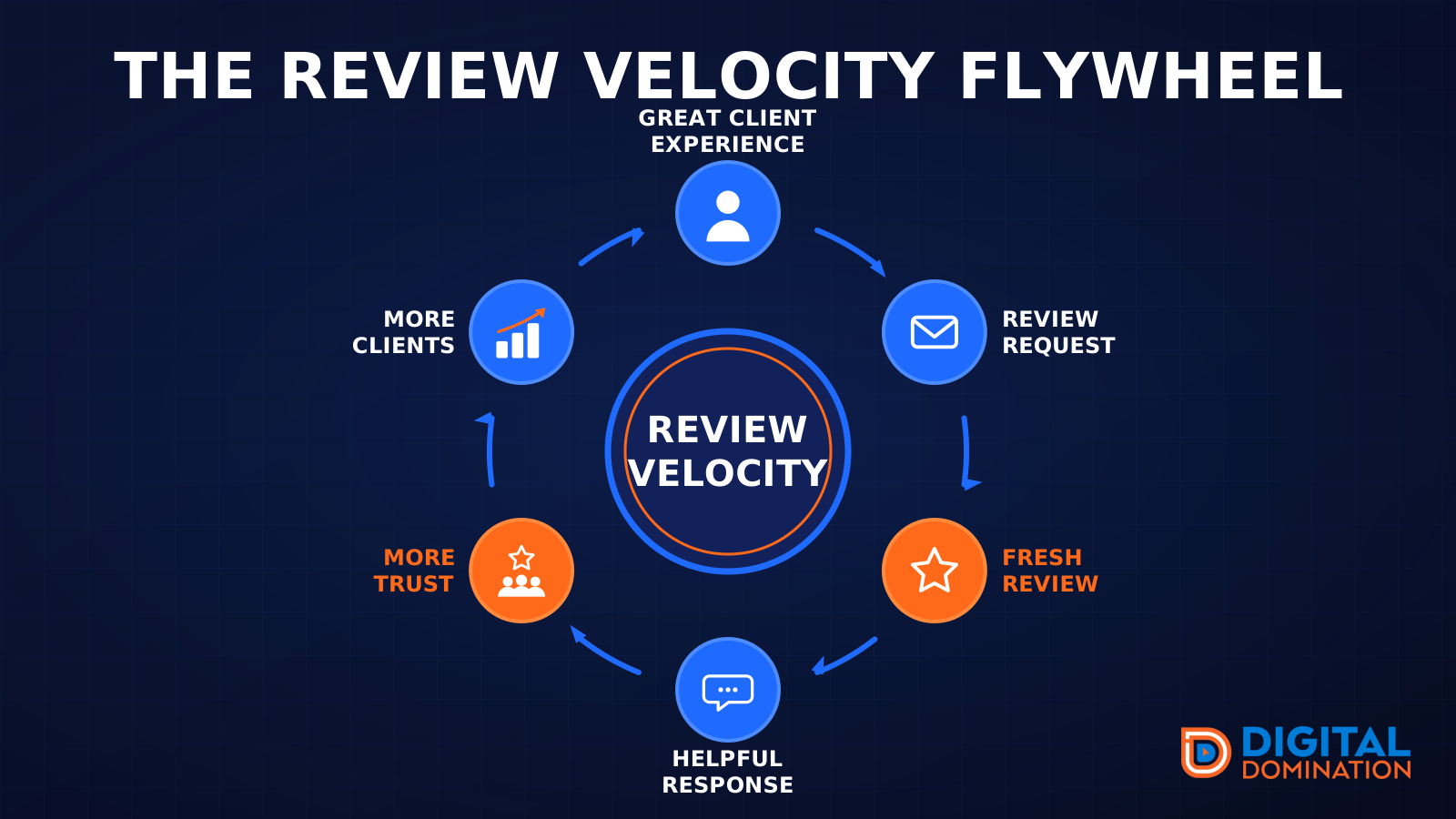
The review velocity flywheel
This leg is reviews and reputation. A good visit leads to a review request, then a fresh review, then a helpful reply, then more trust, then more customers. When the scan can find your Google listing, it shows your rating, your recent reviews, and how many you answered.
Reviews are word of mouth. One kind word helps. A steady stream of real reviews, and a reply from you, helps more.
How this turns into revenue
Being found in more searches leads to more calls. More calls lead to more booked jobs. More booked jobs lead to more revenue.
Example numbers, not a real business: 40 calls from search in a month, a 25 percent close rate, and a $400 average job. That is 10 booked jobs. That is $4,000. The math is the lesson. It is not a promise.
The full page has a box where you can type your own average job value and close rate.
One real story, from our car dealership case study: Medina Auto Group went from invisible on Google Maps to dominating every high-intent search across their market. The turnaround spanned all four of their rooftops at once. The same page says the team eliminated 89 unfair one-star reviews that had been dragging the dealership's reputation down and keeping it out of the Map Pack. It also says: “Results described here are exceptional and non-typical. Outcomes vary based on market conditions, competition, and implementation. No guarantees are made regarding earnings, rankings, or conversions.”
Free strategy call
More booked jobs start with a clear plan
Book a free strategy call. We look at your Google profile, your website, and your reviews, and we tell you what to fix first.
Free. You pick the time. A real person shows up.