
Google Business Profile optimization in Las Vegas
Practical, policy-safe Google Business Profile work for Las Vegas businesses that want better Map Pack visibility, more calls, and cleaner reporting.

Can a Las Vegas provider improve visibility, calls, and compliance on a timeline
Yes, a Las Vegas Google Business Profile optimization provider can improve your odds of better Map Pack visibility, more calls, and cleaner profile compliance on a defined timeline. The right provider should do it by fixing the things Google actually uses, not by stuffing city names into your business name, buying reviews, or making risky edits that can trigger verification problems or suspension.
Google Business Profile Help says local results are based primarily on relevance, distance, and prominence. That means your profile needs to clearly match the services people search for, be eligible and accurate for your real location or service area, and show enough trust signals to compete. No provider can change where your customer is searching from, but a provider can tighten the parts of the profile you control.
For a Las Vegas owner, the timeline should be practical. Some edits to business information can take up to 3 days to appear in search results, according to Google Business Profile Help. Google also says rankings for new businesses can take up to a month to appear in search results. Verification can add time, especially when Google requires postcard or video verification.
What Google Business Profile optimization includes
Google Business Profile optimization is not one setting. It is the ongoing work of making the profile accurate, complete, useful, and safe under Google's rules. A good Las Vegas provider should start with eligibility, verification, category fit, service clarity, location setup, photos, reviews, posts, and performance reporting.
Google Business Profile Help says a Business Profile lets a storefront or service-area business manage how it appears on Google Maps and Search at no charge. It also says only businesses that make face-to-face contact with customers are eligible. Online-only businesses without in-person service are not eligible.
For a real local business, optimization usually covers these areas:
- ▸Primary and secondary category review
- ▸Business name compliance against the real-world name
- ▸Address, hours, phone, website, and appointment link review
- ▸Service area setup for service-area or hybrid businesses
- ▸Service menu cleanup with clear descriptions
- ▸Photo and post publishing plan
- ▸Review request process that follows Google rules
- ▸Weekly or monthly performance reporting tied to calls and visibility
Why Las Vegas businesses need a cautious approach
Las Vegas is a high-intent local search market. A customer looking for a plumber, dentist, attorney, med spa, restaurant, barber, mechanic, electrician, or home service company often starts with Google Maps. That does not mean the answer is to push every aggressive tactic into the profile.
Google Business Profile Help requires the Business Profile name to reflect the real-world business name. Google also says adding unnecessary information to the name can result in suspension. That matters because keyword-stuffed names may look tempting when competitors use them, but they create a compliance risk for the business owner.
A careful provider should protect the asset first. Your Google Business Profile is often where calls, directions requests, website clicks, messages, bookings, and reviews meet. If it gets suspended, the short-term search gain is not worth the operational pain.
The optimization checkpoints you should be able to verify
You do not need to be technical to check whether your provider is doing real work. Ask for a before snapshot, a list of planned edits, and proof of what changed. If the provider cannot explain the work in plain English, that is a warning sign.
Google Business Profile Help says performance data is available only for verified profiles and can include searches, views, directions, calls, website clicks, messages, bookings, products, menus, and offers. That means reporting should not be a vague statement that rankings are better. It should show what people are doing on the profile.
Here are concrete checkpoints an owner can verify:
- ▸The primary category matches your main money service
- ▸Secondary categories match real services you provide
- ▸The business name is your real-world name, with no extra keywords
- ▸The address and service area match how you actually serve customers
- ▸Hours, holiday hours, phone, website, and booking links are correct
- ▸Services are grouped clearly and written for customers
- ▸Photos are current and represent the real business
- ▸Posts are not stale, misleading, or unrelated
- ▸Review requests do not offer incentives
- ▸Reports show Map visibility and profile actions over time
Categories, services, and relevance
Categories are one of the highest-impact areas of Google Business Profile optimization. Google Business Profile Help says categories help connect a business with customers searching for its products or services, and that selected categories affect local ranking. Whitespark's 2026 Local Search Ranking Factors report also defines Google Business Profile signals as factors such as proximity, categories, and keywords in the business name.
The important part is not to choose every category that sounds close. The primary category should match the main thing your business wants to be found for. Secondary categories should support real services, not stretch the business into unrelated searches.
Services help customers understand what you do before they call. Google Business Profile Help says eligible service businesses can show services, group them into categories, and add details such as descriptions and prices. For many Las Vegas businesses, this is where a profile becomes clearer to both customers and Google.
A practical category and service cleanup should include:
- ▸A primary category tied to your main revenue service
- ▸Secondary categories that reflect real customer-facing services
- ▸Removal of categories that do not match the business
- ▸Service groups that match how customers ask for help
- ▸Simple service descriptions without keyword stuffing
- ▸Optional price details only when they help buyers make a decision
Service-area setup for Las Vegas and nearby areas
Service-area setup is a common place where businesses make mistakes. Google Business Profile Help says a service-area business can set up to 20 service areas by city, postal code, or other area. It also says the service area cannot be set as a radius around the business.
That matters for mobile services, home services, repair companies, and hybrid businesses that serve customers across Las Vegas and nearby communities. The profile should show where you realistically serve customers, not every place you wish you could rank.
A provider should help you choose service areas based on reality, capacity, and compliance. If your team does not serve a place consistently, adding it to the profile is not a ranking shortcut.
Your service-area review should answer these questions:
- ▸Do you serve customers at your location, at their location, or both
- ▸Are all listed areas places you actually serve
- ▸Are the areas set by city, postal code, or accepted area type
- ▸Are there more than 20 service areas listed
- ▸Does the website support the same service area claims
- ▸Do your hours and dispatch process match the listed service area
Reviews without incentives or shortcuts
Reviews matter because they influence trust. They also affect how customers choose between similar businesses in the Map Pack. But review growth has to follow Google's rules.
Google Business Profile Help prohibits offering incentives such as free or discounted goods or services in exchange for customers posting reviews, changing reviews, or removing negative reviews. That means no gift cards for reviews, no discounts for 5-star feedback, and no pressure campaign to remove complaints.
BrightLocal's 2026 Local Consumer Review Survey reported that Google's share as a review source fell from 83% in 2025 to 71% in 2026. Google still matters, but this is a reminder that reputation is broader than one platform. For your Google Business Profile, the safest review strategy is steady, honest, and easy for real customers.
A compliant review process should include:
- ▸A simple review request after a real customer interaction
- ▸No reward, discount, or free service tied to leaving a review
- ▸No script that tells customers what rating to choose
- ▸A response plan for positive and negative reviews
- ▸Owner access to the review request process
- ▸Tracking of review activity without fake or filtered reviews
Posts, photos, and freshness
Profile content should help a buyer decide whether to call. Photos, posts, service descriptions, and offers can all support that decision when they are accurate. They should not be treated as filler.
Google Business Profile Help says posts can include updates, offers, and events. It also says posts older than 6 months are archived unless a date range is set. That means a profile with old seasonal posts or outdated offers can look neglected.
Photos should show the real business. For a storefront, that may include the exterior, interior, team, products, menu, equipment, or work examples. For a service-area business, it may include branded vehicles, uniforms, completed work, tools, and team photos where appropriate.
A simple freshness plan can cover:
- ▸New photos added on a regular schedule
- ▸Old or misleading photos removed when possible
- ▸Posts for timely updates, offers, and events
- ▸Service descriptions reviewed when services change
- ▸Holiday hours updated before busy periods
- ▸Questions and answers monitored for accuracy
Verification, suspensions, and safe editing
Verification is not optional if you want full control. Google Business Profile Help says verification is required to edit business information and interact with customers. Google also says verification methods are automatically determined and cannot be changed.
For mail verification, Google Business Profile Help says most postcard codes arrive within 14 days, and verification reviews take up to 5 business days after the business completes the steps. Some businesses may be asked for other methods. The safest approach is to prepare accurate documents, signage, address details, and business information before making sensitive changes.
Suspension risk often comes from mismatched information, ineligible business models, keyword-stuffed names, virtual offices that do not meet guidelines, and aggressive edits. A provider should explain risk before changing the name, address, category, or service-area setup.
Before major edits, ask your provider to check:
- ▸Whether the business is eligible for a profile
- ▸Whether the public business name matches the real-world name
- ▸Whether the address is staffed and appropriate under Google's rules
- ▸Whether the service area matches how customers are served
- ▸Whether documents and signage support the profile information
- ▸Whether timing is right before changing sensitive fields
Seven questions to ask before you sign
The cheapest provider is not always risky, and the most expensive provider is not automatically better. The right choice depends on whether the work is clear, compliant, and measured. Google's third-party policy requires Business Profile managers to be truthful about services, costs, and expected results. It also lists promises of a top placement on Google as an example of a false, misleading, or unrealistic claim.
Use these questions before you hire a Las Vegas Google Business Profile optimization provider:
- ▸Will you review eligibility before making edits
- ▸Will you explain category changes before applying them
- ▸Will you keep the business name compliant with Google's rules
- ▸How will you handle verification if Google requires it
- ▸What will you report each week or month
- ▸How do you request reviews without incentives
- ▸What changes could increase suspension risk
- ▸Who owns the profile, photos, and reporting access
- ▸How do you measure calls, directions, and website clicks
- ▸What timeline do you expect for edits, verification, and early visibility checks
Who should do it themselves or choose a cheaper option
DIY can be a good fit for an owner who has time and patience. Google Business Profile is free to use, and many basic improvements can be handled by the business if the owner follows Google's guidance closely.
The cheaper or DIY route usually suits a business that is not in a rush, is not in a highly competitive category, and has someone who can check the profile every week. It also works better when the profile is already verified, accurate, and not at risk of suspension.
DIY owners should be ready to maintain:
- ▸Verification steps and profile access
- ▸Categories and services
- ▸Photos and posts
- ▸Holiday hours and temporary closures
- ▸Review requests and review responses
- ▸Service areas and location details
- ▸Performance data and call tracking notes
- ▸Compliance with Google's profile guidelines
How Digital Domination approaches Las Vegas GBP optimization
Digital Domination focuses on practical Map Pack visibility for local businesses. The work starts with understanding where you rank across the area, not just from one office or one phone. A single search from your location does not show the full picture.
Digital Domination offers a free 169-point GeoGrid scan that checks 169 real Google results across the service area. For ongoing campaigns, weekly GeoGrid tracking reports provide visual proof of rankings and call volume. That helps an owner see where visibility is improving and where more work is needed.
Digital Domination also follows a one client per trade per service area model, which gives territory exclusivity. The company has spent 20 years learning how businesses earn attention, authority, trust, and rankings online, and its founders are Nick Thompson and Dan Dirksen.
For Las Vegas business owners, the approach is built around:
- ▸Profile compliance before aggressive edits
- ▸Map visibility measured across the service area
- ▸Category, service, photo, post, and review improvements
- ▸Weekly GeoGrid tracking reports
- ▸Clear owner-facing reporting
- ▸Territory exclusivity by trade and service area
Next step for Las Vegas business owners
If you want a local team to review your Map Pack opportunity, start with the Las Vegas page. It explains the local program, who it fits, and how Digital Domination evaluates whether your market is a fit. Pricing for the Maps Domination Program is set per market on a qualification call. Results vary.
If you want proof before a sales conversation, request the free GeoGrid scan. The scan checks 169 real Google results across your service area, so you can see where your profile is visible and where competitors are winning. Ask for the free GeoGrid scan page, or visit the Las Vegas page to take the next step.
Keep reading
Related guides
Put it into action
Frequently Asked Questions
How long does Google Business Profile optimization take in Las Vegas
Some profile edits can take up to 3 days to appear in search results, according to Google Business Profile Help. Google also says rankings for new businesses can take up to a month to appear. A practical provider should separate edit timing, verification timing, and ranking movement so you know what is happening.
Can changing my Google Business Profile get it suspended
Yes, certain changes can increase risk if they make the profile look inaccurate or noncompliant. Google requires the business name to reflect the real-world business name and says unnecessary information in the name can result in suspension. Sensitive edits should be reviewed before they are made.
Do I need to verify my Google Business Profile before optimization
Yes, full control depends on verification. Google Business Profile Help says verification is required to edit business information and interact with customers. Verification methods are chosen by Google and cannot be changed by the business or provider.
What should a Las Vegas GBP optimization report show
A useful report should show visibility, calls, website clicks, directions, and other profile actions when available. Google Business Profile performance data is available only for verified profiles. Digital Domination also uses GeoGrid tracking to show rankings across the service area.
Can I add Las Vegas keywords to my business name
Only if those words are part of your real-world business name. Google Business Profile Help says the profile name must reflect the real-world business name. Adding unnecessary location or service keywords can create suspension risk.
How many service areas can I add to my profile
Google Business Profile Help says a service-area business can set up to 20 service areas by city, postal code, or other area. Google does not allow setting the service area as a radius around the business. The listed areas should match where you actually serve customers.
Is it okay to offer discounts for Google reviews
No. Google Business Profile Help prohibits offering incentives such as free or discounted goods or services in exchange for customers posting reviews, changing reviews, or removing negative reviews. A safer process is to ask real customers for honest feedback without steering the rating.
Should I hire a provider or manage my Google Business Profile myself
DIY can work if you have time to check categories, services, photos, posts, reviews, service areas, and reporting each week. Hiring a provider makes more sense when competition is strong, the profile has risk issues, or you want visibility tracked across the service area. The best choice depends on your time, risk tolerance, and growth goals.
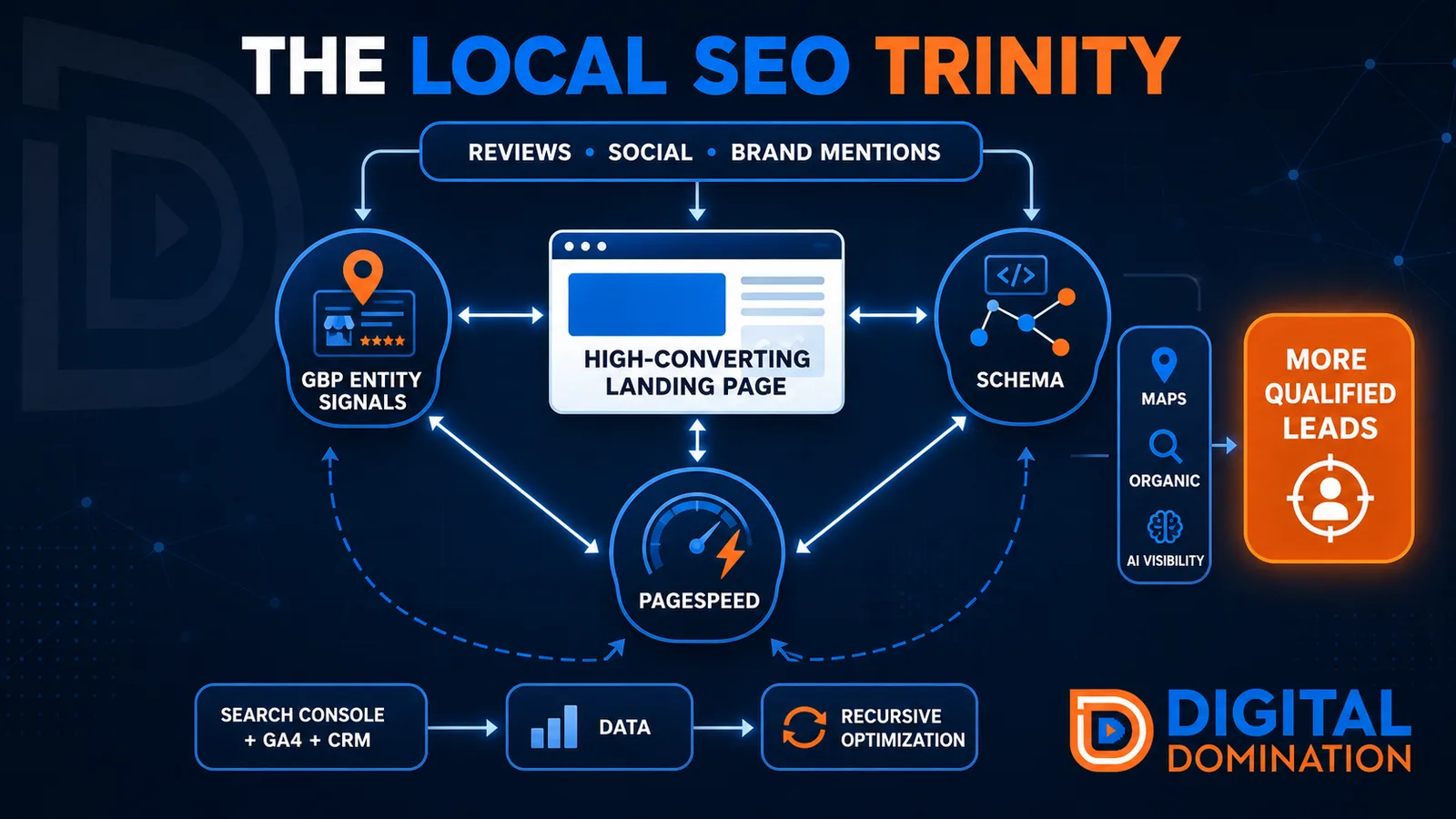
The Local SEO Trinity
Think of a three-legged stool. Your Google profile, your website, and your reviews all have to hold you up. If one leg is short, the whole thing wobbles.
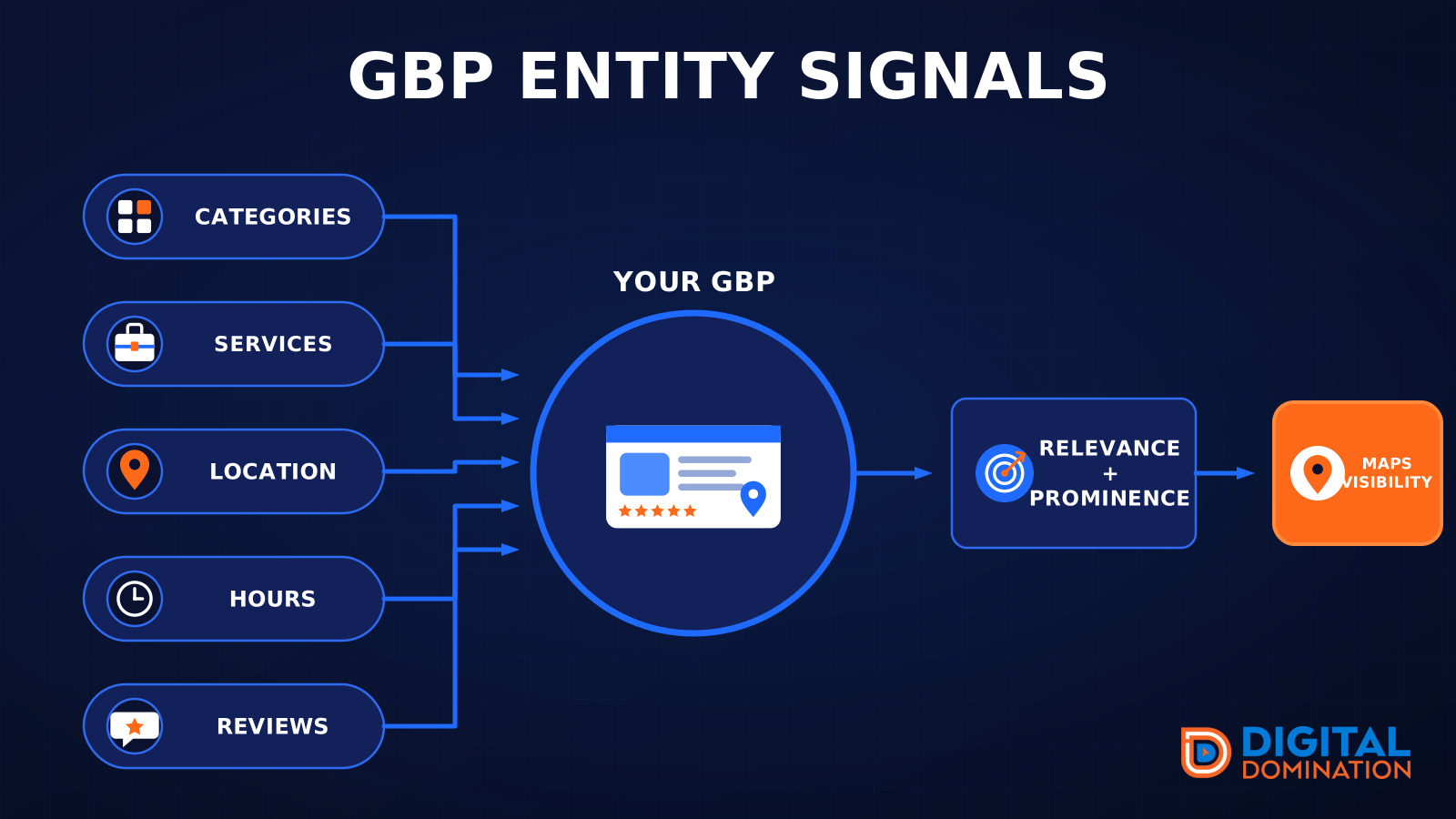
GBP entity signals
This leg is your Google Business Profile. GBP means Google Business Profile. It covers your categories, your services, your location, your hours, and your reviews. Google uses those facts to decide who to show.
Your Google profile is your storefront sign. If the sign is missing, or it names the wrong shop, people drive past.
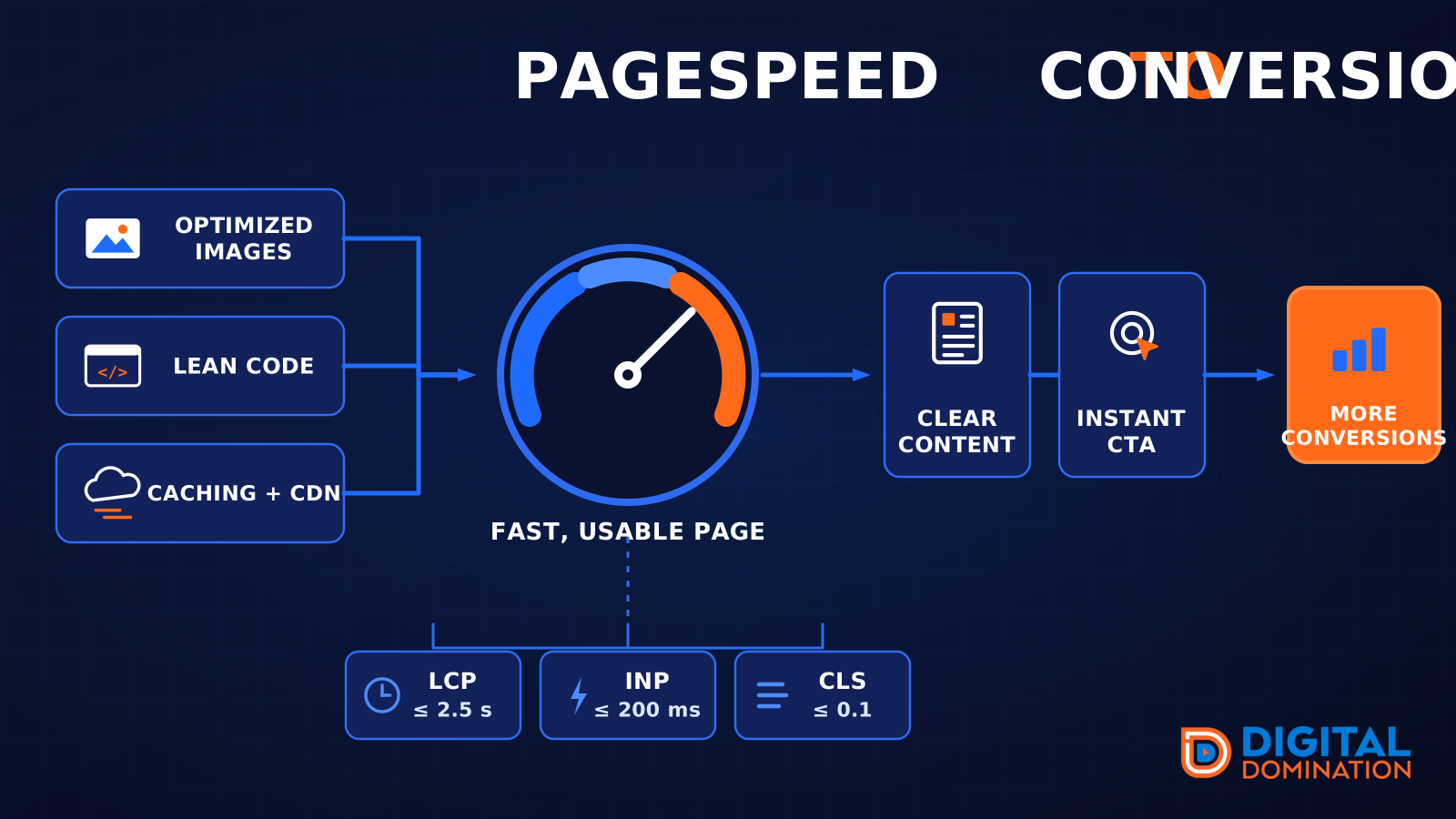
PageSpeed to conversion
This leg is your website, above all on a phone. Small images, lean code, and caching make a page fast. A fast, clear page is what turns a visit into a call. Phone speed is one of the 12 Trinity checks because a slow page loses the call before anyone sees your offer.
Your website is the showroom. If the door sticks, people leave before they look around.
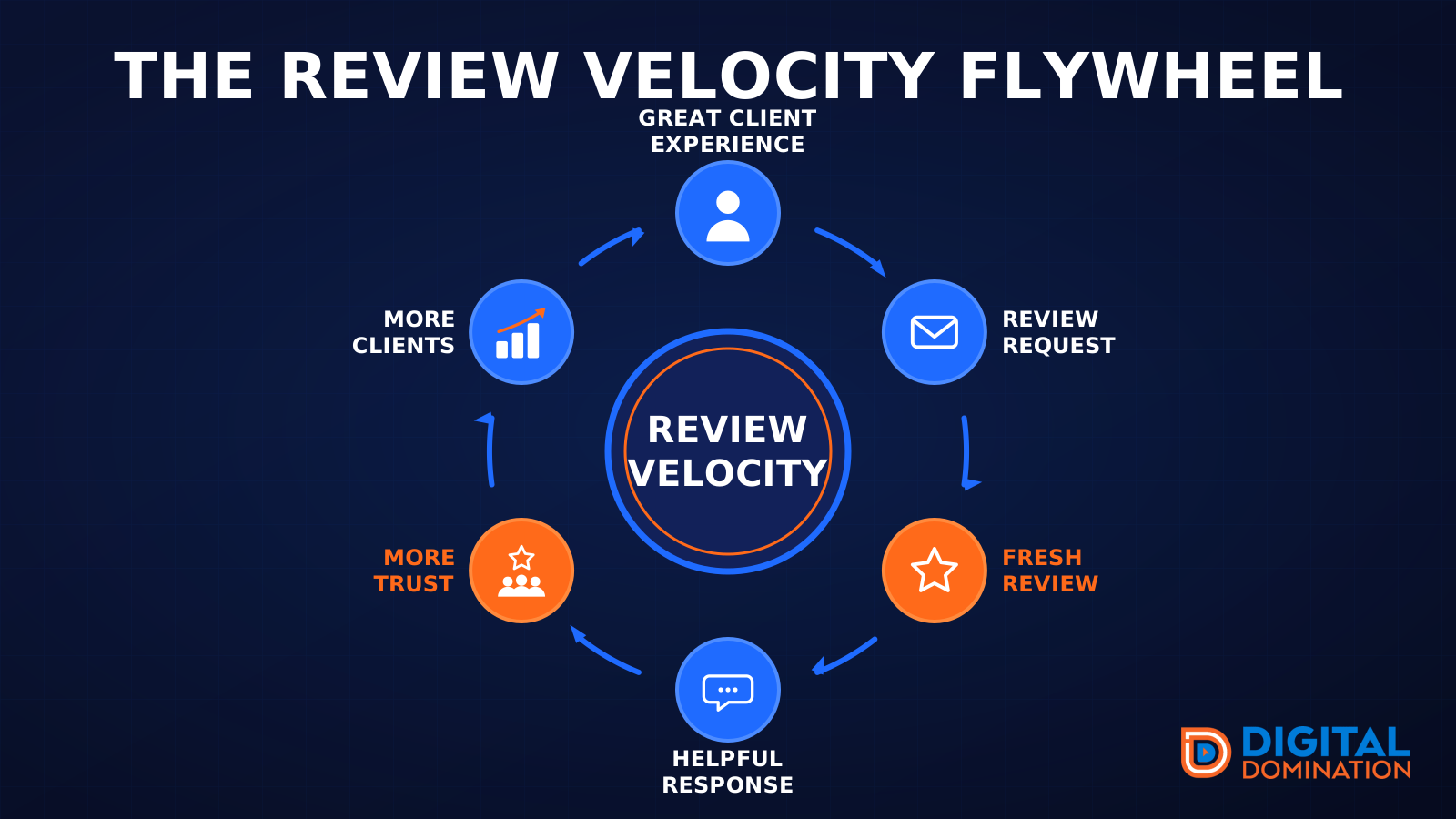
The review velocity flywheel
This leg is reviews and reputation. A good visit leads to a review request, then a fresh review, then a helpful reply, then more trust, then more customers. When the scan can find your Google listing, it shows your rating, your recent reviews, and how many you answered.
Reviews are word of mouth. One kind word helps. A steady stream of real reviews, and a reply from you, helps more.
How this turns into revenue
Being found in more searches leads to more calls. More calls lead to more booked jobs. More booked jobs lead to more revenue.
Example numbers, not a real business: 40 calls from search in a month, a 25 percent close rate, and a $400 average job. That is 10 booked jobs. That is $4,000. The math is the lesson. It is not a promise.
The full page has a box where you can type your own average job value and close rate.
One real story, from our car dealership case study: Medina Auto Group went from invisible on Google Maps to dominating every high-intent search across their market. The turnaround spanned all four of their rooftops at once. The same page says the team eliminated 89 unfair one-star reviews that had been dragging the dealership's reputation down and keeping it out of the Map Pack. It also says: “Results described here are exceptional and non-typical. Outcomes vary based on market conditions, competition, and implementation. No guarantees are made regarding earnings, rankings, or conversions.”
Free strategy call
More booked jobs start with a clear plan
Book a free strategy call. We look at your Google profile, your website, and your reviews, and we tell you what to fix first.
Free. You pick the time. A real person shows up.