
Google Merchant Center AI reports now show shopper intent, terms and missing attributes
Local retailers using product feeds can now use Merchant Center to spot the language, intent patterns and missing details that may affect visibility in AI Mode and AI Overviews.

What changed for local retailers
Google has expanded the AI Performance Insights report inside Merchant Center with new sections for AI Search intent, AI Search terms and AI Attributes. In plain English, retailers can now see more than whether their products are appearing in Google's generative AI surfaces. They can see what shoppers appear to be asking for, which terms are tied to that visibility and which missing product details Google is flagging.
This matters for any local store that uploads products to Merchant Center, including boutiques, furniture stores, sporting goods shops, appliance dealers, jewelers, hardware stores and specialty retailers. If your product feed is thin, vague or missing important attributes, that is no longer just an ecommerce cleanup issue. It can affect how well Google understands your products for AI Mode and AI Overviews.
Google Merchant Center Help, in its page About AI performance insights, says the current scope is organic AI traffic, not paid ads. Search Engine Roundtable and Search Engine Watch both reported the new report sections this week, which makes this a timely reason to look at your feed before competitors do.
What the new report sections actually mean
Think of the AI Performance Insights report as a window into how Google is interpreting your product catalog in generative search. It is not a magic ranking button, and it is not the same thing as a paid Shopping campaign report. It is a diagnostic tool for organic AI visibility.
For a local retailer, the useful part is not just seeing a chart. The useful part is spotting mismatches between what shoppers ask for and what your product data says. If people search with phrases like "waterproof hiking boots for wide feet" but your feed only says "men's boot," Google has less detail to work with.
The three new areas give you different clues about what to improve:
- ▸AI Search intent shows the kind of need or shopping purpose Google connects with your products.
- ▸AI Search terms show the shopper language tied to AI visibility.
- ▸AI Attributes show missing or weak product details that may limit understanding.
- ▸Together, they point to feed edits, product page edits and inventory data cleanup.
Why this is different from ordinary product feed housekeeping
Retailers have always had reasons to keep Merchant Center clean. Accurate prices, availability, images, product identifiers and descriptions help products appear properly across Google surfaces. What is changing is the search behavior around the feed.
AI Mode and AI Overviews can summarize options, compare features and answer more specific product questions than a traditional blue-link result. That means Google needs structured facts. It needs to know color, size, material, gender, compatibility, condition, use case, shipping details and other attributes that help match a product to a specific shopper need.
For local stores, this connects online product data with real-world buying intent. A nearby shopper may not type your exact product title. They may ask for a "same-day pickup dress shirt for a wedding" or "kid's bike helmet with adjustable fit near me." Your feed and product pages need to help Google understand that your inventory fits that situation.
Where to start inside Merchant Center
Start by opening Merchant Center and finding the AI Performance Insights report. If you do not see useful data yet, do not panic. Reports can depend on eligibility, available activity and whether Google has enough information to show insights. The important move is to confirm that your account, product feed and website data are in good enough shape to benefit when insights appear.
Do not treat this like a one-time audit. Make it part of your weekly retail routine, the same way you might check inventory errors, disapproved products or pickup availability. The report is most useful when you compare it against actual product pages and feed fields.
This week, check these basics first:
- ▸Confirm your Merchant Center account is active and products are approved.
- ▸Look for the AI Performance Insights report and review any available AI sections.
- ▸Compare AI Search terms with your product titles and descriptions.
- ▸Review AI Attributes for missing information Google calls out.
- ▸Write down feed problems that affect many products, not just one item.
Five things to check on your profile this week
This is the numbered-style checklist I would give a local retailer before making more complex changes. You do not need a developer for most of it. You need your Merchant Center login, your product feed source and a few high-priority product pages.
Focus on products that matter most to the store first. Start with best sellers, seasonal products, local pickup items and products where shoppers often ask questions in person. If your staff has to explain the same details every day, those details probably belong in your feed or on the product page.
Use this list as your first pass:
- ▸Check whether product titles include the words real shoppers use, not only internal SKU language.
- ▸Check descriptions for material, size, fit, compatibility, use case and pickup details where relevant.
- ▸Check missing attributes in Merchant Center and fill the ones that apply honestly.
- ▸Check images for clarity, variant accuracy and whether the image matches the selected product.
- ▸Check that availability, price and local pickup information match what customers will find in-store.
How to use AI Search terms without stuffing keywords
AI Search terms are useful because they show the language Google associates with shopper activity in AI surfaces. The mistake would be copying every phrase awkwardly into product titles. That can make your listings look spammy and less helpful to actual buyers.
Instead, use the terms as market research. If shoppers use "wide width," "pet safe," "for apartment," "for toddlers," "for hard water" or "compatible with," those words reveal the details people need before they buy. Add the detail where it belongs. Some phrases belong in the title. Others belong in the description, specifications, FAQ section or variant attributes.
Your rule should be simple: if the product truly has that feature and shoppers care about it, make it clear in natural language. If the phrase does not accurately describe the product, do not add it just because it appeared in a report.
How to read intent like a store owner
AI Search intent is about the job the shopper is trying to get done. A person looking for "running shoes" may have a different intent than someone asking for "supportive running shoes for flat feet." A person asking for "small sectional sofa for apartment delivery" is giving Google a much richer buying situation.
Local retailers have an advantage here because they hear these questions on the sales floor every day. Your team already knows the difference between a browsing question and a ready-to-buy question. The report can help you translate that store knowledge into product content.
When you review intent patterns, sort them into practical buckets:
- ▸Problem solving, such as repair, replacement, fit or compatibility.
- ▸Occasion based, such as weddings, holidays, school, travel or outdoor events.
- ▸Local convenience, such as pickup, availability, delivery or installation.
- ▸Comparison intent, such as best material, size, model, brand or feature.
- ▸Urgency, such as same-day needs, nearby stock or last-minute gifts.
What to do about missing AI attributes
The AI Attributes section is where many retailers will find the fastest wins. Missing attributes are usually not glamorous, but they are exactly the kind of structured facts Google can use to understand a product. If your feed omits color, size, age group, gender, material, pattern, brand, GTIN, condition or variant details, you may be making Google guess.
Do not fill attributes with junk. If an attribute does not apply, leave it alone or handle it correctly in your feed system. If it does apply, make it accurate and consistent across Merchant Center, your website and your point-of-sale inventory system.
Prioritize missing attributes in this order:
- ▸Required attributes causing product issues or disapprovals.
- ▸Attributes tied to high-value products or seasonal inventory.
- ▸Variant attributes, such as size, color, pattern and material.
- ▸Identifiers, such as brand and GTIN when available.
- ▸Local fulfillment details, including pickup and availability where your setup supports them.
What to do about it this week
The owner-level action plan is simple: pick one product category, review the new report, improve the feed and update the matching product pages. Do not try to rewrite your entire catalog in one sitting. Start with the category most likely to drive store visits or local pickup orders this month.
Assign someone to compare what Merchant Center says with what your customers ask in the store. If staff commonly explain sizing, compatibility, delivery limits or product differences, that is a sign your product content is thin. Use the new report to confirm where Google may also need more clarity.
Take these actions before next week:
- ▸Export or review the products connected to your most important category.
- ▸Pull the AI Search terms and note repeated phrases that match real product features.
- ▸Review AI Search intent and identify what shoppers are trying to solve.
- ▸Fix missing AI Attributes that apply to the category.
- ▸Rewrite weak product descriptions so they answer common buyer questions plainly.
- ▸Check that product page details match the Merchant Center feed.
- ▸Repeat the same process for another category after the first one is cleaned up.
How this connects to local SEO
Merchant Center visibility is not the same thing as Google Maps rankings, but the two are connected by trust and clarity. Google's local ranking factors are relevance, distance and prominence. Product data helps with relevance because it gives Google a clearer picture of what you sell and whether it matches a shopper's need.
A local retailer should not look at Merchant Center in isolation. Your Google Business Profile, website category pages, product pages and inventory feed should tell the same story. If your profile says you are a running store, your website has detailed shoe categories and Merchant Center has accurate product attributes, you are giving Google cleaner signals than a competitor with scattered information.
The practical point is consistency. Use the same product names, brand names, categories and local service details across the places Google reads. If you offer pickup, delivery, installation, fittings or appointments, make those details easy to find on the relevant pages.
Mistakes to avoid as these reports roll out
New reports often cause overreaction. Store owners see a term or missing field and rush to make broad edits without checking accuracy. That can create feed errors, confuse customers and make product pages read like search engines wrote them.
Remember what Google Merchant Center Help says about the current scope: this report is about organic AI traffic, not paid ads. That means you should not judge it like a Shopping campaign report, and you should not expect bid or budget controls to fix weak product data. Treat it as an organic visibility and product understanding report.
Avoid these common mistakes:
- ▸Do not stuff AI Search terms into every product title.
- ▸Do not add attributes that are not true for the product.
- ▸Do not ignore local pickup and availability accuracy.
- ▸Do not fix only Merchant Center while leaving product pages thin.
- ▸Do not assume a lack of data means the report is useless forever.
- ▸Do not let old seasonal products stay live with bad availability.
The local retailer advantage
Big ecommerce sites often have huge catalogs, but local retailers have something valuable: direct customer language. You hear the real questions, objections and product comparisons every day. Merchant Center's new AI Search intent, terms and attributes reports can help you turn that knowledge into cleaner product data.
Search Engine Watch described the report as getting new sections, and Search Engine Roundtable highlighted the additions around intent, terms and attributes. The practical takeaway for a store owner is not complicated. Better product feeds and better product pages are becoming part of AI-search visibility.
At Digital Domination, we look at this from the local SEO side for service businesses and local brands across the country. If you want to see how your local visibility looks across your actual market, start with the free GeoGrid scan. It checks 169 points across a market and you can get it at digitaldomination.ai/scan/.
Keep reading
Related guides
- ▸Google Business Profile optimization in Las Vegas
- ▸Google Business Profile optimization near me
- ▸Google Business Profile optimization vs DIY local SEO
Put it into action
Frequently Asked Questions
What is Google Merchant Center AI Performance Insights?
It is a Merchant Center report that shows how products perform in Google's generative AI surfaces, including AI Mode and AI Overviews. Google Merchant Center Help says the current traffic scope is organic AI traffic, not paid ads.
What are AI Search terms in Merchant Center?
AI Search terms are the shopper phrases connected with your products in Google's AI experiences. A local retailer can use them to understand how customers describe products, then improve titles, descriptions and product pages where the terms are accurate.
What does AI Search intent mean for a local store?
AI Search intent shows the type of need Google connects with shopper activity. For example, the intent may be about comparison, local availability, compatibility, sizing or solving a specific problem.
What are AI Attributes in Merchant Center?
AI Attributes are product details Google may use to understand and match products in AI search experiences. If the report flags missing attributes, review whether details like size, color, material, brand, GTIN, condition or variant information should be added.
Will fixing Merchant Center make my products show in AI Overviews?
No report can guarantee that your products will appear in AI Overviews or AI Mode. Cleaning up your feed gives Google clearer product information, which can make your products easier to understand and match to relevant shopper needs.
Is this report for paid Shopping ads?
Google's own Merchant Center Help page says the current scope is organic AI traffic, not paid ads. You should use it as an organic product visibility report, not as a campaign budget or bidding report.
How often should a local retailer check the AI Performance report?
Check it weekly if Merchant Center is important to your business. Review high-priority categories first, fix missing attributes and compare AI Search terms with the questions customers ask in your store.
Do I need to rewrite every product description because of this update?
No. Start with your most important products and categories, especially items tied to local pickup, seasonal demand or frequent customer questions. Rewrite thin descriptions so they clearly explain features, fit, use case and availability.
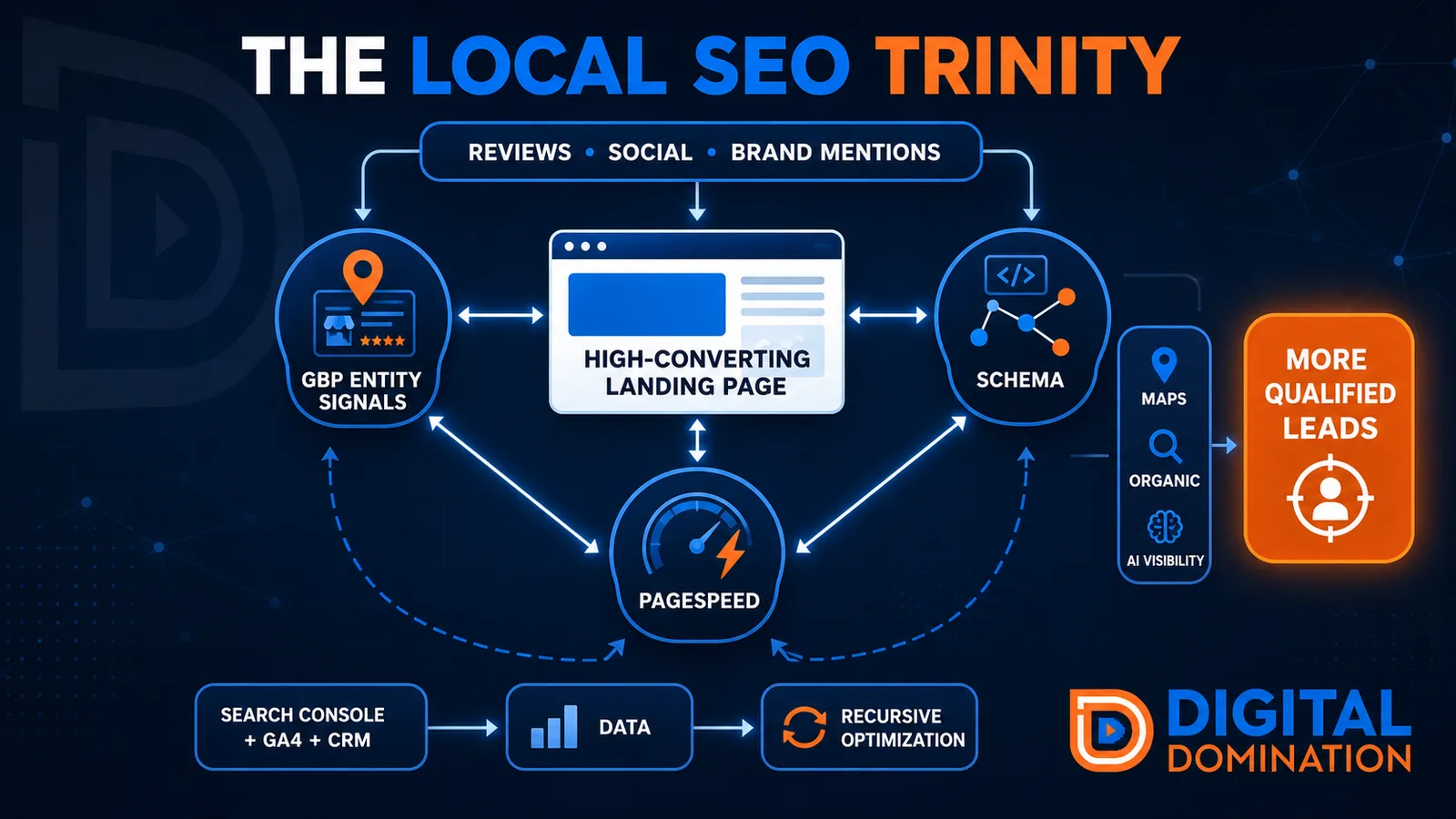
The Local SEO Trinity
Think of a three-legged stool. Your Google profile, your website, and your reviews all have to hold you up. If one leg is short, the whole thing wobbles.
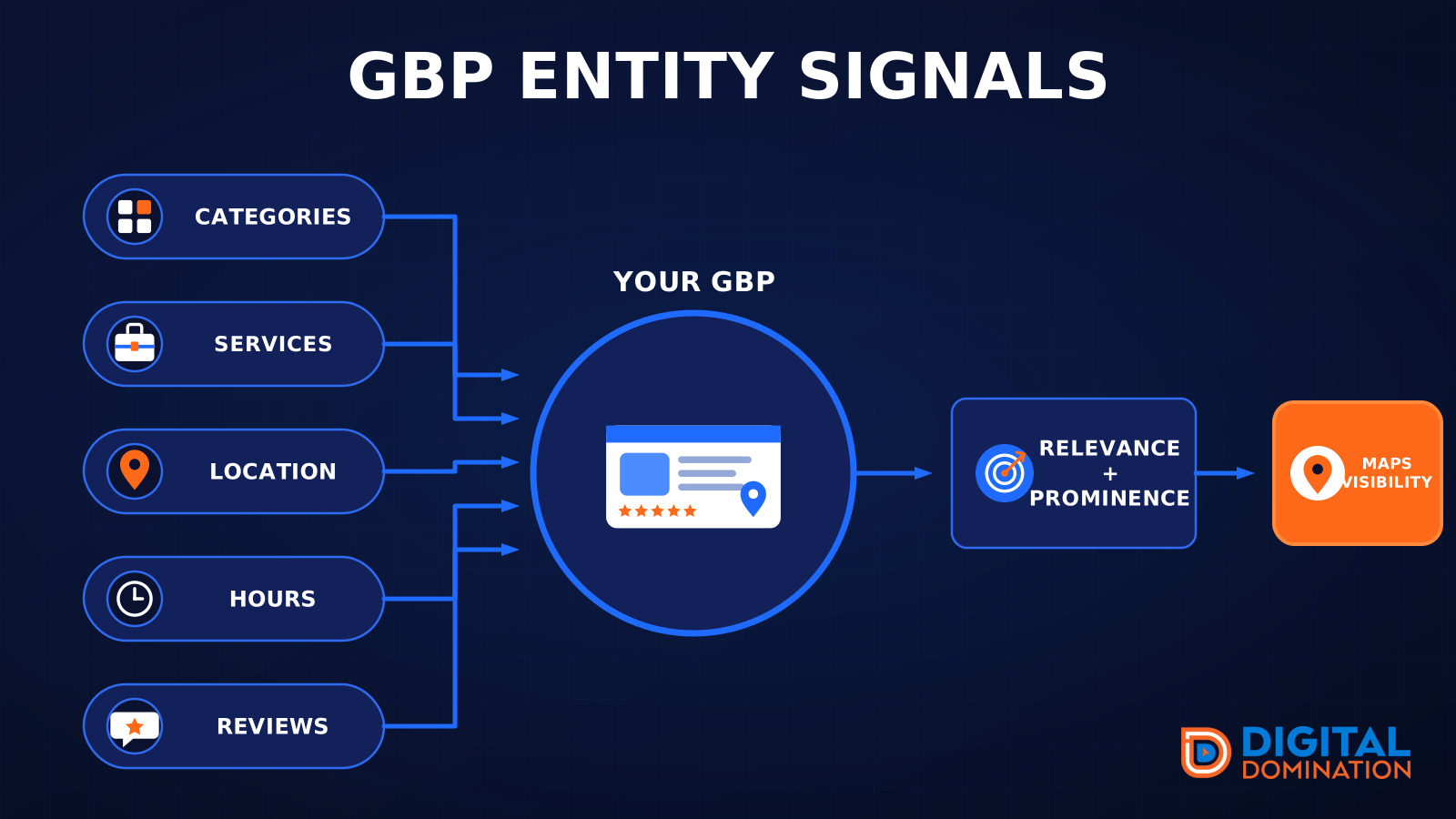
GBP entity signals
This leg is your Google Business Profile. GBP means Google Business Profile. It covers your categories, your services, your location, your hours, and your reviews. Google uses those facts to decide who to show.
Your Google profile is your storefront sign. If the sign is missing, or it names the wrong shop, people drive past.
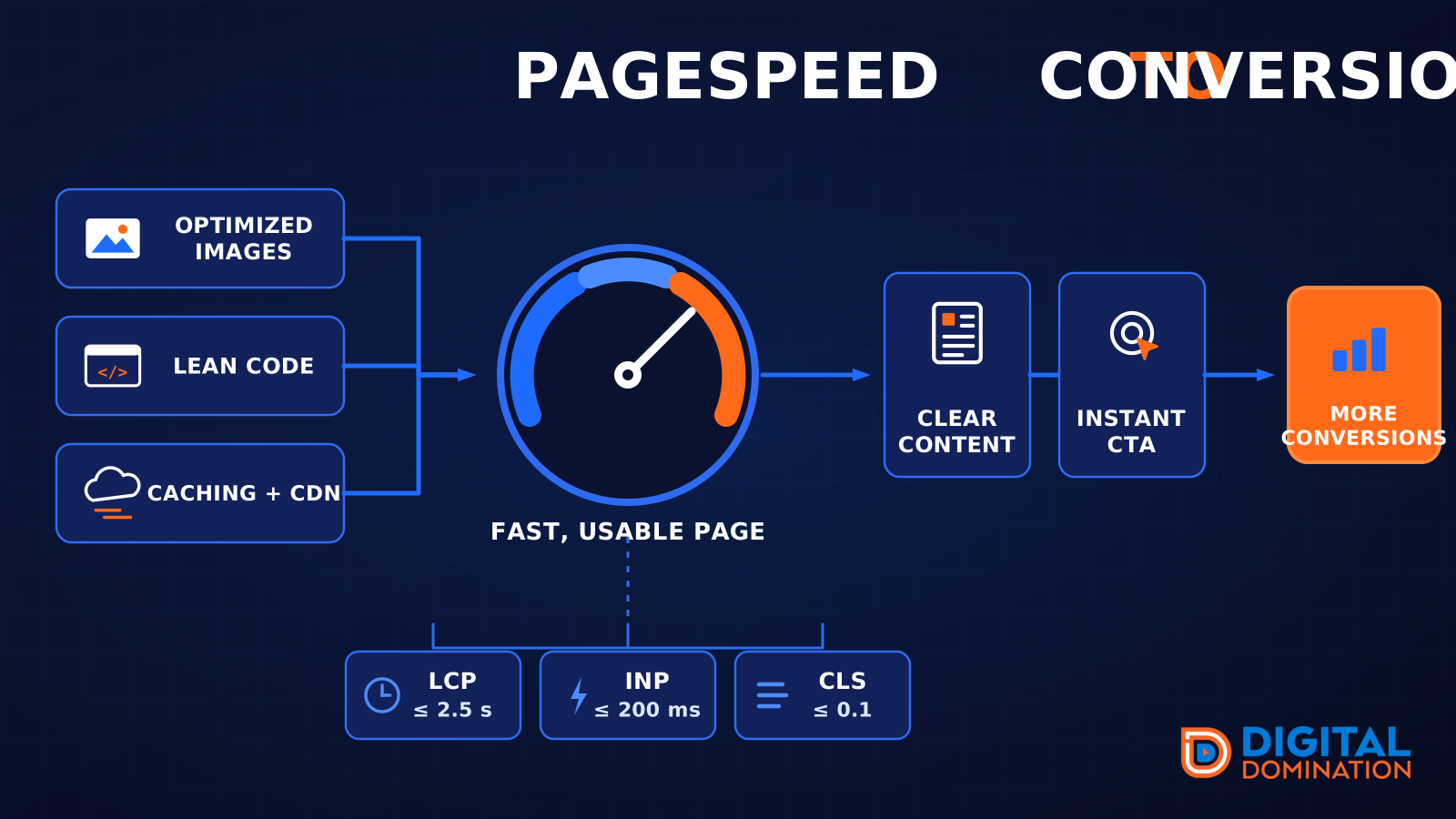
PageSpeed to conversion
This leg is your website, above all on a phone. Small images, lean code, and caching make a page fast. A fast, clear page is what turns a visit into a call. Phone speed is one of the 12 Trinity checks because a slow page loses the call before anyone sees your offer.
Your website is the showroom. If the door sticks, people leave before they look around.
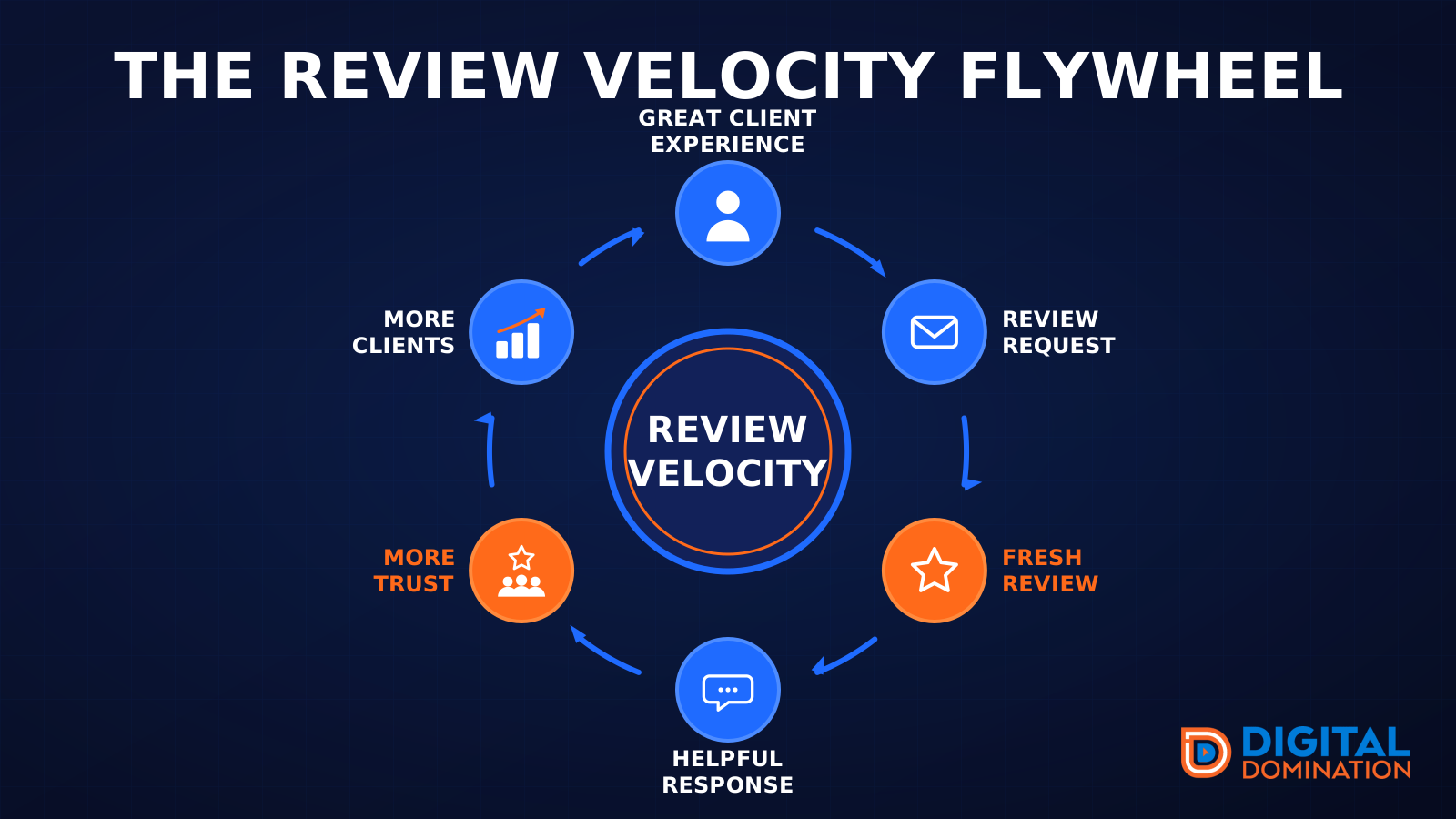
The review velocity flywheel
This leg is reviews and reputation. A good visit leads to a review request, then a fresh review, then a helpful reply, then more trust, then more customers. When the scan can find your Google listing, it shows your rating, your recent reviews, and how many you answered.
Reviews are word of mouth. One kind word helps. A steady stream of real reviews, and a reply from you, helps more.
How this turns into revenue
Being found in more searches leads to more calls. More calls lead to more booked jobs. More booked jobs lead to more revenue.
Example numbers, not a real business: 40 calls from search in a month, a 25 percent close rate, and a $400 average job. That is 10 booked jobs. That is $4,000. The math is the lesson. It is not a promise.
The full page has a box where you can type your own average job value and close rate.
One real story, from our car dealership case study: Medina Auto Group went from invisible on Google Maps to dominating every high-intent search across their market. The turnaround spanned all four of their rooftops at once. The same page says the team eliminated 89 unfair one-star reviews that had been dragging the dealership's reputation down and keeping it out of the Map Pack. It also says: “Results described here are exceptional and non-typical. Outcomes vary based on market conditions, competition, and implementation. No guarantees are made regarding earnings, rankings, or conversions.”
Free strategy call
More booked jobs start with a clear plan
Book a free strategy call. We look at your Google profile, your website, and your reviews, and we tell you what to fix first.
Free. You pick the time. A real person shows up.