
Google tests car inventory inside dealership Business Profiles
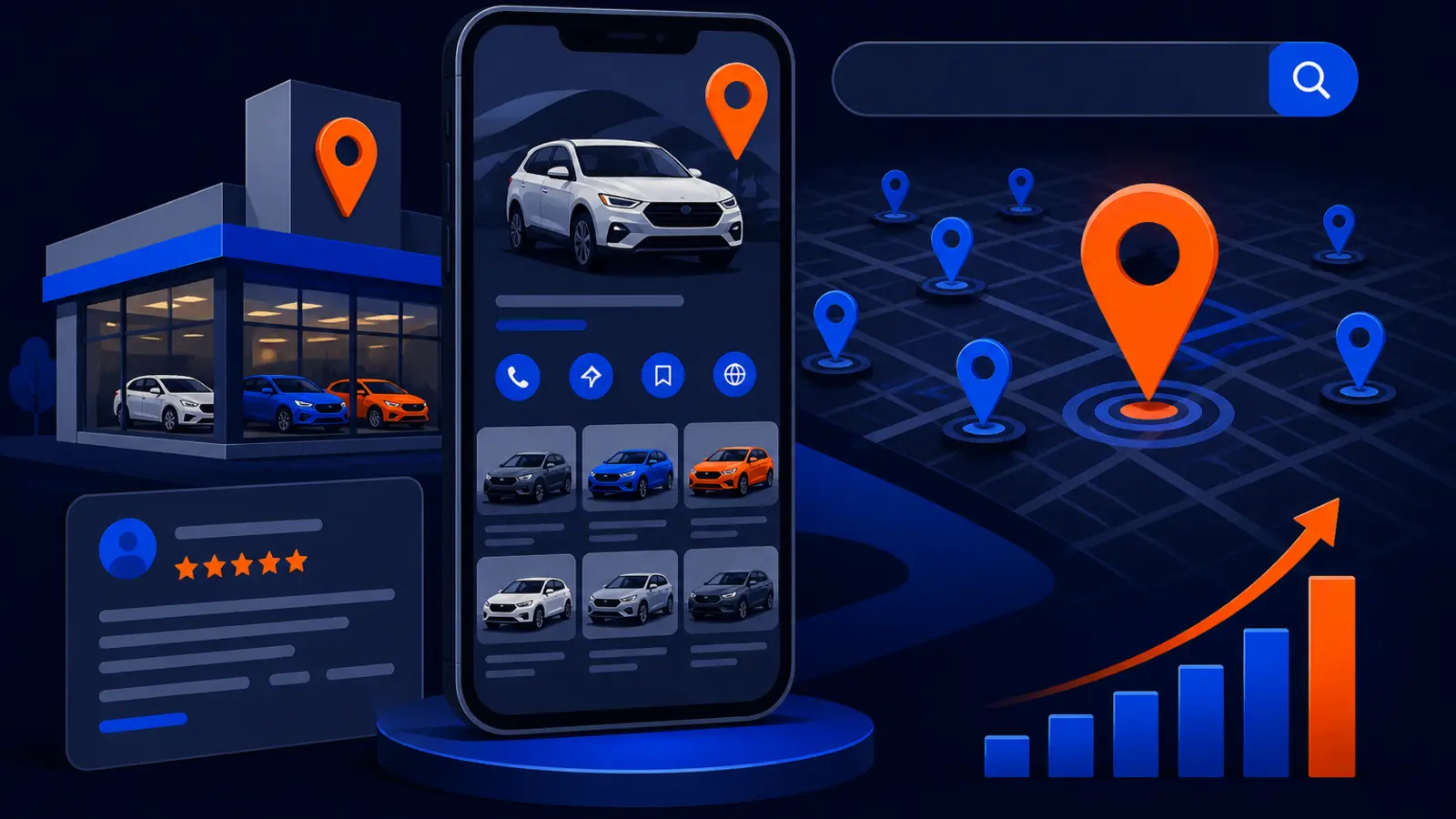
The limited pilot turns a dealer’s Google Business Profile into a more important inventory surface, not just a contact listing.
What changed and who it hits
Google has added car inventory controls to its Business Profile documentation for a limited dealership pilot. Search Engine Roundtable reported on the Google Business Profiles Car Dealership Inventory Limited Pilot on November 5, 2026, noting that participating dealers can show available sales inventory directly on their Google Business Profile.
This matters most for franchise and independent auto dealerships that depend on shoppers finding specific vehicles in Google Search and Google Maps. If a shopper can search, sort and learn about cars without leaving the profile, the Business Profile becomes part of the shopping path, not just a place to find hours, directions and a phone number.
Google’s own Edit your Business Profile help page, viewed November 10, 2026, now describes a Cars for Sale area under Edit Profile. An Internet Archive capture of the same Google Business Profile Help page from October 12, 2026, provides a useful comparison point because this car inventory pilot language was not the same visible feature in that archived capture.
Why this is bigger than a profile edit
For years, many dealers have treated Google Business Profile work as a local SEO task and inventory merchandising as a separate classified-listing or website task. This pilot starts to blur that line. If vehicle inventory can appear inside the profile, then feed accuracy, photo quality, trim details and availability become local search issues too.
Google’s local ranking factors are relevance, distance and prominence. Vehicle inventory can influence the practical meaning of relevance for a dealership, because the customer is not only searching for the store. They may be looking for a specific type of vehicle, body style, price range or model near them.
The owner-level question is simple: who is responsible when the Google profile shows cars for sale, and who checks whether that data is right? If the answer is unclear, you have a management problem before you have a marketing problem.
What Google says dealers can control
Google’s Edit your Business Profile documentation says participating dealers manage the feature under Edit Profile, then Cars for Sale. It also says dealers can choose preferred data providers. That is the key operational detail owners should not miss.
A preferred data provider is not just a technical setting. It can decide what Google receives, how often the feed is updated, which vehicles appear and how conflicts are handled if multiple vendors touch the same inventory data.
Before asking for pilot access or preparing for broader rollout, dealers should know the basic control points:
- ▸Who has owner access to the Business Profile
- ▸Whether the dealership can see Cars for Sale in the profile editor
- ▸Which inventory provider is connected or preferred
- ▸Who approves changes to feed settings
- ▸Who checks that sold units disappear promptly
- ▸Who verifies vehicle photos, prices and descriptions
Five things to check on your profile this week
Even if your store is not in the pilot yet, you can get ready now. The goal is not to chase a shiny feature. The goal is to make sure your profile, access and inventory workflow are clean enough that you can use the feature without creating bad customer experiences.
Ask your general manager, marketing lead or local SEO provider to check these items this week:
- ▸Confirm the correct people have owner or manager access, and remove old employees or vendors who no longer need it
- ▸Open Edit Profile and look for any Cars for Sale option, especially if your dealership is already part of the pilot
- ▸List every vendor that receives or distributes your vehicle inventory feed
- ▸Compare your website inventory to your Business Profile information, including departments, hours, calls and directions
- ▸Document who is responsible for fixing incorrect inventory if a customer finds it on Google
What to do about it if you are a dealer
First, do not wait for full public availability before getting organized. Limited pilots often expose weak ownership of data. If your dealership already has multiple vendors touching inventory, ads, website merchandising and local SEO, Google profile inventory can easily become the place where nobody feels responsible.
Second, ask your local SEO or GBP provider to treat inventory as part of the profile audit. They do not need to replace your inventory vendor. They do need to understand how the feed reaches Google, who controls the preferred provider setting and how inventory problems are escalated.
Third, create a simple weekly review while the feature is new. The review should be short enough that someone will actually do it. Start with these owner-level actions:
- ▸Ask whether your dealership has access to the car inventory pilot
- ▸Identify the person who owns Business Profile permissions
- ▸Identify the vendor that owns inventory feed distribution
- ▸Decide who approves preferred data provider changes
- ▸Spot-check several live vehicles against your website
- ▸Create a process for removing sold, traded or unavailable vehicles from Google quickly
- ▸Save screenshots when Google shows inaccurate inventory, then send them to the responsible provider
Why stale inventory can cost lot visits and trust
A wrong phone number is obviously bad. A wrong vehicle listing can be worse because it creates a specific expectation. If a shopper sees a truck, SUV or sedan on your Business Profile and drives across town to see it, your staff has to recover from disappointment before they can sell anything else.
Stale inventory can also change how shoppers compare dealerships in Maps and Search. If one dealer appears to have useful, searchable inventory and another looks thin or outdated, the shopper may not think about your feed provider. They may simply think your store is less organized.
The biggest risk is not one bad listing. It is the pattern. If customers repeatedly find vehicles that are sold, mispriced or missing key details, the Google profile becomes a source of friction instead of confidence.
Questions to ask your inventory vendor
This pilot makes vendor accountability more important. Dealers should not accept vague answers such as, we send inventory everywhere. You need to know whether Google Business Profile inventory is included, whether the vendor can support the pilot and how conflicts are handled.
Use these questions in your next vendor call:
- ▸Do you support the Google Business Profile car inventory pilot
- ▸Can you be selected as the preferred data provider inside the profile
- ▸How often do you send inventory updates to Google
- ▸What happens when a vehicle is marked sold on our website
- ▸Can we exclude certain vehicles from Google profile inventory
- ▸Who do we contact when Google shows the wrong vehicle data
- ▸Can you provide proof of the feed status without requiring a long support chain
Questions to ask your local SEO or GBP provider
Your local SEO provider should not ignore this because it sounds like an inventory feed issue. Google Business Profile is still the storefront in Search and Maps. If inventory appears there, profile management and inventory accuracy need to be coordinated.
Ask your GBP or local SEO provider these questions:
- ▸Are we eligible for the dealership inventory pilot
- ▸Have you checked Edit Profile for Cars for Sale access
- ▸Who currently owns our profile and who has manager access
- ▸Are our dealership categories, departments and service areas accurate
- ▸Do our profile photos and website pages support the same message as our inventory
- ▸Can you monitor how our dealership appears across different parts of our market
- ▸Will you coordinate with our inventory vendor when Google profile data is wrong
How to think about local SEO with vehicle inventory
Local SEO for dealerships has often focused on profile basics: correct name, address, phone number, hours, categories, photos, reviews, service department details and website links. Those basics still matter. The pilot adds another layer because the profile may now carry product-level information.
Do not let inventory replace the fundamentals. If your hours are wrong, your departments are confusing or your website link points shoppers to a weak page, inventory will not fix that. In fact, more information on a messy profile can make the mess more visible.
A practical dealership profile audit should now connect three areas:
- ▸Profile accuracy, including name, address, phone, hours and categories
- ▸Inventory accuracy, including availability, price, photos, trims and descriptions
- ▸Local visibility, including how the dealership appears in Search and Maps across the market
What to watch while the pilot is limited
Because this is a limited-availability pilot, many dealers may not see the Cars for Sale control yet. That does not mean the change can be ignored. It means you have time to prepare without rushing settings you do not understand.
Watch Google’s Business Profile interface, not just your website provider’s dashboard. Features like this can appear in profile editing areas before every vendor has a polished explanation ready. The current Google Business Profile Help documentation is the place Google has added the pilot language, while the earlier Internet Archive capture helps show that this is a recent documentation change.
Keep an eye on these signals:
- ▸A Cars for Sale option under Edit Profile
- ▸New vendor selection or preferred provider prompts
- ▸Inventory appearing directly on your Business Profile
- ▸Customer calls asking about cars they found on Google
- ▸Differences between your website inventory and Google profile inventory
- ▸Vendors claiming control of a setting your team has not reviewed
The decision for dealership owners
The decision is not whether Google will replace your website, your CRM or your classified listings. It will not. The decision is whether your dealership treats Google Business Profile inventory as part of local search visibility, customer trust and store operations.
If you own or manage a dealership, ask your local SEO or GBP provider to get pilot-ready now. That means auditing profile access, documenting inventory feed ownership, checking whether Cars for Sale is available and deciding who is accountable when Google shows stale vehicle data.
Digital Domination is a Las Vegas local SEO agency serving local service businesses nationally, including businesses that need stronger Google Business Profile systems. Our Google Business Profile SEO page explains how profile optimization, local visibility tracking and Maps-focused SEO work together: digitaldomination.ai/google-business-profile-seo/. If you want to see how your business appears across your market, start with the free GeoGrid scan, which checks 169 points across a market: digitaldomination.ai/scan/.
Keep reading
Related guides
- ▸Questions to ask before buying the Maps Domination Program
- ▸What Are the Best Rankings.io Alternatives for a Law Firm?
- ▸Real estate agent local SEO
Put it into action
Frequently Asked Questions
What is Google testing for car dealerships in Business Profiles?
Google has added a limited pilot that lets participating car dealerships show available sales inventory on their Google Business Profile. Search Engine Roundtable reported the pilot, and Google’s own Business Profile Help documentation describes a Cars for Sale area under Edit Profile.
Can every dealership add cars for sale to its Google Business Profile?
No. The documentation describes this as limited availability, so many dealerships may not see the Cars for Sale option yet. Dealers should still audit access, feed ownership and vendor responsibilities now so they are ready if the feature becomes available.
Where would a dealer manage Google Business Profile car inventory?
Google’s Edit your Business Profile help page says participating dealers manage it under Edit Profile, then Cars for Sale. The same documentation says dealers can choose preferred data providers, which makes vendor control an important issue.
Should my inventory vendor or my local SEO provider handle this?
Your inventory vendor may control the feed, but your local SEO or GBP provider should still be involved because the inventory appears inside the Business Profile. The safest setup is shared accountability: the vendor handles feed accuracy, while the profile team monitors visibility, access and customer-facing accuracy.
Why does stale Google car inventory matter?
Stale inventory can cause shoppers to call or visit for vehicles that are no longer available. That can hurt trust before your sales team has a fair chance to help the customer.
How do I know who controls my dealership inventory feed?
Start by listing every vendor that receives, syndicates or displays your inventory, including your website company and classified-listing providers. Then ask each one whether they support Google Business Profile car inventory and whether they can be selected as a preferred data provider.
Is this a local SEO issue or an inventory management issue?
It is both. If inventory appears on the Google Business Profile, it affects how shoppers see your dealership in Search and Maps, so it belongs in local SEO planning as well as inventory operations.
What should a dealership do this week about the Google car inventory pilot?
Check profile access, look for Cars for Sale under Edit Profile and identify who controls your feed. Then ask your GBP provider and inventory vendor to explain how they will prevent stale or inaccurate vehicle data from appearing on Google.
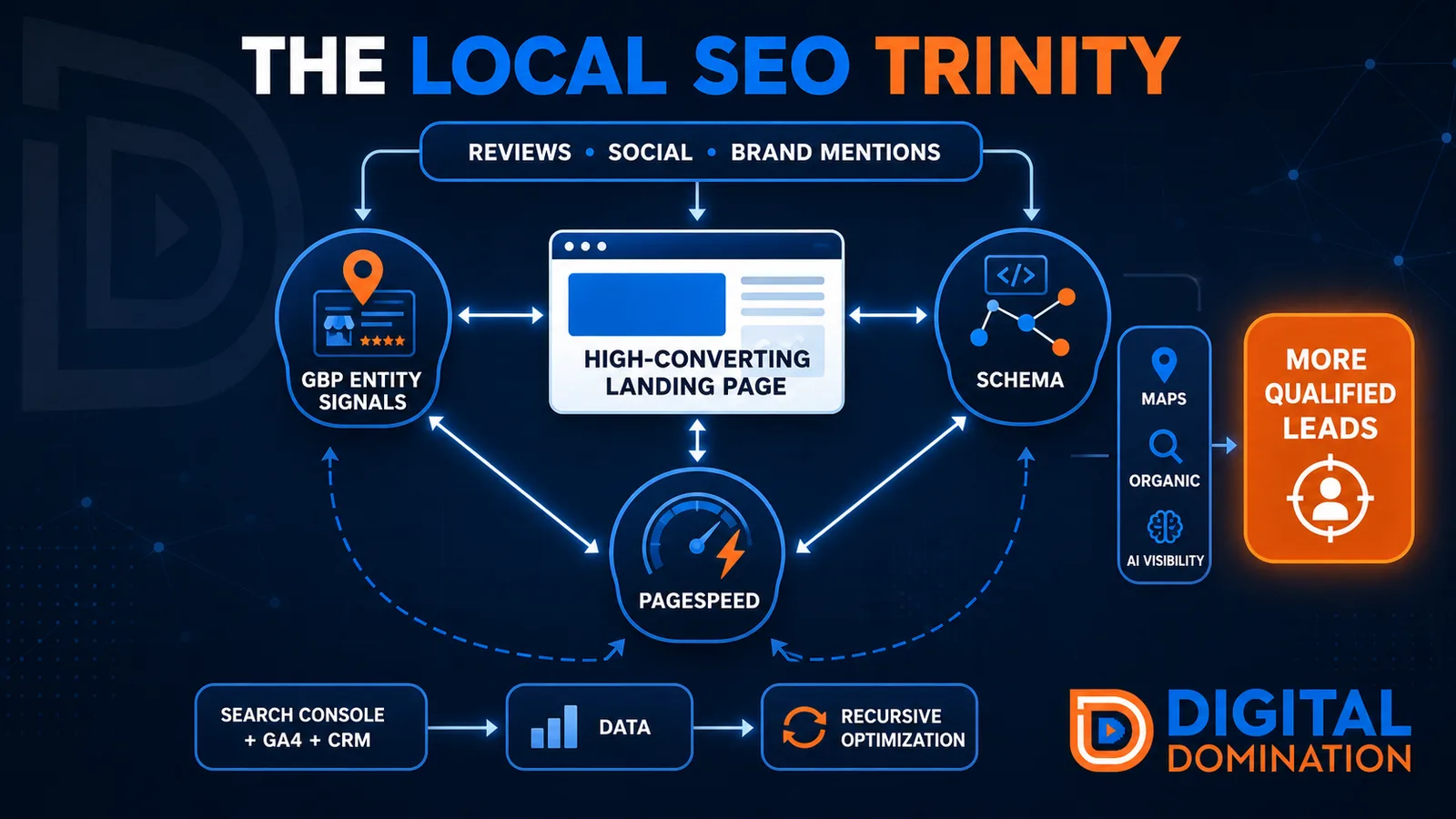
The Local SEO Trinity
Think of a three-legged stool. Your Google profile, your website, and your reviews all have to hold you up. If one leg is short, the whole thing wobbles.
GBP entity signals
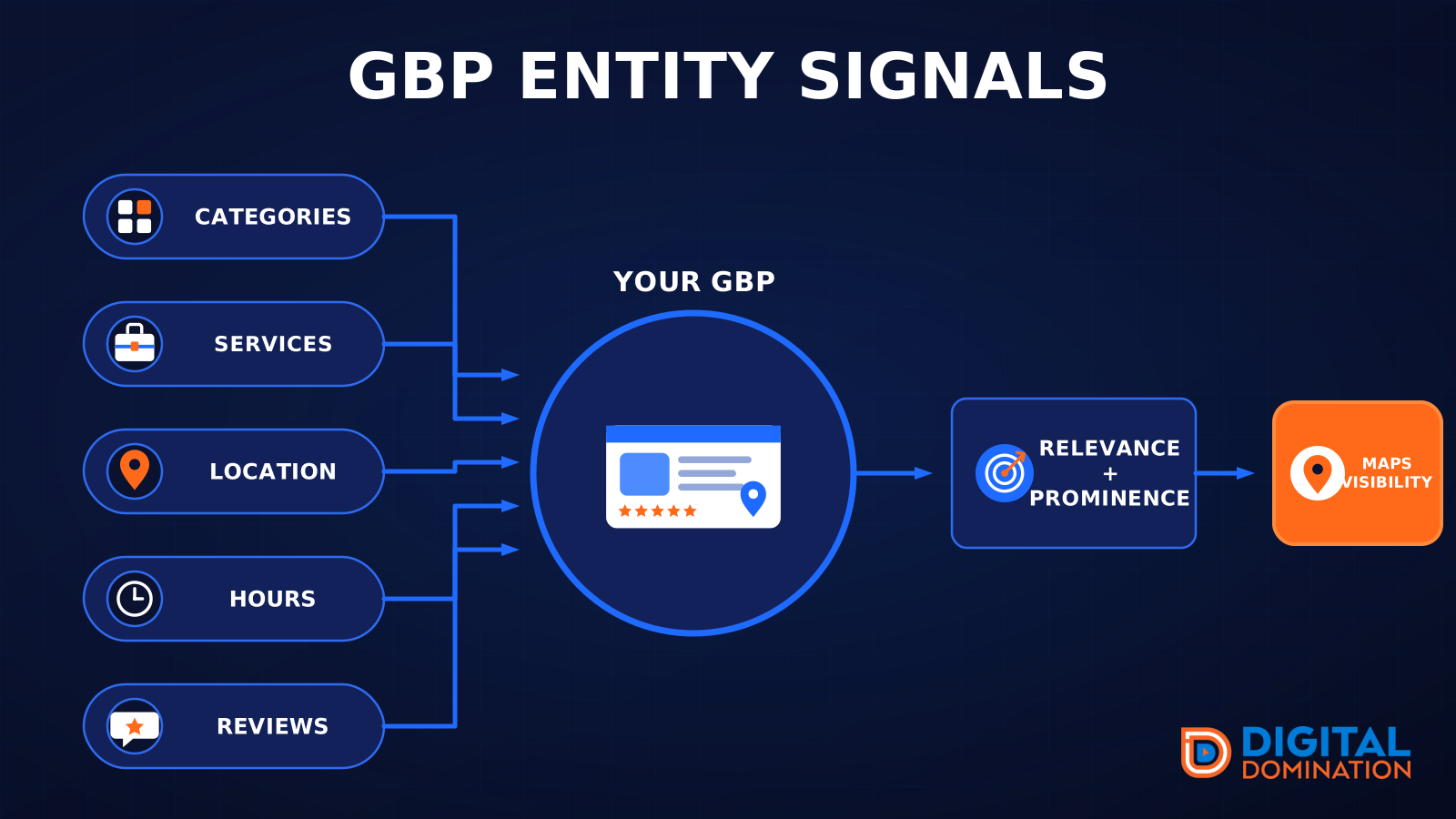
This leg is your Google Business Profile. GBP means Google Business Profile. It covers your categories, your services, your location, your hours, and your reviews. Google uses those facts to decide who to show.
Your Google profile is your storefront sign. If the sign is missing, or it names the wrong shop, people drive past.
PageSpeed to conversion
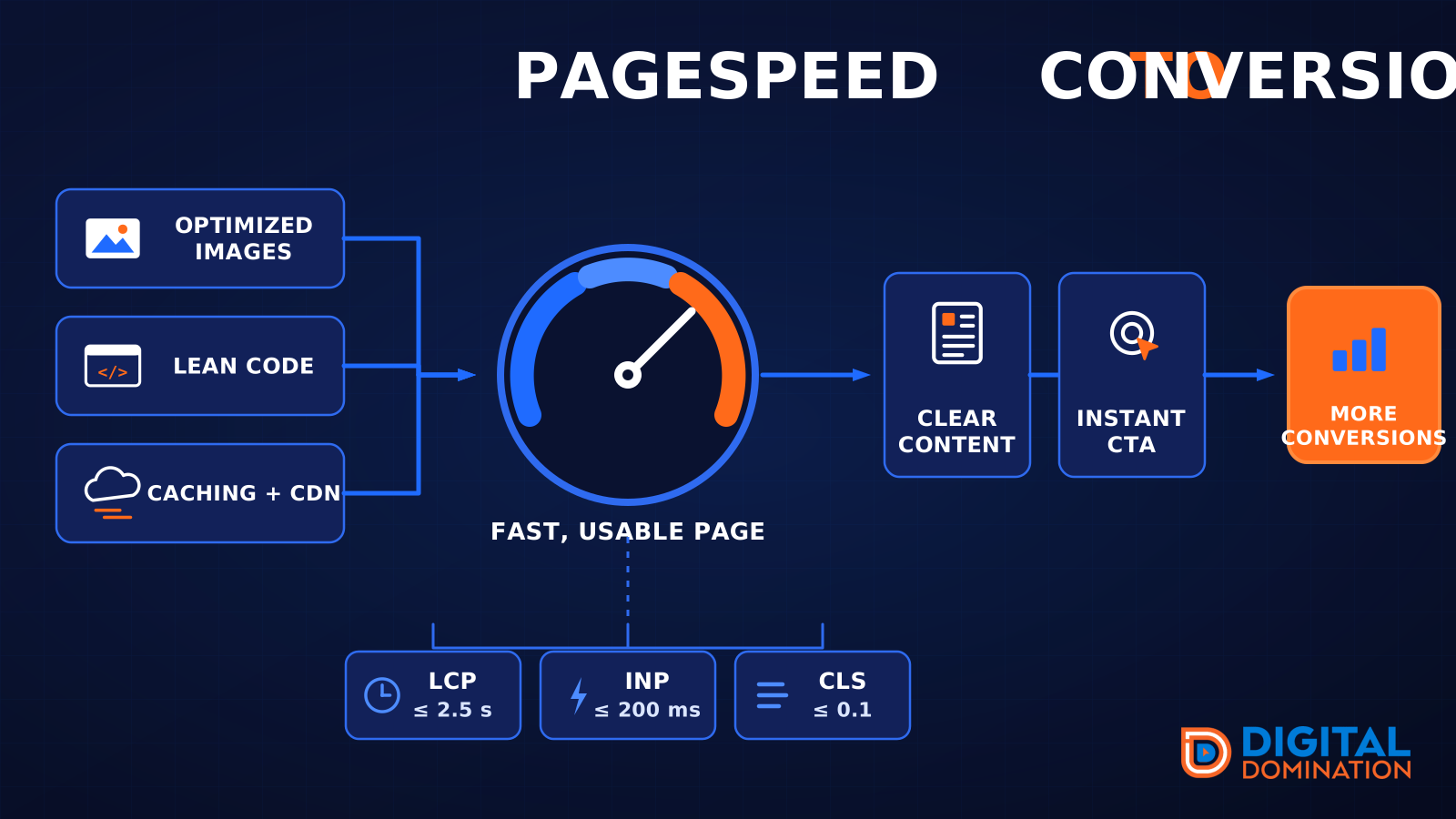
This leg is your website, above all on a phone. Small images, lean code, and caching make a page fast. A fast, clear page is what turns a visit into a call. Phone speed is one of the 12 Trinity checks because a slow page loses the call before anyone sees your offer.
Your website is the showroom. If the door sticks, people leave before they look around.
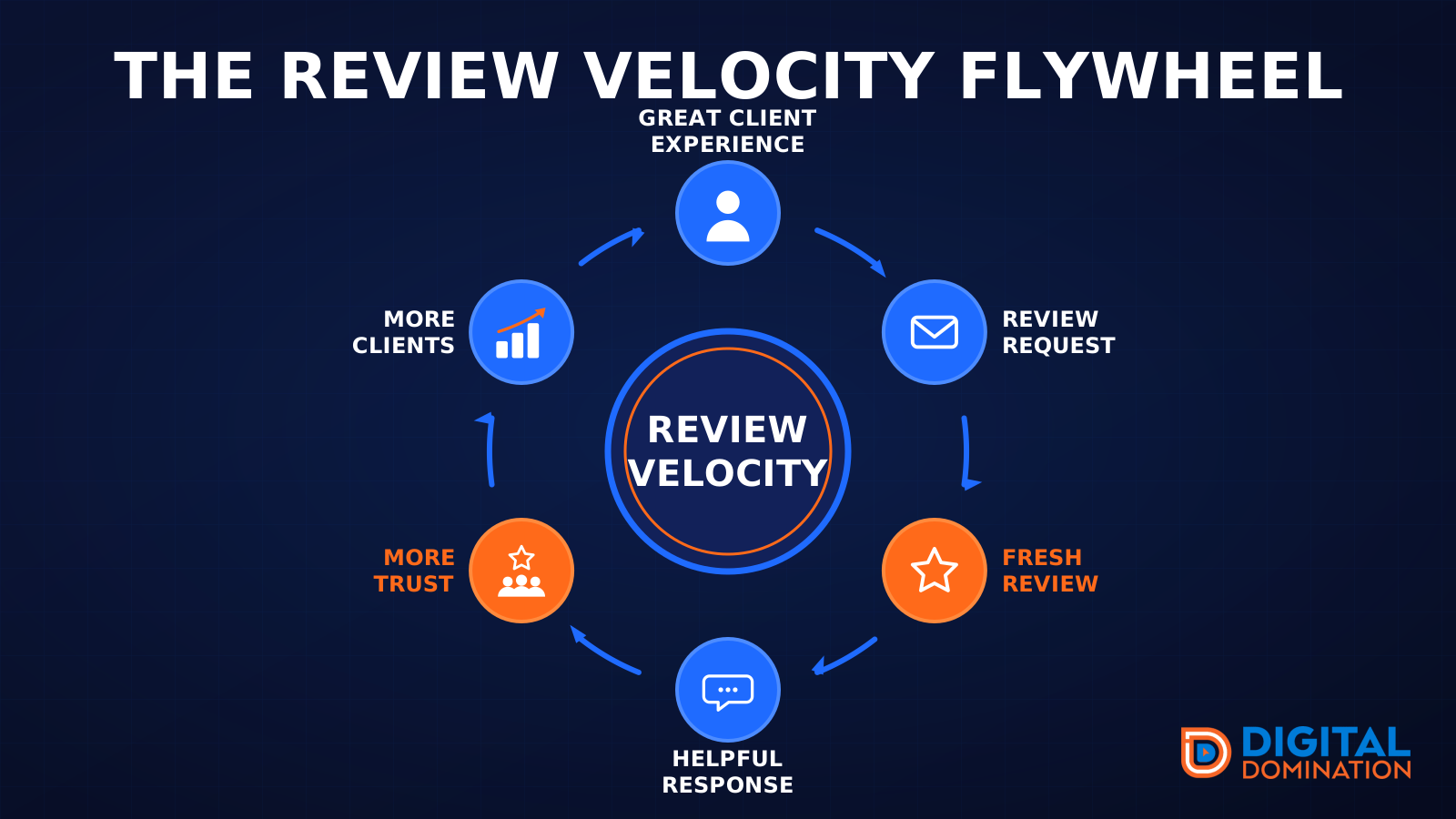
The review velocity flywheel
This leg is reviews and reputation. A good visit leads to a review request, then a fresh review, then a helpful reply, then more trust, then more customers. When the scan can find your Google listing, it shows your rating, your recent reviews, and how many you answered.
Reviews are word of mouth. One kind word helps. A steady stream of real reviews, and a reply from you, helps more.
How this turns into revenue
Being found in more searches leads to more calls. More calls lead to more booked jobs. More booked jobs lead to more revenue.
Example numbers, not a real business: 40 calls from search in a month, a 25 percent close rate, and a $400 average job. That is 10 booked jobs. That is $4,000. The math is the lesson. It is not a promise.
The full page has a box where you can type your own average job value and close rate.
One real story, from our car dealership case study: Medina Auto Group went from invisible on Google Maps to dominating every high-intent search across their market. The turnaround spanned all four of their rooftops at once. The same page says the team eliminated 89 unfair one-star reviews that had been dragging the dealership's reputation down and keeping it out of the Map Pack. It also says: “Results described here are exceptional and non-typical. Outcomes vary based on market conditions, competition, and implementation. No guarantees are made regarding earnings, rankings, or conversions.”
Free strategy call
More booked jobs start with a clear plan
Book a free strategy call. We look at your Google profile, your website, and your reviews, and we tell you what to fix first.
Free. You pick the time. A real person shows up.