
Google Maps listings still point to broken websites
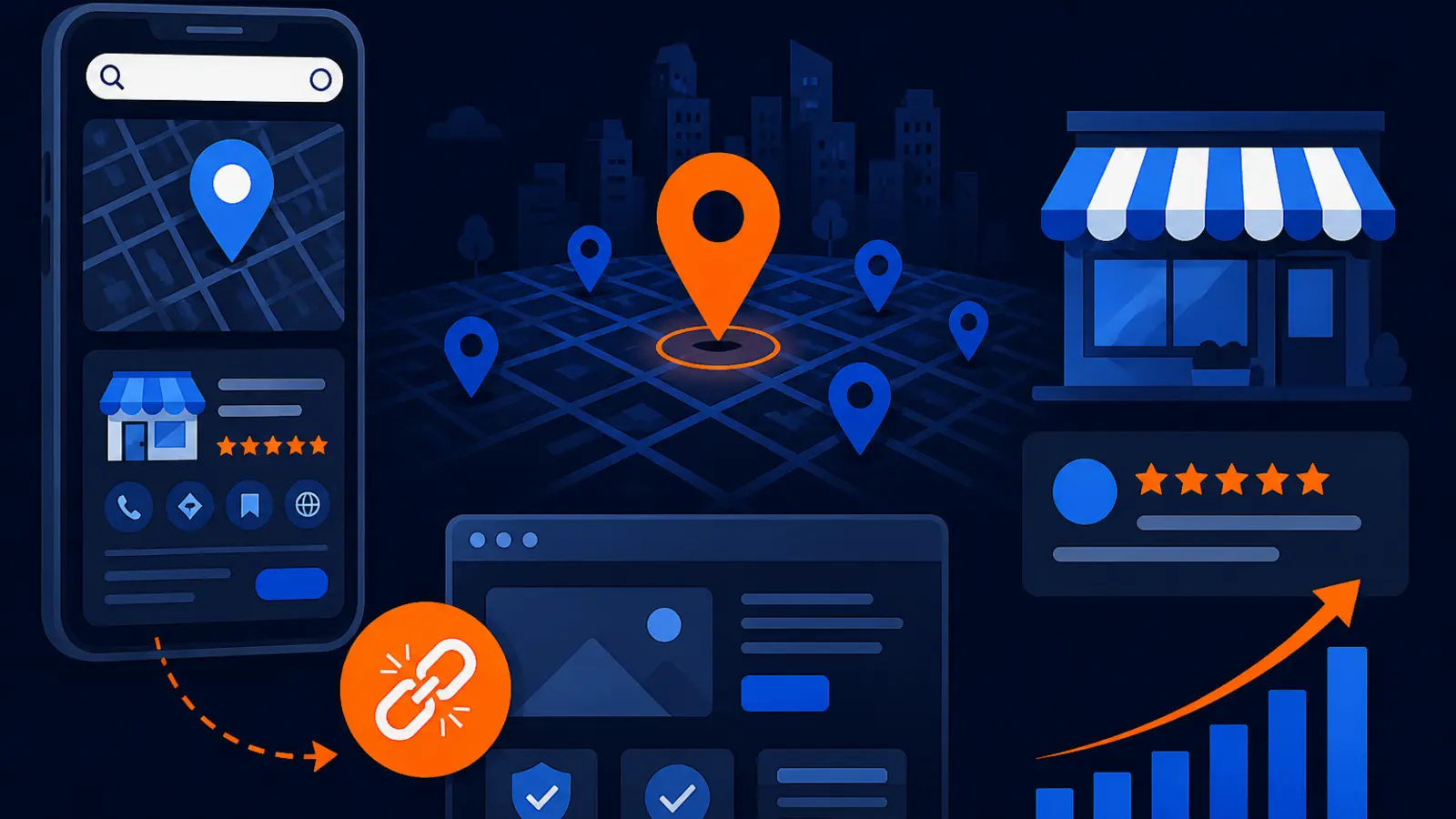
Before you buy local SEO, make sure your Google Business Profile sends Maps traffic to a site you control, can measure and can convert.
What changed this week
A new Google Maps census should make every local business owner check one button today: the website button on the Google Business Profile. Digital Royalty Research published a November 5 study of 8,426 open Google Business Profile listings across 12 UK towns and cities and found that 33% of owner-claimed listings had no working website.
TechRadar followed on November 12 with more context, reporting that 8.9% of listed website links were dead or parked and that some working websites appeared stale. The important part for owners is simple. These were not just abandoned listings sitting untouched. Many were claimed profiles, which means the business had some level of access or ownership, yet buyers could still be sent to a dead end.
This hits service businesses hardest because Maps visitors often have urgent intent. A homeowner looking for a plumber, roofer, HVAC contractor, dentist, attorney or towing company may not give you a second chance if the website button fails. They go back to the map and tap the next competitor.
Why a claimed profile can still leak leads
A claimed Google Business Profile is not the same thing as a clean sales path. Claiming the profile only gives you the ability to manage important information. It does not prove that the website still loads, that you control the domain, that the mobile page works or that the page matches the service the buyer wants.
This is where owners often get burned. They assume that because the profile is verified, Google is sending buyers to the right place. But the website field might point to an old domain, a website builder trial, a parked page, a social profile, a third-party booking page or a page built years ago by a vendor who no longer answers email.
Check for these common profile leaks before you spend money driving more visibility to the listing:
- ▸The website button opens a domain you no longer control.
- ▸The page loads on desktop but fails or crawls on a phone.
- ▸The link goes to a Facebook page, marketplace page or booking platform instead of your own site.
- ▸The domain redirects through old tracking links or agency pages.
- ▸The page has no clear phone number, contact form or service area information.
Ranking is not the same as converting
Local SEO often starts with the question, “How do I rank higher in Google Maps?” That matters, but it is not the full job. Google’s local ranking factors are relevance, distance and prominence. Those factors help decide where you appear. They do not guarantee that a buyer who taps your listing will become a lead.
If your profile ranks but the website button goes nowhere useful, better rankings can amplify the problem. More people see you, more people click and more people leave confused. A broken or stale destination also makes your marketing harder to measure because you cannot tell which calls, forms or bookings came from Maps.
A useful local SEO plan should connect three parts of the journey:
- ▸The profile appears for the right local searches.
- ▸The website button sends visitors to an asset you own or control.
- ▸The destination page makes it easy to call, book or request service.
Five things to check on your profile this week
You do not need to be technical to run a first pass. Open Google Maps on your phone, search your business name and use the profile the same way a new customer would. Do not test only from your office computer. Many Maps visits happen on mobile, under time pressure, and your website has to work there first.
Use this quick check before any campaign, redesign or local SEO contract:
- ▸Tap the website button from your Google Business Profile and confirm the page loads without warnings, errors or redirects to an unexpected domain.
- ▸Check that the page is on a domain you own, with current registrar access, hosting access and a login someone at the business can actually use.
- ▸Confirm the phone number, business name, address or service area match the profile and your major directory listings.
- ▸Look for a clear next step above the fold on mobile, such as call, text, book, request estimate or get directions.
- ▸Open the page on cellular data, not just Wi-Fi, and make sure it loads quickly enough that a real buyer would wait.
What counts as a website asset you control
For local lead generation, control matters. A website you control is not just a page with your logo on it. It is an asset where you can update the content, add tracking, publish service pages, fix technical issues and move providers if needed.
A third-party booking page or social profile can be useful, but it should not be your only destination unless that is a deliberate choice. If your main Maps link points to a platform you do not control, you may be limited in what you can measure, how you can present services and whether you can move the traffic later.
A practical owner-controlled setup usually includes these basics:
- ▸A domain registered in the business owner’s name or the company’s name.
- ▸A live HTTPS website with no browser security warning.
- ▸Admin access to the website, hosting and analytics.
- ▸Pages for your core services and service areas.
- ▸A contact path that works on mobile, including tap-to-call.
Dead links are only one version of the problem
The Digital Royalty Research finding focuses attention on listings with no working website, and TechRadar noted dead or parked links as well as stale sites. But owners should look beyond the obvious broken page. A site can technically load and still be a poor destination for Maps traffic.
A stale site creates friction. Old hours make a buyer doubt whether you are open. Missing services force them to guess whether you do the job. A site that only talks about the company, without clear calls, forms or locations, can waste the click even when the domain is alive.
Watch for these “working but weak” website issues:
- ▸The homepage says little about your current services.
- ▸The address, service area or phone number differs from your Google Business Profile.
- ▸The site has no page for your most profitable service.
- ▸The design hides the phone number on mobile.
- ▸The page looks abandoned because offers, photos or staff details are out of date.
Why this matters before buying local SEO
Buying local SEO before fixing the destination is like sending more trucks to a closed jobsite. The campaign may improve visibility, but the customer path still fails at the moment of intent. That creates frustration for the owner and makes it easy to blame the wrong thing.
Before you pay someone to optimize categories, citations, content or links, make sure the Maps click goes to a page that can receive the traffic. That does not mean you need a huge website. A small, clean site with accurate services, a fast mobile page, clear contact options and a business-controlled domain can outperform a larger site that confuses buyers.
It also protects your reporting. If the profile points to a third-party page, old vendor domain or untracked landing page, you may not know whether Maps traffic is producing calls and forms. That makes it harder to decide what to fix, what to keep and what to stop paying for.
What to do about it
Start with the cheapest fixes first. Most owners can improve this path in a few hours if they still have the right logins. If you do not have access, solving that access problem becomes the first marketing task, not a side issue.
Work through these owner-level actions this week:
- ▸Log in to Google Business Profile and confirm the website field points to the best current page.
- ▸If the link is dead, replace it with a working page immediately, even if it is a simple contact page on your own domain.
- ▸Make sure HTTPS is active so visitors do not see a browser warning.
- ▸Update the page with your current services, service area, hours and main phone number.
- ▸Add a visible call button and form on mobile.
- ▸Test the form and phone number yourself and ask where the lead notification goes.
- ▸Write down who controls the domain, hosting, website edits and analytics so access does not disappear when a vendor changes.
Do a basic technical check without becoming a developer
You do not need to become a web developer, but you should know whether the page is slow, unstable or painful on mobile. Google’s Core Web Vitals “good” thresholds are LCP 2.5 seconds, INP 200 milliseconds and CLS 0.1 at the 75th percentile of field data. In plain English, that means the page should load the main content quickly, respond quickly when someone taps and avoid jumping around while it loads.
If those terms make your eyes glaze over, use a simpler owner test. Open the page on your phone with cellular data, tap the main buttons and try to submit a form. If the page feels slow to you, it probably feels worse to someone comparing three competitors from a driveway or jobsite.
Ask your website person these questions in plain language:
- ▸Does the Google Business Profile link load fast on mobile?
- ▸Is the page secure with HTTPS?
- ▸Can visitors call in one tap?
- ▸Are form submissions going to the right inbox or CRM?
- ▸Can we see how many visitors and leads come from the Google Business Profile link?
The local data lesson for your market
The Digital Royalty Research study covered UK towns and cities, but the lesson is not limited to the UK. Local search systems depend on business owners keeping their public information clean. When a claimed listing points to a weak or broken destination, the owner may be invisible at the most important part of the buyer journey, even while appearing on the map.
This is especially important in competitive trades and professional services. If nearby competitors have clean profiles, working sites and service pages that match the search, your broken website button becomes a gift to them. The buyer does not need to understand why your link failed. They only need to find someone else who looks ready to help.
The practical takeaway is to audit the path from search to lead, not just the ranking. Search your main services, check your profile, tap your buttons and act like a skeptical customer. If anything feels confusing, fix that before paying to send more people through the same path.
How to decide your next move
If this news makes you wonder whether your Maps traffic is going where it should, that is the right question. Before buying local SEO, confirm that your Google Business Profile links to a website asset you control, that the page works on mobile and that leads can be measured. Strong rankings are valuable only when the next click has somewhere useful to go.
Digital Domination is a Las Vegas local SEO agency serving local service businesses nationally. Our Trinity Scan page at digitaldomination.ai/trinity-scan/ explains the three-part review we use to look at local visibility, website conversion paths and authority signals before recommending work. It is meant to show what needs fixing before more money is spent on optimization.
If you want a starting point, our GeoGrid scan checks 169 points across your market so you can see where your Google Maps visibility is strong, weak or missing. Start with the free GeoGrid scan at digitaldomination.ai/scan/.
Keep reading
Related guides
- ▸What Are the Red Flags in an SEO Contract Before You Sign?
- ▸Small-town Map Packs are being won from outside town
- ▸The Biggest Mistakes Local Businesses Make With Google Maps SEO
Put it into action
Frequently Asked Questions
How do I know if my Google Business Profile website link is broken?
Search your business name in Google Maps on your phone and tap the website button. If it does not load, shows a security warning, lands on a parked page or sends you somewhere unexpected, it needs attention. Also test it on cellular data, not only on office Wi-Fi.
Can I use a Facebook page as my Google Business Profile website?
You can, but it is usually not the best main destination if you want control and measurement. A social page limits how much you can change, track and optimize. If possible, use a website on a domain your business owns and keep social links as supporting channels.
Should I fix my website before paying for local SEO?
Yes, at least fix the basics first. Make sure the Google Business Profile link works, the page is secure, the phone number is correct and visitors can contact you. Otherwise, local SEO may send more high-intent Maps traffic into a weak or broken path.
What website page should my Google Business Profile link to?
For many local businesses, the homepage is fine if it clearly shows services, service area and contact options. If you have a strong location or service landing page that matches the profile, that may be better. The best page is the one you control, can update and can measure.
Does Google rank my Maps listing lower if my website is broken?
Google’s local ranking factors are relevance, distance and prominence. A broken website can still hurt business results because buyers may leave after clicking, even if the listing appears. The safer move is to keep the profile and website accurate, current and easy to use.
What does a dead or parked website mean on Google Maps?
A dead website usually means the page does not load or the domain no longer resolves properly. A parked website often means the domain exists but shows a placeholder, ads or a registrar page instead of your business information. Both can make a real business look abandoned.
How often should I audit my Google Business Profile link?
Check it at least monthly and any time you change website vendors, domains, booking tools or tracking numbers. Also test it after website updates, hosting changes and major profile edits. A one-minute mobile check can prevent weeks of lost leads.
What should I do if an old agency controls my domain or website?
Ask for administrative access to the domain registrar, hosting, website and analytics in writing. If they cannot provide it, document what you own and talk with a qualified web professional about recovery or migration options. Do not start a major local SEO push until you know where your Maps traffic will land.
The Local SEO Trinity
Think of a three-legged stool. Your Google profile, your website, and your reviews all have to hold you up. If one leg is short, the whole thing wobbles.
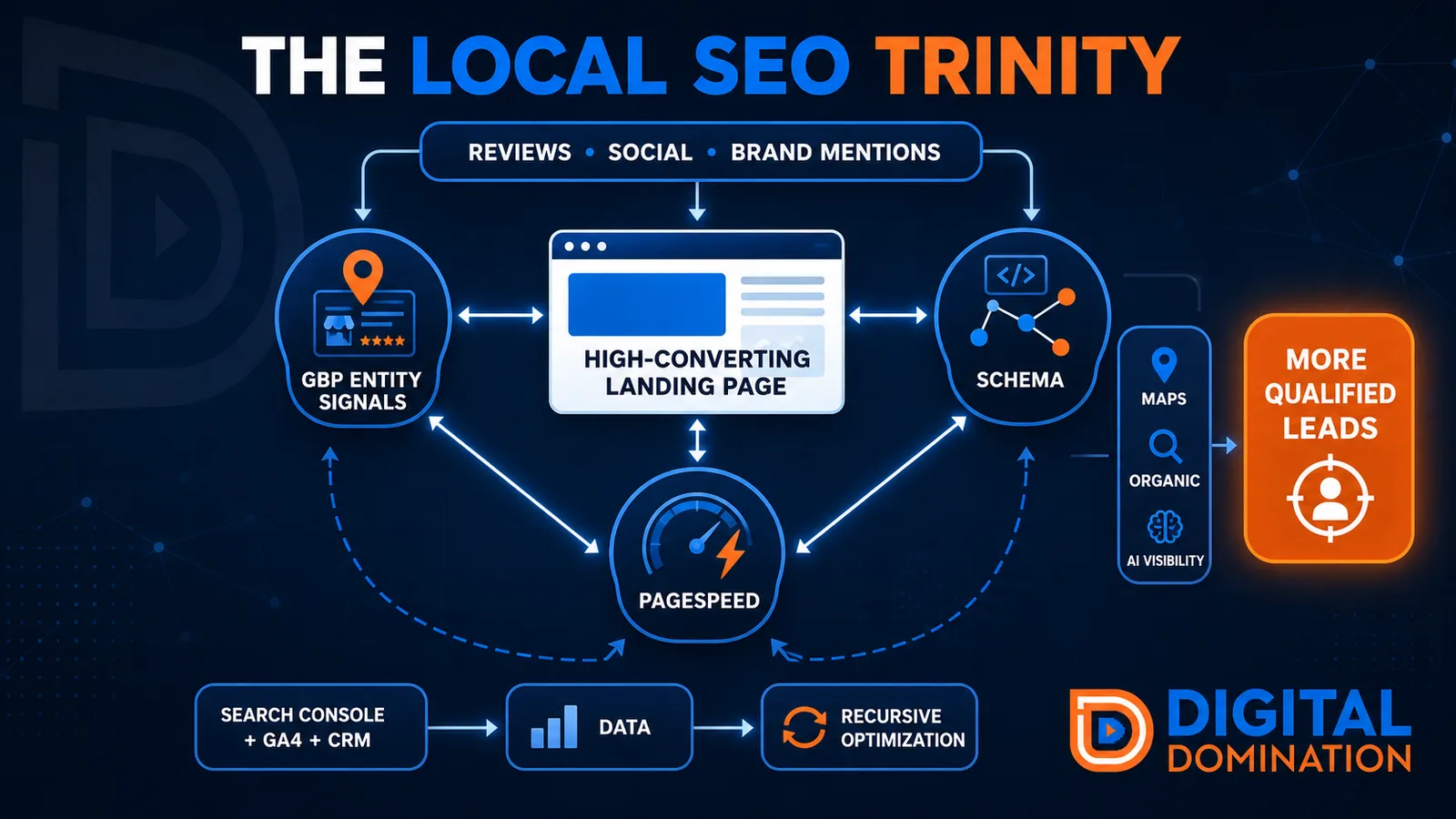
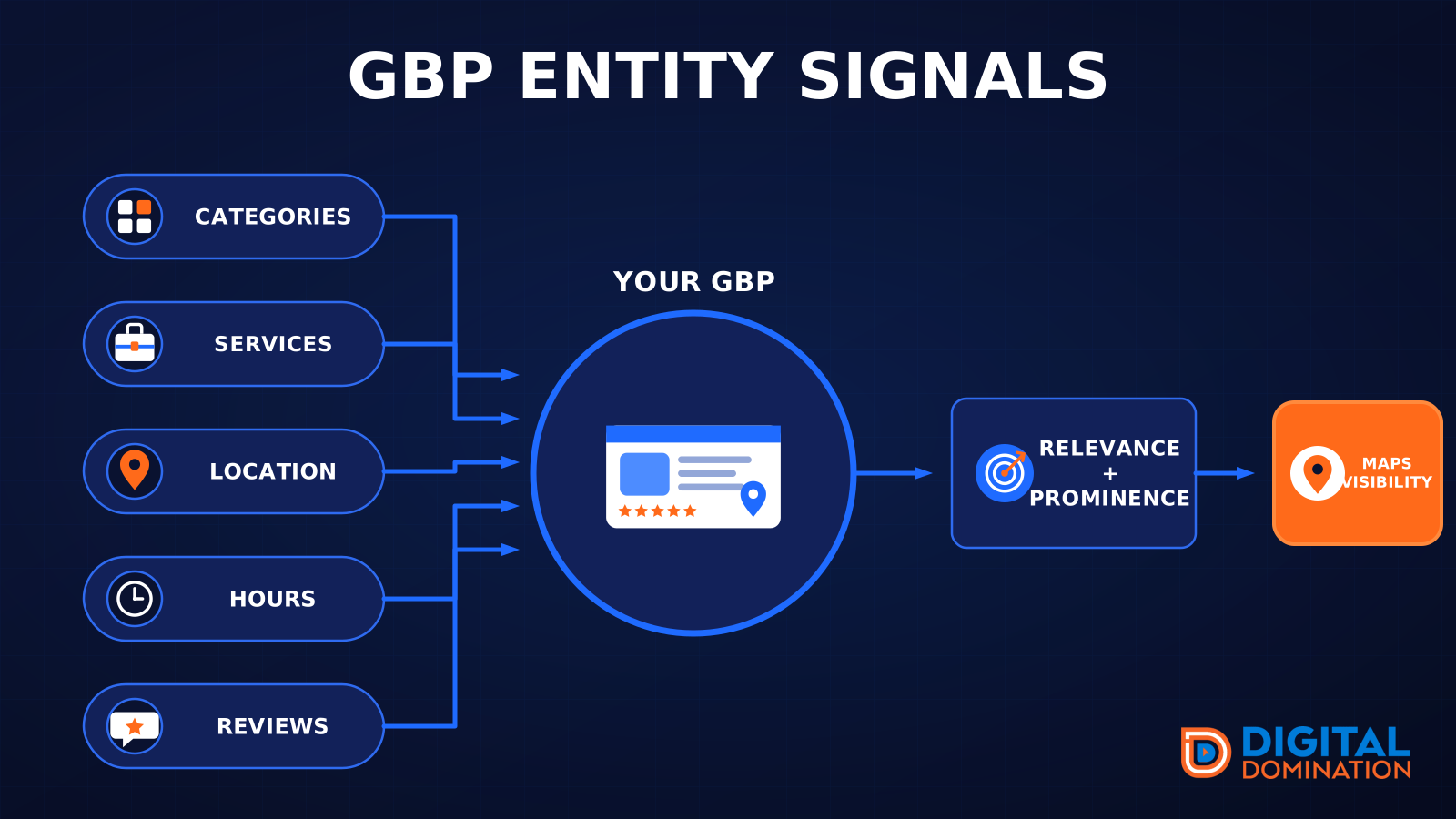
GBP entity signals
This leg is your Google Business Profile. GBP means Google Business Profile. It covers your categories, your services, your location, your hours, and your reviews. Google uses those facts to decide who to show.
Your Google profile is your storefront sign. If the sign is missing, or it names the wrong shop, people drive past.
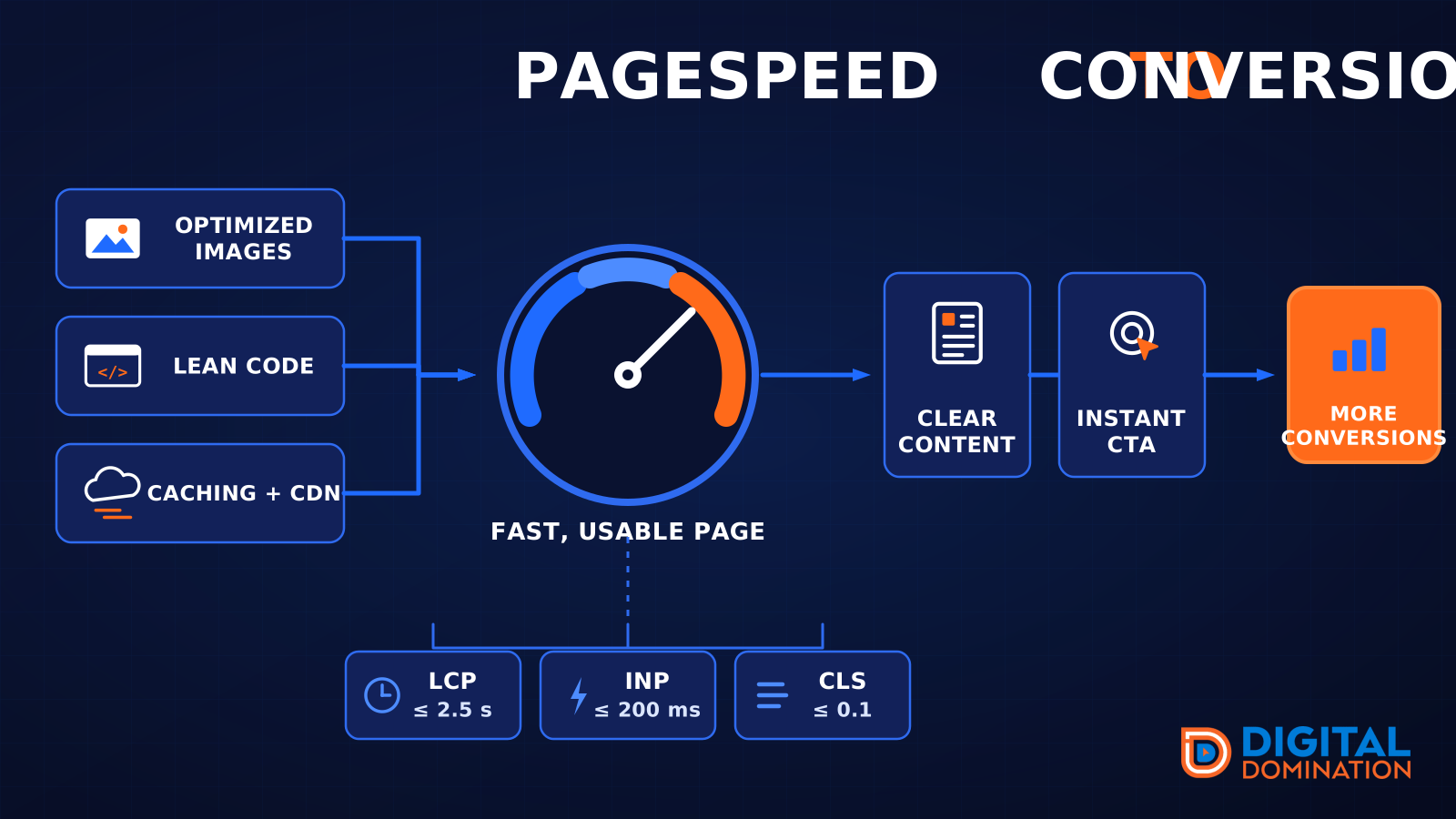
PageSpeed to conversion
This leg is your website, above all on a phone. Small images, lean code, and caching make a page fast. A fast, clear page is what turns a visit into a call. Phone speed is one of the 12 Trinity checks because a slow page loses the call before anyone sees your offer.
Your website is the showroom. If the door sticks, people leave before they look around.
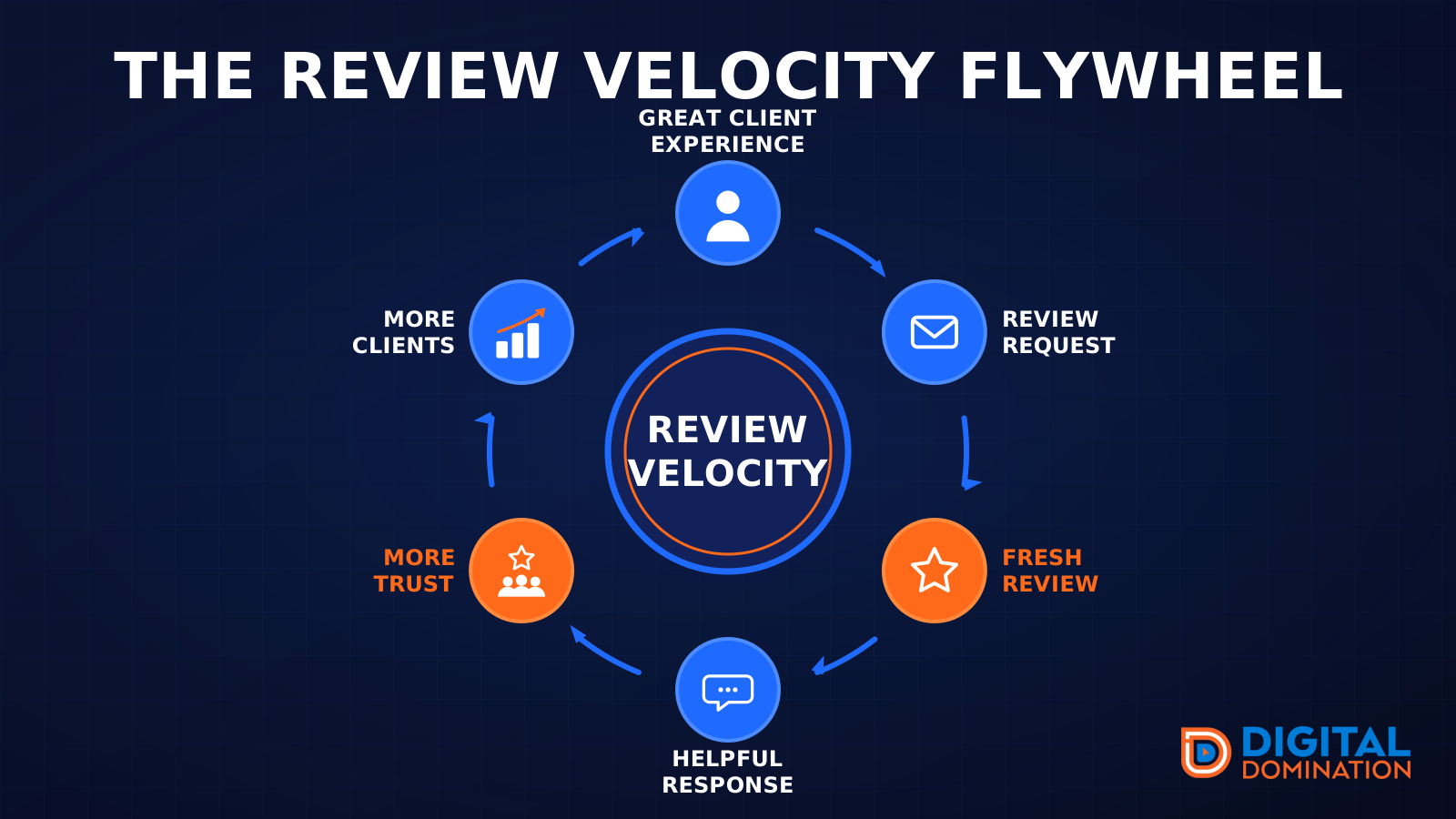
The review velocity flywheel
This leg is reviews and reputation. A good visit leads to a review request, then a fresh review, then a helpful reply, then more trust, then more customers. When the scan can find your Google listing, it shows your rating, your recent reviews, and how many you answered.
Reviews are word of mouth. One kind word helps. A steady stream of real reviews, and a reply from you, helps more.
How this turns into revenue
Being found in more searches leads to more calls. More calls lead to more booked jobs. More booked jobs lead to more revenue.
Example numbers, not a real business: 40 calls from search in a month, a 25 percent close rate, and a $400 average job. That is 10 booked jobs. That is $4,000. The math is the lesson. It is not a promise.
The full page has a box where you can type your own average job value and close rate.
One real story, from our car dealership case study: Medina Auto Group went from invisible on Google Maps to dominating every high-intent search across their market. The turnaround spanned all four of their rooftops at once. The same page says the team eliminated 89 unfair one-star reviews that had been dragging the dealership's reputation down and keeping it out of the Map Pack. It also says: “Results described here are exceptional and non-typical. Outcomes vary based on market conditions, competition, and implementation. No guarantees are made regarding earnings, rankings, or conversions.”
Free strategy call
More booked jobs start with a clear plan
Book a free strategy call. We look at your Google profile, your website, and your reviews, and we tell you what to fix first.
Free. You pick the time. A real person shows up.