
Google’s November 2026 core update is rolling out: separate Maps losses from organic losses before you buy SEO fixes
If calls dipped this week, do not assume your Google Business Profile broke. Prove whether the drop is from Map Pack visibility, organic website rankings, seasonality, or normal update volatility first.

What changed and who it hits
Google began rolling out the November 2026 core update on November 10, 2026, according to the Google Search Status Dashboard. Search Engine Land reported the same rollout date and noted that the update affects Google Search rankings globally and in all languages, with the rollout expected to take up to two weeks.
For a local business owner, that means the next several days can feel messy. A roofing company, dentist, HVAC contractor, med spa, attorney, or home services company may see calls slow down, form fills shift, or rankings bounce around. That does not automatically mean your Google Business Profile was damaged, your website was penalized, or your SEO provider broke something.
The important point is this: a core update is about Google Search ranking systems. Your leads may come from several places inside Google, including the Map Pack, your Google Business Profile, local finder results, organic website listings, paid ads, and branded searches. Before you pay for emergency SEO fixes, you need to know which part actually moved.
Why panic SEO gets expensive fast
Core update weeks create a perfect sales moment for panic. The owner sees fewer calls. A vendor sees a chance to sell rewrites, new service pages, citation blasts, technical audits, or Google Business Profile changes. The problem is that those fixes may target the wrong symptom.
If your website rankings dropped but your Map Pack visibility stayed steady, changing your business categories, service areas, or business description may do nothing. If your Map Pack visibility dropped but organic pages stayed steady, rewriting blog posts may not bring calls back. If neither dropped, the issue may be call tracking, weather, staffing, holidays, ad spend, or normal demand swings.
Do not let one slow day become a rushed project. During a rollout, the first job is measurement, not motion.
Maps losses and organic losses are different problems
Google’s local rankings are driven by relevance, distance, and prominence. That applies to local results such as the Map Pack, where the searcher’s location matters heavily. A business can rank well near its office and poorly across town, even if the website is healthy.
Organic website rankings work differently. Search Console shows how your site appears in Google Search results, including queries, pages, clicks, impressions, average position, and click through rate. It does not give you a true street by street view of where your Google Business Profile ranks in the Map Pack.
That is why a single ranking screenshot is weak evidence. A screenshot from your office, your home, or your phone can be shaped by location, personalization, device, and the exact query typed. A GeoGrid and Search Console check tell you whether the issue is local visibility, organic visibility, or something outside rankings.
Five things to check before you buy SEO this week
Before approving urgent SEO work, take a calm inventory of the data you already have. The goal is not to diagnose the entire business in one sitting. The goal is to avoid paying for fixes before you know where the leak is.
Use this checklist before you approve urgent work:
- ▸Check whether calls dropped from Google Business Profile, organic website traffic, paid ads, or another source.
- ▸Check whether the drop is for all services or only one service line, such as emergency plumbing, roof repair, implants, or personal injury.
- ▸Check whether the drop is across all locations or only one office, shop, or service area.
- ▸Check whether competitors also moved in the Map Pack for your most important keywords.
- ▸Check whether the same week last year had a similar demand pattern, holiday disruption, or weather change.
What Google says to do before diagnosing a core update
Google’s own documentation, Google Search’s Core Updates and your website on Google Search Central, says site owners should wait until a core update finishes before deciding whether rankings have changed. Google also says to compare Search Console data at least one full week after the update finishes, rather than reacting during the rollout.
That guidance matters because rankings can move around while the update is still being applied. If you judge too early, you may mistake temporary volatility for a real loss. You may also miss a recovery that happens before the rollout is complete.
For a local owner, this does not mean you should ignore your leads for two weeks. It means you should monitor, record, and separate channels while holding off on big changes that could muddy the data.
How to read Search Console without getting lost
Search Console is useful because it tells you whether your website is losing visibility in organic Google Search. You do not need to be technical to get value from it. You need to compare the right date ranges and look for patterns, not obsess over one keyword.
After the rollout is complete and at least one full week has passed, compare the week after the rollout to a similar prior period. Look at clicks, impressions, average position, and the pages or queries that changed. If impressions dropped for many service keywords, that points toward organic visibility. If impressions stayed steady but clicks dropped, the issue may be titles, snippets, brand trust, ads above you, or searcher behavior.
Start with these owner-level checks in Search Console:
- ▸Open Performance and filter to Google Search results for your website.
- ▸Compare the post-update week to a comparable earlier week after the rollout is complete.
- ▸Look at queries that include your main services and city names.
- ▸Look at service pages first, not random blog posts.
- ▸Separate branded searches from nonbranded searches, because they tell different stories.
- ▸Write down the pages and queries that changed before asking anyone to rewrite content.
How a GeoGrid answers the Maps question
A GeoGrid scan checks Map Pack visibility from many points across your service area. That matters because local rankings change by location. You might look strong near your office and invisible ten miles away, or you might hold your main city while losing nearby suburbs.
Digital Domination’s GeoGrid scan checks 169 points across a market. The value is not the size of the scan by itself. The value is that it shows whether the Map Pack problem is broad, isolated, keyword specific, or not a Maps problem at all.
A GeoGrid can help you answer these questions quickly:
- ▸Do we still rank near the business location for our main keyword?
- ▸Did visibility drop across the whole market or only in certain neighborhoods?
- ▸Did one competitor replace us repeatedly in the Map Pack?
- ▸Are we weaker for one service keyword but stable for another?
- ▸Is the owner’s ranking screenshot misleading because it came from one location?
What to do about it this week
You do not need to sit frozen during a core update. You do need to avoid mixing ten changes together before you know what happened. The safest owner move is to document the week, protect the basics, and prepare a clean comparison for after the rollout.
If leads dropped, take these actions this week:
- ▸Run a GeoGrid for your most valuable Map Pack keywords and save the report.
- ▸Check Google Business Profile performance for calls, website clicks, direction requests, and messages.
- ▸Check call tracking to confirm whether calls are actually down or only missed, unanswered, or misclassified.
- ▸Open Search Console and mark November 10, 2026, as the core update start date in your notes.
- ▸Do not rewrite core service pages until you have post-rollout data.
- ▸Ask any SEO vendor to explain whether their recommendation targets Maps, organic rankings, conversion rate, or tracking.
- ▸Keep serving customers and asking for legitimate reviews, because prominence still matters in local search.
What not to change during the rollout
The biggest risk during an update is making changes that create new problems. If your business name, address, phone number, categories, and website are correct, do not change them just because calls slowed for a few days.
Google Business Profile edits can trigger review, confuse customers, or make later diagnosis harder. Website rewrites can also make Search Console comparisons messy because you will not know whether the movement came from Google’s update or from your own changes.
Avoid these panic moves unless there is a clear factual error:
- ▸Do not stuff keywords into your business name.
- ▸Do not change your primary category without a real business reason.
- ▸Do not remove services just because one keyword moved.
- ▸Do not rebuild service pages during the rollout without a plan and baseline data.
- ▸Do not buy links, fake reviews, or mass citations as an emergency fix.
- ▸Do not judge performance from one ranking screenshot.
When SEO work is still warranted
Waiting for data does not mean refusing to improve your site. It means sequencing the work. If the post-rollout Search Console comparison shows a real organic decline, then content quality, page usefulness, internal linking, technical performance, and search intent deserve a closer look.
Google Search Central’s core update guidance focuses on making helpful, reliable, people-first content. For a local service business, that usually means clear service pages, proof of real local experience, answers to customer questions, easy contact options, and content that matches what the searcher actually needs.
If the data points to organic loss, reasonable next steps may include these items:
- ▸Improve thin service pages with specific service details, service areas, FAQs, and trust signals.
- ▸Make sure each major service has a clear page instead of being buried on one generic page.
- ▸Review title tags and headings so customers can understand the page quickly.
- ▸Check technical basics, including whether important pages are indexable and load properly.
- ▸Use Core Web Vitals as a quality check, with good thresholds of LCP 2.5 s, INP 200 ms, and CLS 0.1 at the 75th percentile of field data.
- ▸Update outdated information, broken links, old photos, and confusing calls to action.
A simple decision tree for local owners
If you want a practical rule, do not ask, Did SEO drop? Ask, Which source dropped, and can we prove it? The answer decides what to do next.
Use this decision tree before spending money:
- ▸If GeoGrid visibility dropped and Search Console stayed steady, focus on local SEO and Google Business Profile signals.
- ▸If Search Console clicks and impressions dropped but GeoGrid stayed steady, focus on organic website visibility.
- ▸If both dropped, investigate whether a stronger competitor, content issue, technical issue, or brand trust issue is affecting both channels.
- ▸If neither dropped, inspect tracking, phone handling, ads, seasonality, weather, pricing, and close rate.
- ▸If data is mixed during the rollout, monitor and wait for the full post-update comparison before making major changes.
Make the calm decision before you spend
The November 2026 core update is real, and it may affect local businesses because Google Search rankings are changing globally. But a drop in calls during the rollout is not proof that your Google Business Profile failed or that your website needs emergency surgery.
The smart move is to separate Maps from organic before you buy anything. Run a GeoGrid to see your Map Pack visibility across the market. Then use Search Console after the rollout and the full waiting period to see whether your website rankings actually changed.
Digital Domination is a Las Vegas local SEO agency serving local service businesses nationally, so we watch this split every day: Maps problems need Maps evidence, and organic problems need Search Console evidence. If you want the Maps side checked first, start with the free GeoGrid scan at digitaldomination.ai/scan/.
Keep reading
Related guides
- ▸Google Maps optimization services vs DIY local SEO
- ▸Google Maps Optimization Services Vs Hiring An In House Marketer Or Ma
- ▸Google Maps Performance Reports GBP SEO
Put it into action
Frequently Asked Questions
Did the November 2026 Google core update affect my Google Business Profile?
The update is a Google Search core update, not a specific Google Business Profile update. Your calls can still change during the rollout because customers find you through both organic results and local results. You need a GeoGrid and Search Console comparison to see which part moved.
Should I change my Google Business Profile if calls dropped this week?
Do not change your profile just because calls dipped during the rollout. First confirm whether your Map Pack visibility actually dropped across your market. Only fix factual issues, such as wrong hours, wrong phone number, wrong address, or missing services.
How long should I wait before judging the November 2026 core update?
Google says the rollout may take up to two weeks. Google’s own guidance says to wait until the update finishes, then compare Search Console data at least one full week later. You can monitor leads now, but avoid major SEO decisions until the data is clean.
How do I know if my ranking loss is Maps or organic search?
Use a GeoGrid to test Map Pack visibility from many points in your service area. Use Search Console to check organic website clicks, impressions, queries, and pages. If only one channel moved, the fix should match that channel.
Can a core update make my phone stop ringing?
It can contribute if your website loses organic visibility for valuable local searches. But calls can also drop because Map Pack rankings moved, demand changed, ads changed, phones were missed, or competitors were more visible. That is why channel separation matters before buying fixes.
Should I rewrite my service pages during the core update?
Usually, no. Rewriting during the rollout can make it harder to know whether Google’s update or your edits caused the next movement. Wait for the post-rollout Search Console comparison unless the page has obvious factual errors or broken contact information.
What should I ask an SEO company before paying for emergency help?
Ask whether the recommendation is meant to fix Map Pack visibility, organic website rankings, conversions, or tracking. Ask what data proves that problem exists. If they cannot separate GeoGrid results from Search Console results, be careful.
What is the fastest first step if leads dropped during the update?
Run a GeoGrid for your most important local keywords and save the report. Then check Search Console, Google Business Profile performance, and call tracking. That gives you a starting point before you approve any major changes.
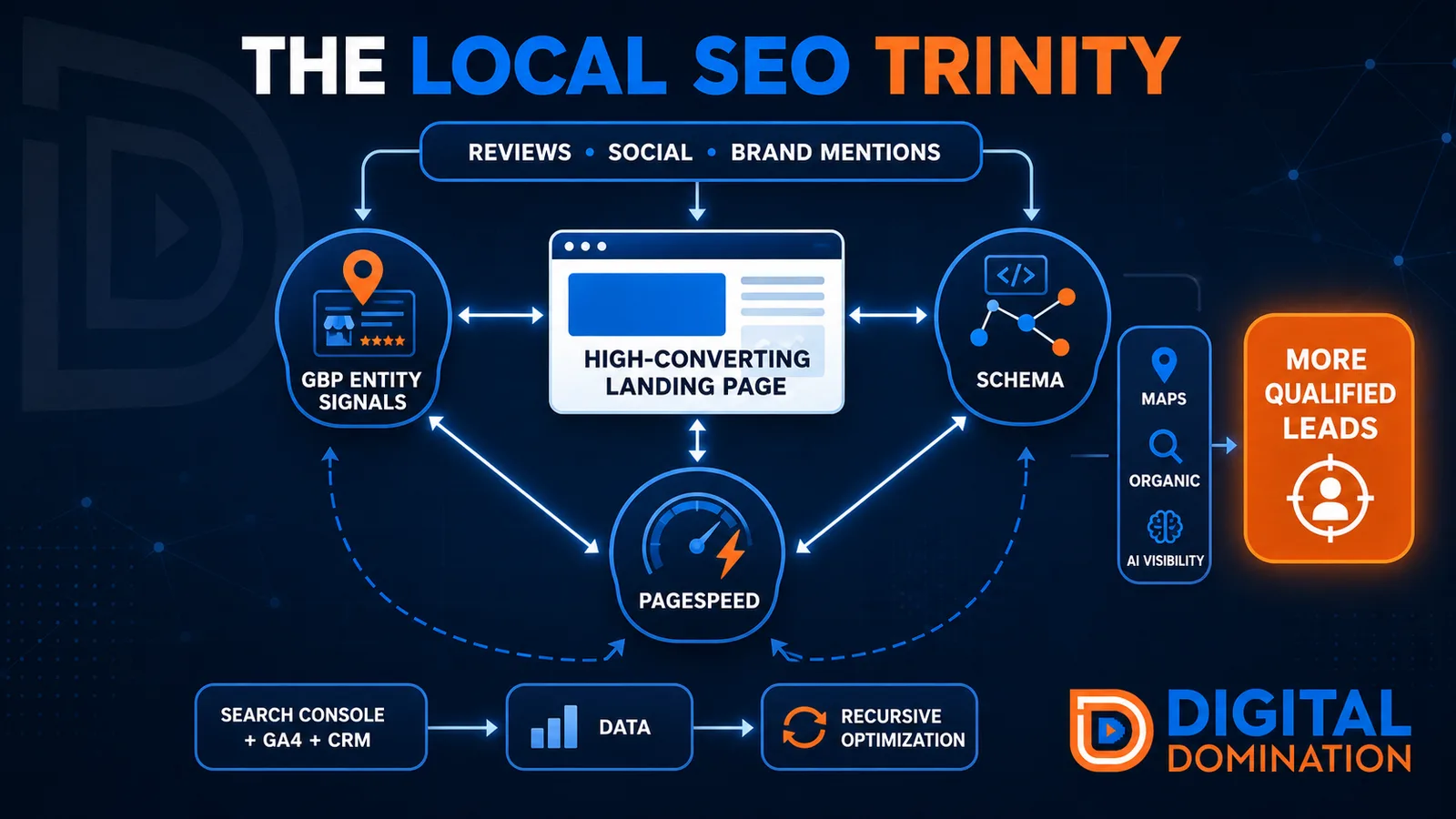
The Local SEO Trinity
Think of a three-legged stool. Your Google profile, your website, and your reviews all have to hold you up. If one leg is short, the whole thing wobbles.
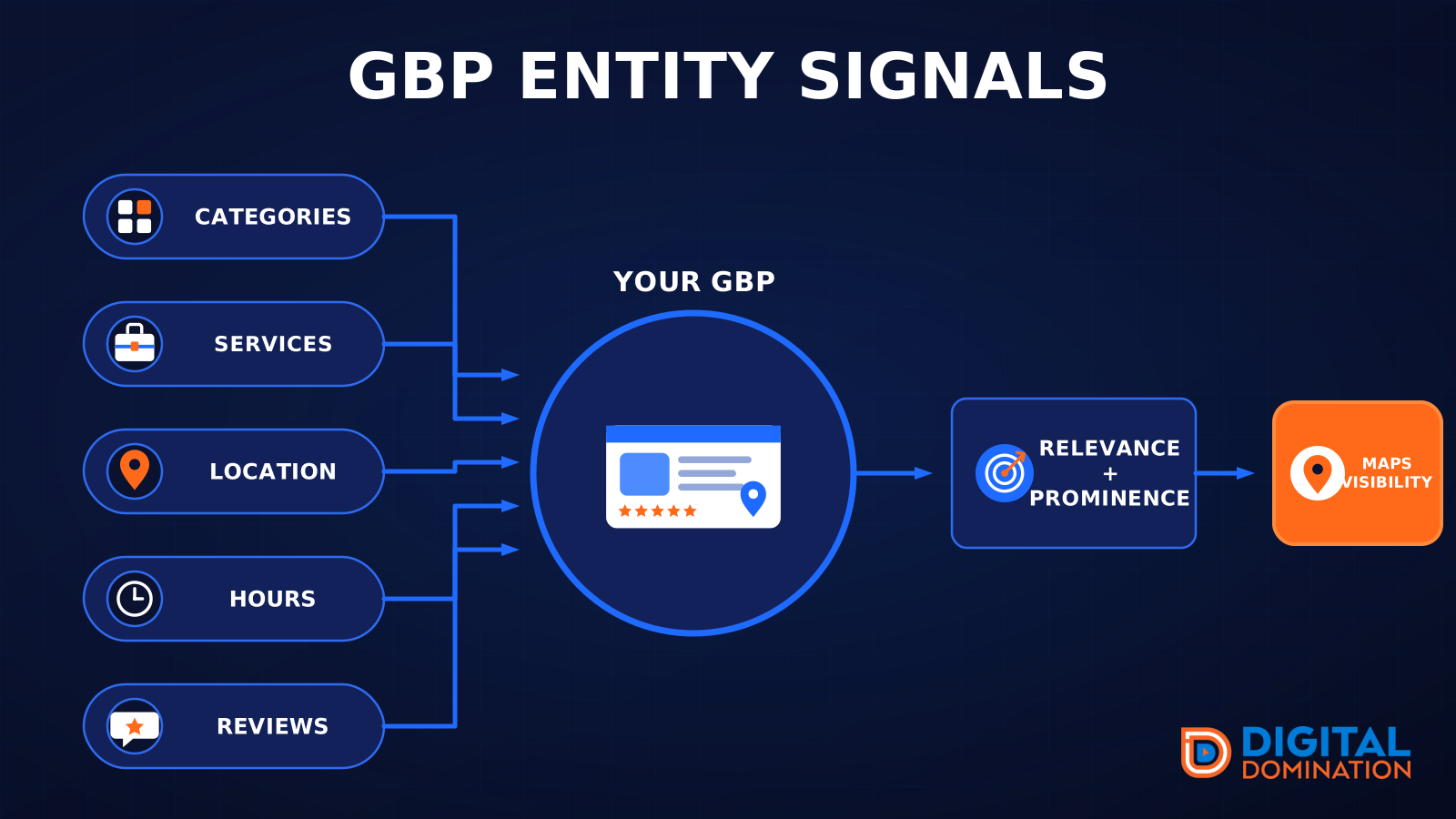
GBP entity signals
This leg is your Google Business Profile. GBP means Google Business Profile. It covers your categories, your services, your location, your hours, and your reviews. Google uses those facts to decide who to show.
Your Google profile is your storefront sign. If the sign is missing, or it names the wrong shop, people drive past.
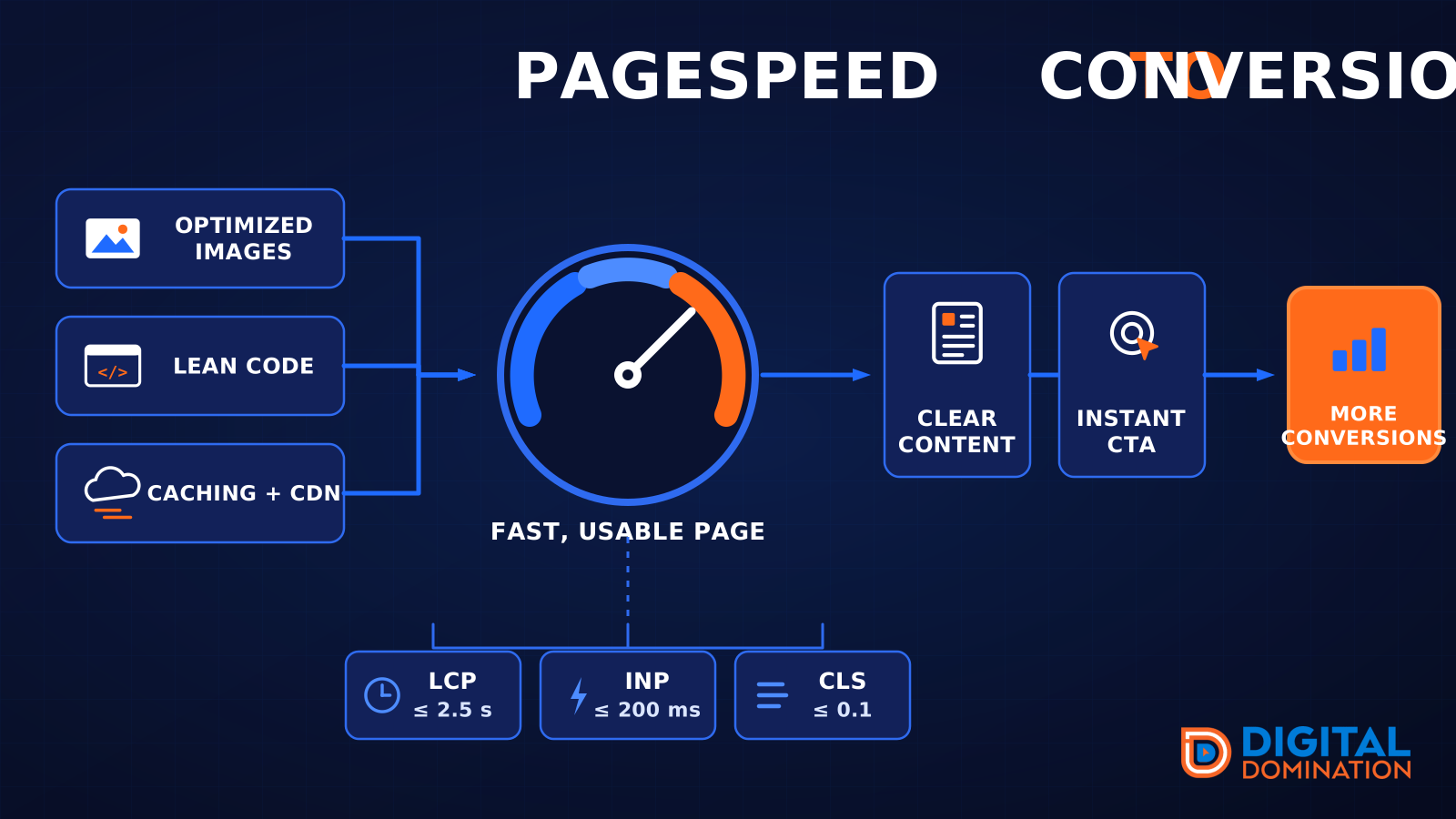
PageSpeed to conversion
This leg is your website, above all on a phone. Small images, lean code, and caching make a page fast. A fast, clear page is what turns a visit into a call. Phone speed is one of the 12 Trinity checks because a slow page loses the call before anyone sees your offer.
Your website is the showroom. If the door sticks, people leave before they look around.
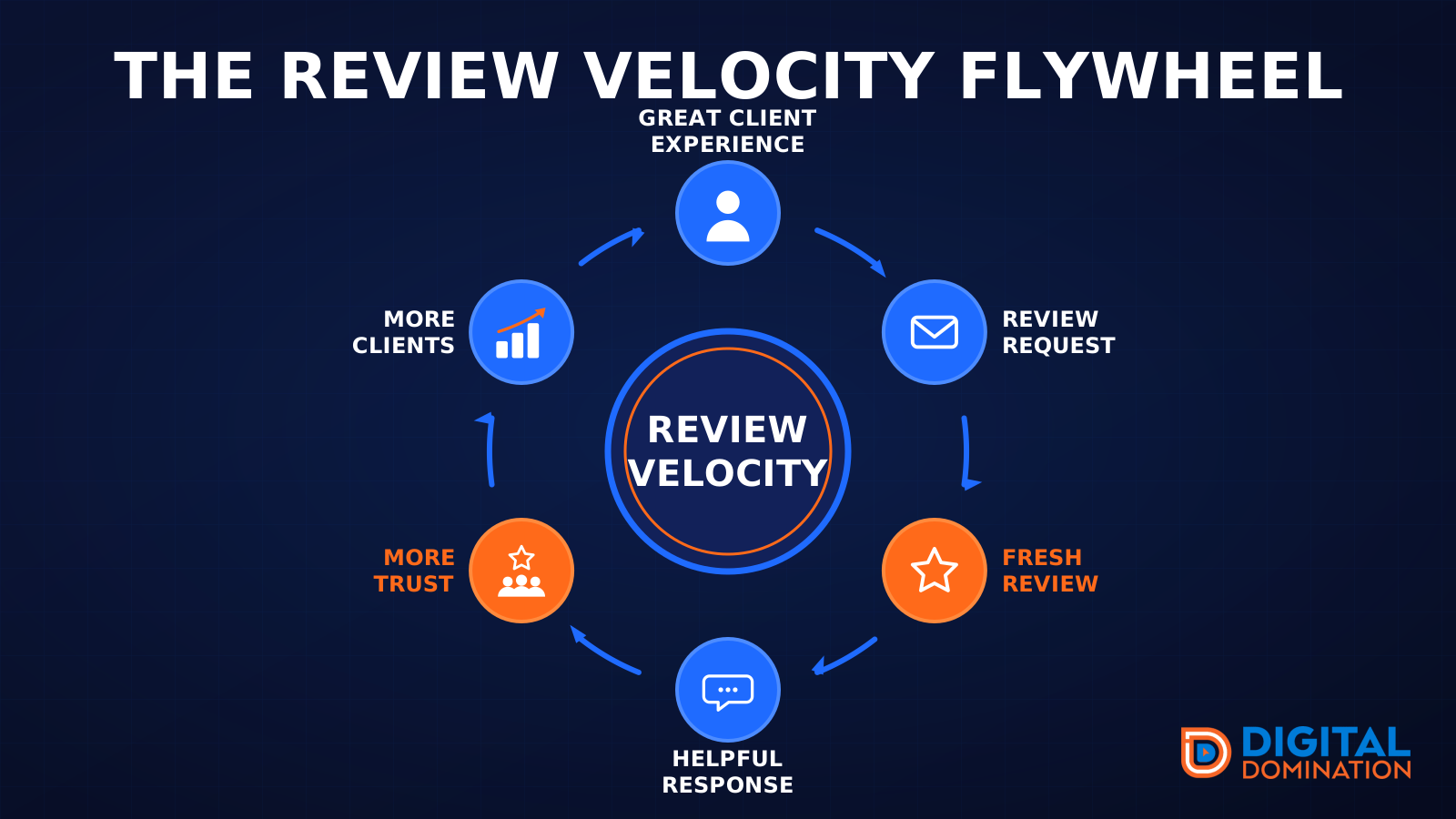
The review velocity flywheel
This leg is reviews and reputation. A good visit leads to a review request, then a fresh review, then a helpful reply, then more trust, then more customers. When the scan can find your Google listing, it shows your rating, your recent reviews, and how many you answered.
Reviews are word of mouth. One kind word helps. A steady stream of real reviews, and a reply from you, helps more.
How this turns into revenue
Being found in more searches leads to more calls. More calls lead to more booked jobs. More booked jobs lead to more revenue.
Example numbers, not a real business: 40 calls from search in a month, a 25 percent close rate, and a $400 average job. That is 10 booked jobs. That is $4,000. The math is the lesson. It is not a promise.
The full page has a box where you can type your own average job value and close rate.
One real story, from our car dealership case study: Medina Auto Group went from invisible on Google Maps to dominating every high-intent search across their market. The turnaround spanned all four of their rooftops at once. The same page says the team eliminated 89 unfair one-star reviews that had been dragging the dealership's reputation down and keeping it out of the Map Pack. It also says: “Results described here are exceptional and non-typical. Outcomes vary based on market conditions, competition, and implementation. No guarantees are made regarding earnings, rankings, or conversions.”
Free strategy call
More booked jobs start with a clear plan
Book a free strategy call. We look at your Google profile, your website, and your reviews, and we tell you what to fix first.
Free. You pick the time. A real person shows up.