
Gemini in Chrome is on US Android. Your service pages need facts in plain text.
A summary of the page you have open can only repeat what the page actually says. Service area, hours, price, and how to book have to be sentences, not only buttons and widgets.
What Google shipped
On August 18, 2026, 9to5Google reported that Google had finished rolling out Gemini in Chrome for Android users in the US, after a preview in May. Abner Li wrote that it shows up as a toolbar shortcut to the right of the address bar, or in the three dot menu. The current page can be added to the prompt. Gemini can summarize that page and answer questions about what you are viewing. The page context can be turned off in settings.
The same report says Google AI Pro and Ultra subscribers can use auto browse to handle tasks. The examples given are booking parking for an event, updating a recurring online order, and organizing travel. Purchases still require the person to confirm.
This is separate from the Maps personalization change covered in Gemini can use Maps saved places. That one is about Gemini using Maps history. This one is about Gemini sitting on top of the page the person already has open.
What an agent can use from a service page
If the tool is summarizing the page, or answering a question about the page, it is working from the text and the structure on that URL. A button that says Book, with no sentence about what gets booked, gives it a control and no fact. An hours graphic, a map widget with no city names, and a price that exists only inside a quote form are easy for a person to see and useless to a summary.
Auto browse, where it is available, is aimed at tasks. The 9to5Google examples are consumer tasks, not "diagnose my condenser." The relevant part for a contractor, a firm, or a med spa is narrower: if a person asks Gemini about the page they are on, the answer will be built from what that page says in words. If your real offer is missing from those words, the answer will be thin, or it will wander off to a competitor page that states the facts.
We are not claiming Google published a rule that widgets are ignored. We are saying the product, as reported, summarizes and answers from the page. Write the page so a summary has something true to repeat.
The four facts that have to be sentences
On the top service pages for a Digital Domination client, we want four facts in plain text, near the top, matching the Google Business Profile.
Service area. Name the cities and neighborhoods you actually cover, in a sentence. A map pin is not a sentence. If you are a service area business, say that you go to the customer and name the area.
Hours. Write the hours in text, and keep them identical to the profile. A missed match here is also a lead problem: Local Services business hours are the hours on the profile, and a page that says something else trains both customers and software to get the schedule wrong.
Price, if you publish one. If you publish a diagnostic fee, a starting price, or a range, put that number in a sentence on the page. If you do not publish price, say how a customer gets a number, in a sentence. Do not hide the only copy of the price inside an image.
Booking. Say what happens next. Call this number, request service on this page, or message the profile. Name the phone in text as well as in the tap to call link. The link is for the person. The sentence is for the summary.
A 30 minute audit of the pages that make money
Do not start with the blog. Start with the pages a homeowner, a patient, or a prospective client would open from the Map Pack or from an ad: the primary service, the two or three jobs you want more of, and the contact page.
Read each one with the images and the chat widget ignored. If you cannot answer "where do you work, when are you open, what does it cost or how do I find out, and how do I book" from the words alone, the page is not ready for a tool that summarizes words.
- ▸Open the page on a phone and read only the paragraphs
- ▸Confirm the cities in the first screen match the service area on the Google Business Profile
- ▸Confirm hours in the text match the profile hours
- ▸Confirm any published price is in HTML text, not only in a banner image
- ▸Confirm the phone number and the booking path are written out, and match call tracking rules you already use
- ▸Remove leftover city names from old location pages that you no longer serve
What we change, and what we leave alone
We do not add a block of keyword stuffed cities to "feed the model." We add the facts a dispatcher would say on the phone, in the same words, on the page and on the profile. Category and services on the profile stay aligned with those sentences. If the page says water heater replacement and the profile's primary category is something broader and vaguer, fix the mismatch. An agent that reads both will not reconcile them for you.
Schema helps when it repeats the visible facts. It does not replace them. If the only place the hours exist is in JSON, a person reading the page still cannot see them, and a summary of the visible page still has a hole. Put the fact in the paragraph. Then mark it up.
The work sits next to the rest of local AI visibility: profile, reviews, and pages that state the job and the place. That is the same job described on AI SEO for local business and on AI search visibility for local business.
What to do this week
Audit the top service pages. Fix the four facts in text. Then ask someone who does not know the business to summarize the page in four lines and see if they get the area, the hours, the price path, and the phone right. If a person cannot do it from the words, Gemini summarizing that page will not do better.
If you want that audit done against the pages that already get calls, book a call at digitaldomination.ai/connect/ or start with the AI SEO page linked above.
Source
9to5Google, Abner Li, Gemini in Chrome and auto browse roll out on Android in the US, August 18, 2026.
Pages and profile
Put the facts where a summary can read them
We line up service area, hours, services, and the booking path on the site and on the Google Business Profile, in words a person and a tool can both repeat.
See AI SEO for local businessKeep reading
Related guides
Put it into action
Frequently Asked Questions
Did Gemini in Chrome launch for every Android phone?
9to5Google reported on August 18, 2026 that Google had finished the US Android rollout of Gemini in Chrome, after a May preview. The report describes a toolbar shortcut and the option to include the current page in the prompt. It does not say every account or every country has it.
Does Gemini ignore buttons and widgets?
Google did not say that in the report. Gemini in Chrome can summarize the page you are viewing and answer questions about it. If the service area, hours, price, or booking path exist only as a widget, an image, or a button with no sentence, a summary of the page has nothing plain to repeat. Put those facts in text.
Will auto browse book jobs on my website by itself?
The examples in the 9to5Google report are tasks like booking parking, updating a recurring order, and organizing travel, for Google AI Pro and Ultra subscribers. Purchases require the person to confirm. Do not plan your intake around an agent booking HVAC or legal consults unattended. Do make the booking path understandable in text.
Which pages should I audit first?
The primary service page, the few job types you want more of, and the contact page. Those are the URLs a person opens from the Map Pack or an ad. Blog posts can wait.
Should the page copy match my Google Business Profile?
Yes. Hours, phone, service area, and the jobs you list should say the same thing on the page and on the profile. A summary that reads the site and a Maps result that reads the profile should not disagree.
The Local SEO Trinity
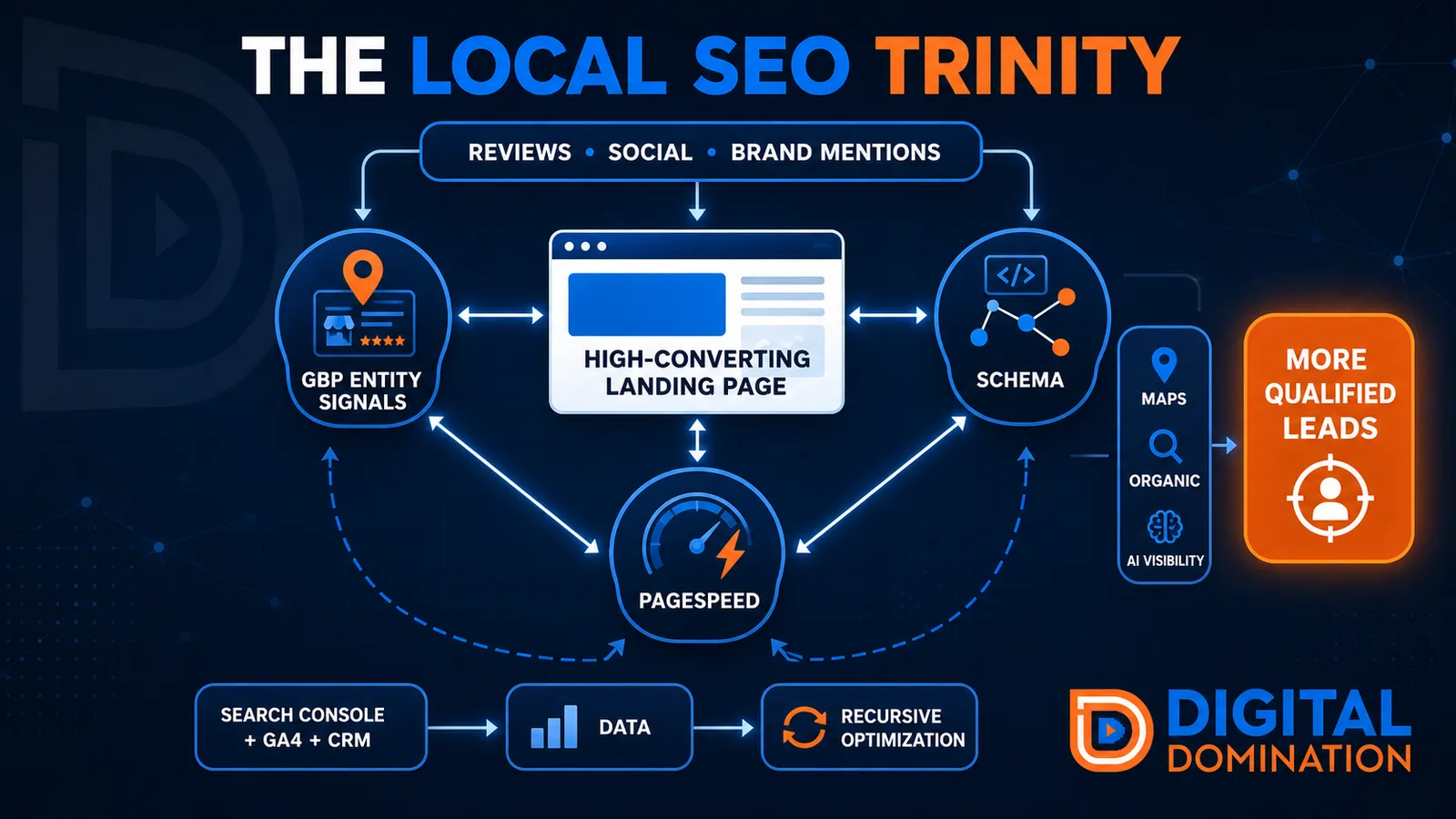
Think of a three-legged stool. Your Google profile, your website, and your reviews all have to hold you up. If one leg is short, the whole thing wobbles.
GBP entity signals
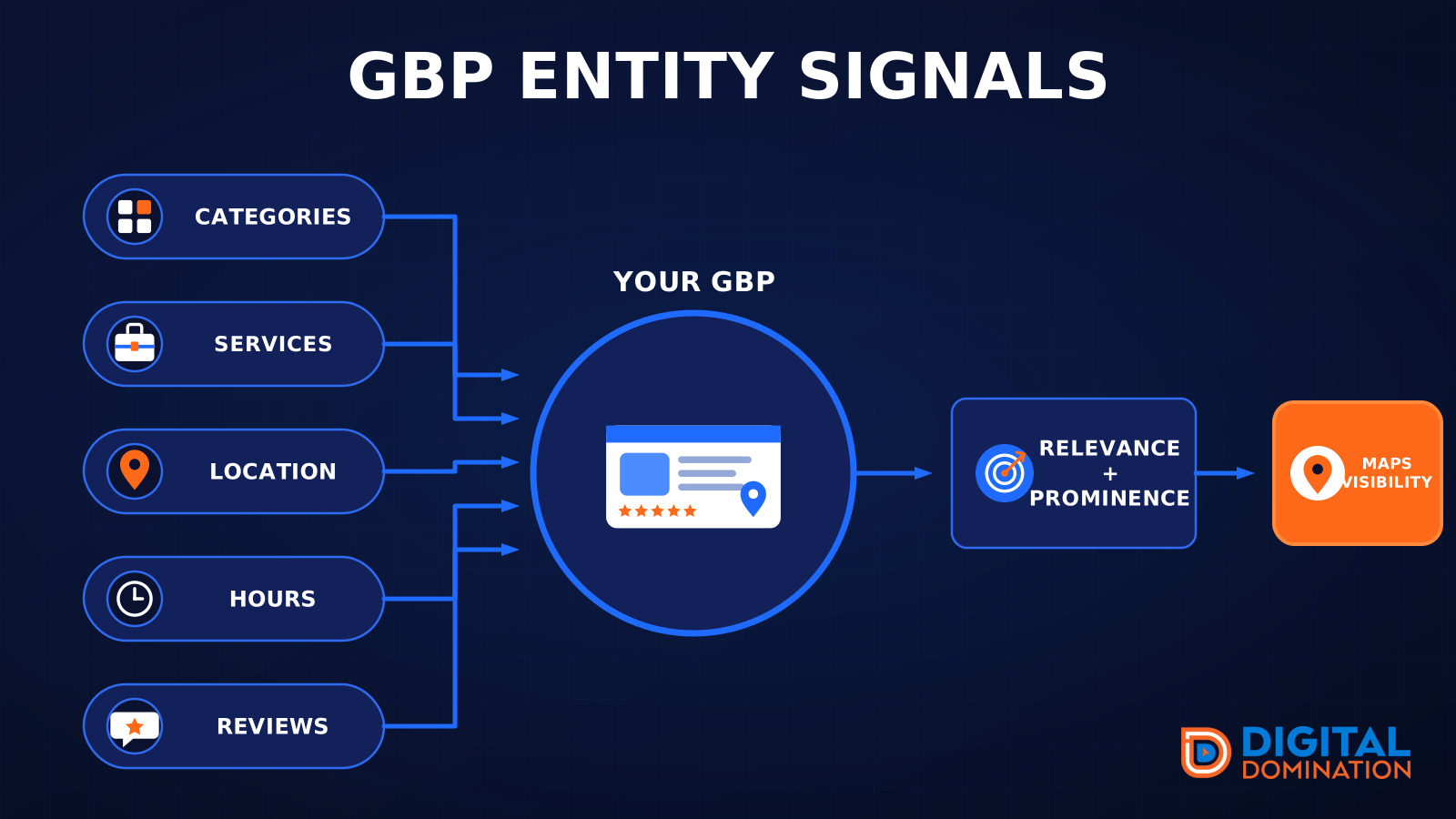
This leg is your Google Business Profile. GBP means Google Business Profile. It covers your categories, your services, your location, your hours, and your reviews. Google uses those facts to decide who to show.
Your Google profile is your storefront sign. If the sign is missing, or it names the wrong shop, people drive past.
PageSpeed to conversion
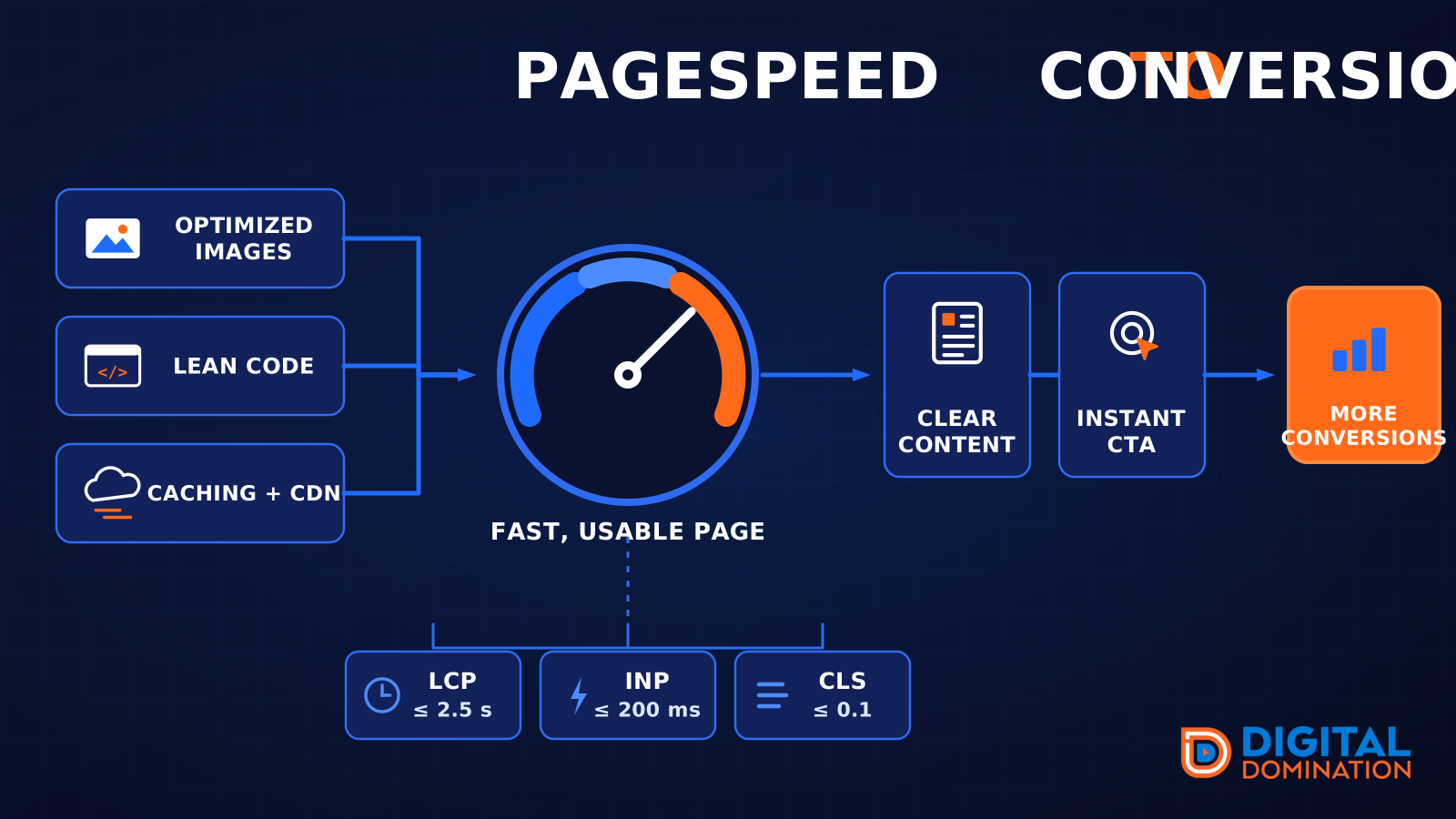
This leg is your website, above all on a phone. Small images, lean code, and caching make a page fast. A fast, clear page is what turns a visit into a call. Phone speed is one of the 12 Trinity checks because a slow page loses the call before anyone sees your offer.
Your website is the showroom. If the door sticks, people leave before they look around.
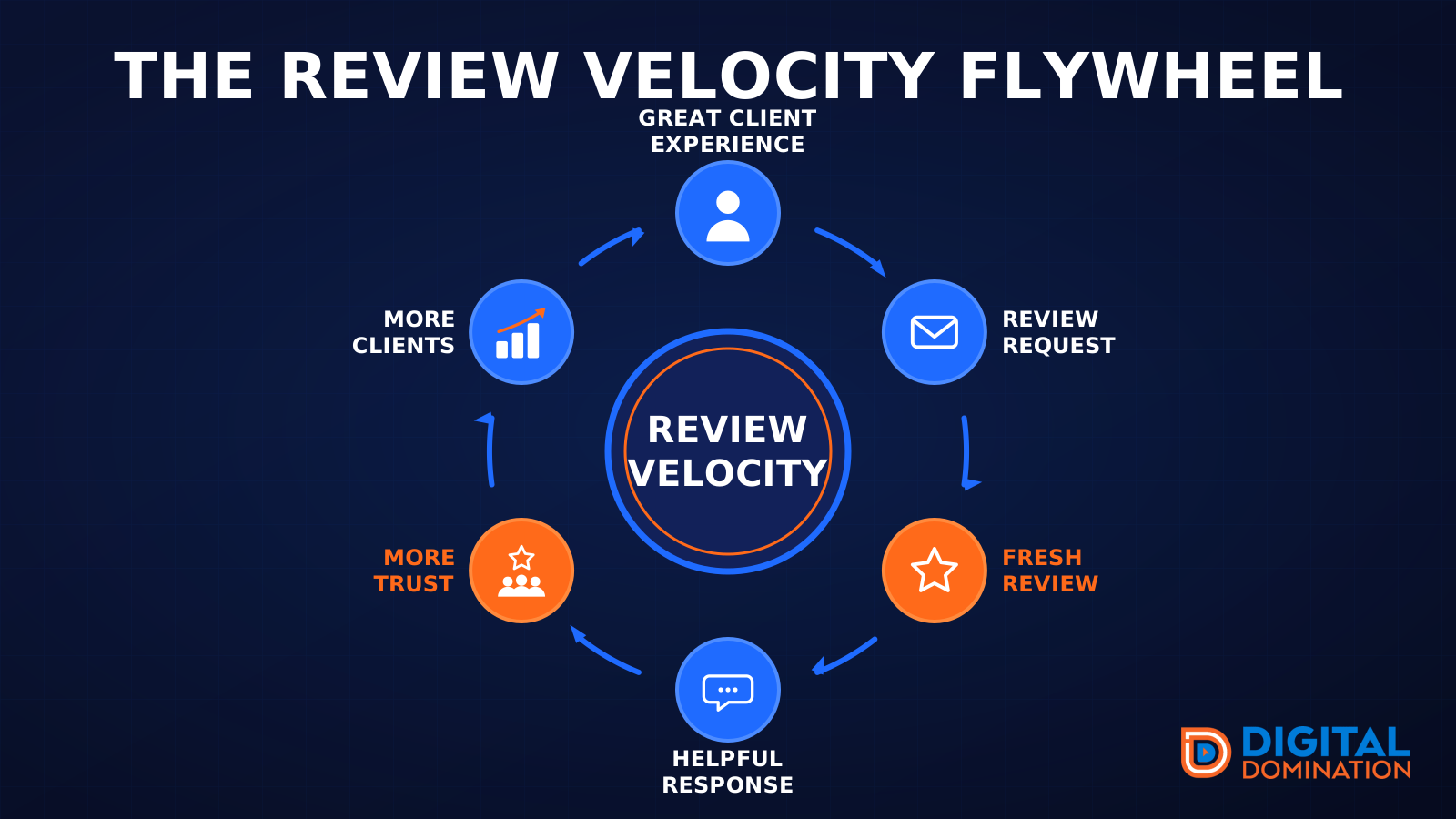
The review velocity flywheel
This leg is reviews and reputation. A good visit leads to a review request, then a fresh review, then a helpful reply, then more trust, then more customers. When the scan can find your Google listing, it shows your rating, your recent reviews, and how many you answered.
Reviews are word of mouth. One kind word helps. A steady stream of real reviews, and a reply from you, helps more.
How this turns into revenue
Being found in more searches leads to more calls. More calls lead to more booked jobs. More booked jobs lead to more revenue.
Example numbers, not a real business: 40 calls from search in a month, a 25 percent close rate, and a $400 average job. That is 10 booked jobs. That is $4,000. The math is the lesson. It is not a promise.
The full page has a box where you can type your own average job value and close rate.
One real story, from our car dealership case study: Medina Auto Group went from invisible on Google Maps to dominating every high-intent search across their market. The turnaround spanned all four of their rooftops at once. The same page says the team eliminated 89 unfair one-star reviews that had been dragging the dealership's reputation down and keeping it out of the Map Pack. It also says: “Results described here are exceptional and non-typical. Outcomes vary based on market conditions, competition, and implementation. No guarantees are made regarding earnings, rankings, or conversions.”
Free strategy call
More booked jobs start with a clear plan
Book a free strategy call. We look at your Google profile, your website, and your reviews, and we tell you what to fix first.
Free. You pick the time. A real person shows up.