
Google Search Console now shows AI Overview and AI Mode visibility
Local businesses can finally see which pages appear in Google’s generative AI features, and they need to make sure nobody turns that visibility off by mistake.

What changed, and who it hits
On August 31, 2026, Google finished rolling out its Search Console Generative AI performance reports and Search generative AI control to websites worldwide. In plain English, your business can now see whether Google is showing your website inside generative AI features such as AI Overviews and AI Mode.
This matters for local service businesses because the pages most likely to influence a real lead are usually specific: a plumbing service page, a roof repair page, a Las Vegas location page, a guide about emergency AC repair, or a FAQ that answers a high-intent question. Until now, many owners were guessing whether those pages appeared in AI answers. They were checking manually, asking their agency, or relying on third-party tools that could not see the same data Google now provides in Search Console.
Google’s own documentation, Generative AI performance report (Search), says the report breaks out performance from Google generative AI features by page, country, device, and date. Search Engine Land reported that the feature and the related control rolled out globally on August 31, 2026. The short version for owners: this is now a normal Search Console audit item, not a future-looking experiment.
What the new AI report actually shows
The new report is not a magic lead tracker. It does not tell you that one specific customer hired you because an AI Overview mentioned your page. It does give you a clearer view of whether your pages are being used or shown in Google’s generative AI search experiences.
For a local business owner, the useful part is not just total impressions. The useful part is being able to sort and filter the data in ways that match how your business actually sells services. If you serve multiple cities, you can look for location-page visibility. If you have seasonal services, you can watch changes by date. If most searchers are on phones, you can check device patterns.
In Google Search Console, review the new generative AI report by asking these simple questions:
- ▸Which service pages are getting impressions in AI Overviews or AI Mode?
- ▸Which location pages are showing up, if any?
- ▸Are guide or FAQ pages appearing more often than your money pages?
- ▸Is visibility mostly on mobile or desktop?
- ▸Did impressions change after you edited a page or changed site settings?
Why this is a local SEO issue, not just an AI issue
Local SEO has always been about being chosen when a nearby customer needs help. Google says its local ranking factors are relevance, distance, and prominence. AI Overviews and AI Mode do not erase those fundamentals, but they may change where a customer first sees an answer.
A homeowner may ask Google a longer question, such as what to do if a water heater is leaking, whether a garage door spring is dangerous, or how often to clean dryer vents. If Google’s AI answer includes or is influenced by a local company’s helpful guide, that company may get visibility earlier in the buying process.
The risk is that owners keep watching only the classic blue-link report or only their Google Business Profile activity. Those still matter. But now you can also check whether Google’s AI features are seeing your website as a useful source. That is a practical local SEO signal, especially for businesses that publish service explanations, city pages, and helpful homeowner guides.
Five things to check on your site this week
This is the section to hand to your office manager, marketing assistant, web developer, or agency. You do not need to be technical to ask for these checks. You just need access to Google Search Console and a list of your most important pages.
Start with the pages that should make the phone ring, then move to supporting content. Check these items first:
- ▸Your highest-value service pages, such as emergency plumbing, roof repair, or pest control.
- ▸Your main city and service-area pages.
- ▸Your best FAQ or guide pages that answer customer questions before a call.
- ▸Pages that have impressions in regular Search but none in the AI report.
- ▸Pages that appear in the AI report but are outdated, thin, or missing a clear call to action.
How to read the report without overreacting
The first mistake is treating AI impressions like a simple scorecard. A page with no AI visibility is not automatically bad. A page with AI visibility is not automatically producing customers. This report is a directional tool, not a replacement for call tracking, form tracking, and normal Search Console analysis.
Look for patterns rather than one-day swings. If a page appears for several dates, across devices, or after a content improvement, that is more useful than one isolated impression change. If a service page never appears but a related blog post does, that may mean Google finds the blog post more helpful for the AI answer. It may also mean the service page needs clearer explanations, better structure, or stronger local proof.
Use the AI report alongside your normal Search Console performance report. You are trying to answer a practical question: which pages does Google trust enough to show in more places, and which important pages are still invisible in this new surface?
When you review the report, avoid these quick conclusions:
- ▸Do not assume no AI impressions means the page is useless.
- ▸Do not rewrite every page because of one date in the chart.
- ▸Do not remove a helpful guide just because it is not a direct sales page.
- ▸Do not compare one city page to another without considering demand and distance.
- ▸Do not ignore normal Search performance while studying AI visibility.
What to do about it
The best response is not panic publishing. It is a focused audit. Pick your most important services, check whether Google’s AI features are showing those pages, then improve the pages that matter most to revenue.
A good local page should be easy for both a person and Google to understand. It should say what you do, where you do it, who you help, what problems you solve, and what the customer should do next. If it is a location page, it should not be a copy-paste version of another city page with only the city name swapped. If it is a guide, it should answer the question directly before asking for the sale.
This week, take these owner-level actions:
- ▸Confirm that you or a trusted person has owner access to Google Search Console.
- ▸Open the generative AI performance report and export the top pages.
- ▸Mark each page as a service page, location page, guide, FAQ, or other page type.
- ▸Update outdated pages that appear in AI features before sending more traffic to them.
- ▸Add clear next steps to helpful guides, such as call, schedule, or request an estimate.
- ▸Ask your developer or agency whether the new AI control is on or off.
- ▸Write down who is allowed to change that setting in the future.
The new control is powerful, so treat it like a lock
Google also introduced the Search generative AI control. Google’s Search Console Help page titled Search generative AI control says site owners can include or exclude their site from appearing in Google generative AI features. Google’s blog post, New opportunities, control and insights for website owners, frames the change as giving website owners more control and insight.
For most local businesses, the default position should be simple: do not opt out unless you have a clear business reason. Visibility in AI Overviews and AI Mode is still visibility in Google. If a homeowner is asking a question that relates to your service, you usually want a chance to appear.
The practical risk is not that Google says this control will hurt your regular rankings. Google says the control is not a ranking signal for regular Search. The practical risk is that an owner, developer, or agency turns off inclusion and your site loses AI Overview or AI Mode impressions and possible traffic from those features.
Treat this setting like an important business control, not a casual checkbox. Before anyone changes it, require answers to these questions:
- ▸Who requested the change?
- ▸What problem are we trying to solve?
- ▸Which pages or site sections could lose AI visibility?
- ▸How will we measure the impact after the change?
- ▸When will we review the setting again?
Should a local business ever opt out
There may be cases where opting out makes sense, but they are narrower than many owners think. A business might have legal, compliance, licensing, or content-control concerns. A company might publish material that should not be summarized in an AI feature without review. A site owner may also decide that certain content is not appropriate for generative AI display.
For a normal local service business, such as HVAC, plumbing, roofing, electrical, pest control, legal services, dental, med spa, or home remodeling, opting out should be unusual. These businesses usually need more qualified visibility, not less. If your competitors remain eligible and your site does not, you may be giving away a new visibility channel without gaining much in return.
If you are considering opting out, make the decision like you would make a major website change: document the reason, take a before snapshot, watch Search Console after the change, and set a date to revisit it. Do not let the setting be changed because someone read a headline and got nervous.
Common mistakes local owners should avoid
The biggest mistakes will come from treating the new report as either everything or nothing. It is not everything. Calls, booked jobs, map rankings, reviews, and regular organic traffic still matter. It is also not nothing, because Google is now giving you first-party visibility into a search surface that customers are using to get answers.
Another mistake is assuming the report only matters to publishers. Local businesses publish important content too. Service pages, location pages, FAQs, before-and-after explanations, maintenance guides, and problem-solving articles can all help Google understand what you know and where you operate.
Watch for these mistakes in the next few weeks:
- ▸Letting a developer change the AI control without owner approval.
- ▸Only checking the homepage instead of service and location pages.
- ▸Deleting guides that support early-stage customer questions.
- ▸Writing vague pages that never clearly mention the service and city.
- ▸Ignoring page experience, speed, and mobile usability.
- ▸Treating AI visibility as a substitute for Google Business Profile work.
How this fits with the rest of your local SEO
AI visibility does not replace the basics. Your Google Business Profile still needs accurate categories, services, hours, photos, products or services where relevant, and a steady review process. Your website still needs pages that match what customers search for. Your local prominence still depends on trust signals across the web.
The new report simply adds another place to look. If Google’s AI features are showing your guide about sewer line warning signs but not your sewer repair service page, that tells you something useful. You may need to connect the guide to the service page more clearly, improve the service page, or make the next step easier for the customer.
You should also make sure important pages are usable. If a page is slow, jumps around while loading, or feels broken on a phone, customers may leave even if Google sends them there. Google’s Core Web Vitals good thresholds are LCP 2.5 s, INP 200 ms, and CLS 0.1 at the 75th percentile of field data. You do not need to memorize those terms, but you should ask your web team whether your top service pages pass.
The bottom line for local businesses
Yes, a local business should use Google Search Console’s new AI report to audit which pages are appearing in AI Overviews and AI Mode. Start with your service pages, location pages, and best guides. The goal is not to chase every AI impression. The goal is to understand which pages Google is using, which pages are being ignored, and whether your most valuable content is eligible to appear.
In most cases, no, a local business should not opt out of Google’s generative AI features without a specific reason. Google says the control is not a regular Search ranking signal, but turning it off can still remove your site from AI Overview and AI Mode opportunities. That is a big enough visibility decision that it should require owner approval.
From our perspective at Digital Domination, a Las Vegas local SEO agency serving local service businesses nationally, this is now part of a modern local visibility audit. If you want to see how your business shows across your market, start with a free GeoGrid scan. It checks 169 points across your market and gives you a plain view of where you stand in local search. Get it at digitaldomination.ai/scan/.
Keep reading
Related guides
Put it into action
Frequently Asked Questions
What is the new Google Search Console AI performance report?
It is a Search Console report that shows visibility from Google generative AI features, including AI Overviews and AI Mode. Google’s documentation says the data can be viewed by page, country, device, and date.
Can I see if my service pages appear in AI Overviews?
Yes, that is the main practical value for local businesses. You can filter or review pages in the generative AI performance report and check whether key service pages, location pages, and guides are receiving impressions from Google’s AI features.
Does opting out of Google AI features hurt my normal rankings?
Google’s Search generative AI control documentation says the control is not a ranking signal for regular Search. The risk is different: if you opt out, your site may stop appearing in AI Overviews or AI Mode, which can reduce visibility from those features.
Should my local business opt out of AI Overviews and AI Mode?
Most local service businesses should not opt out unless they have a clear legal, compliance, or content-control reason. For plumbers, roofers, HVAC companies, dentists, attorneys, and similar businesses, AI visibility is usually an opportunity worth monitoring.
Who can change the Search generative AI control?
The control is managed in Google Search Console, so anyone with the right access may be able to affect it. Owners should confirm who has access and require approval before any setting that includes or excludes the site from AI features is changed.
Why do some pages show in the AI report but not others?
Google may find some pages clearer, more helpful, or more relevant to the question being answered. If guides show but service pages do not, improve the service pages with clearer service details, local information, FAQs, and a stronger next step for customers.
Is AI visibility more important than Google Map Pack rankings?
No, it is another visibility signal, not a replacement. Local businesses still need strong Google Business Profile work, reviews, website pages, and local relevance because Google’s local ranking factors remain relevance, distance, and prominence.
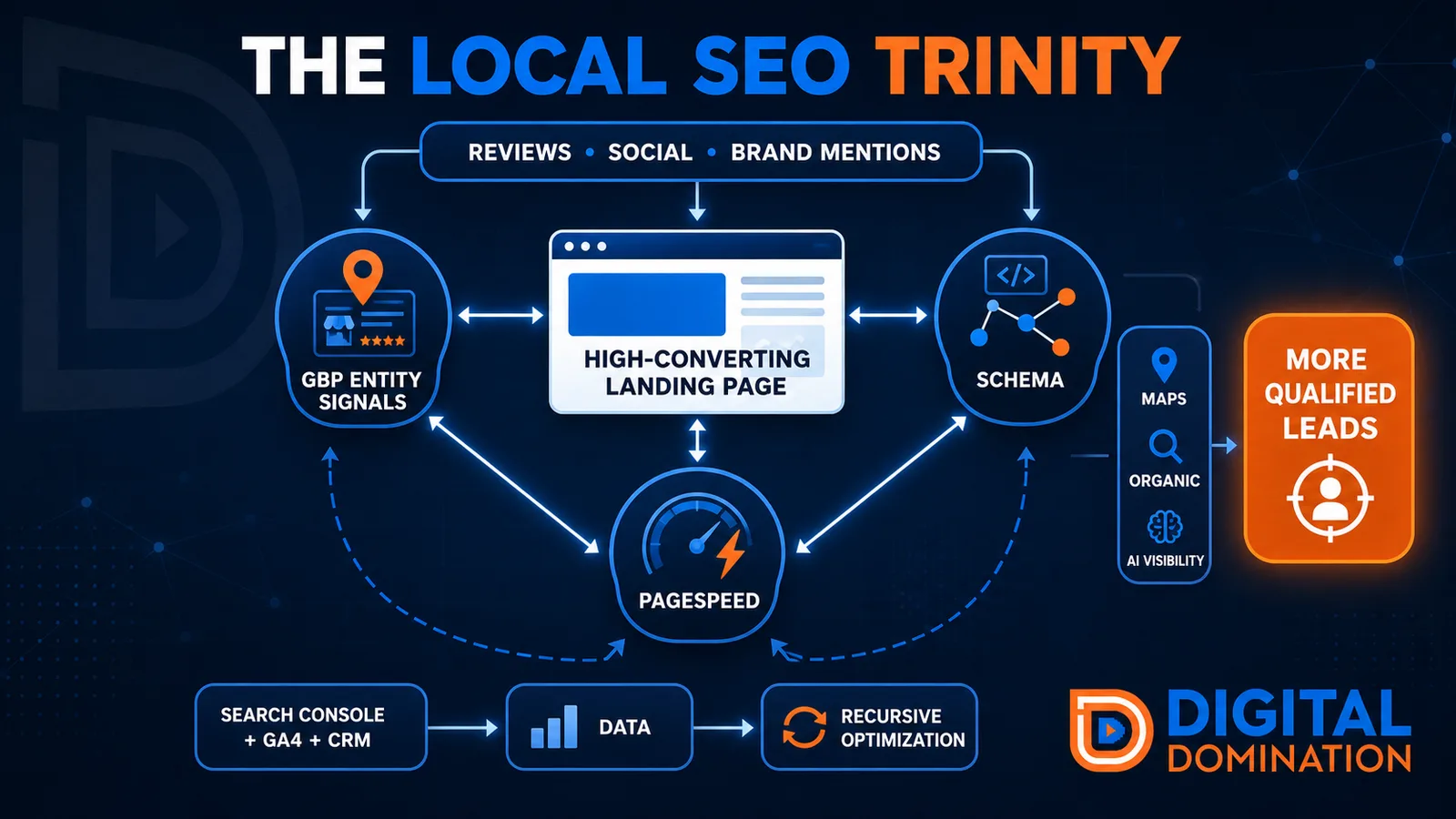
The Local SEO Trinity
Think of a three-legged stool. Your Google profile, your website, and your reviews all have to hold you up. If one leg is short, the whole thing wobbles.
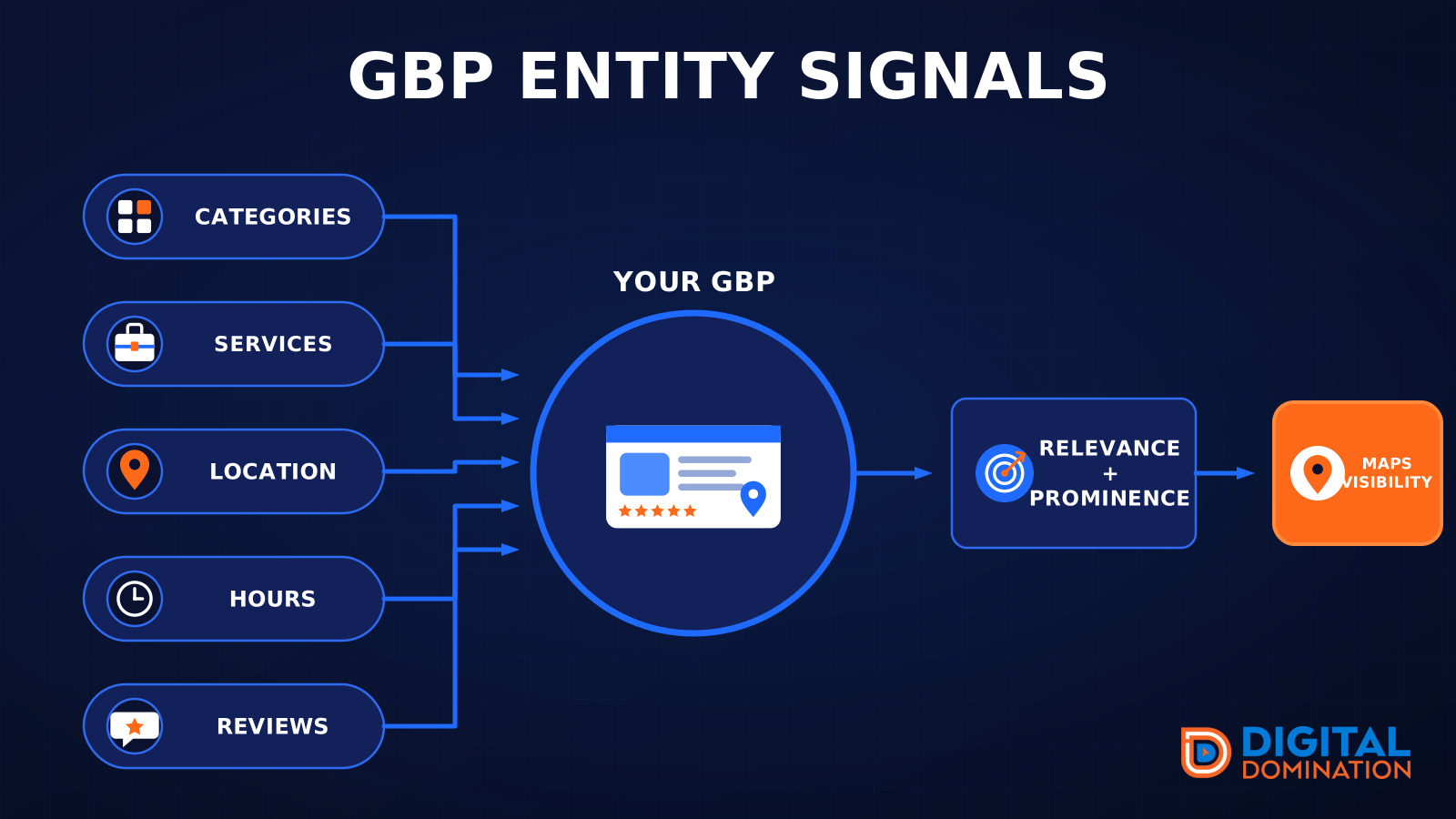
GBP entity signals
This leg is your Google Business Profile. GBP means Google Business Profile. It covers your categories, your services, your location, your hours, and your reviews. Google uses those facts to decide who to show.
Your Google profile is your storefront sign. If the sign is missing, or it names the wrong shop, people drive past.
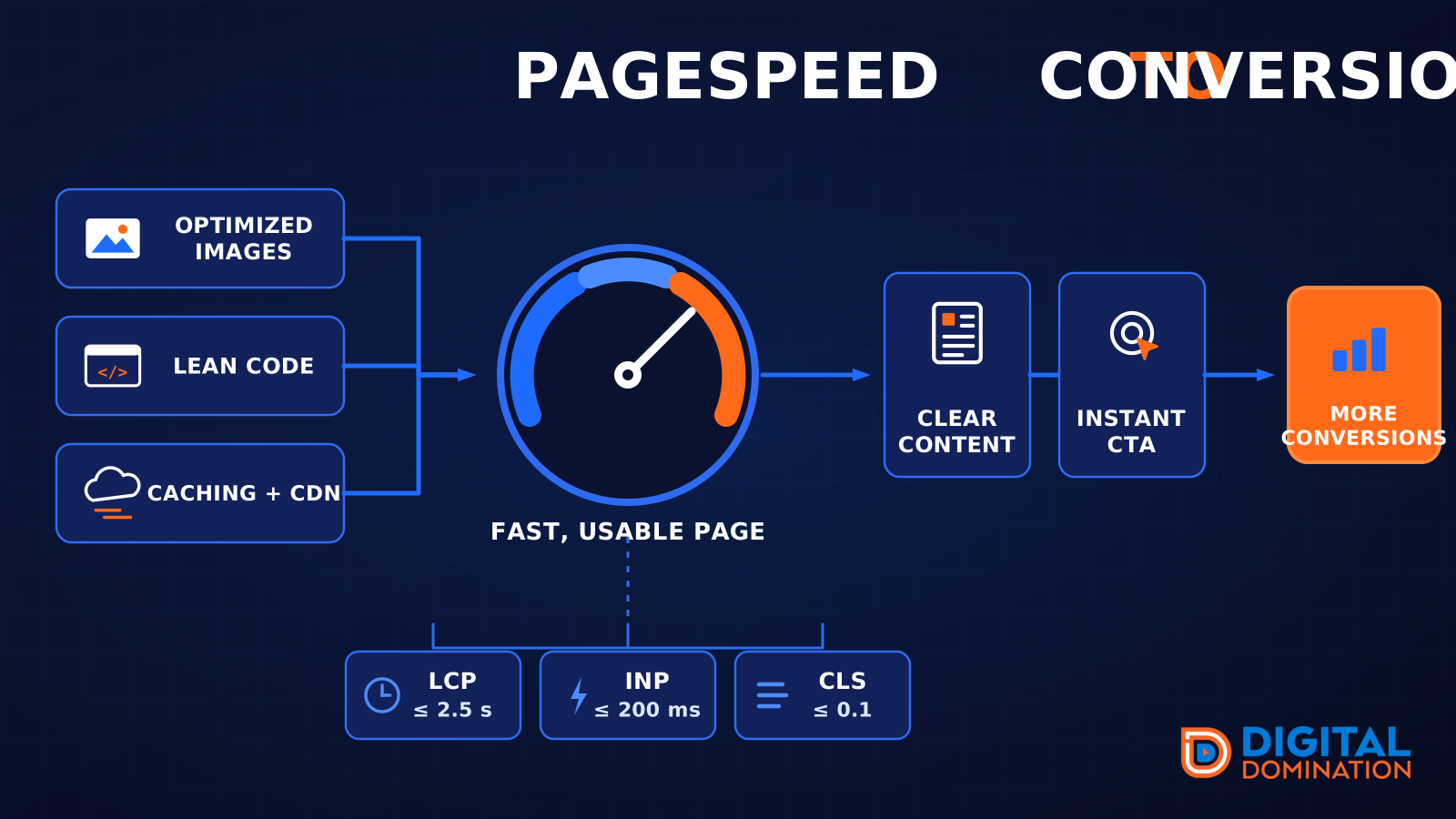
PageSpeed to conversion
This leg is your website, above all on a phone. Small images, lean code, and caching make a page fast. A fast, clear page is what turns a visit into a call. Phone speed is one of the 12 Trinity checks because a slow page loses the call before anyone sees your offer.
Your website is the showroom. If the door sticks, people leave before they look around.
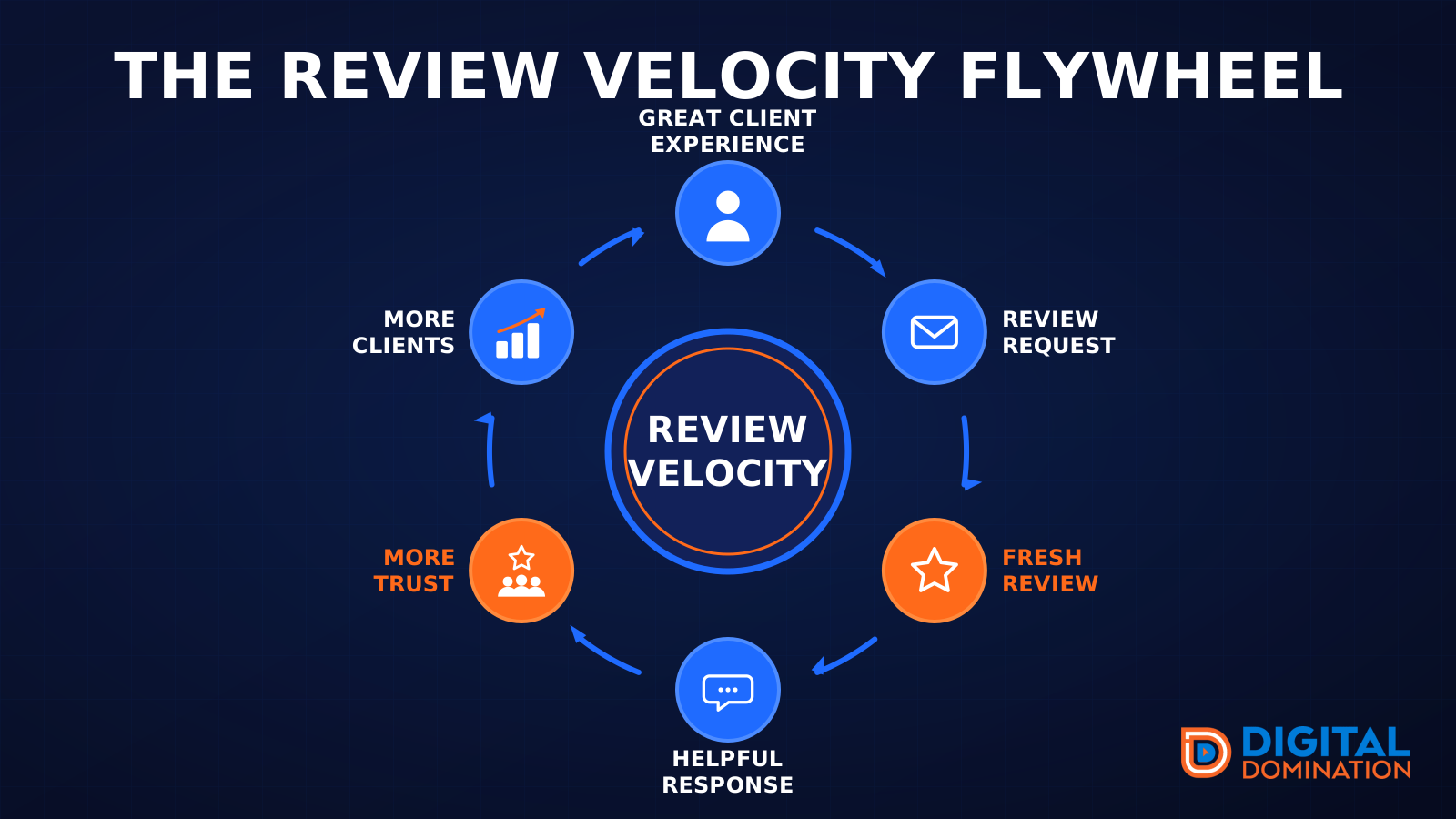
The review velocity flywheel
This leg is reviews and reputation. A good visit leads to a review request, then a fresh review, then a helpful reply, then more trust, then more customers. When the scan can find your Google listing, it shows your rating, your recent reviews, and how many you answered.
Reviews are word of mouth. One kind word helps. A steady stream of real reviews, and a reply from you, helps more.
How this turns into revenue
Being found in more searches leads to more calls. More calls lead to more booked jobs. More booked jobs lead to more revenue.
Example numbers, not a real business: 40 calls from search in a month, a 25 percent close rate, and a $400 average job. That is 10 booked jobs. That is $4,000. The math is the lesson. It is not a promise.
The full page has a box where you can type your own average job value and close rate.
One real story, from our car dealership case study: Medina Auto Group went from invisible on Google Maps to dominating every high-intent search across their market. The turnaround spanned all four of their rooftops at once. The same page says the team eliminated 89 unfair one-star reviews that had been dragging the dealership's reputation down and keeping it out of the Map Pack. It also says: “Results described here are exceptional and non-typical. Outcomes vary based on market conditions, competition, and implementation. No guarantees are made regarding earnings, rankings, or conversions.”
Free strategy call
More booked jobs start with a clear plan
Book a free strategy call. We look at your Google profile, your website, and your reviews, and we tell you what to fix first.
Free. You pick the time. A real person shows up.