
What Is Schema Markup, and Does My Local Business Website Actually Need It?
Schema markup tells Google and AI tools who you are, where you are, and what you do. A local business website should have it, because customers never see it and search engines do.
By Digital Domination Team
Schema markup is a small block of hidden code on your website that tells Google and AI tools, in a format they're built to read, exactly who you are: your business name, address, phone, hours, services and service area. Yes, a local business website should have it, because it removes guesswork about your details and helps Google match your site to your Business Profile. Customers never see it. Search engines do. Google's LocalBusiness structured data guide explains how it can help Google show your business details, and Google's AI guidance says your structured data should match the visible text on your page.
The quickest way to know where you stand is our free Trinity scan. Schema is the first of its three legs, and the report shows what is missing, broken or thin.
What does schema markup actually look like?
Most local sites use a format called JSON-LD: a short block of code in the page that lists your key facts as labeled fields. Your web page is written for people. Schema is a translation of the most important facts into a structured format search engines are built to read. It looks something like this:
{
  "@context": "https://schema.org",
  "@type": "Plumber",
  "name": "Example Plumbing Co.",
  "telephone": "+1-555-010-0100",
  "url": "https://www.example.com",
  "address": {
    "@type": "PostalAddress",
    "streetAddress": "123 Main St",
    "addressLocality": "Springfield",
    "addressRegion": "NV",
    "postalCode": "89000",
    "addressCountry": "US"
  },
  "openingHoursSpecification": [{
    "@type": "OpeningHoursSpecification",
    "dayOfWeek": ["Monday","Tuesday","Wednesday","Thursday","Friday"],
    "opens": "08:00",
    "closes": "17:00"
  }]
}
(This is an example with made-up details. Yours should use your real information.)
The vocabulary comes from Schema.org, a shared standard that Google and other search engines use. Google's introduction to structured data explains the basics.
Why does schema matter for a local business?
It states your details plainly instead of making Google guess, and it backs up your Google Business Profile.
- ▸It removes guesswork. Without schema, Google has to work out your phone number, hours and address from the design of your page. With schema, you state them in a format built for machines.
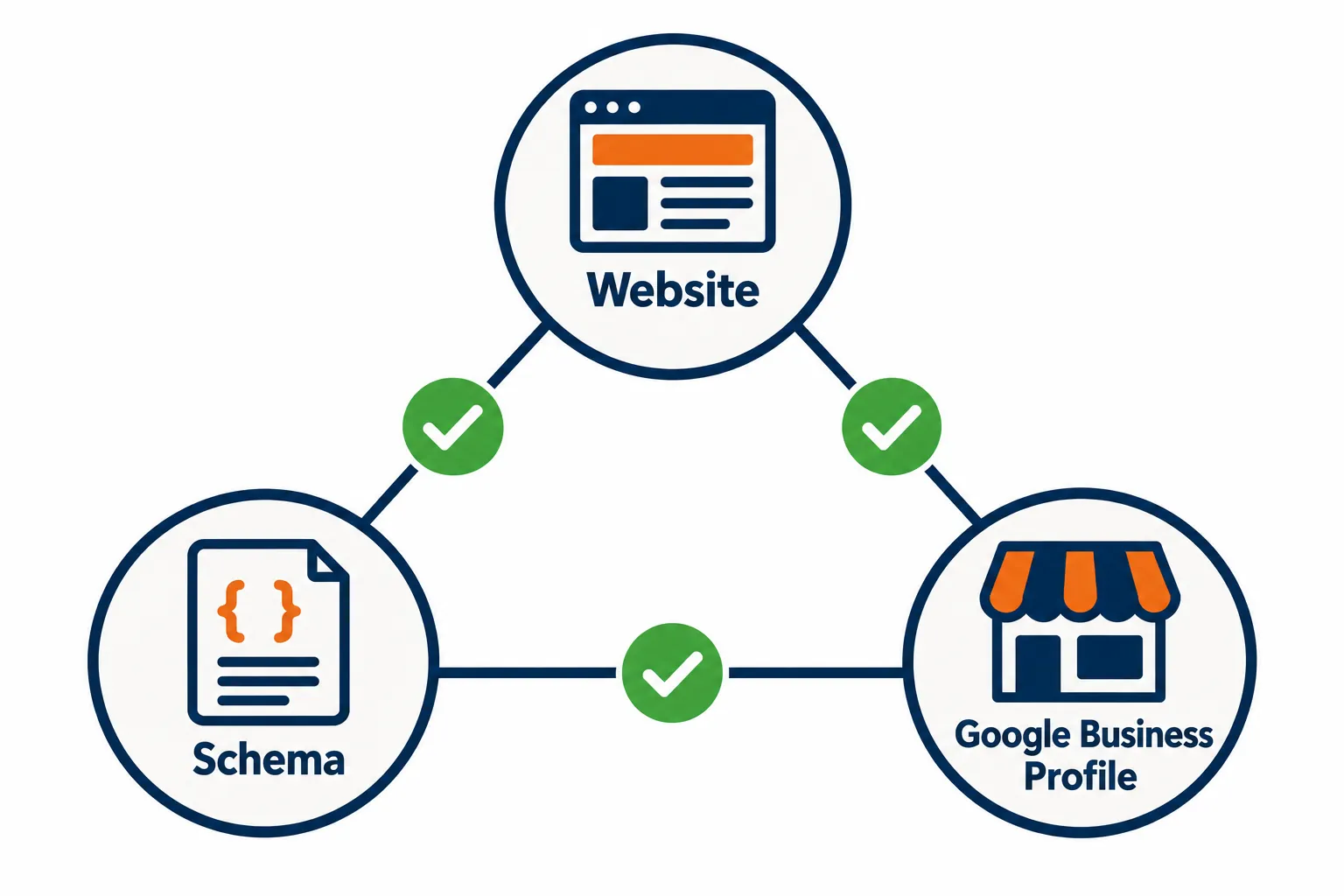
- ▸It supports your Google Business Profile. Google matches your website to your Business Profile using details like your name, address and phone. When your schema, your visible page and your profile all say the same thing, the match is clean. When they disagree, you're sending mixed signals.
What should my local business schema include?
At minimum, your business name and full address, plus your phone, website, hours, map location and the most specific business type you can. Google's LocalBusiness guide lists two required properties and a set of recommended ones. Here's what that means in plain English.
- ▸Required, name: your business name, written the same way as on your Google Business Profile.
- ▸Required, address: your full street address, city, state, ZIP and country. If you're a service-area business that hides its address on Google, talk to whoever runs your site about the right setup before you publish anything.
- ▸Strongly recommended, telephone: one main number, matching your profile.
- ▸Strongly recommended, url: your homepage or the page for that location.
- ▸Strongly recommended, openingHoursSpecification: your regular hours.
- ▸Strongly recommended, geo: your latitude and longitude. Google asks for at least five decimal places.
- ▸Strongly recommended, business type: the most specific type you can. Plumber, Dentist or HVACBusiness tells Google more than a generic LocalBusiness.
- ▸Helpful extra, services: the services you offer, so search systems can connect you to specific jobs.
- ▸Helpful extra, areaServed: the towns and neighborhoods you cover.
- ▸Helpful extra, sameAs: links to your official social profiles and key directory listings.
- ▸Helpful extra, menu: for restaurants.
Can I put my Google star rating in my schema?
No, not for reviews of your own business. Google's guide says aggregate rating markup is recommended only for sites that capture reviews about other local businesses. Adding your own stars to your own page can get your markup ignored. Put your effort into earning real reviews on your Business Profile instead.
Does schema help me show up in AI Overviews or ChatGPT?
For Google's AI Overviews, accurate standard schema is part of the basics, and no special AI schema is needed. Google's guidance on AI features and your website lists making sure your structured data matches the visible text on the page as one of the SEO basics for AI Overviews and AI Mode, and says there's no special AI-only schema you need to add. Good, accurate local schema helps you in regular search and in AI search at the same time. For ChatGPT and other assistants, what matters most is that your facts are readable and consistent everywhere they look, and our AI Overview and LLM SEO scan checks that side. See how to get your local business into Google's AI Overviews and ChatGPT SEO for local businesses.
What are the most common schema problems?
Missing schema, schema that contradicts the page, and old details left behind after a move or redesign. Here are the issues that come up again and again on local business websites:
- No schema at all. Many site builders don't add local business schema by default. Our article Most local business websites still lack LocalBusiness schema covers why this gap is so common.
- Schema that contradicts the page. The page says one phone number and the schema says another. The Trinity scan's example report shows exactly this: a contact page number that doesn't match the number in the structured data.
- Old details left behind. You moved, changed your hours or got a new number, and the schema still has the old information.
- A generic business type. Organization or LocalBusiness when a specific type exists.
- Schema wiped out by a redesign. A new theme or builder often drops code that the old site had.
- Copy-paste schema across locations. Every location page carries the same address and phone, so none of them is clearly tied to its own spot on the map.
How do I check if my website has schema, or if it's broken?
Paste your page into Google's Rich Results Test or the Schema Markup Validator to see what's there, or run the free Trinity scan to see whether it matches your Business Profile too.
Google's free tools:
- ▸Rich Results Test: paste a page address and see what structured data Google can read and whether it's eligible for rich results.
- ▸Schema Markup Validator: checks your markup against the Schema.org standard and flags errors.
These are great for spotting errors. They won't tell you whether your schema matches your Google Business Profile, or whether it's missing details that matter for local search.
The free Trinity scan checks three things together, because a gap in one drags the others down:
Schema: what's missing, broken or thin.
Website and mobile speed: your page titles, descriptions, headings and links, plus your Google speed score on a phone.
GBP website signals: the details on your site that let Google match it to your Business Profile, such as a map, hours, services, name and phone.
Every finding shows the evidence, why it matters and a recommended action you can take or hand to whoever runs your site. It only reads your public homepage, so nothing changes on your site or your profile. If something can't be measured, it's marked unavailable rather than counted as a fail.
How do I fix schema problems?
Pick one correct set of details, put it in your schema, your visible page and your Business Profile, and re-test after every change.
- ▸If you have no schema: add a LocalBusiness (or more specific type) block to your homepage and to each location page, using your real details.
- ▸If your details conflict: decide on one correct name, address and phone, then update your schema, your visible page and your Google Business Profile so all three match. A call-tracking number can be intentional, but it should still match what your Business Profile shows.
- ▸After any redesign: re-test your key pages with the Rich Results Test before launch and again after.
- ▸When anything changes: hours, phone, address or services, update the schema the same day you update your profile.
If your site also struggles to turn visits into calls, read Why does my Google Business Profile get views but no calls?. For how schema fits into AI recommendations, see AI SEO for Local Business, and if you're missing from Maps entirely, start with Why Is My Business Not Showing Up on Google Maps?.
Explore this guide
- ▸Most local business websites still lack LocalBusiness schema
- ▸My Website Traffic Dropped This Month, What Should I Check First?
- ▸Why does my Google Business Profile get views but no calls?
- ▸Plumber local SEO: how GBP entity signals, schema and PageSpeed win the emergency call
- ▸HVAC local SEO: how GBP entity signals, schema and PageSpeed win the emergency call
Sources
- ▸Google Search Central, Local business (LocalBusiness) structured data
- ▸Google Search Central, Introduction to structured data markup
- ▸Google Search Central, AI features and your website
- ▸Google Business Profile Help, Tips to improve your local ranking on Google
Keep reading
Related guides
- ▸How To Choose A Law Firm Marketing Agency
- ▸How Do I Choose the Best Local SEO Company in 2026?
- ▸How To Fire Your SEO Company
Put it into action
Frequently Asked Questions
Does my small business website really need schema markup?
Yes. It states your name, address, phone and hours in a format search engines are built to read, and it helps Google match your website to your Business Profile. Many site builders don't add it by default.
Will adding schema make me rank higher on Google Maps?
Schema on its own won't guarantee a higher ranking. Google says local results are mainly based on relevance, distance and prominence. Schema helps Google understand and trust your details, which supports relevance, but it's one piece of a bigger picture.
Do I need special schema for AI Overviews or ChatGPT?
Not for Google. Google's AI features guidance says there's no special schema needed for AI Overviews or AI Mode. Accurate, standard local business schema that matches your page is what helps.
Can I add my Google star rating to my website's schema?
Not for reviews of your own business. Google's guide says aggregate rating markup is recommended only for sites that capture reviews about other local businesses.
Can I add schema myself?
Yes, if you're comfortable editing your site's code or using a reputable plugin. Always test with the Rich Results Test afterward.
Should every page have local business schema?
Your homepage and each location page should. Service pages can reference your business, but you don't need to repeat a full location block on every page.
How do I find out what's wrong with my schema?
Run the free Trinity scan at https://digitaldomination.ai/trinity-scan/. No email, phone number or call is required to see your initial results, and you'll get a clear list of what to fix first.
Ready to dominate your map?
Run a free GeoGrid scan, or book a call to walk through the map.